Танилцуулга
Худалдан авалт хийсэнд баярлалааasing the KOKKO KMF-1 Multi-Effects Guitar Pedal. This versatile pedal combines 18 speaker models, a drum machine, and a looper, offering a comprehensive solution for guitarists. Please read this manual carefully to ensure proper operation and to fully utilize all features.
Гол онцлогууд
- 18 Speaker Models: Features 18 high-fidelity speaker models, developed with advanced DSP algorithms and IR technology for world-renowned speaker simulations.
- IR Cabinet Simulation: Ensures superior sound quality with high-fidelity cabinet modeling.
- Drum Machine & Looper: Includes a drum machine with 6 styles and over 40 rhythms, and a looper with 30 seconds of non-overdub recording capability, enabling one-man band performances.
- Уян цахилгаан тэжээлийн сонголтууд: Can be powered by AA batteries or an adapter.
- Олон интерфейс: Equipped with external signal input, USB output, and headphone output for easy plug-and-play use.
Багцын агуулга
Савыг задлахдаа доор жагсаасан бүх зүйл байгаа бөгөөд сайн нөхцөлд байгаа эсэхийг шалгана уу.
- 1 x KOKKO KMF-1 Multi-Effects Pedal
- (Note: Power adapter and AA batteries are typically sold separately and not included in the standard package.)
Бүтээгдэхүүн дууссанview
Familiarize yourself with the various parts and controls of your KMF-1 pedal.

Зураг 1: Дээрээс доош view of the KOKKO KMF-1 Multi-Effects Pedal, showing the expression pedal on the left and the control panel with display, knobs, and footswitches on the right.
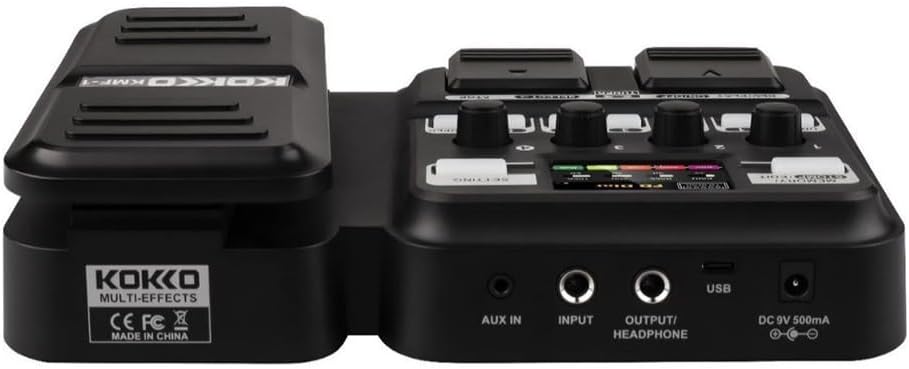
Зураг 2: Арын view of the KOKKO KMF-1 Multi-Effects Pedal, highlighting the AUX IN, INPUT, OUTPUT/HEADPHONE, USB, and DC 9V power input ports.
Хяналт ба холболтууд:
- Илэрхийлэх дөрөө: Used for volume control or wah effects.
- Дэлгэц: Shows current settings, effects, and modes.
- Knobs (1-4): Control various parameters depending on the selected effect or mode.
- Footswitches (DRUM, REC/PLAY ON/OFF, TUNER, SELECT, STOP, LOOPER): For activating/deactivating functions and navigating presets.
- MEMORY/STOMP EDIT Button: Toggles between memory and stompbox modes, or enters edit mode.
- SETTING товч: Системийн тохиргоонд хандана.
- AUX IN: 3.5mm input for connecting external audio sources (e.g., MP3 player).
- Оруулах: 1/4" input for connecting your guitar.
- OUTPUT/HEADPHONE: холбоход зориулсан 1/4" гаралт ampөргөгч эсвэл чихэвч.
- USB порт: For connecting to a computer for recording or software updates.
- DC 9V цахилгаан оролт: For connecting a 9V DC power adapter (center negative).
Тохиргоо
Асааж байна:
- Зайны хүч: Open the battery compartment on the underside of the pedal and insert 4 x AA batteries (not included), ensuring correct polarity.
- Хувьсах гүйдлийн адаптерийн хүч: Connect a 9V DC (center negative) power adapter (not included) to the DC 9V input jack.
Араагаа холбох:
- Гитараа холбоно уу ОРОЛТ jack using a 1/4" instrument cable.
- -г холбоно уу OUTPUT/HEADPHONE гитар руугаа залга amplifier's input or to headphones using a 1/4" cable.
- (Optional) Connect an external audio source (e.g., smartphone, MP3 player) to the AUX ДАХЬ jack using a 3.5mm stereo cable.
- (Заавал биш) холбоно уу USB port to your computer for direct recording or firmware updates.
Ашиглалтын заавар
Үндсэн үйл ажиллагаа:
- Асаах/унтраах: The unit powers on automatically when connected to power. Disconnect power to turn off.
- Дууны хяналт: Use the expression pedal to control the overall output volume.
- Навигацийн урьдчилсан тохиргоо: Use the SELECT footswitch to cycle through different presets or effects.
Using Speaker Models:
The KMF-1 features 18 high-quality speaker models. These models simulate the sound characteristics of various guitar cabinets.
- Enter the speaker model selection mode (refer to display).
- Use the SELECT footswitch or corresponding knobs to browse and choose your desired speaker model.
- Adjust parameters like gain, tone, and volume using the numbered knobs (1-4) as indicated on the display.
Бөмбөрийн машин:
The built-in drum machine offers 6 styles and over 40 rhythms to practice or jam along with.
- дээр дарна уу БӨМБӨР footswitch to activate the drum machine.
- Use the SELECT footswitch or knobs to choose a drum style and rhythm.
- Adjust the drum volume using the appropriate knob.
- дарна уу БӨМБӨР again to stop the drum machine.
Looper Function:
The looper allows you to record up to 30 seconds of audio without overdubbing, perfect for creating backing tracks.
- дээр дарна уу REC/PLAY ON/OFF footswitch once to start recording. The display will indicate recording status.
- Play your guitar part.
- дарна уу REC/PLAY ON/OFF again to stop recording and immediately start playback of the recorded loop.
- Дахин тоглуулахыг зогсоохын тулд ЗОГС хөлийн түлхүүр.
- To clear the loop, press and hold the ЗОГС хөлийн түлхүүр.
Тохируулагчийн функц:
The integrated tuner allows for accurate guitar tuning.
- дээр дарна уу Тунер footswitch to activate the tuner. The output signal will be muted.
- Play a single note on your guitar. The display will show the note and indicate if it is sharp, flat, or in tune.
- Adjust your guitar's tuning until the display indicates the note is in tune.
- дээр дарна уу Тунер footswitch again to exit the tuner and unmute the output.
Memory/Stomp Edit Mode:
This mode allows you to switch between saved presets (Memory mode) and individual stompbox effects (Stomp mode), as well as edit parameters.
- дээр дарна уу MEMORY/STOMP EDIT button to toggle between Memory and Stomp modes.
- In Stomp mode, individual effects can be turned on/off using their dedicated footswitches or by selecting them.
- To edit parameters, press and hold the MEMORY/STOMP EDIT button to enter edit mode. Use the knobs and footswitches to adjust settings as displayed.
- Save your changes by following the on-screen prompts (usually by pressing a specific footswitch or button).
Системийн тохиргоо:
Access system settings to configure global parameters.
- дээр дарна уу Тохиргоо button to enter the system settings menu.
- Use the footswitches or knobs to navigate through the menu options.
- Adjust settings such as display brightness, factory reset, etc.
- дээр дарна уу Тохиргоо цэснээс гарахын тулд товчийг дахин дарна уу.
Засвар үйлчилгээ
- Цэвэрлэгээ: Дөрөө цэвэрлэхдээ зөөлөн, хуурай даавуу ашиглаарай. Зүлгүүрийн цэвэрлэгч эсвэл уусгагч хэрэглэж болохгүй.
- Хадгалах: Дөрөөг нарны шууд тусгал, хэт температураас хол, сэрүүн, хуурай газар хадгална.
- Зай солих: If using batteries, replace them when the low battery indicator appears or when the pedal's performance degrades. Remove batteries if the pedal will not be used for an extended period.
- Чийгнээс зайлсхийх: Keep the pedal away from water and other liquids.
- Болгоомжтой харьцах: Дөрөө унах, хүчтэй цохилт өгөхөөс зайлсхий.
Алдааг олж засварлах
| Асуудал | Боломжит шалтгаан | Шийдэл |
|---|---|---|
| Дууны гаралт байхгүй. | Incorrect cable connections; Low battery; Tuner is active; Ampөргөгч унтарсан. | Check all cables are securely connected. Replace batteries or use AC adapter. Deactivate tuner. Ensure ampчангалагч асаалттай, дууны хэмжээ нэмэгдсэн байна. |
| Гажуудсан эсвэл дууны чанар муу. | Input level too high; Incorrect effect settings; Damaged cable. | Adjust guitar volume or pedal input level. Check and adjust effect parameters. Try a different cable. |
| Педаль асахгүй байна. | No power source; Dead batteries; Faulty adapter. | Ensure power adapter is connected or batteries are inserted correctly. Replace batteries. Try a different compatible power adapter. |
| Looper not recording. | Incorrect looper mode; Memory full. | Ensure you are in the correct looper recording mode. Clear previous loops if memory is full. |
Үзүүлэлтүүд
| Онцлог | Дэлгэрэнгүй |
|---|---|
| Загварын нэр | KMF-1 |
| Бүтээгдэхүүний хэмжээ (L x W x H) | 31 x 20 x 7 см (12.2 x 7.9 x 2.8 инч) |
| Зүйлийн жин | 900 гр (1.98 фунт) |
| Эрчим хүчний хангамж | 9V DC (center negative) adapter or 4 x AA batteries |
| Тоног төхөөрөмжийн интерфейс | USB |
| Илтгэгч загварууд | 18 (IR technology) |
| Давталтын бичлэгийн хугацаа | 30 seconds (non-overdub) |
| Бөмбөрийн хэмнэл | Over 40 rhythms across 6 styles |
| Үйлдвэрлэгчийн загварын дугаар | 43ST9NRST131F1P8K5GRJ7 |
Баталгаат болон дэмжлэг
KOKKO products are designed and manufactured to the highest quality standards. For information regarding warranty coverage, technical support, or service, please refer to the warranty card included with your product or visit the official KOKKO webсайт. Аливаа баталгаат нэхэмжлэлийн хувьд худалдан авалтаа нотлох баримтаа хадгална уу.
For further assistance, please contact our customer support team.


