1. Танилцуулга
This manual provides comprehensive instructions for the installation, operation, and maintenance of your Juno 2-Inch Flat Trim Canless Wafer LED Downlight. This innovative lighting solution is designed for quick and easy installation in various ceiling spaces, eliminating the need for traditional recessed housings. It features an all-in-one design with switchable white color temperature and adjustable lumen output, offering versatile lighting for accent, task, or general illumination.

Figure 1: Juno 2-Inch Flat Trim Canless Wafer LED Downlight with its remote driver box.
2. Аюулгүй байдлын мэдээлэл
Please read all instructions carefully before installation and retain this manual for future reference. Failure to follow these instructions may result in electric shock, fire, or other hazards.
- Суурилуулалтыг эхлүүлэх эсвэл засвар үйлчилгээ хийхээсээ өмнө хэлхээний таслуурын цахилгааныг үргэлж унтраа.
- Бүх цахилгаан холболтууд нь орон нутгийн болон Үндэсний Цахилгаан Кодын (NEC) стандартын дагуу байх ёстой. Хэрэв та цахилгааны утсыг зөв холбох талаар мэдэхгүй бол мэргэшсэн цахилгаанчинтай зөвлөлдөнө үү.
- Бүтээгдэхүүнийг ямар нэгэн байдлаар өөрчлөх, өөрчлөхийг хориглоно.
- Нийлүүлэлтийн хэмжээг баталгаажуулахtage is compatible with the fixture (120 Volts).
- This product is suitable for wet locations and is IC Rated for direct contact with insulation.
- Do not install damaged products. Inspect the product upon receipt.
3. Багцын агуулга
Суулгах ажлыг үргэлжлүүлэхийн өмнө бүх эд ангиуд байгаа бөгөөд гэмтээгүй эсэхийг шалгана уу:
- LED Lens (Integrated with Downlight Fixture)
- Mounting Hardware (Spring clips, remote driver box)
Note: The downlight fixture and remote driver box are typically pre-assembled or connected.
4. Онцлогууд
The Juno 2-Inch Flat Trim Canless Wafer LED Downlight offers advanced features for optimal lighting performance and ease of use:
- Canless Design: No housing required, allowing installation directly into ceiling drywall.
- Switchable White Color Temperature (SWW5): Easily select from five color temperature options:
- 2700К Зөөлөн цагаан
- 3000К Халуун цагаан
- 3500К төвийг сахисан цагаан
- 4000К хүйтэн цагаан
- 5000К өдрийн гэрэл
- Adjustable Lumen Output (ALO25): Choose from three brightness levels (Low, Medium, High) to suit your needs.
- Багасгах: Compatible with most standard TRIAC dimmers, dimming down to 10 percent.
- Эрчим хүчний хэмнэлттэй: Long-life LEDs and a high-efficiency driver ensure superior illumination and extended service life.
- IC үнэлгээ: Approved for direct contact with insulation, simplifying installation in insulated ceilings.
- Wet Location Certified: Suitable for use in bathrooms, showers, and outdoor covered areas.

Figure 2: Switches on the remote driver box allow selection of color temperature and lumen output.

Figure 3: Visual guide to the different color temperatures available.
5. Тохиргоо ба суурилуулалт
The canless design simplifies installation. Follow these steps for a secure and proper setup:
- Цахилгааныг унтраах: Эхлэхийн өмнө угсралтын талбайн цахилгаан хангамжийг хэлхээний таслуур дээр унтраасан эсэхийг шалгаарай.
- Нээлтийн бэлтгэл: Cut a 2-inch diameter hole in the ceiling drywall at the desired location. Ensure there are no obstructions (joists, pipes, wires) within the ceiling space.
- Утас холбох:
- Open the remote driver box.
- Connect the building's supply wires (hot, neutral, ground) to the corresponding wires in the driver box using appropriate wire connectors.
- Бүх холболтууд найдвартай, зөв тусгаарлагдсан эсэхийг шалгаарай.
- Close the driver box cover.
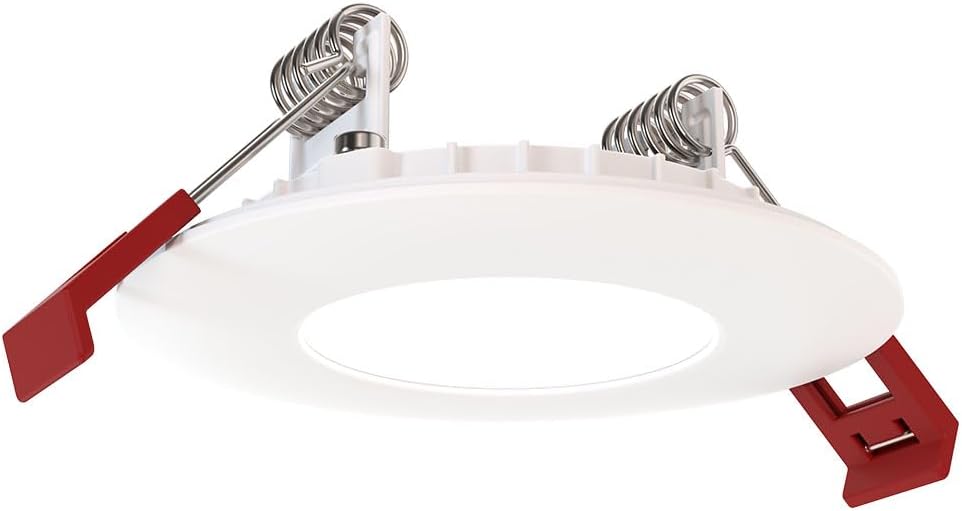
Figure 4: The remote driver box houses the electrical connections and adjustment switches.
- Select Settings (Pre-Installation): Before inserting the downlight into the ceiling, use the switches on the remote driver box to select your desired color temperature (2700K-5000K) and lumen output (Low, Medium, High). These settings can be adjusted later if needed, but it's easier before final installation.
- Insert Driver Box: Place the remote driver box into the ceiling opening. Its slim design allows it to fit into tight spaces.
- Доод гэрэлтүүлгийг суурилуулах:
- Gently push the spring-loaded clips on the sides of the downlight upwards.
- Insert the downlight into the ceiling opening.
- Once the downlight is fully inserted, release the clips. The clips will spring back down and firmly secure the fixture against the ceiling.

Figure 5: Dimensions of the downlight and driver box for installation planning.
- Эрчим хүчийг сэргээх: Turn the power back on at the circuit breaker. Test the downlight's functionality.
6. Ашиглалтын заавар
Your Juno LED Downlight is designed for simple operation once installed.
- Асаах/унтраах: Control the light using a standard wall switch connected to the circuit.
- Бүдэгрүүлж байна: If connected to a compatible TRIAC dimmer switch, adjust the brightness by manipulating the dimmer control. The light can be dimmed down to 10% of its maximum output.
- Adjusting Color Temperature and Lumen Output:
The color temperature and lumen output are set via switches located on the remote driver box (refer to Figure 2). To change these settings after installation, you will need to access the driver box, which may require temporarily removing the fixture from the ceiling or accessing the box through an attic/access panel if it was placed there. It is recommended to set these preferences during installation.
- Өнгөний температурын унтраалга: Select from 2700K, 3000K, 3500K, 4000K, or 5000K.
- Lumen Output Switch: Choose Low, Medium, or High brightness.
7. Засвар үйлчилгээ
The Juno LED Downlight requires minimal maintenance due to its durable design and long-life LEDs.
- Цэвэрлэгээ: Цэвэрлэхийн өмнө цахилгааныг унтраасан эсэхийг шалгаарай. Бэхэлгээг зөөлөн, хуурай эсвэл бага зэрэг арчина damp даавуу. Зүлгүүрийн цэвэрлэгч, уусгагчийг бүү ашигла, учир нь тэдгээр нь өнгөлгөө болон цахилгаан эд ангиудыг гэмтээж болзошгүй.
- LED ашиглалтын хугацаа: The integrated LEDs are designed for extended operation and do not require replacement under normal use.
8. Алдаа засах
Хэрэв та гэрэлтүүлэгтэй холбоотой асуудалтай тулгарвал дараах нийтлэг асуудал, шийдлүүдийг үзнэ үү.
| Асуудал | Боломжит шалтгаан | Шийдэл |
|---|---|---|
| Гэрэл асдаггүй. | Бэхэлгээнд хүч байхгүй. Сул утас холболт. Шилжүүлэгч эсвэл таслуур буруу байна. | Хэлхээ таслагч болон ханын унтраалгыг шалгана уу. Turn off power, check all wire connections in the driver box. Test switch or breaker; replace if necessary. |
| Гэрэл буруу анивчих эсвэл бүдгэрэх. | Тохиромжгүй бүдгэрүүлэгч унтраалга. Сул утас. Хэт ачаалалтай хэлхээ. | Ensure dimmer is TRIAC compatible and designed for LED lighting. Цахилгааныг унтрааж, бүх утсан холболтыг шалгана уу. Reduce load on the circuit or consult an electrician. |
| Incorrect color temperature or brightness. | Switches on driver box set incorrectly. | Access the remote driver box and adjust the color temperature and lumen output switches to desired settings. |
If the problem persists after trying these solutions, contact customer support.
9. Техникийн үзүүлэлтүүд
| Атрибут | Дэлгэрэнгүй |
|---|---|
| Брэнд | Жуно |
| Загварын нэр | WF2 RD ALO25 SWW5 90CRI 120 MW M6 (Round LED) |
| Хэмжээ | 2-Inch Flat Trim |
| Өнгө | Матт цагаан |
| Материал | Хөнгөн цагаан, поликарбонат |
| Гэрлийн эх үүсвэрийн төрөл | LED |
| Ботьtage | 120 вольт |
| Ватtage | 9.2 ватт |
| Онцлог шинж чанарууд | Adjustable Color Temperature (2700K-5000K), Dimmable (Triac), Energy Efficient, Waterproof |
| Суурилуулалтын төрөл | Flush Mount (Canless) |
| Дотор/гадаа ашиглах | Indoor, Outdoor (Wet Location Certified) |
| Бүтээгдэхүүний хэмжээс | 3.2"L x 3.2"W x 1.3"H (Fixture) |
| Зүйлийн жин | 13.2 унц |
| Гэрчилгээ | CSA certified, Title 24, Energy Star, IC Rated |
10. Баталгаат хугацаа ба дэмжлэг
Баталгаат хугацаа: This product comes with a Limited Warranty. Please refer to the product packaging or the manufacturer's official website for specific terms and conditions of the warranty.
Хэрэглэгчийн дэмжлэг: For technical assistance, troubleshooting beyond this manual, or warranty claims, please contact Juno customer support. Contact information can typically be found on the product packaging or the official Juno webсайт.
Онлайн нөөцүүд: For additional information, product updates, or FAQs, visit the official Juno webсайт: www.acuitybrands.com/brands/juno


