1. Танилцуулга
This user manual provides comprehensive instructions for the installation, operation, and maintenance of your COCOCAM AOV 4G LTE Security Camera. Please read this manual thoroughly before using the product to ensure proper functionality and safety.
1.1 Багцын агуулга
- 1x COCOCAM AOV 4G LTE Security Camera
- 1х нарны хавтан
- 1x Шургийн багц (бэхэлгээнд)
- 1x Дата кабель
- 1х зааварчилгааны гарын авлага (энэ баримт бичиг)
- 1х нарны хавтангийн хаалт
- 2x AA Batteries (pre-installed or included for initial setup)

Figure 1.1: COCOCAM AOV 4G LTE Security Camera and Solar Panel. The image displays the main camera unit with two antennas, a lens, and four LED lights, alongside a rectangular solar panel connected by a cable.
2. Аюулгүй байдлын мэдээлэл
- Ensure the camera and solar panel are installed securely to prevent falling.
- Камерыг ажиллах хүрээнээс гадуур хэт өндөр температурт бүү байлга.
- Төхөөрөмжийг хүчтэй соронзон орноос хол байлга.
- Камерыг өөрөө задлах эсвэл засах гэж бүү оролдоорой. Тусламж авахын тулд дэмжлэгтэй холбогдоно уу.
- Ensure all cables are properly connected and protected from environmental damage.
- This device is IP66 rated for water and dust resistance, but avoid submerging it in water.
3. Бүтээгдэхүүн дууссанview
3.1 Гол онцлогууд
- 24/7 Recording & Fast Alarm Trigger: Continuous recording with quick alarm activation.
- Intelligent Sound and Light Alarm: Customizable alarm areas with real-time notifications.
- 30 Meters Night Vision: Clear visibility in low-light conditions with white light and infrared options.
- AI Detection/Tracking: Human form detection and movement tracking up to 30 meters.
- Уян хатан хадгалах сонголтууд: Supports TF card (up to 128GB) and cloud storage.
- Хоёр талын аудио: Харилцаа холбооны зориулалттай суурилуулсан микрофон болон чанга яригч.
- Long-lasting Battery with Solar Panel: 15000mAh rechargeable battery with 8W solar panel for continuous power.
- IP66 цаг агаарт тэсвэртэй: Designed for outdoor use, resistant to water and dust.
- 3MP High Definition Video: 2304*1296 resolution for clear footage.
- 355° Pan/90° Tilt: Wide area coverage with remote adjustable viewөнцөг.
- Remote Monitoring and Mobile Compatibility: Access via COCOCAM app on Android/iOS devices.
- 4G LTE холболт: Operates without Wi-Fi, includes a built-in SIM card with trial data.
4. Тохиргоо
4.1 Камер болон нарны хавтанг суурилуулах
The camera and solar panel can be mounted on walls or ceilings. Choose a location that provides optimal sunlight exposure for the solar panel and a clear view камерт зориулсан.
- Тохиромжтой суурилуулах гадаргууг тодорхойл.
- Use the provided screw package to secure the camera bracket and solar panel bracket.
- Attach the camera to its bracket and the solar panel to its bracket.
- Нарны хавтангийн кабелийг камерын цэнэглэх порттой холбоно уу. Холболт найдвартай, ус нэвтэрдэггүй эсэхийг шалгаарай.

Figure 4.1: Easy installation of the COCOCAM camera and solar panel. The image shows a person installing the camera and solar panel unit under an eave, demonstrating the ease of setup.

Figure 4.2: Self-sustaining power setup with solar panel and battery. This image illustrates the camera and solar panel mounted on a building, highlighting the 8W solar panel and 15000mAh rechargeable battery for continuous power.
4.2 SIM Card and Storage Card Installation
The camera comes with a built-in SIM card for initial use. You can also install an external SIM card or a TF (microSD) card for local storage.
- Locate the SIM card slot and TF card slot on the camera (refer to the product diagram in the quick start guide).
- Insert the TF card (up to 128GB) into the TF card slot with the contacts facing down.
- If using an external SIM card, insert it into the designated slot. Ensure it is properly seated.
- Close the protective cover to maintain IP66 rating.

Figure 4.3: 3G/4G LTE Connection without Wi-Fi. This image highlights the camera's ability to operate using 3G or 4G LTE networks, making it suitable for locations without Wi-Fi, such as farms, construction sites, or RVs.
4.4 App Download and Initial Configuration
Download the COCOCAM app from your device's app store (Android or iOS).
- хайх "COCOCAM" in the Google Play Store or Apple App Store.
- Апп суулгаж, данс үүсгэнэ үү.
- Камераа нэмэхийн тулд апп доторх зааврыг дагана уу. Үүнд ихэвчлэн камер дээрх QR кодыг сканнердах эсвэл ID-г нь гараар оруулах шаардлагатай.
- Once connected, you can configure network settings, recording preferences, and alarm settings.

Figure 4.4: COCOCAM app for 24/7 continuous recording. This image shows a smartphone displaying the COCOCAM app interface, with the security camera mounted on a wall in the background, indicating continuous monitoring capabilities.
5. Ашиглалтын заавар
5.1 24/7 Recording and Alarm Features
The camera supports continuous recording. When an alarm is triggered, the camera quickly switches to full-frame recording.
- Үргэлжлүүлэн бичлэг хийх: The camera records 2 seconds per frame during non-alarm periods.
- Fast Alarm Trigger: Upon detection, the camera initiates full-frame recording within 0.2 seconds.
- Customizable Alarm Areas: Define specific zones within the camera's view хөдөлгөөн илрүүлэх зориулалттай.
- Intelligent Sound and Light Alarm: The camera can emit sound and light warnings upon detecting suspicious activity.
- Бодит цагийн мэдэгдэл: Receive instant alerts on your mobile device when an alarm is triggered.
5.2 PTZ удирдлага (Pan, Tilt, Zoom)
The camera offers extensive pan and tilt capabilities, allowing you to adjust the viewing angle remotely via the COCOCAM app.
- Пан: Камерыг хэвтээ байдлаар 355° хүртэл эргүүлнэ.
- Хазайлт: Камерыг босоо байдлаар 90° хүртэл тохируулна уу.
- Дижитал томруулах: Use the app to digitally zoom into the live feed or recorded footage.

Figure 5.1: 355° Pan and 90° Tilt with AI Tracking. This image illustrates the camera's wide range of motion and its ability to track subjects, with icons for two-way audio, AI detection, and AI tracking.
5.3 Хиймэл оюун ухааныг илрүүлэх ба хянах
The camera's advanced AI capabilities allow for precise detection and tracking of human forms and vehicles.
- Хүний илрүүлэлт: Identifies human shapes, reducing false alarms from animals or swaying branches.
- Vehicle Recognition: Distinguishes vehicles for specific alerts.
- AI мөрдөх: The camera can automatically follow detected subjects within its field of view 30 метр хүртэл.
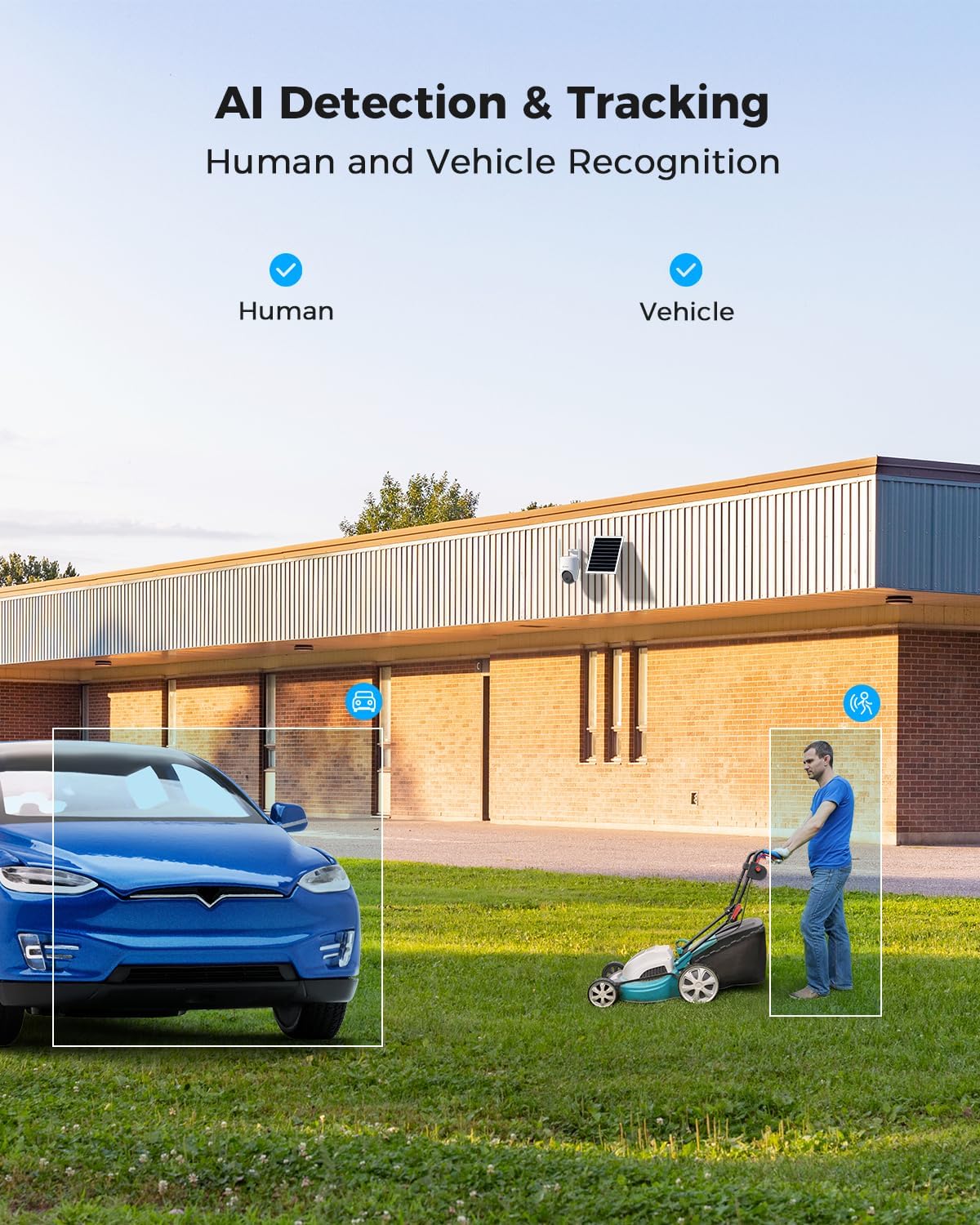
Figure 5.2: AI Detection & Tracking for Human and Vehicle Recognition. The image shows a security camera monitoring an outdoor area, with highlighted boxes indicating detected human and vehicle subjects, demonstrating its AI capabilities.
5.4 Хоёр талын аудио
Суурилуулсан микрофон болон чанга яригчийг ашиглан зочинтой харилцах эсвэл халдагчдыг таслан зогсоох.
- Access the two-way audio feature through the COCOCAM app.
- Speak into your phone's microphone to transmit audio through the camera's speaker.
- Listen to audio from the camera's surroundings through your phone.
5.5 Шөнийн хараа
The camera provides clear visibility up to 30 meters in complete darkness.
- Хэт улаан туяаны шөнийн хараа: Automatically activates in low-light conditions for black and white video.
- Бүрэн өнгөт шөнийн хараа: Utilizes white light LEDs to provide color video at night when activated or upon detection.

Figure 5.3: 30m Night Vision and 2K Full Color Night Vision. This image compares standard black and white night vision with the camera's full-color night vision capability, showing enhanced detail and color in low light.
6. Засвар үйлчилгээ
6.1 Батерей болон нарны хавтангийн арчилгаа
The integrated 15000mAh battery is continuously charged by the 8W solar panel. To ensure optimal performance:
- Нарны хавтанг өдрийн турш нарны шууд тусгалыг хамгийн их хэмжээгээр авахаар байрлуулсан эсэхийг шалгаарай.
- Regularly clean the surface of the solar panel to remove dust, dirt, or debris that may obstruct sunlight.
- Avoid placing the solar panel in shaded areas.

Figure 6.1: 8W Solar Panel for continuous power. This image focuses on the solar panel, highlighting its 8W power output and the 3-meter cable length for flexible installation.
6.2 Камерыг цэвэрлэх
- Зөөлөн ашиглах, damp cloth to wipe the camera lens and body.
- Химийн бодис, зүлгүүрийн цэвэрлэгч бүү хэрэглэ.
- Ensure the camera is dry before prolonged exposure to the elements.
6.3 Програм хангамжийн шинэчлэлтүүд
Periodically check the COCOCAM app for available firmware updates. Keeping your camera's firmware updated ensures optimal performance, new features, and security enhancements.
7. Алдаа засах
| Асуудал | Боломжит шалтгаан | Шийдэл |
|---|---|---|
| Камер аппликейшнтай холбогдоогүй байна. | Incorrect pairing process, weak 4G signal, camera not powered on. | Ensure camera is powered on. Re-attempt pairing process. Check 4G signal strength at installation location. |
| Видео чанар муу. | Dirty lens, low light conditions, weak 4G signal. | Clean the camera lens. Ensure adequate lighting or verify night vision is active. Check 4G signal strength. |
| Батерейг цэнэглэхгүй байна. | Solar panel obstructed, faulty connection, insufficient sunlight. | Ensure solar panel is clean and receives direct sunlight. Check cable connection between solar panel and camera. |
| AI detection not working or too many false alarms. | Incorrect sensitivity settings, detection area not configured. | Adjust AI detection sensitivity in the app. Configure specific detection zones to exclude irrelevant areas. |
| Хоёр талын аудио асуудал. | Microphone/speaker obstruction, app permissions, network delay. | Ensure nothing is blocking the camera's microphone or speaker. Check app permissions for microphone access. Verify stable 4G connection. |
8. Техникийн үзүүлэлтүүд
| Онцлог | Дэлгэрэнгүй |
|---|---|
| Загварын нэр | AOV 4G Camera with 7x24 Recording |
| Загварын дугаар | ZY-Q6 |
| Брэнд | КОКОКАМ |
| Видео бичлэгийн нягтрал | 1440p (3MP, 2304*1296) |
| Тойрог/Найлтын муж | 355° Pan / 90° Tilt |
| Шөнийн харааны хүрээ | 30 Meters (Infrared & White Light) |
| Холболтын технологи | Утасгүй (4G LTE) |
| Эрчим хүчний эх үүсвэр | Battery Powered (15000mAh) with 8W Solar Panel |
| Хадгалах сонголтууд | TF карт (128GB хүртэл), Үүлэн хадгалалт |
| Цаг агаарын эсэргүүцэл | IP66 |
| Материал | Акрилонитрил бутадиен стирол (ABS) |
| Хэмжээ (L x W x H) | 20 x 15 x 12 см |
| Зүйлийн жин | 620 гр |
| Батерей | 2 АА батерей (дагсан) |
9. Баталгаат хугацаа ба дэмжлэг
COCOCAM provides a насан туршийн баталгаа for this product, ensuring long-term reliability and customer satisfaction.
For technical support, troubleshooting assistance, or warranty claims, please contact COCOCAM customer service:
- Үйлдвэрлэгч: КОКОКАМ
- Албан ёсны Webсайт: www.cococamtech.com
- Имэйл: service@cococamtech.com
Please have your model number (ZY-Q6) and purchase information ready when contacting support.


