1. Аюулгүй байдлын мэдээлэл
- Бүх зааврыг уншина уу: Before using the Tilta Hydra Electronic Suction Cup, read and understand all instructions and safety warnings.
- Гадаргуугийн бэлтгэл: Ensure the mounting surface is clean, dry, smooth, and non-porous. Dust, dirt, or uneven surfaces can compromise suction integrity.
- Ачааллын хүчин чадал: Do not exceed the maximum vertical load capacity of 20kg. Overloading can lead to detachment and equipment damage.
- Air pressure monitoring: Regularly check the air pressure indicator. If the pressure drops significantly, re-activate the suction pump immediately.
- Temperature extremes: Avoid using the suction cup in extreme temperatures, as this may affect suction performance.
- Аюулгүй хавсралт: Always ensure the mounting bracket and any attached equipment are securely fastened to the suction cup.
- Тээвэр: Remove the suction cup and attached equipment from the surface before transporting the vehicle or equipment.
2. Багцын агуулга
Доор жагсаасан бүх зүйл таны багцад байгаа эсэхийг шалгаарай.
- Electronic Suction Cup (4.5″)
- Universal Multi-Functional Mounting Bracket
- USB-C цэнэглэгч кабель
- Hex Key / Tool Set
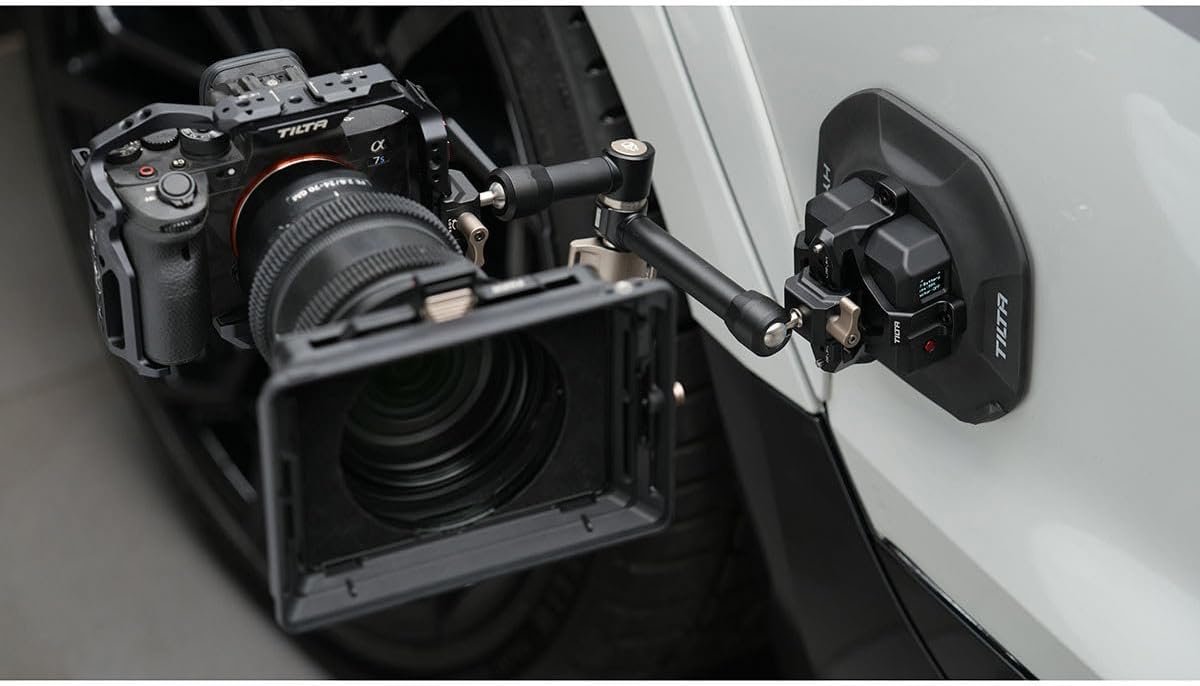
3. Бүтээгдэхүүн дууссанview
The Tilta Hydra Electronic Suction Cup is designed for secure and reliable camera mounting on various smooth, non-porous surfaces. It features an integrated electronic pump for consistent suction, real-time air pressure monitoring, and a built-in battery for extended operation. The multi-functional mounting bracket offers versatile attachment options for different camera setups.

Видео 3.1: Дэлгэрэнгүйview of the Tilta Hydra Electronic Suction Cup, demonstrating its features and capabilities.
4. Тохиргоо
Follow these steps to assemble and prepare your Tilta Hydra Electronic Suction Cup for use:
- Unpack components: Сав баглаа боодолоос бүх зүйлийг болгоомжтой авч хая.
- Суурилуулалтын хаалтыг бэхлэх: Secure the universal multi-functional mounting bracket to the top of the electronic suction cup using the provided hex key and screws.
- Гадаргууг бэлтгэх: Clean the desired mounting surface thoroughly to ensure it is free of dust, grease, and moisture. A clean, smooth surface is crucial for optimal suction.
- Position suction cup: Place the electronic suction cup firmly onto the prepared surface.
- Activate suction: Press the ON/OFF button on the suction cup. The electronic pump will activate, creating a vacuum. Monitor the air pressure indicator to ensure stable suction.
- Attach camera/device: Secure your camera or other compatible device to the mounting bracket. Ensure all connections are tight and stable.
Video 4.1: Unboxing and basic setup instructions for the suction cup.


5. Ашиглалтын заавар
The electronic suction cup is designed for ease of use and continuous monitoring to ensure the safety of your equipment.
- Electronic Suction: Press the ON/OFF button once to activate the electronic pump. The pump will automatically create and maintain a strong vacuum seal.
- Air Pressure Detection: The integrated air pressure detection system continuously monitors the vacuum level. If a pressure drop is detected, the pump will automatically reactivate to restore optimal suction.
- Харааны үзүүлэлтүүд: Refer to the LED indicators or LCD display (if applicable) for real-time battery status and suction pressure.
- Releasing Suction: To release the suction cup, press the 'OPEN' button or lever. This will break the vacuum seal, allowing for safe removal.


Video 5.1: Demonstration of the electronic vacuum suction in action on a car surface.
6. Суурилуулах сонголтууд
The universal multi-functional mounting bracket provides flexible options for attaching various accessories and cameras:
- M25 Mount: Compatible with M25 standard accessories.
- НАТО-гийн төмөр зам: Allows for quick attachment and detachment of NATO rail compatible accessories.
- Universal Multi-Mount: Features multiple 1/4"-20 and 3/8"-16 threaded holes for broad compatibility with various camera rigs and accessories.

7. Цэнэглэх
The Tilta Hydra Electronic Suction Cup features an integrated 2000mAh battery for long-lasting power.
- USB-C цэнэглэх: Connect the provided USB-C cable to the charging port on the suction cup and to a compatible PD (Power Delivery) USB-C power source.
- Түргэн цэнэглэх: The device supports PD fast charging protocol for quick replenishment of the battery.
- Зайны хугацаа: A full charge provides approximately 24 hours of continuous operation.

8. Засвар үйлчилгээ
- Цэвэрлэгээ: Regularly clean the suction pad with a soft, damp cloth. Avoid abrasive cleaners or solvents that could damage the rubber.
- Хадгалах: Store the suction cup in a cool, dry place away from direct sunlight and extreme temperatures. Ensure the suction pad is clean and free from debris before storage.
- Батерейны арчилгаа: For long-term storage, charge the battery to approximately 50-60% to prolong its lifespan.
9. Алдаа засах
| Асуудал | Боломжит шалтгаан | Шийдэл |
|---|---|---|
| Suction cup does not hold | Dirty or uneven surface; low battery; damaged suction pad | Clean surface thoroughly; charge battery; inspect and replace suction pad if damaged |
| Electronic pump not activating | Low battery; faulty ON/OFF button | Charge battery; contact customer support if button is unresponsive |
| Air pressure drops frequently | Porous or textured surface; minor leak in seal | Relocate to a smoother, non-porous surface; ensure suction pad is clean and free of debris |
10. Техникийн үзүүлэлтүүд
| Онцлог | Дэлгэрэнгүй |
|---|---|
| Бүтээгдэхүүний хэмжээс | 11 x 9 x 4 инч |
| Зүйлийн жин | 1.83 фунт |
| Загварын дугаар | HDA-ESC-MMB-45 |
| Батерей | 1 CR5 batteries required (integrated) |
| Онцлог шинж чанарууд | Adjustable, Electronic Suction, Air Pressure Detection, USB-C Charging |
| Өнгө | Хар |
| Үйлдвэрлэгч | Тилта |
| Тохиромжтой төхөөрөмжүүд | M25, NATO, Universal Multi-Mount Option |
| Суурилуулах төрөл | Сорох |
11. Баталгаат хугацаа ба дэмжлэг
Tilta products are designed and manufactured to the highest quality standards. For warranty information, technical support, or service inquiries, please refer to the official Tilta webсайт эсвэл эрх бүхий дилертэйгээ холбогдоно уу.


