1. Танилцуулга
The Eureka Forbes Smart Air Purifier 355 is designed to provide clean and healthy indoor air. This device features a 4-stage advanced purification system, including a True H13 HEPA filter, and offers smart control via Wi-Fi connectivity. It is capable of purifying air in spaces up to 480 sq. ft. by removing 99.97% of impurities as small as 0.1 µm.
This manual provides detailed instructions for the proper setup, operation, and maintenance of your air purifier to ensure optimal performance and longevity.
2. Аюулгүй байдлын чухал мэдээлэл
Төхөөрөмжийг ашиглахаасаа өмнө бүх зааврыг анхааралтай уншина уу. Энэ гарын авлагыг цаашид лавлах зорилгоор хадгална уу.
- Эрчим хүчний хангамжийн хэмжээг баталгаажуулна ууtage нь төхөөрөмж дээрх үнэлгээний шошготой таарч байна.
- Гэмтсэн утас, залгууртай төхөөрөмжийг бүү ажиллуул.
- Агаарын оролт, гаралтыг саад тотгороос хол байлга.
- Төхөөрөмжийг ус болон бусад шингэнд дүрж болохгүй.
- Төхөөрөмжийг цэвэрлэх, засвар үйлчилгээ хийхээсээ өмнө цахилгааны утсыг салга.
- Энэ хэрэгсэл нь зөвхөн дотор ашиглах зориулалттай.
3. Бүтээгдэхүүн дууссанview
The Eureka Forbes Smart Air Purifier 355 features a sleek design with 360° air intake for comprehensive purification. The top panel includes a digital display and touch controls for easy operation.
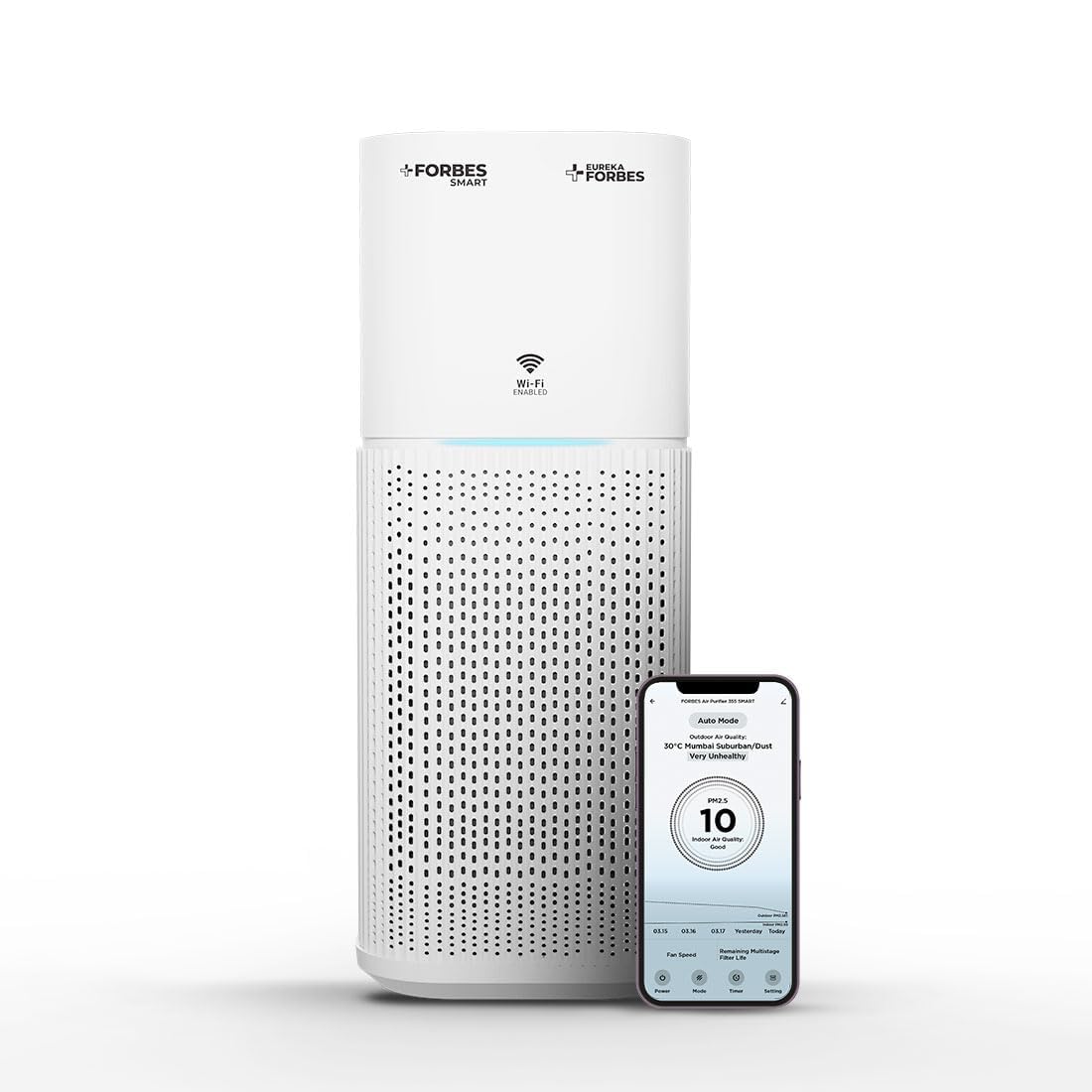
Figure 3.1: Main unit of the Eureka Forbes Smart Air Purifier 355.
Хяналтын самбарын онцлогууд:

Figure 3.2: Top control panel with digital display and touch buttons.
- Цахилгаан товч: Төхөөрөмжийг асаах/унтраах.
- Горимын товчлуур: Cycles through Auto, Sleep, and Manual modes.
- Хурдны товчлуур: Сэнсний хурдыг тохируулна (12 түвшин).
- Цаг хэмжигч товчлуур: Sets operation timer (1-12 hours).
- Plasma Button: Activates/deactivates plasma ion function.
- Бүдгэрүүлэх товчлуур: Дэлгэцийн тод байдлыг тохируулна.
- Wi-Fi үзүүлэлт: Wi-Fi холболтын статусыг харуулна.
- PM 2.5 Display: Real-time air quality indicator.
Шүүлтүүрийн систем:
Цэвэршүүлэгч нь 4-s ашигладагtage advanced filtration system to capture various airborne particles and odors.

Зураг 3.3: Тэсэрсэн view 4-аасtage шүүлтүүрийн систем.
- Урьдчилсан шүүлтүүр: Тоос, хөвөн, гэрийн тэжээвэр амьтдын үс зэрэг том тоосонцорыг барьж авдаг.
- Идэвхжүүлсэн нүүрс шүүлтүүр: Үнэр, дэгдэмхий органик нэгдлүүд (VOCs), хортой хийг шингээдэг.
- True H13 HEPA Filter: Traps 99.97% of airborne particles as small as 0.3 microns, including pollen, dust mites, mold spores, and pet dander.
- Plasma Filtration: Generates positive and negative ions to eliminate microbial contaminants and enhance air freshness.
4. Тохиргоо
4.1 Unboxing and Filter Installation
Before first use, ensure all packaging materials are removed and the filter is correctly installed.
- Агаар цэвэршүүлэгчийг савлагаанаас нь болгоомжтой авч хая.
- Turn the unit upside down and twist the base counter-clockwise to unlock and remove it.
- Remove the integrated filter from its protective plastic bag.
- Insert the filter back into the unit, ensuring it is seated properly.
- Replace the base and twist clockwise to lock it securely.
Video 4.1: Demonstrates the unboxing and filter installation process for the air purifier.
4.2 Эрчим хүчний холболт
Place the air purifier on a flat, stable surface. Connect the power adapter to the unit and then plug it into a suitable electrical outlet.
5. Ашиглалтын заавар
5.1 Үндсэн үйл ажиллагаа
- дээр дарна уу Хүч button to turn the air purifier on. The PM 2.5 display will show the current air quality.
- дээр дарна уу Горим үйлдлийн горимуудаар шилжих товчлуур:
- Авто горим: The fan speed adjusts automatically based on the detected air quality (PM 2.5 levels) and ambient light.
- Унтах горим: Operates at the lowest fan speed with dimmed lights for quiet operation during rest.
- Гар горим: Allows manual selection of fan speed.
- In Manual Mode, press the Хурд button to select from 12 fan speed levels.
- дээр дарна уу Цаг хэмжигч button to set the desired operating duration from 1 to 12 hours. The unit will automatically turn off after the set time.
- дээр дарна уу Плазм button to activate or deactivate the plasma ion function for enhanced air purification.
- дээр дарна уу Бүдгэр button to adjust the brightness of the display lights.
Видео 5.1: Хурдан дуусгахview of key features and controls of the air purifier.
5.2 Wi-Fi Enabled Smart Control
The air purifier can be controlled remotely using a dedicated smartphone application.

Figure 5.1: Smart app interface showing air quality and control options.
- Download the Eureka Forbes Smart app from your smartphone's app store.
- Follow the in-app instructions to connect your air purifier to your home Wi-Fi network.
- Once connected, you can manage all settings, monitor real-time PM 2.5 levels, and adjust modes/speeds from anywhere.
6. Засвар үйлчилгээ
6.1 Шүүлтүүрийг солих
The air purifier is equipped with a filter replacement indicator. When the indicator lights up, it is time to replace the integrated filter to maintain optimal performance.
- Агаар цэвэршүүлэгчийг цахилгаан залгуураас салга.
- Turn the unit upside down and twist the base counter-clockwise to unlock.
- Хуучин шүүлтүүрийг аваад зохих ёсоор нь хая.
- Insert a new Eureka Forbes replacement filter into the unit.
- Суурийг буцааж тавиад цагийн зүүний дагуу эргүүлж түгжээрэй.
- Plug in the unit. Reset the filter replacement indicator by pressing and holding the appropriate button (refer to the control panel diagram for specific button, usually the Timer or Mode button for a few seconds).
6.2 Төхөөрөмжийг цэвэрлэх
- Цэвэрлэхийн өмнө төхөөрөмжийг үргэлж салга.
- Гадна талын гадаргууг зөөлөн арчиж, damp даавуу. Зүлгүүрийн цэвэрлэгч, уусгагчийг бүү ашигла.
- Clean the air intake and outlet vents with a soft brush or vacuum cleaner attachment to remove dust buildup.
- Шүүлтүүрийг угааж болохгүй.
7. Алдаа засах
| Асуудал | Боломжит шалтгаан | Шийдэл |
|---|---|---|
| Төхөөрөмж асахгүй байна. | No power supply; power cord not connected; unit damaged. | Check power outlet; ensure power cord is securely plugged in; contact customer support if damaged. |
| Агаар цэвэршүүлэх чадвар муу. | Filter is dirty or needs replacement; air inlets/outlets blocked. | Check filter replacement indicator and replace filter if necessary; clear any obstructions from vents. |
| Ашиглалтын явцад ер бусын дуу чимээ. | Foreign object inside; unit not on a stable surface. | Unplug and check for foreign objects; place unit on a flat, stable surface. |
| Wi-Fi холболтын асуудал. | Incorrect Wi-Fi password; router too far; app not configured correctly. | Verify Wi-Fi password; move unit closer to router; reconfigure Wi-Fi settings in the app. |
8. Техникийн үзүүлэлтүүд
| Онцлог | Дэлгэрэнгүй |
|---|---|
| Брэнд | Эврика Форбс |
| Загварын дугаар | GAPDF400Z1SM00 |
| Өнгө | Цагаан |
| Бүтээгдэхүүний хэмжээс | 24.3D x 24.3W x 53.5H Сантиметр |
| Шалны талбайн хамрах хүрээ | 480 квадрат фут |
| CADR | 355 m³/Hr |
| Шүүлтүүрийн төрөл | 4-Сtage (Pre-filter, Activated Carbon, True H13 HEPA, Plasma) |
| Бөөм хадгалах хэмжээ | 0.1 микрон |
| Дуу чимээний түвшин | 63 Децибел (Макс) |
| Хянагчийн төрөл | Mobile Application, Touch Control |
| Ватtage | 35 ватт |
| Эрчим хүчний эх үүсвэр | Утастай цахилгаан |
| Зүйлийн жин | 4.3 кг |
| Оруулсан бүрэлдэхүүн хэсгүүд | Air Purifier, Integrated Filter, Adapter |
9. Баталгаат хугацаа ба дэмжлэг
Your Eureka Forbes Smart Air Purifier 355 comes with a 1 жилийн иж бүрэн баталгаа. For any assistance or service requests, please contact Eureka Forbes customer support.
- Хэрэглэгчийн дэмжлэг: Available for 12 hours daily.
- Үйлчилгээний сүлжээ: Presence in over 700 cities and 17,000+ pincodes.
- Өргөтгөсөн баталгаа: A 2-Year Extended Warranty Plan by Onsitego is available for purchase.

Figure 9.1: Information on Eureka Forbes' extensive service network and support.
For further details or to register your product, please visit the official Eureka Forbes website or refer to the product detail page on Amazon.