Танилцуулга
The Mytrix Tac Master Wireless Gaming Headset is designed to provide a high-quality audio experience for gaming across multiple platforms. Featuring 2.4GHz lossless wireless technology, Bluetooth 5.3, and a 3.5mm wired connection, this headset offers versatile connectivity, low latency, and immersive surround sound. The detachable noise-canceling microphone ensures clear communication, while the ergonomic design and long battery life provide comfort for extended use.
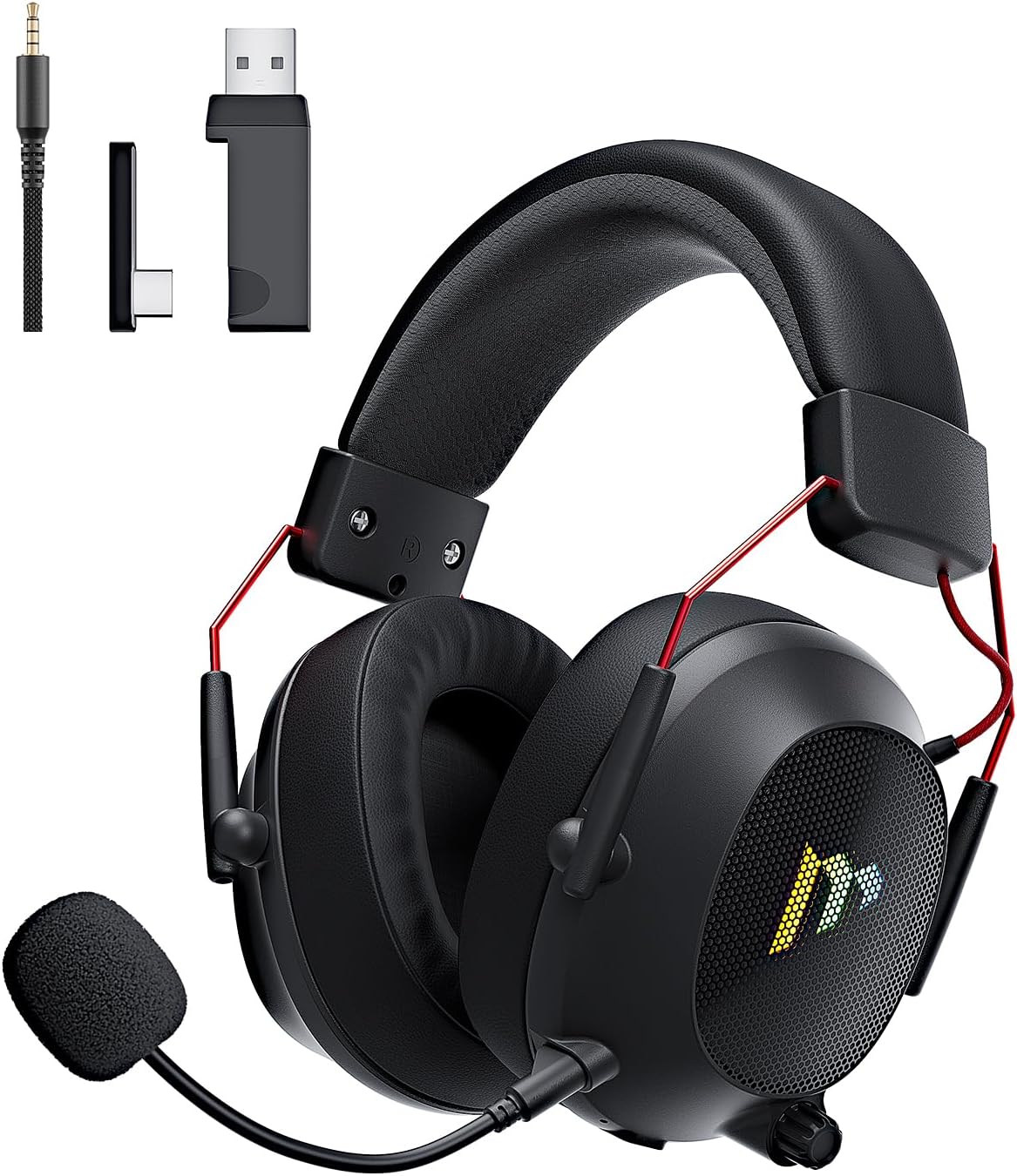
Image: The Mytrix Tac Master Wireless Gaming Headset, showcasing its sleek black design with red accents, detachable microphone, and included USB dongle and Type-C adapter.
Багцын агуулга
Доор жагсаасан бүх зүйл таны багцад байгаа эсэхийг шалгана уу.
- Mytrix Tac Master Wireless Gaming Headset
- Салгаж болдог дуу чимээг намсгадаг микрофон
- 2.4GHz USB-A утасгүй донгл
- USB Type-C Transmitter
- 3.5 мм аудио кабель
- USB цэнэглэгч кабель (USB-A-USB-C)
- Хэрэглэгчийн гарын авлага (энэ баримт бичиг)
Headset Controls and Components
Familiarize yourself with the various controls and components of your Mytrix Tac Master headset:

Image: Diagram illustrating the location and function of controls on the Mytrix Tac Master headset, including power button, volume wheel, microphone mute button, and mode switch.
- Цахилгаан товч: Press and hold for 3 seconds to turn on/off. Single press to pause/play audio.
- Горимын товчлуур (M): Single press to toggle microphone on/off. Double press to switch between Bluetooth and 2.4G wireless modes. Press and hold for 3 seconds to turn RGB lights on/off.
- Эзлэхүүний хүрд: Rotate up to increase volume, rotate down to decrease volume.
- Микрофон порт: Салдаг микрофоныг холбоход зориулагдсан.
- 3.5 мм аудио залгуур: Утастай холболтын хувьд.
- USB-C цэнэглэх порт: Чихэвчийг цэнэглэхэд зориулагдсан.
- RGB гэрэлтүүлэг: Located on the earcups.
Тохиргоо
1. Чихэвчийг цэнэглэж байна
Before first use, fully charge the headset. Connect the USB charging cable to the headset's USB-C port and the other end to a USB power source (e.g., computer USB port, USB wall adapter). The LED indicator will show charging status and turn off when fully charged. A full charge takes approximately 3 hours and provides up to 48 hours of battery life.

Image: Visual representation of the headset's long-lasting battery life, indicating approximately 50 hours of use and a 3-hour charging time.
2. Микрофон залгах
Insert the detachable microphone into the microphone port on the left earcup. Ensure it is securely seated. The microphone is flexible and omni-directional, allowing for angle adjustment.
3. Холболтын сонголтууд
The Mytrix Tac Master headset offers multiple connection methods for broad compatibility:

Image: Diagram illustrating the four connection modes: 2.4GHz Dongle (USB-A and USB-C), Bluetooth 5.3, and 3.5mm Wired, along with compatible devices for each mode.
3.1. 2.4GHz Wireless Connection (Recommended for PC, PS4, PS5, Switch Docked Mode)
- Identify the appropriate dongle for your device:
- For devices with a USB-A port (PC, PS4, PS5, Switch Docked): Use the 2.4GHz USB-A dongle.
- For devices with a USB-C port (Switch Handheld, Laptops, Tablets): Use the USB Type-C transmitter.
- Plug the selected 2.4GHz dongle/transmitter into an available USB port on your device.
- Power on the headset by pressing and holding the Power button for 3 seconds.
- Ensure the headset is in 2.4GHz mode. If not, double-press the 'M' button to switch modes until the headset connects to the dongle. The headset will automatically pair with the dongle.
- Төхөөрөмж дээрээ чихэвчийг аудио гаралт болон оролтын төхөөрөмж болгон сонгоно уу.
3.2. Bluetooth 5.3 Connection (Recommended for Mobile Phones, Tablets, Laptops)
- Power on the headset by pressing and holding the Power button for 3 seconds.
- Double-press the 'M' button to switch the headset to Bluetooth pairing mode. The LED indicator will flash, indicating it's ready to pair.
- On your device, enable Bluetooth and search for "Mytrix Tac Master" in the list of available devices.
- Select "Mytrix Tac Master" to connect. Once connected, the LED indicator will stop flashing.
3.3. 3.5mm Wired Connection (Recommended for Xbox, Game Console Controllers, Devices without USB/Bluetooth)
- 3.5 мм-ийн аудио кабелийн нэг үзүүрийг чихэвчний 3.5 мм-ийн залгуурт холбоно уу.
- Connect the other end of the 3.5mm audio cable to the audio jack on your device (e.g., Xbox controller, phone).
- In wired mode, the headset's microphone and RGB lighting functions are not active.
Ашиглалтын заавар
Асаах/унтраах
- Асаахын тулд: Press and hold the Power button for approximately 3 seconds until the headset powers on.
- Унтраахын тулд: Press and hold the Power button for approximately 3 seconds until the headset powers off.
Дууны хяналт
- Эзлэхүүнийг нэмэгдүүлэх: Rotate the Volume wheel upwards.
- Эзлэхүүнийг бууруулах: Rotate the Volume wheel downwards.
Микрофоны удирдлага
- Микрофоны дууг хаах/асах: Single press the 'M' button.
- The detachable microphone features noise cancellation for clear voice chat.
RGB гэрэлтүүлгийн хяналт
- Turn RGB Lights On/Off: Press and hold the 'M' button for approximately 3 seconds.
Аудио тоглуулах хяналт
- Аудио тоглуулах/түр зогсоох: Цахилгаан товчийг нэг удаа дарна уу.
Хүрээлэн буй орчны дуу чимээ
The headset features 7.1 stereo surround sound for an immersive audio experience, allowing for precise positioning of sound details in games.

Зураг: дэлбэрсэн view of the headset's 50mm drivers, illustrating the components that contribute to its 7.1 stereo surround sound capability.
Засвар үйлчилгээ
- Цэвэрлэгээ: Use a soft, dry cloth to clean the headset. Do not use abrasive cleaners or solvents. For earcups, gently wipe with a damp даавуугаар хийж, хэрэглэхийн өмнө агаарт бүрэн хатаана.
- Хадгалах: Store the headset in a cool, dry place away from direct sunlight and extreme temperatures. If storing for an extended period, ensure the battery is partially charged (around 50%) to preserve battery health.
- Батерейны арчилгаа: Avoid fully discharging the battery frequently. Charge the headset regularly, even if not in constant use, to maintain battery longevity.
- Микрофон арчилгаа: Handle the detachable microphone gently. Avoid excessive bending or twisting.
Алдааг олж засварлах
| Асуудал | Боломжит шалтгаан | Шийдэл |
|---|---|---|
| Чихэвчнээс дуу гарахгүй. | Headset not powered on, low battery, incorrect audio output selected, connection issue. | Ensure headset is powered on and charged. Check device's audio settings to confirm "Mytrix Tac Master" is selected as output. Re-establish 2.4GHz or Bluetooth connection. For wired mode, ensure cable is fully inserted. |
| Микрофон ажиллахгүй байна. | Microphone muted, not properly attached, incorrect audio input selected, wired mode limitation. | Single press the 'M' button to unmute. Ensure microphone is securely attached. Check device's audio settings to confirm "Mytrix Tac Master" is selected as input. Note: Microphone does not function in 3.5mm wired mode. |
| 2.4GHz утасгүй холболтоор холбогдох боломжгүй. | Dongle not recognized, headset not in 2.4GHz mode, interference. | Ensure dongle is fully inserted into a working USB port. Double-press 'M' button to switch headset to 2.4GHz mode. Try a different USB port. Move closer to the dongle to reduce interference. |
| Bluetooth-ээр холбогдож чадахгүй байна. | Headset not in pairing mode, Bluetooth disabled on device, already connected to another device. | Double-press 'M' button to enter Bluetooth pairing mode (LED flashes). Ensure Bluetooth is enabled on your device. Disconnect from other Bluetooth devices if necessary. |
| RGB гэрэл ажиллахгүй байна. | Lights turned off, low battery, wired mode limitation. | Press and hold the 'M' button for 3 seconds to toggle RGB lights. Ensure headset has sufficient battery. Note: RGB lights do not function in 3.5mm wired mode. |
Үзүүлэлтүүд
| Онцлог | Дэлгэрэнгүй |
|---|---|
| Загварын нэр | Gaming Headset (G901) |
| Холболтын технологи | 2.4GHz утасгүй, Bluetooth 5.3, 3.5мм утастай |
| Чихэвчний үүр | 3.5 мм Жак |
| Утасгүй сүлжээ | Up to 50 feet (in open spaces) |
| Хоцролт | ≤20ms (2.4GHz) |
| Аудио драйверын төрөл | 50 мм динамик драйверууд |
| Дууны онцлог | 7.1 Стерео хүрээлэх дуу |
| Микрофон | Detachable, Omni-directional, Noise-Canceling |
| Зайны ашиглалт | 48 цаг хүртэл |
| Цэнэглэх хугацаа | Ойролцоогоор 3 цаг |
| Зайны төрөл | 1 лити ион батерей (дагсан) |
| Чихэвчний хэлбэр | Чихний дээгүүр |
| Онцлог шинж чанарууд | Ergonomic Design, RGB Lighting, Foldable & Portable |
| Бүтээгдэхүүний хэмжээс | 5.91 x 3.94 x 5.91 инч |
| Зүйлийн жин | 13.4 унц |
| Үйлдвэрлэгч | Mytrix |
Баталгаат болон дэмжлэг
Mytrix products are manufactured to high quality standards. For information regarding warranty coverage, technical support, or service inquiries, please refer to the warranty card included with your product or visit the official Mytrix website. You may also contact Mytrix customer support directly for assistance with your Tac Master Gaming Headset.
Нэмэлт тусламж авахыг хүсвэл зочилно уу Mytrix Store on Amazon.
Аюулгүй байдлын чухал мэдээлэл
- Чихэвчийг хэт өндөр температур, чийгшил, шингэн зүйлд бүү тавь.
- Чихэвчийг унагах эсвэл хүчтэй цохилтонд оруулахаас зайлсхий.
- Do not attempt to disassemble or repair the headset yourself. This will void the warranty.
- Listen at moderate volume levels to prevent hearing damage. Prolonged exposure to loud sounds can cause permanent hearing loss.
- Хүүхдийн гар хүрэхгүй газар хадгална.


