Танилцуулга
This manual provides essential information for the safe and effective use of your Vangoa 61-Key Light-Up Keyboard Piano and Kids Electric Guitar. Please read these instructions thoroughly before operating the instruments and retain them for future reference.
Аюулгүй байдлын мэдээлэл
- Эрчим хүчний хангамж: Зөвхөн заасан тэжээлийн адаптерийг ашиглана уу. Боть байгаа эсэхийг баталгаажуулна ууtage matches your local power supply. Unplug the instruments during lightning storms or when unused for extended periods.
- Ус ба чийг: Do not expose the instruments to water or excessive moisture. Avoid placing liquid-filled containers near them.
- Агааржуулалт: Do not block ventilation openings. Ensure adequate airflow around the instruments.
- Байршил: Place the instruments on a stable, flat surface. Avoid extreme temperatures, direct sunlight, or heat sources.
- Цэвэрлэгээ: Зөвхөн хуурай, зөөлөн даавуугаар цэвэрлэнэ. Шингэн цэвэрлэгч эсвэл аэрозоль хэрэглэж болохгүй.
- Хүүхдүүд: Adult supervision is recommended for young children operating these instruments. Small parts may pose a choking hazard.
Багцын агуулга
Таны багцад бүх зүйл байгаа эсэхийг шалгана уу:
Vangoa 61-Key Light-Up Keyboard Piano
- 61-Key Light-Up Keyboard Piano
- Микрофон
- Цахилгаан хувиргагч (AC)
- Аудио кабель
- Эзэмшигчийн гарын авлага
Vangoa Kids Electric Guitar
- 30-inch Electric Guitar
- Мини Ampилүү амьд (Amp)
- Гитарын цүнх
- Таалагч
- Капо
- Оосор
- Сонгодог
- Хэрэгслийн кабель
- Хэрэглэгчийн гарын авлага

Image: Vangoa 61-Key Light-Up Keyboard Piano with included microphone, power adapter, audio cable, and owner's manual.

Image: Vangoa 30-inch Kids Electric Guitar in blue with included guitar bag, mini amplifier, tuner, capo, strap, picks, and cable.
Тохиргоо
Keyboard Piano Setup
- Эрчим хүчний холболт: Connect the AC power adapter to the DC 9V input jack on the back of the keyboard. Plug the adapter into a standard wall outlet. Alternatively, the keyboard can be powered via USB.
- Микрофон холболт: Insert the microphone plug into the designated microphone input jack.
- Чихэвчний холболт: For private practice, connect headphones to the headphone output jack.
- Асаах: Press the 'Power' button to turn on the keyboard. The LED display will illuminate.

Image: Close-up of the Vangoa 61-Key Light-Up Keyboard Piano's control panel and lighted keys, showing the LED display and various function buttons.
Electric Guitar Setup
- Туузны хавсралт: Attach the guitar strap to the strap buttons located on the body of the guitar.
- Ampөргөгч холболт: Connect one end of the instrument cable to the output jack on the guitar and the other end to the input jack on the mini ampнастан.
- AmpАмьдралын хүч: -ийг баталгаажуулах amplifier has batteries installed or is connected to its power source (if applicable) and turn it on.
- тааруулах: Use the included tuner to accurately tune the guitar strings. Pluck each string individually and adjust the tuning pegs until the tuner indicates the correct pitch.
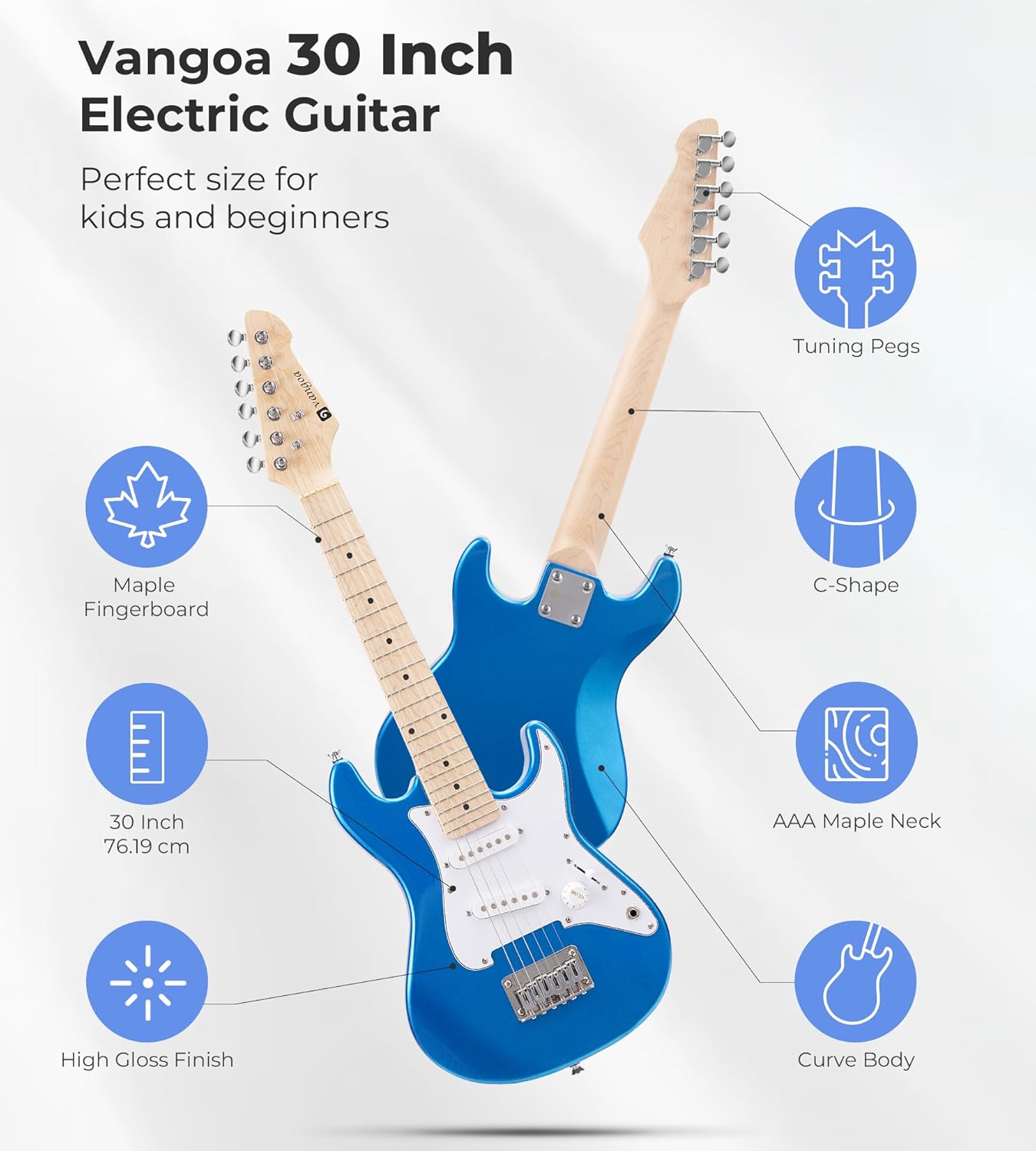
Image: Diagram illustrating the features of the Vangoa 30-inch Electric Guitar, including tuning pegs, maple fingerboard, C-shape neck, AAA maple neck, 30-inch size, and high gloss finish.
Ашиглалтын заавар
Keyboard Piano Operation
- Асаах/унтраах: дээр дарна уу ХҮЧ гарыг асаах эсвэл унтраах товчлуур.
- Дууны хяналт: -г ашиглана уу ЭЗЭМШИГ knob or buttons to adjust the overall sound level.
- Гэрэлтэй түлхүүрүүд: The keyboard features lighted keys to assist beginners in learning melodies. Follow the illuminated keys during demo songs or learning modes.
- Timbres (Voices): Select from 350 built-in timbres to change the instrument sound. Refer to the keyboard's panel for timbre selection buttons or number input.
- Хэмнэл: Choose from 350 rhythms to add a backing track to your playing. Adjust the tempo as desired.
- Демо дуунууд: Play one of the 30 demo songs to hear examples or practice along.
- Percussions: Access 61 percussion sounds for rhythmic accompaniment.
- Vibrato & Sustain: Тусгай зориулалтыг ашиглана уу Вибрато болон Тогтвортой байдал buttons to add effects to your sound.
- Бичлэг хийх ба тоглуулах: The keyboard allows you to record your performances and play them back. Consult the manual for specific recording and playback button functions.

Image: Diagram showing the rich functions of the Vangoa keyboard, including 350 Timbres, 350 Rhythms, 30 Demo Songs, 8 Percussions, Sustain & Vibrato, Dual Keyboard, Microphone Gift, Headphone Connectable, and Recording & Playback.
Electric Guitar Operation
- Эзлэхүүний товчлуур: Adjust the output volume of the guitar using the ЭЗЭМШИГ knob on the guitar body.
- 3-Way Switch (Pickup Selector): The guitar features S-S (Single-Single) pickups. Use the 3-way switch to select different pickup configurations, which alters the tonal quality of the sound. Experiment with positions to find your preferred tone.
- Тоглож байна: Hold the guitar comfortably. Use a pick or your fingers to pluck or strum the strings. Practice basic chords and scales.

Image: Close-up of the Vangoa Electric Guitar's S-S pickups, stable bridge, volume knob, and 3-way switch, highlighting the controls for tone adjustment.
Засвар үйлчилгээ
- Цэвэрлэгээ: Wipe down the instruments regularly with a soft, dry, lint-free cloth. For the guitar, clean the strings after each use to prolong their life.
- Хадгалах: Store the instruments in a cool, dry place away from direct sunlight, extreme temperatures, and humidity. Use the provided guitar bag for protection.
- String Replacement (Guitar): Guitar strings will eventually wear out and break. Replace them with appropriate gauge strings when necessary.
- Battery Replacement (Amp/Tuner): If the mini amplifier or tuner uses batteries, replace them when power is low.
Алдааг олж засварлах
Төгөлдөр хуур
- Дуугүй:
- Ensure the power adapter is securely connected and the keyboard is turned on.
- Дууны түвшинг шалгана уу.
- If headphones are connected, sound will only come through them. Disconnect headphones if you want sound from the speakers.
- Түлхүүрүүд асахгүй байна:
- Ensure the lighted key feature is enabled (if applicable, refer to specific button on keyboard).
- This feature typically works during learning modes or demo songs.
Цахилгаан гитар
- Дуу гарахгүй Ampамь нас:
- Ensure the guitar and amplifier are both turned on.
- Хөгжмийн хэрэгслийн кабель гитар болон гитар хоёуланд нь найдвартай холбогдсон эсэхийг шалгана уу ampнастан.
- -ийг баталгаажуулна уу amplifier's volume is turned up.
- -г шалгана уу amplifier's power source (batteries or power adapter).
- Дууны чанар муу/чимээтэй:
- Бүх кабелийн холболтууд нягт байгаа эсэхийг шалгаарай.
- Check the guitar's volume and tone knobs.
- Кабелийн эвдрэлийг арилгахын тулд өөр багажны кабелийг туршиж үзээрэй.
- Ensure the guitar is properly tuned.
Үзүүлэлтүүд
| Онцлог | Тодорхойлолт |
|---|---|
| Брэнд | Вангоа |
| Загварын дугаар | a26993f1-5e81-430c-9ad0-9f6e39259b0c |
| Keyboard Number of Keys | 61 |
| Keyboard Special Feature | Lighted Keys, Weighted Keys |
| Keyboard Timbres | 350 |
| Keyboard Rhythms | 350 |
| Keyboard Demo Songs | 30 |
| Гарын цохиур | 61 |
| Гарын холболт | USB |
| Гарын цахилгаан эх үүсвэр | Corded Electric (AC, USB) |
| Guitar Size | 30 инч |
| Guitar Neck Material | Canadian C-shaped Maple |
| Guitar Fingerboard Material | Maple |
| Гитар пикапууд | S-S (Single-Single) |
| Ур чадварын түвшин | Эхлэгч |
| Насны хүрээ | Хүүхэд |
Баталгаат хугацааны мэдээлэл
Vangoa products are designed and manufactured to high-quality standards. This product is covered by a manufacturer's warranty against defects in materials and workmanship. Please refer to the specific warranty terms provided with your purchase documentation or contact Vangoa customer support for details. Keep your proof of purchase for warranty claims.
Хэрэглэгчийн дэмжлэг
For technical assistance, troubleshooting, or warranty inquiries, please contact Vangoa customer support. You can typically find contact information on the Vangoa official webсайт эсвэл бүтээгдэхүүнийг худалдан авсан жижиглэн худалдаалагчаар дамжуулан.
-д зочилно уу Vangoa Store on Amazon нэмэлт мэдээлэл, дэмжлэгийн эх сурвалжийг авна уу.


