1. Аюулгүй байдлын чухал мэдээлэл
- Төхөөрөмжийг ашиглахаасаа өмнө бүх зааврыг уншина уу.
- Төхөөрөмжийг ус, чийгээс хол байлга.
- Хэт их температур, нарны шууд тусгалд бүү өрт.
- Use only the provided power adapter and charging cables.
- Төхөөрөмжийг өөрөө задлах, засах гэж бүү оролдоорой. Мэргэшсэн үйлчилгээний ажилтантай холбоо барина уу.
- Хэт халалтаас урьдчилан сэргийлэхийн тулд зохих агааржуулалтыг хангах.
2. Багцын агуулга
Бүх зүйл багцад байгаа эсэхийг шалгана уу:
- Ikarao Break X2 Karaoke Machine
- 2 утасгүй микрофон
- Цэнэглэх кабель
- Оосор
- Хэрэглэгчийн гарын авлага
3. Бүтээгдэхүүн дууссанview
The Ikarao Break X2 is an all-in-one portable karaoke system designed for an immersive entertainment experience. It features a 10.1-inch touch screen, a powerful 600W Bluetooth speaker, and two self-charging wireless microphones.
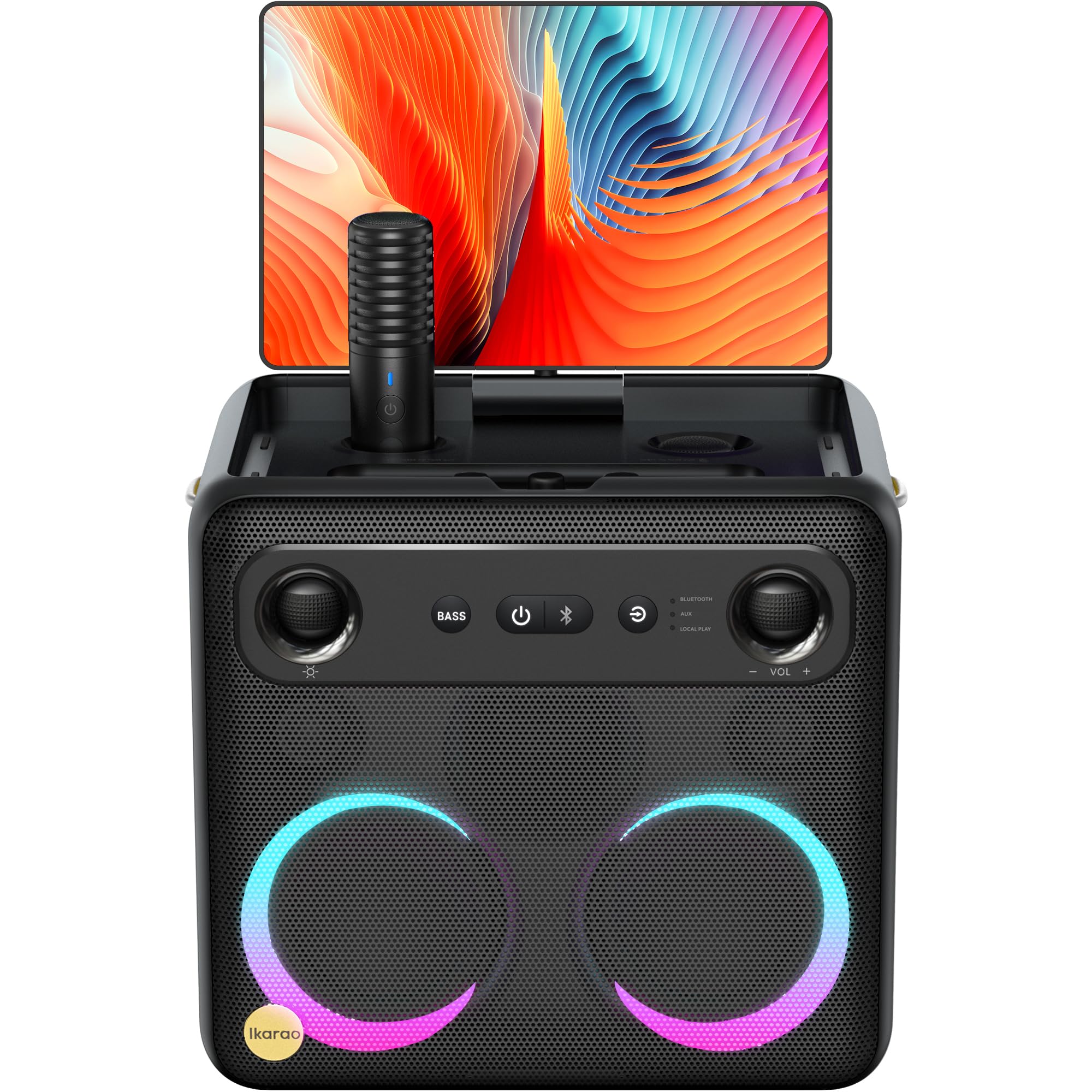
Image: Ikarao Break X2 Karaoke Machine. This image shows the main unit with its integrated 10.1-inch touch screen, the speaker grille, and the two wireless microphones stored in their charging slots.
Гол онцлогууд:
- Integrated 10.1-inch Touch Screen: 2K HD resolution for clear lyric display. The screen can rotate 180 degrees for optimal viewөнцөг.
- 600W Bluetooth Speaker: Delivers powerful and clear audio for an engaging karaoke experience.
- Two Self-Charging Wireless Microphones: Conveniently store and charge microphones within the unit. No manual pairing required.
- Баригдсан холболт: Access YouTube and Spotify via Wi-Fi for an unlimited song library.
- Олон тоглуулах горим: Supports HDMI, USB, AUX IN, AUX OUT, TF, SD, and wired microphone connections.
- Зөөврийн дизайн: Compact and equipped with a strap for easy transport, offering up to 8 hours of battery life.
4. Тохиргоо
4.1 Анхны цэнэглэлт
- Connect the provided charging cable to the charging port on the Ikarao Break X2.
- Plug the other end into a suitable power outlet.
- Төхөөрөмжийг анх ашиглахаасаа өмнө бүрэн цэнэглэхийг хүлээнэ үү. Цэнэглэх индикатор нь батерейны төлөвийг харуулна.
4.2 Асаах/унтраах
- To power on, press and hold the Power button located on the control panel until the screen illuminates.
- To power off, press and hold the Power button until the shutdown options appear on the screen, then select 'Power Off'.
4.3 Wi-Fi холболт
- Once powered on, navigate to the 'Settings' menu on the touch screen.
- 'Wi-Fi'-г сонгоод асаана уу.
- Жагсаалтаас хүссэн Wi-Fi сүлжээгээ сонгоод, асуувал нууц үгээ оруулна уу.
- Once connected, you can access online features like YouTube and Spotify.
4.4 Микрофоны хэрэглээ
- The two wireless microphones are pre-paired with the unit. Simply remove them from their charging slots to activate.
- To charge, place the microphones back into their designated slots on the main unit.
5. Ашиглалтын заавар
5.1 Мэдрэгчтэй дэлгэц ашиглах
- The 10.1-inch touch screen functions like a tablet. Tap to select, swipe to scroll.
- The screen can be rotated 180 degrees to adjust the viewing angle. Gently pivot the screen to the desired position.
5.2 Karaoke Mode (YouTube/Spotify)
- Төхөөрөмж Wi-Fi-д холбогдсон эсэхийг шалгана уу.
- From the home screen, tap on the YouTube or Spotify application icon.
- хайх your desired karaoke songs or playlists.
- Adjust the main volume using the controls on the unit or the on-screen interface.
- Adjust microphone volume and echo effects using the dedicated controls.
5.3 Bluetooth чанга яригчийн горим
- Гадаад төхөөрөмж дээрээ (жишээ нь, ухаалаг утас, таблет) Bluetooth-ийг идэвхжүүл.
- On the Ikarao Break X2, navigate to the Bluetooth settings or select the Bluetooth input mode.
- хайх 'Ikarao Break X2' on your external device and pair.
- Once connected, you can play audio from your external device through the Ikarao Break X2 speaker.
5.4 Гадаад төхөөрөмжийн холболт
- HDMI: Connect to a TV or external display for a larger viewтуршлага.
- USB/TF/SD: Insert USB drives or memory cards to play local audio or video files.
- AUX IN: 3.5 мм аудио кабель ашиглан гадаад аудио эх үүсвэрийг холбоно уу.
- AUX OUT: Connect to external speakers or sound systems.
- Утастай микрофон: An additional port is available for a wired microphone if desired.
6. Засвар үйлчилгээ
6.1 Цэвэрлэгээ
- Wipe the screen and exterior surfaces with a soft, dry, lint-free cloth.
- Зүлгүүрийн цэвэрлэгч, уусгагч, аэрозол шүршигч хэрэглэж болохгүй.
- Зөрүүд тэмдгийн хувьд хөнгөнөөр dampдаавууг усаар хийж, дараа нь тэр даруй хатаана.
6.2 Хадгалалт
- Төхөөрөмжийг нарны шууд тусгал, хэт температураас хол, сэрүүн, хуурай газар хадгална.
- Ensure microphones are securely placed in their charging slots when not in use.
6.3 Батерейны арчилгаа
- Зайны ашиглалтын хугацааг уртасгахын тулд зайгаа ойр ойрхон бүрэн цэнэггүй болгохоос зайлсхий.
- Хэрэв удаан хугацаагаар хадгалах бол хэдэн сар тутамд батерейг ойролцоогоор 50% хүртэл цэнэглээрэй.
7. Алдаа засах
7.1 Чанга яригчаас дуу гарахгүй
- Check the main volume level on the unit and any connected external devices.
- Ensure the correct input source is selected (e.g., Bluetooth, AUX, YouTube).
- Verify that cables are securely connected if using wired inputs.
7.2 Microphones Not Working
- Ensure microphones are fully charged. Place them in their slots for a few minutes.
- Check microphone volume levels on the unit.
- Confirm that the microphones are removed from their charging slots to activate.
7.3 Wi-Fi холболтын асуудал
- Restart the Ikarao Break X2 and your Wi-Fi router.
- Та Wi-Fi сүлжээнийхээ хүрээнд байгаа эсэхээ шалгаарай.
- Wi-Fi нууц үгээ дахин шалгана уу.
7.4 Дэлгэц хариу өгөхгүй байна
- Асаах товчийг удаан дарж төхөөрөмжийг дахин асааж үзнэ үү.
- If the screen is frozen, a hard reset might be necessary (refer to specific instructions if available, or hold power button for 10-15 seconds).
8. Техникийн үзүүлэлтүүд
| Онцлог | Тодорхойлолт |
|---|---|
| Брэнд | Икарао |
| Загварын нэр | X2 завсарлага |
| Бүтээгдэхүүний хэмжээс | 21 x 27 x 29 см |
| Жин | 6 кг |
| Зайны төрөл | Лити ион (1 шаардлагатай, багтсан) |
| Эрчим хүчний эх үүсвэр | Батерейгаар ажилладаг |
| Тохиромжтой захын төхөөрөмжүүд | HDMI, Гитар, USB, AUX ОРОЛТ, AUX ГАРАЛТ, TF, SD, Утастай Микрофон |
| Онцлог шинж чанарууд | Integrated YouTube and Spotify connection |
| Холболтын технологи | Aux, Bluetooth, HDMI, USB, Wi-Fi |
| Хэвлэл мэдээллийн төрөл | USB, Bluetooth |
| Зөвлөмж болгож буй хэрэглээ | TV connection, Indoor, Outdoor, Parties, Commercial, Home use |
9. Баталгаат хугацаа ба дэмжлэг
The Ikarao Break X2 Karaoke Machine comes with a standard manufacturer's warranty. Please refer to the warranty card included in your package for specific terms and conditions.
For technical support, troubleshooting assistance, or warranty claims, please contact Ikarao customer service through their official webсайт эсвэл таны худалдан авалтын баримт бичигт заасан холбоо барих мэдээлэл.
Баталгаат хугацаанд худалдаж авсан баримтаа хадгална уу.


