Танилцуулга
Thank you for choosing the Oakcastle HIFI150 Stereo System. This manual provides essential information for setting up, operating, and maintaining your device. Please read it thoroughly before use and retain it for future reference.
Аюулгүй байдлын мэдээлэл
Аюулгүй ажиллагааг хангах, эвдрэлээс урьдчилан сэргийлэхийн тулд дараах аюулгүй байдлын урьдчилан сэргийлэх арга хэмжээг дагаж мөрдөнө үү.
- Төхөөрөмжийг бороо, чийг, хэт өндөр температурт бүү гарга.
- c-г нээж болохгүйasing. Бүх үйлчилгээг мэргэшсэн боловсон хүчинд шилжүүлээрэй.
- Төхөөрөмжийн эргэн тойронд зохих агааржуулалтыг хангах. Агааржуулалтын нүхийг хааж болохгүй.
- Зөвхөн төхөөрөмжид дагалддаг тэжээлийн адаптерийг ашиглана уу.
- Keep the unit away from heat sources such as radiators, stoves, or other heat-producing appliances.
- Төхөөрөмжийг зөвхөн хуурай даавуугаар цэвэрлэ.
Багцын агуулга
Таны багцад бүх зүйл байгаа эсэхийг шалгана уу:
- Oakcastle HIFI150 Stereo System
- Алсын удирдлага
- Алсын удирдлагад зориулсан батерей
- Цахилгаан кабель
- Хэрэглэгчийн гарын авлага
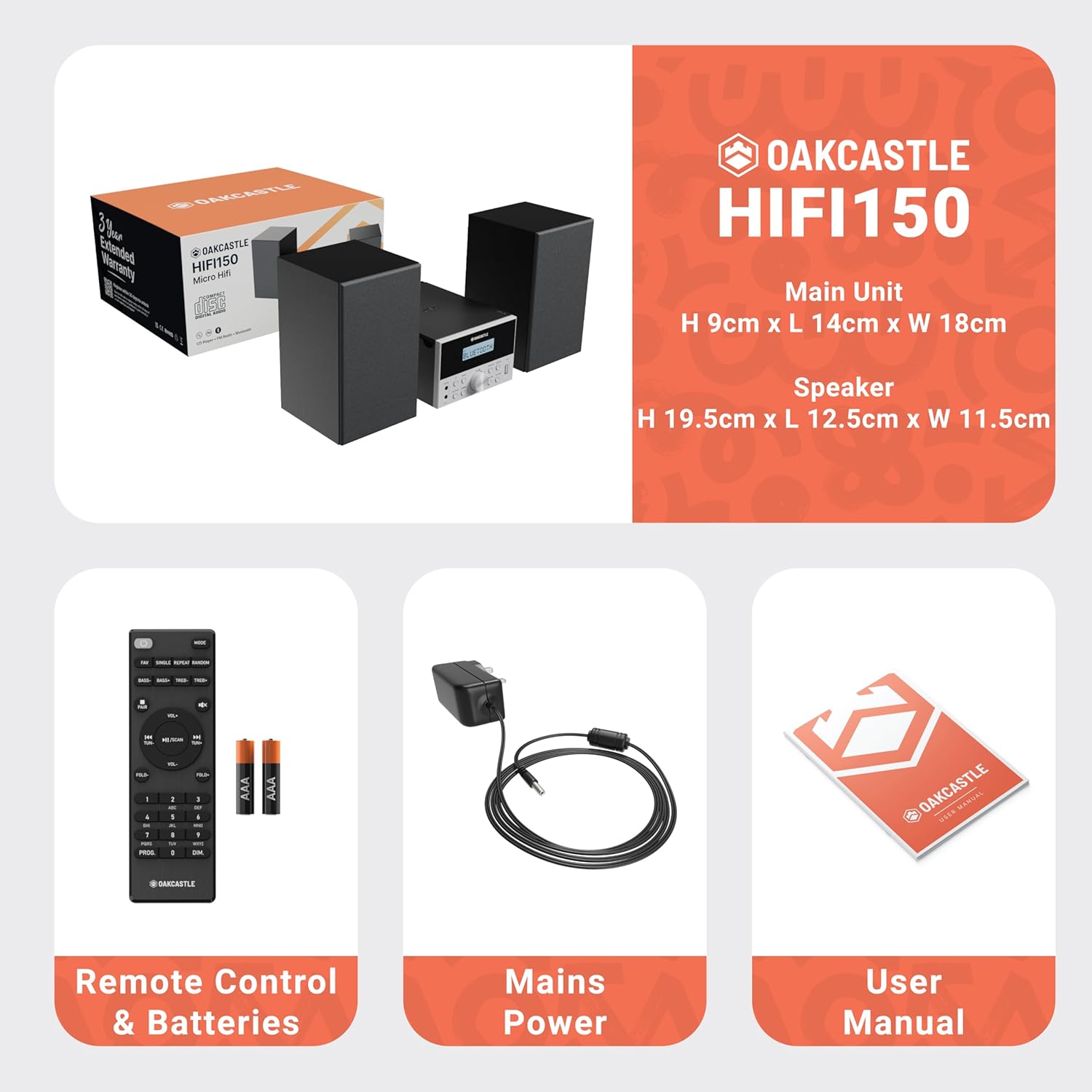
Image: The Oakcastle HIFI150 package contents, showing the main unit, two speakers, remote control with batteries, power adapter, and user manual.
Бүтээгдэхүүн дууссанview
The Oakcastle HIFI150 features a compact design with intuitive controls and multiple connectivity options.
Урд самбарын удирдлага ба дэлгэц

Image: A close-up of the Oakcastle HIFI150 main unit's front panel, highlighting the digital display, central volume knob, mode selection buttons, and front-facing AUX In and USB ports. The display shows 'BLUETOOTH'.
- Дэлгэц: Shows current mode, track information, and radio frequency.
- Цахилгаан товч: Төхөөрөмжийг асаах эсвэл унтраана.
- Горимын товчлуур: Cycles through input sources (CD, FM, Bluetooth, AUX, USB).
- Эзлэхүүний товчлуур: Мастер дууны хэмжээг тохируулна.
- Тоглуулах/түр зогсоох товчлуур: CD, USB болон Bluetooth-г тоглуулахыг хянадаг.
- Алгасах/Тохируулах товчлуурууд: Navigates tracks or tunes radio frequencies.
- AUX порт: Гадны аудио төхөөрөмжийг 3.5 мм-ийн кабелиар холбоход зориулагдсан.
- USB порт: Аудио тоглуулах зориулалттай fileUSB дискнээс.
Арын самбарын холболтууд
The rear panel includes connections for speakers and power.
Тохиргоо
1. Чанга яригчийг холбох
Connect the included speakers to the speaker terminals on the rear of the main unit. Ensure correct polarity (red to red, black to black) for optimal sound quality.
2. Эрчим хүчний холболт
Plug the power cable into the AC inlet on the rear of the main unit, then plug the other end into a standard wall outlet.
Ашиглалтын заавар
Асаах/унтраах
дээр дарна уу Хүч төхөөрөмжийг асаах, унтраахын тулд урд самбар эсвэл алсын удирдлага дээрх товчлуурыг дарна уу.
Горим сонгох
дээр дарна уу Горим button on the front panel or remote control repeatedly to cycle through the available input sources: CD, FM радио, Bluetooth, AUX, ба USB.
Bluetooth ажиллагаа
- Сонго Bluetooth mode using the Mode button. The display will show 'BLUETOOTH' and the unit will enter pairing mode.
- Ухаалаг утас эсвэл бусад Bluetooth төхөөрөмж дээрээ Bluetooth-г идэвхжүүлж, боломжтой төхөөрөмжүүдийг хайж олоорой.
- Select 'OAKCASTLE HIFI150' from the list. Once connected, the unit will confirm the connection.
- You can now stream audio wirelessly from your device to the HIFI150.
CD тоглуулах

Image: The Oakcastle HIFI150 with its top-loading CD player mechanism open, revealing a compact disc placed inside. The display shows 'CD'.
- CD тасалгааны тагийг нээ.
- Place a CD (MP3, CD, WMA, or CD-R format) onto the spindle with the label side facing up.
- CD тасалгааны тагийг хаа.
- Сонго CD mode. The unit will read the disc and begin playback automatically.
- Тоглуулах/Түр зогсоох, Алгасах товчийг ашиглан тоглуулахыг удирдана.
FM радиогийн үйл ажиллагаа

Image: The Oakcastle HIFI150 main unit with its telescopic antenna extended, displaying an FM radio frequency on its screen. The unit is placed between two speakers.
- Сонго FM радио горим.
- Илүү сайн хүлээн авахын тулд дурангийн антенныг сунгана уу.
- Автомат скан хийх: Press and hold the Play/Pause button to automatically scan and save available FM stations (up to 30 presets).
- Гараар тааруулах: Use the Skip/Tune buttons to manually adjust the frequency.
- Урьдчилсан тохиргоог эргүүлэн татах: Use the 'FAV/PROG' button on the remote to cycle through saved stations.
USB тоглуулах
- USB дискийг урд талын самбар дээрх USB порт руу оруулна уу.
- Сонго USB mode. The unit will automatically detect and begin playing compatible audio files (MP3, WMA).
- Тоглуулах/Түр зогсоох, Алгасах товчийг ашиглан тоглуулахыг удирдана.
AUX оролт
- Гадаад аудио төхөөрөмжийг (жишээ нь, MP3 тоглуулагч, ухаалаг утас) холбоно уу AUX In port on the front panel using a 3.5mm audio cable (not included).
- Сонго AUX горим.
- Холбогдсон гадаад төхөөрөмжөөсөө тоглуулахыг удирдаарай.
Дууны хяналт
-г эргүүл Эзлэхүүний товчлуур урд самбар дээр эсвэл ашиглана уу VOL +/- дууны түвшинг тохируулахын тулд алсын удирдлага дээрх товчлуурууд.
Алсын удирдлагын хэрэглээ
The included remote control provides full functionality for the HIFI150. Ensure batteries are correctly inserted. Point the remote control towards the front panel of the main unit for optimal response.
Засвар үйлчилгээ
Цэвэрлэгээ
- Төхөөрөмжийг зөөлөн, хуурай даавуугаар арчина.
- Өнгөлгөөг гэмтээж болзошгүй тул зүлгүүрийн цэвэрлэгч, лав, уусгагчийг бүү ашигла.
Хадгалах
Хэрэв төхөөрөмжийг удаан хугацаагаар ашиглаагүй бол цахилгааны залгуураас салгаад сэрүүн, хуурай газар хадгална уу.
Алдааг олж засварлах
If you encounter issues with your HIFI150, please refer to the following common problems and solutions:
| Асуудал | Боломжит шалтгаан | Шийдэл |
|---|---|---|
| Хүч чадалгүй | Цахилгаан кабель холбогдоогүй; Цахилгаан залгуур гэмтэлтэй | Цахилгааны кабель найдвартай холбогдсон эсэхийг шалгаарай; Өөр цахилгаан залгуурыг туршаад үзээрэй. |
| Дуу алга | Volume too low; Incorrect input mode; Speakers not connected | Increase volume; Select correct input mode; Check speaker connections. |
| CD тоглуулахгүй байна | CD inserted incorrectly; Disc scratched/dirty; Incorrect format | Reinsert CD correctly; Clean or replace disc; Ensure disc is compatible (MP3, CD, WMA, CD-R). |
| Bluetooth холбогдоогүй байна | Bluetooth mode not selected; Device too far; Device already connected to another unit | Select Bluetooth mode; Move device closer; Disconnect from other devices and try again. |
| FM хүлээн авах чадвар муу байна | Антенн сунгаагүй; Дохио сул байна | Fully extend the telescopic antenna; Try repositioning the unit. |
Үзүүлэлтүүд
| Загварын дугаар | 1000002971 |
| Брэнд | Оккасл |
| Холболт | Bluetooth 5.2, USB, AUX |
| Аудио гаралт | 20 Вт |
| Дэмжигдсэн медиа | CD, MP3, WMA, CD-R, USB |
| Радио | 30 урьдчилсан тохиргоотой FM радио |
| Тохиромжтой төхөөрөмжүүд | MP3 тоглуулагч, ухаалаг утас, таблет |
| Засгийн газрын материал | Мод |
| Өнгө | Хар |
| Хэмжээ (L x W x H) | 13.7 x 17.8 x 9 см |
| Зүйлийн жин | 2 кг |
Баталгаат болон дэмжлэг
The Oakcastle HIFI150 comes with an extended 3-year warranty. Registration is required to activate the full warranty period. Please refer to the warranty card included in your package or visit the official Oakcastle website for registration details and support information.
For technical assistance or further inquiries, please contact Oakcastle customer support through their official channels.