1. гаруйview
This manual provides detailed instructions for the Jazmm CD Cassette Player Combo with Bluetooth, Model CD-W16. This versatile audio system offers multiple playback options including CD, cassette tape, FM radio, Bluetooth, USB, TF card, and AUX-IN. It features 10W HiFi speakers, a built-in rechargeable battery, and remote control for convenient use in various settings.

Image 1.1: The Jazmm CD Cassette Player Combo (Model CD-W16) highlighting its seven playback modes: CD Player, FM Radio, TF Card Playback, USB Playback, Tape Player, AUX-IN Playback, and Bluetooth 5.1.
2. Аюулгүй байдлын чухал мэдээлэл
- Төхөөрөмжийг ажиллуулахын өмнө бүх зааврыг уншина уу.
- Энэ гарын авлагыг цаашид лавлах зорилгоор хадгална уу.
- Гал болон цахилгаан цочролоос сэргийлэхийн тулд төхөөрөмжийг бороо, чийгэнд бүү тавь.
- Агааржуулалтын нүхийг хааж болохгүй. Үйлдвэрлэгчийн зааврын дагуу суурилуулна.
- Радиатор, халаалтын төхөөрөмж, зуух болон бусад төхөөрөмж (үүнд ampөргөгч) дулаан үүсгэдэг.
- Цахилгааны утсыг гишгэх, хавчихаас хамгаалаарай, ялангуяа залгуур, залгуур, төхөөрөмжөөс гарах цэг дээр.
- Зөвхөн үйлдвэрлэгчээс заасан хавсралт/дагалдах хэрэгслийг ашиглана уу.
- Аянга шуурганы үед эсвэл удаан хугацаагаар ашиглаагүй үед энэ төхөөрөмжийг цахилгааны залгуураас салга.
- Бүх засвар үйлчилгээг мэргэшсэн үйлчилгээний ажилтнуудад хандаарай. Төхөөрөмж ямар нэгэн байдлаар гэмтсэн тохиолдолд засвар үйлчилгээ хийх шаардлагатай.
3. Бүтээгдэхүүний онцлог
The Jazmm CD Cassette Player Combo (Model CD-W16) is designed for versatile audio playback and recording. Key features include:
- 7-in-1 Playback Modes: Supports CD, Cassette Tape, FM Radio, Bluetooth 5.1, USB, TF Card, and AUX-IN.
- CD тоглуулагч: Compatible with CD, CD-R, CD-RW, MP3, and WMA formats. Features song programming.
- Cassette Player & Recorder: Play existing tapes or record audio onto blank tapes using the built-in microphone.
- FM радио: Extended antenna for improved reception, automatic scanning, and storage for up to 30 preset stations (FM 87.5-108MHz).
- Bluetooth 5.1: Supports both Bluetooth transmission (to external Bluetooth speakers/headphones) and reception (from mobile devices).
- High-Fidelity Speakers: Dual 10W HiFi speakers deliver clear sound with strong bass and pure treble.
- 5 EQ Sound Modes: Customize your audio experience with NORMAL, ROCK, POP, JAZZ, and CLASS settings.
- Олон оролт: USB port, TF (Micro SD) card slot, and 3.5mm AUX-IN jack for various media sources.
- Цэнэглэдэг батерей: Built-in 5000mAh rechargeable battery for portable use.
- Алсын удирдлага: Conveniently operate the device from a distance of up to 7 meters.
- Чихэвчний Жак: 3.5mm headphone output for private listening.
4. Багцын агуулга
Дараах зүйлсийн багцад байгаа эсэхийг шалгана уу.
- Jazmm CD Cassette Player Combo (Model CD-W16)
- Алсын удирдлага
- Цахилгаан адаптер/кабель
- Хэрэглэгчийн гарын авлага
5. Удирдлага ба портууд
Familiarize yourself with the controls and connection ports on your device.
Урд самбарын удирдлага:
- FUNC/REP/PROG: Function/Repeat/Program button.
- БООЛЬ- / БООЛЬ+: Volume down / Volume up.
- SCAN: Scan for radio stations.
- Тэгшитгэл: Эквалайзерын тохиргоо.
- ӨМНӨХ / ДАРААГИЙН: Өмнөх дуу / Дараагийн дуу.
- ТОГЛОХ/ЗОГСООХ: Тоглуулах/түр зогсоох товчлуур.
- ЗОГСООХ/ГАРАХ: Stop playback / Eject CD or cassette.
- FFWD / REW: Fast forward / Rewind (for cassette).
- REC: Record button (for cassette).
- Цахилгаан товч: Төхөөрөмжийг асаах/унтраах.
- LCD дэлгэц: Shows current mode, track number, time, etc.
Side/Rear Panel Ports:
- Чихэвчний залгуур (3.5 мм): Чихэвч холбох.
- AUX-IN (3.5mm): Гадаад аудио төхөөрөмжийг холбоход зориулагдсан.
- USB порт: USB флаш дискний хувьд.
- TF картын оролт: Микро SD картуудын хувьд.
- DC IN порт: Цахилгаан адаптерийн холболтод зориулагдсан.
- FM антен: Extendable antenna for radio reception.
6. Тохиргоо
- Эрчим хүчний холболт:
Connect the provided power adapter to the DC IN port on the device and plug it into a standard wall outlet. The internal battery will begin charging automatically.
- Анхны төлбөр:
For optimal battery life, fully charge the device before first use. The charging indicator light will show charging status.
- Antenna (for FM Radio):
Extend the telescopic FM antenna for better radio reception.
- Асаах:
дээр дарна уу Хүч button to turn on the device. The LCD display will illuminate.
7. Ашиглалтын заавар
7.1 CD тоглуулах
- CD тасалгааны тагийг нээ.
- Place a CD (label side up) onto the spindle.
- CD тасалгааны тагийг найдвартай хаа.
- дээр дарна уу Хөгжим "CD" горим сонгогдох хүртэл товчийг дахин дахин дарна уу.
- дээр дарна уу ТОГЛОХ/ЗОГСООХ тоглуулж эхлэх товчлуур.
- Ашиглах ӨМНӨХ болон ДАРААГИЙН зам алгасах товчлуурууд.
- дарна уу ЗОГСООХ/ГАЛААХ тоглуулахыг зогсоох.
7.2 Cassette Tape Playback & Recording

Image 7.1: The Jazmm CD Cassette Player Combo with a cassette tape inserted into the front loading slot.
- Кассет тасалгааны хаалгыг нээнэ үү.
- Insert a cassette tape with the open edge facing the player.
- Кассет тасалгааны хаалгыг хаа.
- дээр дарна уу Хөгжим "TAPE" горим сонгогдох хүртэл товчийг дахин дахин дарна уу.
- дээр дарна уу ТОГЛОХ/ЗОГСООХ тоглуулж эхлэх товчлуур.
- Ашиглах FFWD or REW for fast winding.
- To record: Insert a blank tape. Press the REC button. The device will record audio from the built-in microphone. Press ЗОГСООХ/ГАЛААХ бичлэгийг дуусгах.
7.3 FM радиогийн ажиллагаа

Image 7.2: The Jazmm CD Cassette Player Combo with its telescopic FM antenna fully extended for optimal radio reception.
- FM антенныг бүрэн сунгана уу.
- дээр дарна уу Хөгжим "FM" горим сонгогдох хүртэл товчийг дахин дахин дарна уу.
- дээр дарна уу SCAN боломжтой FM станцуудыг автоматаар сканнердаж, хадгалах товчийг дарна уу.
- Ашиглах ӨМНӨХ болон ДАРААГИЙН Хадгалсан урьдчилан тохируулсан станцуудаар дамжуулан шилжих товчлуурууд.
7.4 Bluetooth холболт
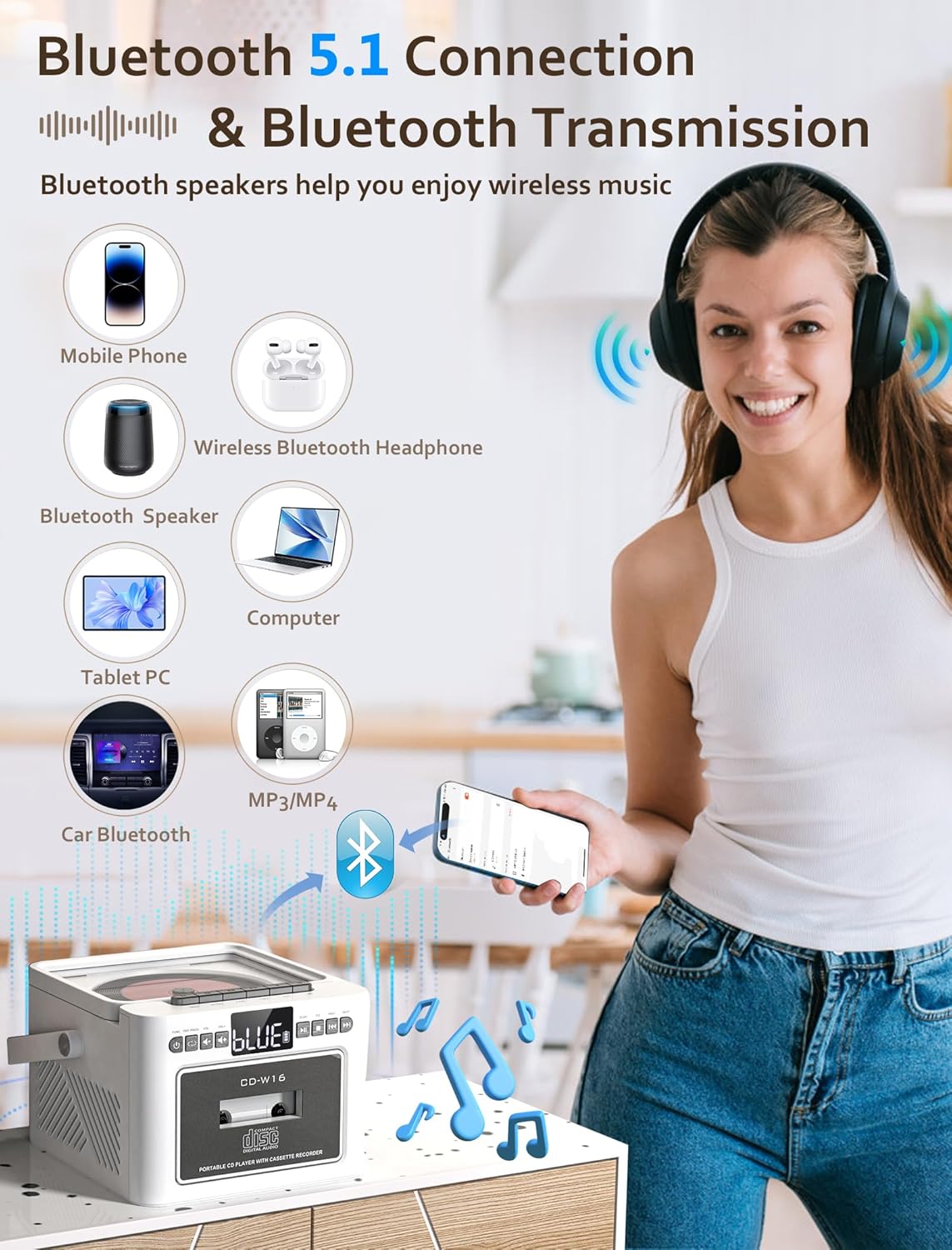
Image 7.3: The Jazmm CD Cassette Player Combo illustrating its Bluetooth 5.1 capabilities for both connecting to mobile devices and transmitting to Bluetooth speakers or headphones.
- дээр дарна уу Хөгжим button repeatedly until "BT" (Bluetooth) mode is selected. The display will show "BLUE" and flash, indicating it's in pairing mode.
- On your external device (smartphone, tablet, etc.), enable Bluetooth and search for "CD-W16" (or similar).
- Select "CD-W16" to pair. Once connected, the "BLUE" indicator will stop flashing.
- You can now play audio from your device through the boombox speakers.
- Bluetooth дамжуулалт: To transmit audio from the boombox (e.g., CD playback) to external Bluetooth headphones or speakers, ensure the external device is in pairing mode. The boombox will automatically search and connect.
7.5 USB / TF Card / AUX-IN Playback
- USB/TF карт: Insert a USB flash drive into the USB port or a TF (Micro SD) card into the TF card slot. Press the Хөгжим button to select "USB" or "TF" mode. Playback will begin automatically.
- Нэмэлт: Connect an external audio device (e.g., MP3 player) to the AUX-IN port using a 3.5mm audio cable (not included). Press the Хөгжим button to select "AUX" mode. Control playback from your external device.
7.6 Алсын удирдлага ашиглах

Image 7.4: The Jazmm CD Cassette Player Combo shown with its included remote control, allowing for convenient operation from a distance.
The remote control allows you to operate most functions from a distance. Ensure there are no obstructions between the remote and the boombox. Insert batteries (not included) into the remote control before use.
8. Засвар үйлчилгээ
- Цэвэрлэгээ: Төхөөрөмжийн гадна талыг цэвэрлэхийн тулд зөөлөн, хуурай даавуу ашиглана уу. Зүлгүүрийн цэвэрлэгч, уусгагчийг бүү ашигла.
- CD линзний арчилгаа: Хэрэв CD тоглуулахтай холбоотой асуудал гарвал худалдаанд байгаа CD линз цэвэрлэгч дискийг ашиглаарай.
- Кассет толгой цэвэрлэх: Periodically clean the cassette player's heads with a cotton swab lightly dampened with isopropyl alcohol to ensure optimal sound quality.
- Хадгалах: Удаан хугацаагаар ашиглаагүй тохиолдолд төхөөрөмжийг сэрүүн, хуурай газар хадгална.
- Батерейны арчилгаа: To prolong battery life, avoid fully discharging the battery frequently. Recharge the battery regularly, even if the device is not in active use.
9. Алдаа засах
| Асуудал | Боломжит шалтгаан | Шийдэл |
|---|---|---|
| Хүч чадалгүй | Power adapter not connected; Battery discharged. | Ensure power adapter is securely connected and plugged into a working outlet. Charge the battery. |
| Дуу алга | Дууны хэмжээ хэт бага; Буруу сонгосон горим; Чихэвч холбогдсон. | Increase volume. Select the correct playback mode (CD, BT, FM, etc.). Disconnect headphones if sound is desired from speakers. |
| CD тоглогдохгүй / алгасахгүй байна | CD dirty or scratched; CD inserted incorrectly; CD format not supported. | Clean the CD with a soft cloth. Reinsert the CD label side up. Ensure the CD is a supported format (CD, CD-R, CD-RW, MP3, WMA). |
| Cassette tape not playing | Tape inserted incorrectly; Tape tangled or damaged. | Reinsert the tape correctly. Check the tape for damage. |
| FM радио хүлээн авах чадвар муу | Антен сунгагдаагүй; Сул дохио. | Fully extend the FM antenna. Reposition the unit for better reception. |
| Bluetooth холболт амжилтгүй боллоо | Device not in pairing mode; Boombox too far from device. | Ensure both devices are in pairing mode. Move devices closer. Restart Bluetooth on both devices. |
10. Техникийн үзүүлэлтүүд
| Онцлог | Дэлгэрэнгүй |
|---|---|
| Загвар | CD-W16 |
| Брэнд | Жазмм |
| Бүтээгдэхүүний хэмжээ (L x W x H) | 7.5 x 6.2 x 4.3 инч |
| Холболтын технологи | Туслах, Bluetooth, USB |
| Чанга яригчийн төрөл | Stereo (Dual 10W HiFi Speakers) |
| Эрчим хүчний эх үүсвэр | Батерейгаар ажилладаг (5000 мАч цэнэглэдэг батерей) |
| FM радиогийн давтамж | 87.5-108 МГц |
| Bluetooth хувилбар | 5.1 |
| Дэмжигдсэн медиа | CD, CD-R, CD-RW, MP3, WMA, Cassette Tape, USB, TF Card |
11. Баталгаат хугацаа ба дэмжлэг
Jazmm offers a lifetime warranty on this portable CD player boombox. For any inquiries, technical assistance, or warranty claims, please contact our customer service team. We provide 24/7 world-class customer service to ensure your satisfaction.
Please refer to your purchase documentation or the Jazmm official webтодорхой холбоо барих мэдээллийг авах сайт.


