1. Танилцуулга
Thank you for choosing the Techno Line WD2200 Weather Station. This device provides comprehensive weather data, including indoor and outdoor temperature and humidity, barometric pressure, and a 3-day weather forecast. It also features connectivity with the 'Direct Weather' application for smartphones (iOS and Android), allowing you to view data on your mobile device. This manual will guide you through the setup, operation, and maintenance of your weather station to ensure optimal performance.
2. Аюулгүй байдлын мэдээлэл
- Төхөөрөмжийг ашиглахаасаа өмнө бүх зааврыг анхааралтай уншина уу.
- Төхөөрөмжийг хэт өндөр температур, нарны шууд тусгал, хүчтэй чичиргээ болон цохилтоос хол байлга.
- Төхөөрөмжийг ус болон бусад шингэнд дүрж болохгүй.
- Төхөөрөмжийг өөрөө задлах, засах гэж бүү оролдоорой. Бүх үйлчилгээг мэргэшсэн боловсон хүчинд шилжүүлээрэй.
- Ашигласан батерейг орон нутгийн дүрэм журмын дагуу хариуцлагатайгаар устгана уу.
- Батерейг зөв туйлшралтайгаар оруулсан эсэхийг шалгаарай.
3. Багцын агуулга
Please check that all components are present in your package:
- WD2200 Weather Station (Main Unit)
- TX205DTH Outdoor Transmitter (Sensor)
- Хэрэглэгчийн гарын авлага
Жич: Батерейг оруулаагүй тул тусад нь худалдаж авна.
4. Бүтээгдэхүүн дууссанview
The Techno Line WD2200 Weather Station consists of a main display unit and an external wireless sensor. The main unit displays all collected data and forecasts, while the external sensor measures outdoor temperature and humidity.
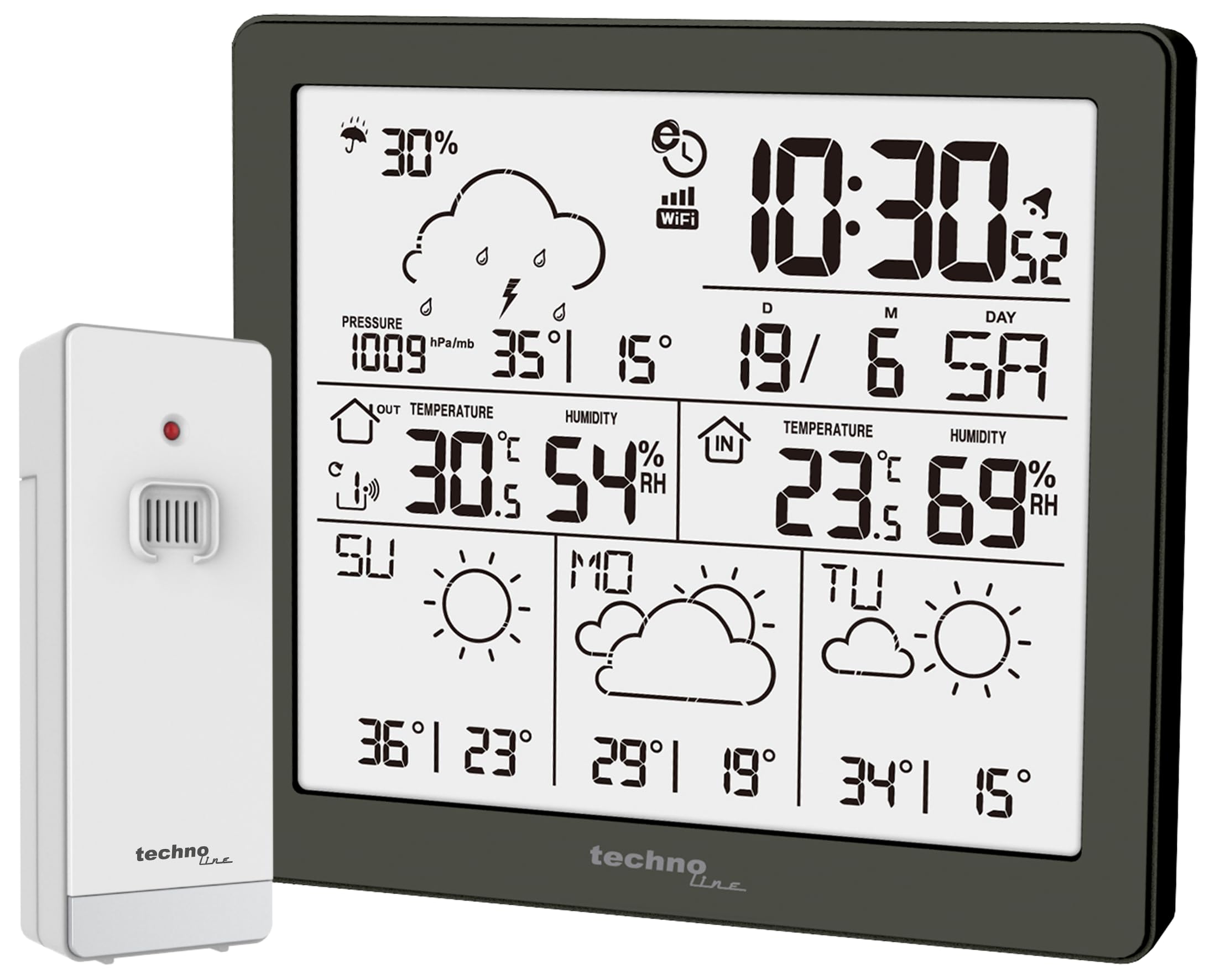
Зураг 1: Урд view of the Techno Line WD2200 Weather Station display. The display shows time, date, indoor and outdoor temperature and humidity, barometric pressure, precipitation probability, and a 3-day forecast with corresponding weather icons and min/max temperatures.
Дэлгэцийн элементүүд:
- Зүүн дээд: Precipitation probability (e.g., 30%).
- Баруун дээд: Current time (e.g., 10:30) and date (e.g., 19/6 SA for June 19th, Saturday).
- Middle Left (Outdoor Data): Barometric pressure (e.g., 1009 hPa/mb), outdoor temperature (e.g., 30.5°C), and outdoor humidity (e.g., 54% RH).
- Middle Right (Indoor Data): Indoor temperature (e.g., 23.6°C) and indoor humidity (e.g., 69% RH).
- Доод хэсэг: 3-day forecast (e.g., Sunday, Monday, Tuesday) with weather icons (sunny, cloudy) and corresponding minimum and maximum temperatures (e.g., SU: 36°/23°, MO: 29°/19°, TU: 34°/15°).
5. Тохиргоо
5.1 Батерей суурилуулах
- Outdoor Transmitter (TX205DTH): Open the battery compartment on the back of the sensor. Insert 2 x AA Mignon LR06 batteries, observing the correct polarity (+/-). Close the compartment securely.
- Main Unit (WD2200): Open the battery compartment on the back of the main unit. Insert 4 x AA Mignon LR06 batteries, observing the correct polarity (+/-). Close the compartment securely.
Note: It is recommended to insert batteries into the outdoor sensor first, then into the main unit, to ensure proper pairing.
5.2 Initial Power-On and Sensor Pairing
Upon inserting batteries into the main unit, the display will light up, and the unit will begin searching for the outdoor sensor. The outdoor temperature and humidity readings should appear on the main unit within a few minutes. If the outdoor data does not appear, refer to the Troubleshooting section.
5.3 App Connection (Direct Weather)
The WD2200 Weather Station connects to your smartphone via Bluetooth for enhanced data viewing and settings management through the 'Direct Weather' app.
- Download the 'Direct Weather' app from the App Store (iOS) or Google Play Store (Android).
- Ухаалаг утсан дээрээ Bluetooth идэвхжсэн эсэхийг шалгаарай.
- Open the 'Direct Weather' app and follow the on-screen instructions to pair with your WD2200 Weather Station. The app will guide you through the connection process.
6. Цаг уурын станцыг ажиллуулах
6.1 Дэлгэцийг унших
Үндсэн төхөөрөмжийн дэлгэц нь цогц мэдээллийг өгдөгview of current and forecasted weather conditions:
- Цаг, огноо: Automatically synchronized via the app or manually set.
- Өрөөн доторх температур ба чийгшил: Үндсэн нэгжээр хэмжсэн.
- Гаднах температур ба чийгшил: Received from the TX205DTH outdoor sensor.
- Барометрийн даралт: Displays current atmospheric pressure.
- Precipitation Probability: Indicates the likelihood of rain or snow.
- 3 хоногийн урьдчилсан мэдээ: Provides weather icons and expected high/low temperatures for today and the next three days.
6.2 Using the Direct Weather App
The 'Direct Weather' app offers additional functionalities:
- Detailed Data View: Access historical data and more detailed graphs of temperature, humidity, and pressure.
- Тохиргооны тохиргоо: Adjust time, date, measurement units (°C/°F, hPa/inHg), and other preferences directly from your phone.
- Анхааруулга: Set up custom alerts for specific temperature or humidity thresholds.
7. Засвар үйлчилгээ
7.1 Цэвэрлэгээ
Wipe the main unit and outdoor sensor with a soft, damp cloth. Do not use abrasive cleaners or solvents, as these may damage the surfaces or electronic components.
7.2 Батерейг солих
When the battery indicator appears on the display, replace the batteries in the respective unit (main station or outdoor sensor). Always replace all batteries in a unit at the same time with new ones of the same type.
7.3 Гадна мэдрэгчийг байрлуулах
For accurate outdoor readings, place the TX205DTH sensor in a shaded area, protected from direct sunlight and precipitation. Ensure it is within the effective transmission range of the main unit (typically up to 30 meters, depending on obstacles).
8. Алдаа засах
- Дэлгэц байхгүй: Батерейны туйлыг шалгаж, батерейнууд шинэ байгаа эсэхийг шалгаарай.
- Outdoor Data Not Appearing:
- Ensure batteries in the outdoor sensor are correctly installed and fresh.
- Relocate the outdoor sensor closer to the main unit.
- Press the reset button on both the main unit and the outdoor sensor (if available) and allow them to re-pair.
- Буруу уншилтууд: Ensure both units are placed in appropriate locations (main unit indoors, sensor outdoors in a shaded, protected area). Allow some time for readings to stabilize after setup or relocation.
- Апп холболтын асуудал:
- Ухаалаг утсан дээрээ Bluetooth идэвхжсэн эсэхийг шалгаарай.
- Restart the 'Direct Weather' app.
- Try unpairing and re-pairing the device within the app's settings.
9. Техникийн үзүүлэлтүүд
| Загварын дугаар | WD2200 |
| Main Unit Dimensions (L x H x P) | 129 x 118 x 29 мм |
| Outdoor Sensor Dimensions (L x H x P) | 40 x 102 x 26 мм |
| Үндсэн нэгжийн цахилгаан хангамж | 4 ширхэг AA Mignon LR06 батерей (дагалдахгүй) |
| Outdoor Sensor Power Supply | 2 ширхэг AA Mignon LR06 батерей (дагалдахгүй) |
| Холболтын технологи | Bluetooth |
| Зөвлөмж болгож буй хэрэглээ | Home weather monitoring |
| Онцлог шинж чанар | Lightweight, App integration |
10. Баталгаат хугацаа ба дэмжлэг
Techno Line products are designed for reliability and performance. For information regarding warranty terms and conditions, please refer to the documentation provided at the time of purchase or visit the official Techno Line website. For technical support or further assistance, please contact your retailer or the manufacturer's customer service department.


