1. Танилцуулга
The BUSICOM PC-SeaV15c is a 15-inch Windows IoT touch panel PC designed for commercial and industrial applications. This manual provides essential information for the safe and efficient setup, operation, and maintenance of your device. Please read this manual thoroughly before using the product and retain it for future reference.
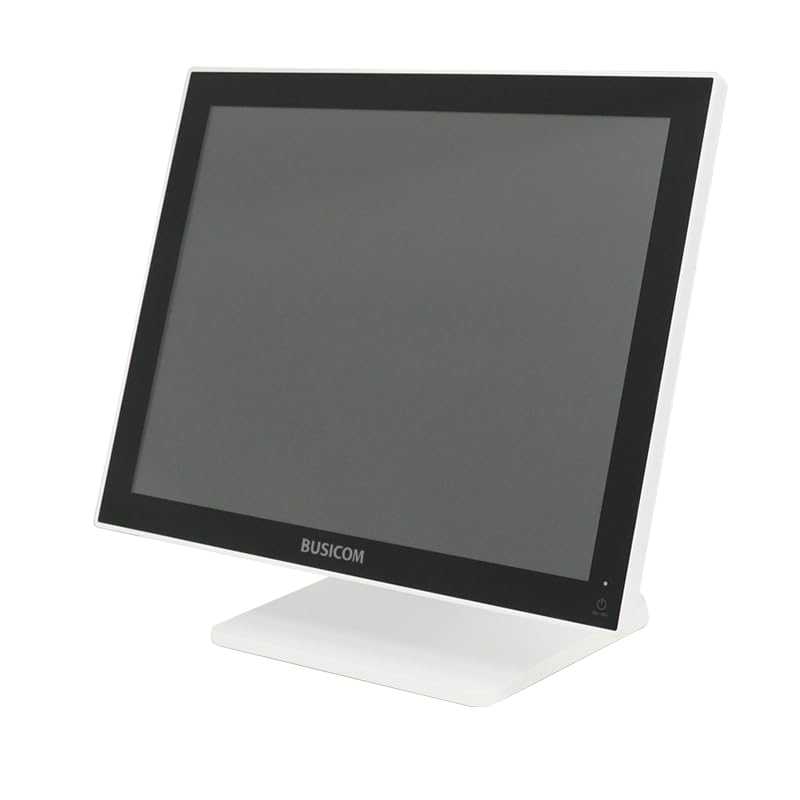
Зураг 1: Урд view of the BUSICOM PC-SeaV15c Touch Panel PC.
2. Бүтээгдэхүүн дууссанview
2.1 Гол онцлогууд
- Нарийвчилсан дизайн: Features an ultra-thin bezel and a highly durable 7H reinforced display for enhanced aesthetics and protection.
- Дээд зэргийн гүйцэтгэл: Equipped with Microsoft Windows 10 IoT Enterprise, ensuring long-term support and reliable operation.
- Intuitive Touch Panel: Utilizes a capacitive touch method, offering a familiar and responsive touch experience similar to smartphones and tablets.
- Хялбар засвар үйлчилгээ: Designed for simple RAM and SSD replacement, facilitating upgrades and servicing.
- Олон талт интерфэйсүүд: Provides a wide range of connectivity options to integrate with various peripherals.
- Үр ашигтай хадгалах: SSD storage ensures fast processing speeds, quiet operation, and excellent shock resistance.
2.2 Бүрэлдэхүүн хэсэг
The package typically includes the BUSICOM PC-SeaV15c unit and a power adapter. Additional accessories may vary.

Figure 2: Front and side profile of the PC-SeaV15c unit.

Зураг 3: Ар талд view showing access panels for RAM and SSD components.
3. Тохируулах заавар
3.1 Савлах
- Carefully remove the PC-SeaV15c from its packaging.
- Check for any visible damage. If damaged, contact your vendor immediately.
- Бүртгэгдсэн бүх бүрэлдэхүүн хэсгүүд байгаа эсэхийг шалгаарай.
3.2 Захын төхөөрөмжүүдийг холбох
Refer to the interface diagram below for port locations and types.

Figure 4: Detailed diagram of the PC-SeaV15c's rear and bottom interfaces.
- Эрчим хүчний холболт: Connect the provided power adapter to the DC In port and then to a power outlet.
- USB төхөөрөмжүүд: Use the USB 2.0 (4 ports) and USB 3.0 (2 ports) for connecting keyboards, mice, printers, and other USB peripherals.
- Сүлжээний холболт: Connect an Ethernet cable to the LAN port for wired network access.
- Аудио гаралт: Connect external speakers or headphones to the Audio Out port.
- Serial Ports (RJ45): Utilize COM1, COM2, COM3, and COM6 for connecting specialized POS peripherals such as barcode scanners or receipt printers.
- Cash Drawer (RJ11): Connect a compatible cash drawer to the RJ11 port.
- Гадаад дэлгэц: If an external monitor is required, connect it to the Mini DisplayPort.
- USB Type-C: Тохиромжтой төхөөрөмжүүдийн хувьд.
3.3 Асаах/унтраах
- Асаах: Press the power button located on the upper right side of the display bezel or the power mark on the rear panel.
- Унтраах: To safely shut down the system, use the standard Windows shutdown procedure. Avoid direct power disconnection during operation to prevent data loss.
4. Ашиглалтын заавар
4.1 Windows 10 IoT Enterprise
The PC-SeaV15c operates on Windows 10 IoT Enterprise 2021. Familiarize yourself with the Windows operating system for basic navigation, application management, and system settings.
4.2 Touch Panel Usage
The capacitive touch screen supports multi-touch gestures.
- Товш: Хулганы товшилттой тэнцүү.
- Давхар цорго: Хоёр товшилттой тэнцүү.
- Дарж барина уу: Баруун товчлуур дээр дарахтай адил.
- Шудрах: Гүйлгэх эсвэл навигаци хийх зориулалттай.
- Томруулахын тулд чимхэх: Томруулах эсвэл жижигрүүлэхийн тулд хоёр хуруугаа ашиглана уу.
5. Засвар үйлчилгээ
5.1 Төхөөрөмжийг цэвэрлэх
- Төхөөрөмжийг цэвэрлэхийн өмнө үргэлж унтрааж, залгуураас нь салга.
- Зөөлөн, хөвөнгүй даавууг бага зэрэг хэрэглээрэй dampусаар эсвэл зүлгүүргүй дэлгэц цэвэрлэгчээр дүүргэнэ.
- Do not spray liquids directly onto the screen or device.
- Хүчтэй химийн бодис, уусгагч, зүлгүүрийн материал ашиглахаас зайлсхий.
5.2 RAM and SSD Replacement
The PC-SeaV15c is designed for easy replacement of RAM and SSD components. Refer to Figure 3 for the access panel location. For detailed instructions on component replacement, consult a qualified technician or the BUSICOM support webсайт.
6. Алдаа засах
Энэ хэсэг нь танд тулгарч болох нийтлэг асуудлуудын шийдлүүдийг өгдөг.
- Төхөөрөмж асахгүй байна:
- Цахилгаан адаптер нь төхөөрөмж болон ажиллаж байгаа цахилгаан залгуурт найдвартай холбогдсон эсэхийг шалгаарай.
- Өөр төхөөрөмжийг залгах замаар цахилгааны залгуур ажиллаж байгаа эсэхийг шалгана уу.
- Мэдрэгчтэй дэлгэц хариу өгөхгүй байна:
- Төхөөрөмжийг дахин эхлүүлнэ үү.
- Дэлгэц нь цэвэр, саадгүй байгаа эсэхийг шалгаарай.
- Дэлгэц байхгүй:
- Төхөөрөмж асаалттай байгаа эсэхийг шалгаарай.
- If an external display is connected, ensure the correct input source is selected on the external display.
- Peripheral not detected:
- Ensure the peripheral is correctly connected to the appropriate port (USB, LAN, COM).
- Захын төхөөрөмжийг өөр порт руу холбож үзээрэй.
- Check the peripheral's own power supply, if applicable.
For further assistance, please contact BUSICOM customer support.
7. Техникийн үзүүлэлтүүд
| Онцлог | Дэлгэрэнгүй |
|---|---|
| Брэнд | BUSICOM |
| Загварын нэр | PC-SeaV15c |
| Өнгө | Цагаан |
| Дэлгэцийн хэмжээ | 15 инч |
| Шийдвэр | 1024х768 |
| Үйлдлийн систем | Windows 10 IoT Enterprise 2021 |
| CPU-ийн брэнд | Intel |
| Процессорын залгуур | Intel® N97 |
| CPU-ийн хурд | 3.6 GHz |
| Санах ойн төрөл | DDR4 |
| Суулгасан RAM | 4 ГБ |
| Хатуу дискний төрөл | SSD |
| SSD багтаамж | 128 GB (as per product title) |
| График картын төрөл | Нэгдсэн |
| VRAM Type | DDR4 SDRAM |
| VRAM Capacity | 4 ГБ |
| USB 2.0 портууд | 4 |
| USB 3.0 портууд | 2 |
| Оптик хөтөч | Байхгүй |
| Бүтээгдэхүүний жин | 6 кг |
| Өндөр (ойролцоогоор) | 307.5 mm (as per dimension diagram) |

Зураг 5: Ар талд view of the PC-SeaV15c with approximate height dimension.
8. Баталгаат хугацаа ба дэмжлэг
For warranty information and technical support, please refer to the warranty card included with your product or visit the official BUSICOM webсайт. Худалдан авалтын баримтаа баталгаат нэхэмжлэлд зориулж худалдан авалтын баталгаа болгон хадгална уу.
BUSICOM Official Webсайт: BUSICOM Store on Amazon.co.jp


