Танилцуулга
The GearLight S1000 LED Tactical Flashlight is a powerful and versatile illumination tool designed for a wide range of applications, from everyday tasks to outdoor adventures and emergency situations. Its robust construction and advanced features ensure reliable performance when you need it most.
This manual provides detailed instructions on how to set up, operate, maintain, and troubleshoot your S1000 flashlight to ensure optimal performance and longevity.
Багцын агуулга
Upon opening your GearLight S1000 package, please verify that all the following items are included:
- (2) GearLight S1000 LED Tactical Flashlights
- (2) Built-in Lithium-Ion Batteries (pre-installed)
- (2) 19-inch USB-C Charging Cables
- (2) Hand Straps
- (1) Holster
- (1) Operation Guide (this manual)
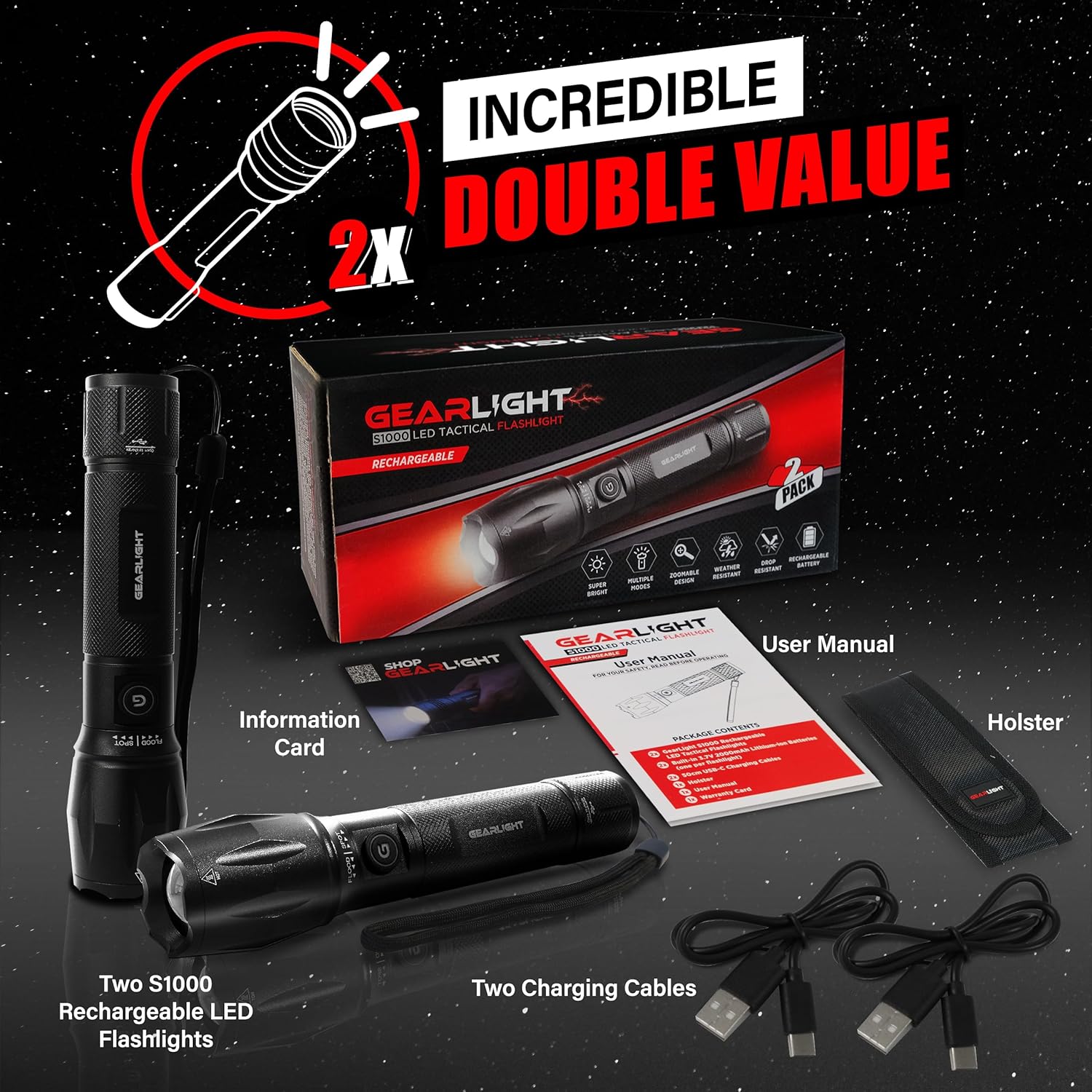
Figure 1: Included items in the GearLight S1000 2-Pack Rechargeable package.
Гол онцлогууд
- Bright & Rechargeable: The S1000 provides powerful illumination with multiple modes and a zoomable beam, powered by a CREE LED. It features a built-in rechargeable lithium-ion battery for long-lasting performance.
- Dual-Button Design: Equipped with two power buttons—one on the side and one on the tail—for convenient operation and quick access in various situations.
- USB-C хурдан цэнэглэгч: Features a built-in 3.7V 2000mAh lithium-ion battery that charges quickly via USB-C, ensuring your flashlight is always ready.
- Хөнгөн ба халаасны хэмжээтэй: Compact and easy to carry, fitting comfortably in a pocket, backpack, or glove compartment, making it ideal for travel and emergency kits.
- Удаан эдэлгээтэй, цаг агаарт тэсвэртэй: Constructed from military-grade aluminum with an anti-roll body design. It is IPX4 water-resistant and can withstand drops up to 10 feet.

Figure 2: The S1000 flashlight providing powerful illumination in a dark environment.

Зураг 3: Нарийвчилсан view of the S1000's durable construction and key design elements.

Figure 4: The S1000's resilience against water and impact.
Тохиргоо ба цэнэглэх
The GearLight S1000 comes with a built-in rechargeable lithium-ion battery. Before first use, it is recommended to fully charge the flashlight.
- Locate the Charging Port: Twist the tail end of the flashlight to reveal the USB-C charging port.
- Кабелийг холбоно уу: Insert one end of the provided USB-C charging cable into the flashlight's port and the other end into a compatible USB power source (e.g., wall adapter, computer USB port, power bank).
- Цэнэглэх үзүүлэлт: The charging indicator light (usually near the charging port or power button) will illuminate to show charging status. Refer to the flashlight's specific indicator behavior (e.g., red for charging, green for fully charged).
- Бүрэн цэнэглэх: Allow the flashlight to charge until the indicator shows a full charge. Charging time may vary depending on the power source.
- Secure the Port: Once charging is complete, remove the USB-C cable and twist the tail end back to cover and protect the charging port from dust and water.
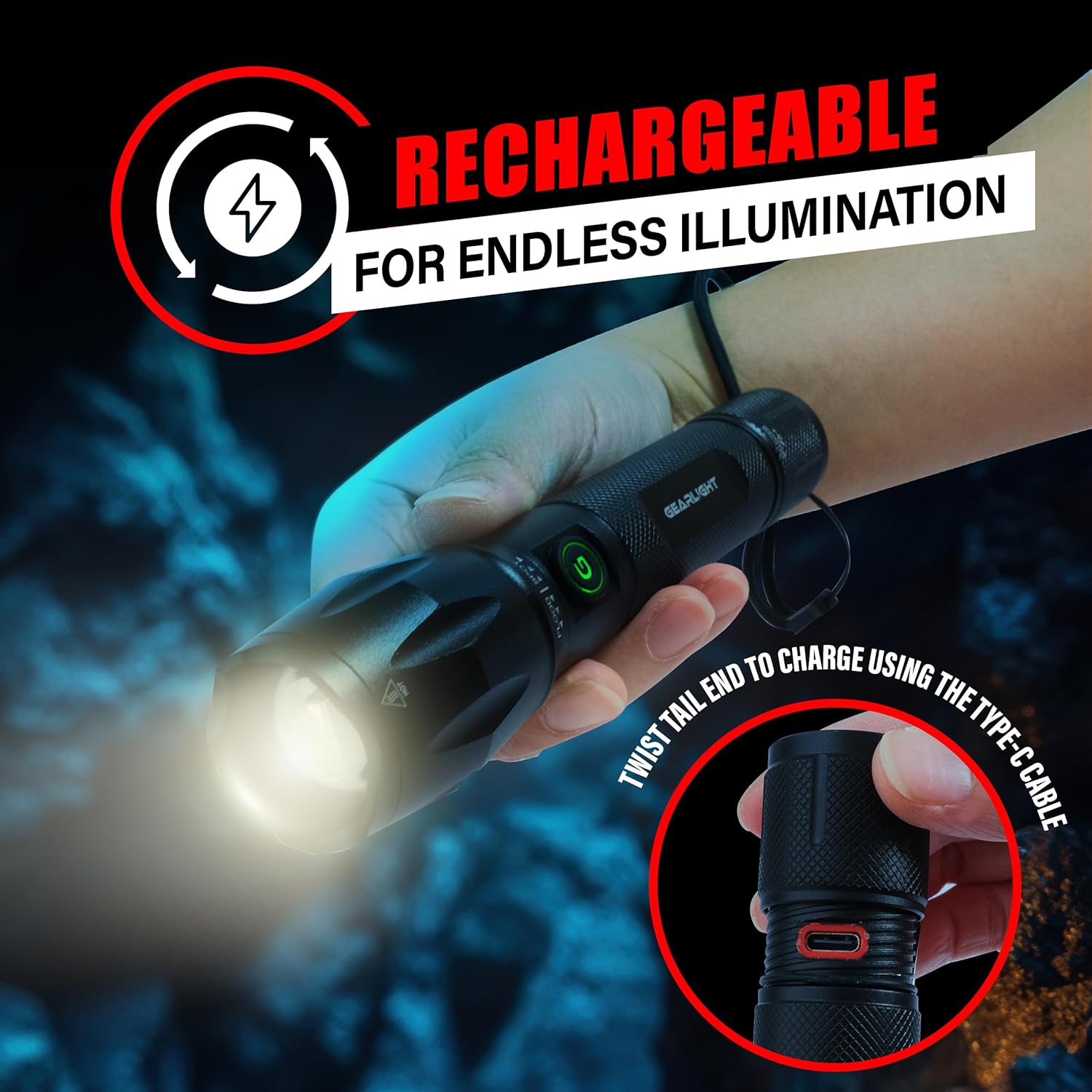
Figure 5: Accessing the USB-C charging port by twisting the tail end.
Ашиглалтын заавар
The S1000 flashlight features a dual-button design and multiple lighting modes for various needs.
Асаах/унтраах
- Хажуугийн товчлуур: Press the side power button to turn the flashlight ON or OFF.
- Tail Button: Press the tail cap button to turn the flashlight ON or OFF. This button often provides momentary on/off functionality with a half-press.
Гэрэлтүүлгийн горимыг өөрчлөх
The S1000 offers 5 lighting modes: High, Medium, Low, Strobe, and SOS.
- With the flashlight ON, quickly press the side power button repeatedly to cycle through the modes: High → Medium → Low → Strobe → SOS → High.
- Alternatively, with the flashlight ON, lightly tap the tail cap button (without fully clicking) to cycle through the modes. A full click will turn the flashlight off.
Томруулах функц
The S1000 features a zoomable beam to adjust between a wide floodlight and a focused spotlight.
- To adjust the beam, simply push or pull the head of the flashlight forward or backward.
- Pulling the head forward will narrow the beam for a focused spotlight.
- Pushing the head backward will widen the beam for a broad floodlight.
Засвар үйлчилгээ
Proper maintenance ensures the longevity and optimal performance of your GearLight S1000 flashlight.
- Цэвэрлэгээ: Гар чийдэнгийн их биеийг зөөлөн арчиж, damp cloth. Do not use abrasive cleaners or solvents. Keep the lens clean for maximum light output.
- Тосолгоо: Periodically apply a thin layer of silicone grease to the O-rings and screw threads (e.g., tail cap threads) to maintain water resistance and smooth operation.
- Хадгалах: Store the flashlight in a cool, dry place away from direct sunlight and extreme temperatures. If storing for extended periods, ensure the battery is partially charged (around 50%) to preserve battery health. Recharge every 3-6 months if not in use.
- Буулгахаас зайлсхийх: Do not attempt to disassemble the sealed head or other components beyond what is necessary for charging or basic cleaning, as this may void the warranty and damage the flashlight.
Алдааг олж засварлах
If you encounter issues with your GearLight S1000 flashlight, try the following solutions:
| Асуудал | Боломжит шалтгаан | Шийдэл |
|---|---|---|
| Гар чийдэн асахгүй байна. | Батерей дуусч байна. Сул сүүлний малгай. Damaged internal components. | Батерейг бүрэн цэнэглэ. Сүүлний тагийг сайтар чангал. Асуудал хэвээр байвал хэрэглэгчийн тусламжтай холбогдоно уу. |
| Гэрэл бүдэг эсвэл анивчдаг. | Батерей бага. Dirty lens or contacts. | Зайгаа цэнэглэ. Clean the lens and ensure contacts are free of debris. |
| Горимуудыг өөрчлөх боломжгүй. | Буруу дарсан товчлуур. Програм хангамжийн алдаа. | Ensure quick, successive presses of the side button or light taps of the tail button. Try turning off and on again. |
| Цэнэглэх үзүүлэлт ажиллахгүй байна. | Алдаатай кабель эсвэл тэжээлийн эх үүсвэр. Цэнэглэх портын бөглөрөл. | Try a different USB-C cable and power source. Check charging port for debris. |
Үзүүлэлтүүд
| Онцлог | Дэлгэрэнгүй |
|---|---|
| Загвар | S1000 |
| Гэрлийн эх үүсвэрийн төрөл | LED (CREE) |
| Эрчим хүчний эх үүсвэр | Батерейгаар ажилладаг (цэнэглэдэг) |
| Зайны төрөл | Built-in 3.7V 2000mAh Lithium-Ion |
| Цэнэглэх порт | USB-C |
| Материал | Military-Grade Aluminum |
| Усны эсэргүүцлийн түвшин | IPX4 Усны хамгаалалттай |
| Уналтын эсэргүүцэл | 10 фут хүртэл |
| Бүтээгдэхүүний хэмжээс | 6.1"D x 1.57"W x 1.57"H |
| Зүйлийн жин | 1.1 фунт (2 ширхэгтэй) |
| UPC | 850021168520 |
Баталгаат болон дэмжлэг
For warranty information, technical support, or any inquiries regarding your GearLight S1000 flashlight, please visit the official GearLight webсайт эсвэл харилцагчийн үйлчилгээтэй шууд холбогдоно уу.
Та мөн зочилж болно GearLight Store on Amazon бүтээгдэхүүний талаарх дэлгэрэнгүй мэдээлэл, дэмжлэгийн эх сурвалжийг авна уу.


