1. Танилцуулга
This manual provides essential instructions for the safe and efficient use of your Meizu Note 21 Pro smartphone. Please read this manual thoroughly before operating the device and retain it for future reference.
2. Хайрцагт юу байна
- Meizu Note 21 Pro Smartphone
- Эрчим хүчний адаптер
- (Other accessories such as USB cable, SIM ejector tool, and documentation may vary by region.)
3. Төхөөрөмжийн зохион байгуулалт
Familiarize yourself with the physical components of your Meizu Note 21 Pro.
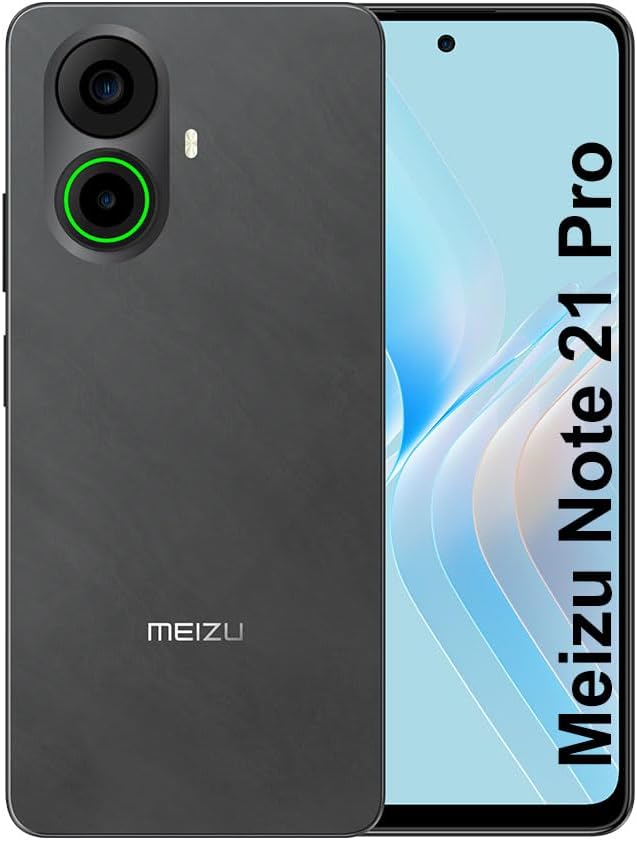
Зураг 3.1: Урд болон хойд view of the Meizu Note 21 Pro. The front displays the screen with a punch-hole camera. The rear shows the dual camera module with a green accent ring on one lens, a flash, and the "MEIZU" logo at the bottom.
- Урд дэлгэц: 6.78-inch FHD+ screen with a 120Hz refresh rate.
- Урд камер: Дэлгэцийн дээд төвд байрладаг.
- Арын камерууд: Dual camera system, including a 64MP main camera.
- Хажуугийн хурууны хээ мэдрэгч: Integrated for secure access.
- USB порт: Цэнэглэх, өгөгдөл дамжуулах зориулалттай.
- 3.5 мм аудио залгуур: Чихэвчний хувьд.
- SIM/MicroSD картны тавиур: Supports Dual Nano SIM and MicroSD cards.
4. Тохиргоо
4.1. SIM болон MicroSD картуудыг оруулж байна
- Төхөөрөмжийнхөө хажуу талд байгаа SIM картны тавиурыг олоорой.
- SIM гаргагч хэрэгслийг тавиурын дэргэдэх жижиг нүхэнд хийж, тавиур гарч иртэл зөөлөн дарна уу.
- Place your Nano SIM card(s) and/or MicroSD card into the designated slots on the tray. Ensure the gold contacts face downwards.
- Тавиурыг байранд нь товших хүртэл болгоомжтой дахин суулгана уу.
4.2. Анхдагч асаалт ба тохиргоо
- Press and hold the Power button until the Meizu logo appears.
- Дэлгэц дээрх зааврыг дагаж хэлээ сонгож, Wi-Fi сүлжээнд холбогдож, Google бүртгэлээ тохируулна уу.
- During setup, you will be guided to configure security features such as a PIN, pattern, or password.
4.3. Fingerprint Recognition Setup
- руу шилжих Тохиргоо > Аюулгүй байдал ба нууцлал > Хурууны хээ тайлах.
- Follow the on-screen instructions to register your fingerprint by repeatedly touching the side-mounted sensor.
- Ensure your finger covers the entire sensor area during registration for optimal performance.
5. Төхөөрөмжөө ажиллуулах
5.1. Дэлгэц ба навигаци
- The 6.78-inch FHD+ display operates at a 120Hz refresh rate for smooth visuals.
- Navigate the Android 14 operating system using touch gestures: tap, swipe, pinch-to-zoom.
- Access quick settings by swiping down from the top of the screen.
5.2. Камерын функцууд
- Үндсэн дэлгэц эсвэл програмын шүүгээнээс Камерын програмыг нээнэ үү.
- The rear camera system features a 64MP main sensor for high-resolution photos and a 2MP depth-of-field camera for portrait effects.
- The 13MP front-facing camera is suitable for selfies and video calls.
- Tap on the screen to focus, and use the on-screen shutter button to capture images. Explore various modes like Portrait, Night, and Pro within the camera app.
5.3. Гүйцэтгэл ба хадгалалт
- The MediaTek G99 Octa Core processor ensures efficient performance for applications and multitasking.
- The device comes with 256GB of internal storage and 8GB of RAM.
- Storage can be expanded using a MicroSD card (sold separately).
5.4. Зай ба цэнэглэх
- The Meizu Note 21 Pro is equipped with a 5000mAh battery.
- Use the provided Power Adapter for 30W fast charging.
- To charge, connect the USB cable to the phone's USB port and the power adapter, then plug the adapter into a wall outlet.
5.5. Холболт
- 4G LTE: Supports various LTE FDD and TDD bands for cellular data. Note: This international version works on T-Mobile in the USA and globally with other carriers.
- Wi-Fi 5: Интернетэд холбогдохын тулд утасгүй сүлжээнд холбогдоно уу.
- Bluetooth: Чихэвч, чанга яригч зэрэг утасгүй хэрэгслүүдтэй хослуул.
- NFC: Зайлшгүй төлбөр хийх, тохирох төхөөрөмжтэй хурдан холбох.
- GPS: Байршлын үйлчилгээ болон навигацийн хувьд.
6. Засвар үйлчилгээ
- Цэвэрлэгээ: Төхөөрөмжийн дэлгэц болон их биеийг цэвэрлэхийн тулд зөөлөн, хөвөнгүй даавуу ашиглана уу. Хүчтэй химийн бодис, зүлгүүрийн материалаас зайлсхий.
- Батерейны арчилгаа: Avoid extreme temperatures. Do not fully discharge the battery frequently. For optimal battery longevity, keep the charge between 20% and 80%.
- Програм хангамжийн шинэчлэлтүүд: Хамгийн сайн гүйцэтгэл болон аюулгүй байдлыг хангахын тулд системийн шинэчлэлтүүдийг тогтмол шалгаж, суулгана уу. Тохиргоо > Систем > Системийн шинэчлэл.
7. Алдаа засах
| Асуудал | Боломжит шийдэл |
|---|---|
| Төхөөрөмж асахгүй байна | Ensure the battery is charged. Connect the device to the power adapter and try again. If unresponsive, press and hold the Power button for 10-15 seconds to force a restart. |
| Сүлжээний дохио муу | Check if the SIM card is correctly inserted. Move to an area with better network coverage. Restart the device. Verify with your carrier that your plan is active. |
| Аппликейшнүүд удаан эсвэл гацаж байна | Арын дэвсгэр програмуудыг хаах. Програмын кэшийг цэвэрлэх (Тохиргоо > Програмууд > апп сонгох > Хадгалах сан болон кэш > Кэшийг цэвэрлэх). Restart the device. Ensure sufficient storage space. |
| Хурууны хээ мэдрэгч ажиллахгүй байна | Ensure your finger and the sensor are clean and dry. Re-register your fingerprint in settings. |
8. Техникийн үзүүлэлтүүд
- Загвар: Meizu Note 21 Pro
- Үйлдлийн систем: Android 14
- Процессор: MediaTek G99 Octa Core (2.2GHz)
- Дэлгэц: 6.78 inches FHD+ (1080 x 2160 resolution), 120Hz Refresh Rate
- RAM: 8 ГБ
- Дотоод санах ой: 256 ГБ
- Арын камер: 64MP үндсэн + 2MP гүн
- Урд камер: 13 МП
- Зай: 5000mAh, 30W хурдан цэнэглэлт
- Холболт: 4G LTE (FDD:1,2,3,4,5,7,8,12,17,18,19,20,26,28,66; TDD:38,40,41), 3G WCDMA, 2G Quad Band, Wi-Fi 5, Bluetooth, NFC, GPS
- Аудио Жак: 3.5 мм
- Хэмжээ: 6.64 x 2.96 x 0.33 инч
- Жин: 1.1 фунт
9. Баталгаат хугацаа ба дэмжлэг
For warranty information and technical support, please refer to the warranty card included with your product or visit the official Meizu webсайт. Баталгаат нэхэмжлэл гаргахын тулд худалдан авалтаа нотлох баримтаа хадгалаарай.
For further assistance, you may contact Meizu customer service through their official channels.


