1. Танилцуулга
Худалдан авалт хийсэнд баярлалааasing the Samsung HW-S810D Soundbar. This 3.1.2 channel sound system, featuring a wireless subwoofer, is designed to enhance your audio experience with immersive Dolby Atmos and DTS:X technologies. This manual provides essential information for setting up, operating, and maintaining your soundbar. Please read these instructions carefully before use to ensure proper operation and safety.
2. Аюулгүй байдлын мэдээлэл
Цахилгаан цочрол, гал түймэр, төхөөрөмжид гэмтэл учруулах эрсдлийг бууруулахын тулд дараах аюулгүй байдлын урьдчилан сэргийлэх арга хэмжээг дагаж мөрдөнө үү.
- Энэ төхөөрөмжийг бороо, чийгэнд бүү тавь.
- Агааржуулалтын нүхийг хааж болохгүй. Үйлдвэрлэгчийн зааврын дагуу суурилуулна.
- Радиатор, халаалтын төхөөрөмж, зуух болон бусад төхөөрөмж (үүнд ampөргөгч) дулаан үүсгэдэг.
- Цахилгааны утсыг гишгэх, хавчихаас хамгаалаарай, ялангуяа залгуур, залгуур, төхөөрөмжөөс гарах цэг дээр.
- Зөвхөн үйлдвэрлэгчээс заасан хавсралт/дагалдах хэрэгслийг ашиглана уу.
- Бүх засвар үйлчилгээг мэргэшсэн үйлчилгээний ажилтнуудад хандаарай. Төхөөрөмж ямар нэгэн байдлаар гэмтсэн тохиолдолд засвар үйлчилгээ хийх шаардлагатай.
3. Багцын агуулга
Таны багцад бүх бүрэлдэхүүн хэсгүүд байгаа эсэхийг шалгана уу:
- Samsung HW-S810D Soundbar
- Утасгүй сабвуфер
- Батерейтай алсын удирдлага
- Цахилгааны утас (саундбар болон сабвуферт зориулсан)
- HDMI кабель
- Ханын бэхэлгээний хэрэгсэл (заавал биш, бүс нутгаас хамаарч өөр өөр байж болно)
- Ширээний бэхэлгээ
- Хэрэглэгчийн гарын авлага (энэ баримт бичиг)
4. Бүтээгдэхүүн дууссанview
The Samsung HW-S810D is a slim, elegant soundbar designed to deliver powerful and immersive audio.
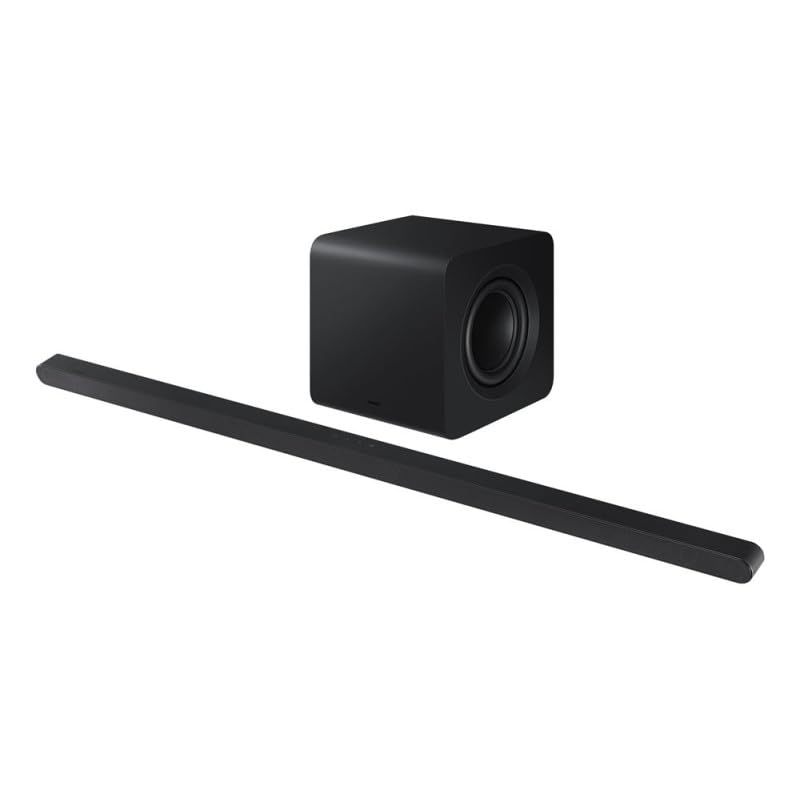
Image 1: Samsung HW-S810D Soundbar and Wireless Subwoofer. The soundbar is a long, slender black unit, and the subwoofer is a compact black cube.
4.1. Үндсэн шинж чанарууд
- 3.1.2 сувгийн аудио: Delivers a rich sound experience with dedicated center and up-firing speakers.
- Dolby Atmos & DTS:X: Object-based audio formats for a truly immersive, three-dimensional sound.
- Утасгүй сабвуфер: Provides deep, powerful bass without the clutter of cables.
- Нарийхан дизайн: At only 3.8 cm (1.5 inches) in height, it fits seamlessly under most TVs.
- Олон холболтын сонголтууд: Wi-Fi, Bluetooth, and HDMI for versatile connection to your devices.
- Дуут удирдлага: Compatible with voice assistants for hands-free operation.
4.2. Soundbar Components
- Урд самбар: Speaker grille, LED indicator.
- Шилдэг самбар: Touch controls (Power, Volume, Input).
- Арын хэсэг: Power input, HDMI (eARC) port, Optical input, USB port (for service only).
4.3. Wireless Subwoofer
The wireless subwoofer automatically connects to the soundbar. It features a power input and a pairing button (usually on the rear) for manual connection if needed.
5. Тохиргоо
5.1. Байрлуулах
- Дууны самбар: Place the soundbar centrally below your TV. Ensure no objects block the front or top speakers.
- Сабвуфер: Place the wireless subwoofer anywhere in the room, preferably near the soundbar, for optimal bass distribution. Avoid placing it directly against a wall or in a corner, which can cause excessive resonance.
5.2. Холболтууд
Choose the connection method that best suits your TV and other devices.
5.2.1. HDMI (eARC/ARC) Connection (Recommended)
- Connect one end of the HDMI cable to the HDMI OUT (TV-eARC/ARC) port on the soundbar.
- Connect the other end of the HDMI cable to the HDMI IN (ARC/eARC) port on your TV.
- Power on the soundbar and TV. Select the correct HDMI input on your TV.
5.2.2. Оптик холболт
- Connect an optical cable (not always included) from the DIGITAL AUDIO OUT port on your TV to the OPTICAL IN port on the soundbar.
- Power on the soundbar and TV. Select the Optical input on the soundbar.
5.2.3. Bluetooth холболт
- Press the Bluetooth button on the remote or soundbar to enter Bluetooth pairing mode.
- On your mobile device, search for "Samsung HW-S810D" in the Bluetooth settings and select it to pair.
5.2.4. Wi-Fi Connection (SmartThings App)
- Download and install the Samsung SmartThings app on your smartphone or tablet.
- Open the app and follow the on-screen instructions to add your HW-S810D soundbar to your network.
- This connection enables features like AirPlay 2, Spotify Connect, and firmware updates.
5.3. Эрчим хүчний холболт
- Connect the power cord to the soundbar's power input, then plug it into a wall outlet.
- Connect the power cord to the wireless subwoofer's power input, then plug it into a wall outlet.
- The subwoofer should automatically pair with the soundbar. If not, refer to the troubleshooting section.
6. Ашиглалтын заавар
6.1. Үндсэн функцууд
- Асаах/унтраах: Алсын удирдлага эсвэл дууны самбар дээрх Асаах товчийг дарна уу.
- Дууны хяналт: Алсын удирдлага эсвэл дууны самбар дээрх Дууны +/- товчлууруудыг ашиглана уу.
- Оролтын сонголт: Press the Source button on the remote to cycle through HDMI, Optical, Bluetooth, and Wi-Fi inputs.
- Дууг хаах: Дууг түр хаахын тулд удирдлага дээрх Дууг хаах товчийг дарна уу.
6.2. Дууны горимууд
The HW-S810D offers various sound modes to optimize your listening experience:
- Стандарт: Original sound delivery.
- Хүрээлэн буй орчин: Дуу чимээг өргөжүүлдэгtage.
- Тоглоом: Тоглоомын аудионд оновчлогдсон.
- Дасан зохицох дуу: Analyzes content and optimizes sound settings in real-time.
6.3. Дуут удирдлага
The soundbar supports voice control through compatible voice assistants (e.g., Bixby, Alexa, Google Assistant) when connected via Wi-Fi and configured through the SmartThings app. Follow the app's instructions to enable and customize voice commands.
7. Засвар үйлчилгээ
Proper maintenance ensures the longevity and performance of your soundbar.
- Цэвэрлэгээ: Саундбар болон сабвуферын гадаргууг зөөлөн, хуурай даавуугаар арчина. Шингэн цэвэрлэгч эсвэл зүлгүүрийн материал бүү хэрэглэ.
- Агааржуулалт: Хэт халалтаас урьдчилан сэргийлэхийн тулд агааржуулалтын нүхийг хаагаагүй эсэхийг шалгаарай.
- Хадгалах: Хэрэв төхөөрөмжийг удаан хугацаагаар хадгалах бол цахилгааны залгуураас салгаад сэрүүн, хуурай газар хадгална.
8. Алдаа засах
Хэрэв та өөрийн soundbar-тай холбоотой асуудалтай тулгарвал дараах нийтлэг асуудал, шийдлүүдийг үзнэ үү.
| Асуудал | Боломжит шийдэл |
|---|---|
| Хүч чадалгүй | Check if the power cords are securely connected to the soundbar/subwoofer and the wall outlet. Try a different outlet. |
| Дуу алга |
|
| Сабвуфер холбогдоогүй байна |
|
| Bluetooth холболтын асуудал |
|
9. Техникийн үзүүлэлтүүд
| Онцлог | Дэлгэрэнгүй |
|---|---|
| Загварын нэр | HW-S810D |
| Брэнд | Samsung |
| Чанга яригчийн төрөл | Утасгүй сабвуфер бүхий дууны самбар |
| Сувгийн тохиргоо | 3.1.2 суваг |
| Аудио гаралтын горим | Dolby Atmos, DTS:X |
| Холболтын технологи | Bluetooth, HDMI (eARC), Wi-Fi |
| Чанга яригчийн гаралтын дээд чадал | 200 ватт |
| Хяналтын арга | Remote, Touch Controls, Voice |
| Жин | 10.53 килограмм (нийт савлагааны жин) |
| Өнгө | Хар титан |
| Оруулсан бүрэлдэхүүн хэсгүүд | Soundbar, Wireless Subwoofer, Remote Control, Power Cords, HDMI Cable, Table Mount |
| Суурилуулах төрөл | Table Mount (Wall Mount optional) |
| Тохиромжтой төхөөрөмжүүд | TVs, Computers, Smartphones, Tablets |
10. Баталгаат хугацаа ба дэмжлэг
This Samsung HW-S810D Soundbar comes with a limited warranty. For specific warranty terms and conditions, please refer to the warranty card included in your package or visit the official Samsung support webсайт.
For technical support, service requests, or to download the latest firmware updates, please visit: www.samsung.com/support
When contacting support, please have your model number (HW-S810D) and serial number ready.