Танилцуулга
This manual provides instructions for the safe and effective use of your Ashfly Portable Handheld Kids Microscope. Please read this manual thoroughly before operating the device and retain it for future reference.
The Ashfly Portable Handheld Kids Microscope is designed to introduce young scientists to the microscopic world. Featuring a 2-inch LCD screen and 200x magnification, it allows for real-time observation of small objects.
Багцын агуулга
Доор жагсаасан бүх зүйл таны багцад байгаа эсэхийг шалгаарай.
- Ashfly Portable Handheld Kids Microscope
- USB цэнэглэгч кабель
- Lanyard/Wrist Strap
- Хэрэглэгчийн гарын авлага (энэ баримт бичиг)

Image: Contents of the Ashfly Portable Handheld Kids Microscope package, including the microscope, USB cable, and wrist strap.
Тохиргоо
1. Төхөөрөмжийг цэнэглэж байна
- Locate the USB charging port on the microscope.
- Connect the provided USB charging cable to the microscope and a compatible USB power source (e.g., computer, wall adapter).
- Цэнэглэх заагч гэрэл асна. Бүрэн цэнэглэхийн тулд ойролцоогоор 2-3 цаг зарцуулна уу.
- Бүрэн цэнэглэгдсэний дараа цэнэглэгч кабелийг салга.
2. Attaching the Lanyard/Wrist Strap
Thread the lanyard or wrist strap through the designated loop on the microscope to prevent accidental drops during use.
Ашиглалтын заавар
1. Асаах/унтраах
- To power on, press and hold the power button (usually marked with a power symbol) for a few seconds until the screen illuminates.
- Унтраахын тулд дэлгэц унтрах хүртэл асаах товчийг дахин дараад барина уу.
2. Observing Objects
- Place the object you wish to observe on a flat surface.
- Position the microscope's lens directly over the object.
- Adjust the focus wheel (if present) or move the microscope closer/further from the object until a clear image appears on the 2-inch LCD screen.
- Use the zoom adjustment button (4x zoom) to further magnify the image up to 200x.

Image: A child holding the Ashfly microscope, observing a small object on a surface, demonstrating its handheld operation.
3. Зураг болон видео бичлэг хийх
The microscope supports photo and video functions. It comes with built-in memory for storing observations.
- To take a photo: Press the designated photo capture button (refer to device markings).
- To record a video: Press the designated video record button to start recording, and press it again to stop.

Image: The Ashfly microscope's screen displaying a magnified image of an insect, illustrating its digital imaging capability.
4. Dual-Lens Design
This microscope features a dual-lens design. One side is the digital microscope for recording observations, and the other side is a physical magnifier for quick viewобъектуудын англ.
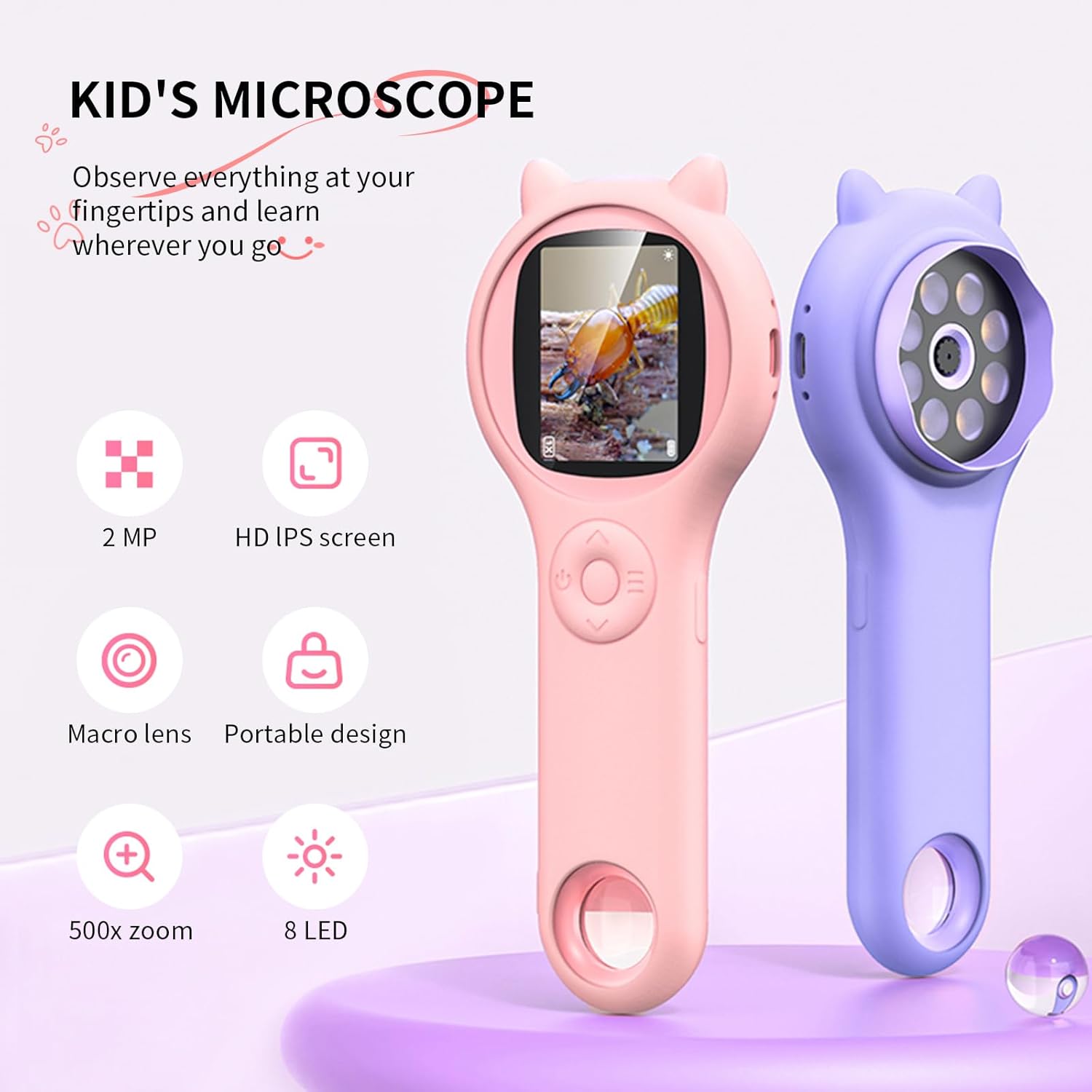
Image: Two Ashfly Kids Microscopes, one pink and one purple, illustrating the compact design and the different lenses/screens on each side.
Засвар үйлчилгээ
- Цэвэрлэгээ: Use a soft, dry cloth to clean the exterior of the microscope. For the lens and screen, use a specialized lens cleaning cloth. Do not use abrasive cleaners or solvents.
- Хадгалах: Микроскопыг сэрүүн, хуурай газар, нарны шууд тусгал болон хэт өндөр температураас хол хадгална.
- Батерейны арчилгаа: Зайны ашиглалтын хугацааг уртасгахын тулд зайгаа ойр ойрхон бүрэн цэнэггүй болгохоос зайлсхий. Төхөөрөмжийг удаан хугацаагаар ашиглаагүй байсан ч тогтмол цэнэглэ.
Алдааг олж засварлах
| Асуудал | Боломжит шалтгаан | Шийдэл |
|---|---|---|
| Төхөөрөмж асахгүй байна. | Батерей цэнэггүй болсон. | Өгөгдсөн USB кабелийг ашиглан төхөөрөмжийг цэнэглэ. |
| Image on screen is blurry. | Incorrect focus or distance from object. | Adjust the microscope's distance from the object or use the focus wheel (if applicable) until the image is clear. |
| Зураг/видео бичлэг хийх боломжгүй. | Дотоод санах ой дүүрсэн байна. | Transfer existing photos/videos to a computer to free up space. |
Үзүүлэлтүүд
| Онцлог | Дэлгэрэнгүй |
|---|---|
| Загвар | ASIN B0DBVB3RGT |
| Брэнд | Ashfly |
| Томруулах | Up to 200x (with 4x zoom adjustment) |
| Дэлгэц | 2-inch LCD, 1080P HD digital imaging |
| Гэрлийн эх үүсвэр | LED |
| Материал | Хуванцар |
| Өнгө | Нил ягаан |
| Эрчим хүчний эх үүсвэр | Батерейгаар ажилладаг |
| Объектив линз | Ахроматик |
Баталгаат хугацааны мэдээлэл
Ashfly products are designed for quality and durability. For specific warranty details, please refer to the warranty card included with your product or visit the official Ashfly webсайт. Худалдан авалтын баримтаа баталгаат нэхэмжлэлд зориулж худалдан авалтын баталгаа болгон хадгална уу.
Хэрэглэгчийн дэмжлэг
If you encounter any issues or have questions regarding your Ashfly Portable Handheld Kids Microscope, please contact our customer support team:
- Онлайн дэмжлэг: -д зочилно уу Ashfly Store on Amazon Түгээмэл асуултууд болон холбоо барих сонголтуудын талаар.
- Имэйл: Бүтээгдэхүүний сав баглаа боодол эсвэл албан ёсны мэдээллийг үзнэ үү webшууд имэйл дэмжлэг үзүүлэх сайт.


