1. Бүтээгдэхүүн дууссанview
The LiNKFOR 6-Channel Audio Mixer is an ultra-compact device designed to combine up to six line-level signal sources into a single output channel. It is suitable for connecting various electronic instruments and audio equipment such as microphones, guitars, basses, keyboards, and phones, making it ideal for small clubs, bars, or personal stage setups. This mixer features individual volume controls for each input and the main output, along with mono/stereo switching capabilities. Its robust all-metal shell ensures durability and reduces electromagnetic interference for a purer sound experience.

Figure 1: LiNKFOR 6-Channel Audio Mixer, showcasing нь авсаархан дизайн болон удирдлагын зохион байгуулалттай.
2. Аюулгүй байдлын мэдээлэл
- Эрчим хүчний хангамжийн хэмжээг баталгаажуулна ууtage matches the device's requirements (5V DC).
- Төхөөрөмжийг ус, чийг, хэт өндөр температурт бүү тавь.
- Төхөөрөмжийг задлах эсвэл өөрчлөхөөс зайлсхий, учир нь энэ нь баталгааг хүчингүй болгож, эвдрэлд хүргэж болзошгүй.
- Төхөөрөмжийг хүчтэй соронзон орноос хол байлга.
- Use only the provided or recommended power adapter and cables.
3. Багцын агуулга

Зураг 2: Бүтээгдэхүүний багцад багтсан агуулга.
Таны багцад бүх зүйл байгаа эсэхийг шалгана уу:
- LiNKFOR 6-Channel Audio Mixer (Model 6-IN-1-OUT)
- 5V цахилгаан хангамж
- USB Type-C Power Cable with Magnetic Ring
- 6.35 мм аудио кабель
- Хэрэглэгчийн гарын авлага
4. Бүтээгдэхүүний онцлог
- Хэт авсаархан дизайн: Mixes up to 6 line signal sources into 1 channel for headphones or speakers.
- Олон талт нийцтэй байдал: Suitable for microphones, guitars, basses, keyboards, phones, and other stage тоног төхөөрөмж.
- Бие даасан хяналт: Each input and the main output feature independent volume control.
- Stereo/Mono Switching: Supports switching between stereo and mono modes with a single key.
- Ultra-Low Noise Performance: Designed for impressive audio experience without interference.
- Тогтвортой цахилгаан хангамж: Certified 5V power supply and power cable with magnetic ring ensure stable performance.
- Specific Power Switch: Easy to operate on/off switch, eliminating frequent unplugging.
- Удаан эдэлгээтэй барилга: All-metal shell reduces electromagnetic interference and provides a purer sound. Non-slip pads prevent movement during use.
Видео 1: Дууслааview of a 6-channel stereo audio mixer, highlighting its inputs and controls. This video demonstrates the compact design, 6.35mm input interfaces, independent volume adjustments, and mono/stereo switching capabilities.
5. Тохиргоо
Follow these steps to set up your LiNKFOR 6-Channel Audio Mixer:
- Эрчим хүчний холболт: Connect the provided USB Type-C power cable to the mixer's 5V DC input port. Plug the other end into a compatible 5V USB power source (e.g., wall adapter, computer USB port, power bank).
- Асаах: Press the power switch located on the mixer. The power indicator light will illuminate.
- Оролтын холболтууд: Connect your audio sources (microphones, instruments, phones, etc.) to the INPUT 1-6 jacks using 6.35mm TRS/TS cables.
- Гаралтын холболт: Connect your headphones or amplifier to the OUTPUT jack using a 6.35mm TRS/TS cable.
- Анхны дууны тохируулга: Set all LEVEL knobs (1-6) and the main OUTPUT knob to their minimum position before playing any audio to avoid sudden loud sounds.

Figure 3: Connecting the Type-C power supply.
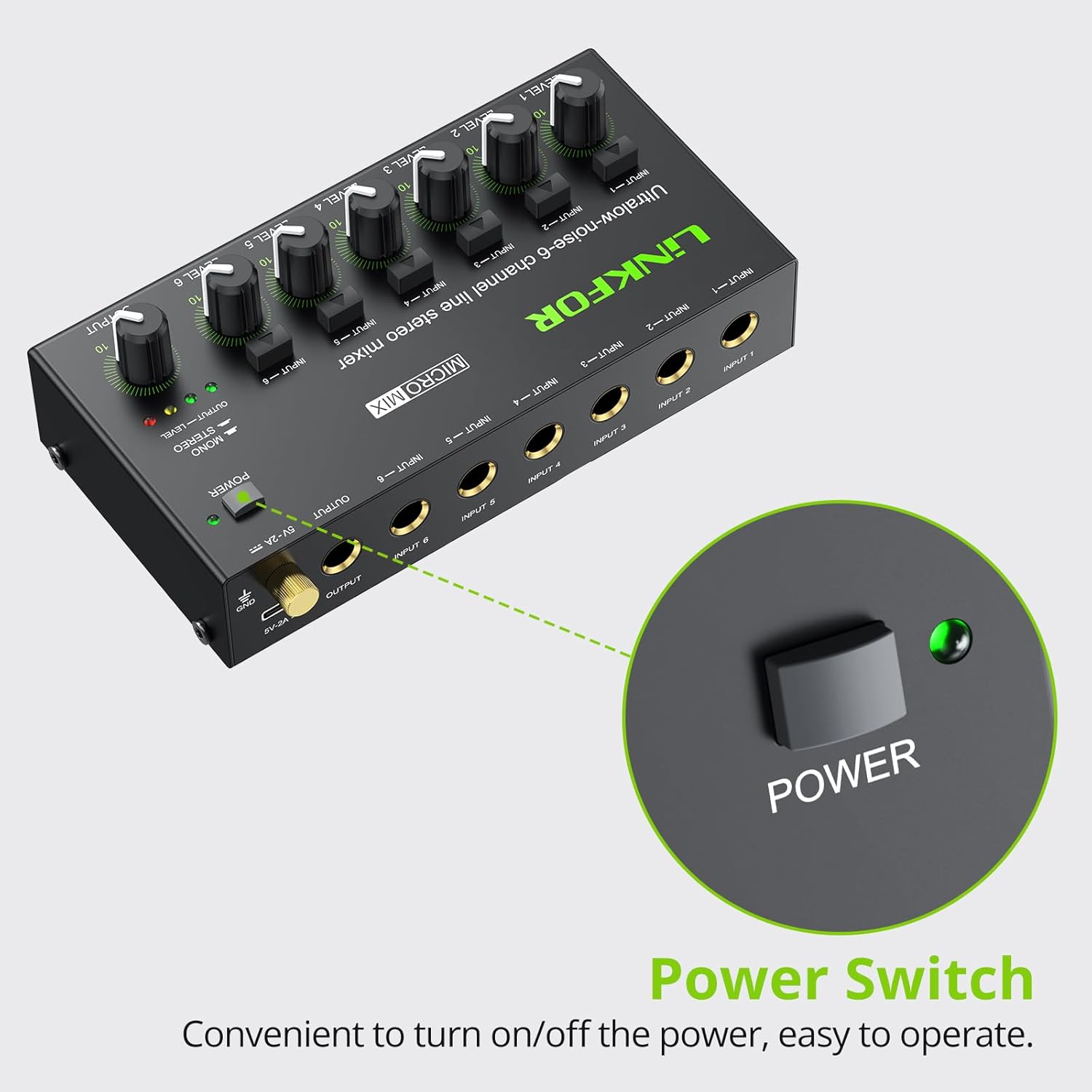
Figure 4: Power switch location.
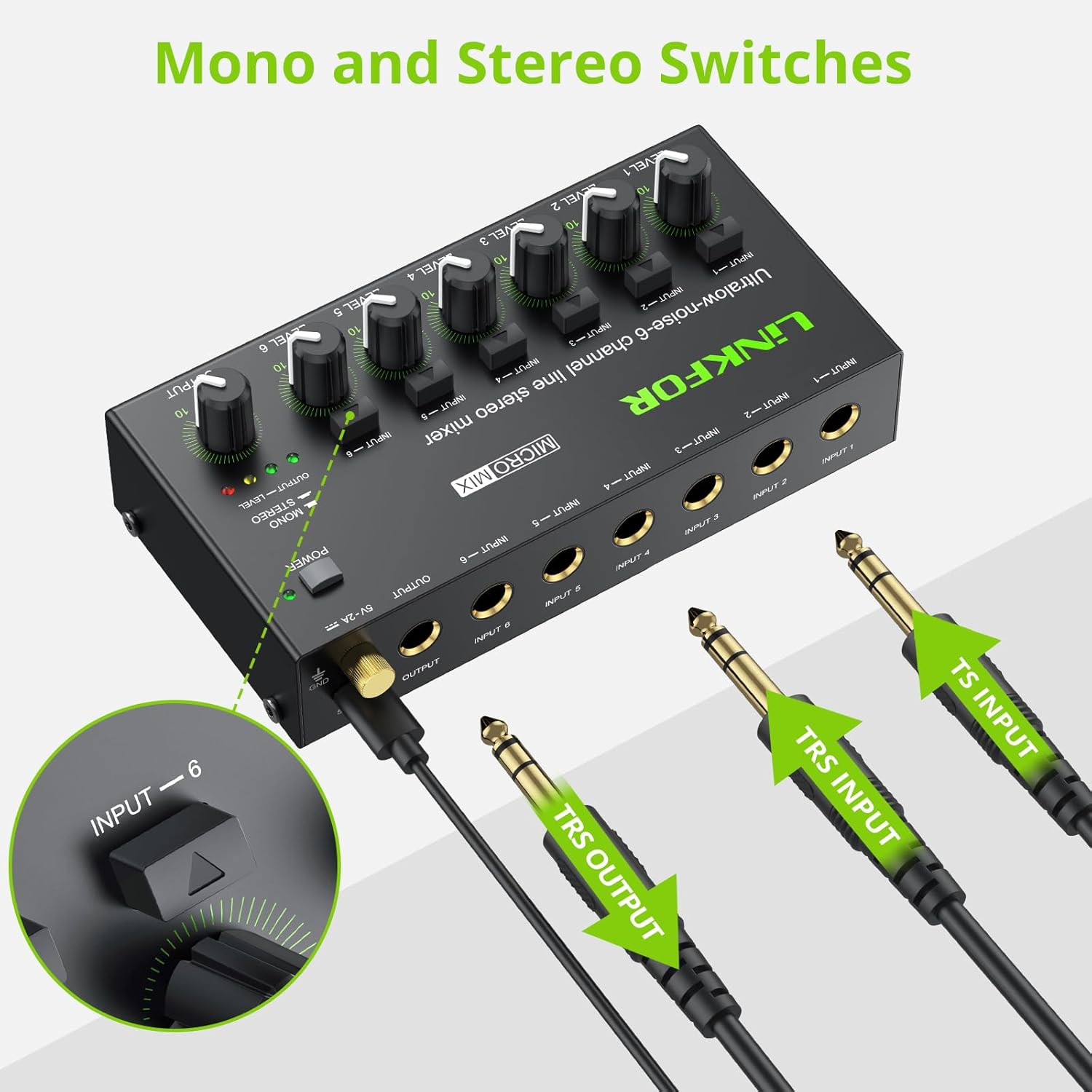
Figure 5: Input and output interfaces.

Figure 6: Connection diagram for inputs and outputs.
6. Ашиглалтын заавар
Once your mixer is set up, follow these instructions for operation:
- Оролтын түвшинг тохируулах: Gradually turn up the LEVEL knob for each active input channel (LEVEL 1-6) until the desired volume is achieved for that specific source.
- Гаралтын түвшинг тохируулах: Slowly increase the main OUTPUT knob to control the overall volume of the mixed audio sent to your headphones or amplifier. Monitor the OUTPUT LEVEL indicator lights (green, yellow, red) to prevent clipping (red light indicates signal is too high).
- Mono/Stereo Switching: Each input channel has a dedicated button to switch between mono and stereo modes. Press the button above the respective input to toggle between modes as needed for your audio source.
- Mixing Multiple Sources: Adjust the individual LEVEL knobs for each input to create a balanced mix of all connected audio sources.
Video 2: Official LiNKFOR video demonstrating the 6-Channel Audio Mixer's features. This video highlights the specific power switch, separate volume controls for each channel, stereo/mono switching, and ultra-low noise performance during operation.

Зураг 7: Жишээ ньample of mixer in use with guitar and laptop.
7. Засвар үйлчилгээ
- Цэвэрлэгээ: Холигчны гадна талыг зөөлөн, хуурай даавуугаар цэвэрлэ. Шингэн цэвэрлэгч, уусгагчийг бүү ашигла.
- Хадгалах: Төхөөрөмжийг ашиглаагүй үед нарны шууд тусгал, хэт температураас хол, сэрүүн, хуурай газар хадгална.
- Кабель арчилгаа: Ensure all cables are connected securely and are not bent or kinked excessively to prevent damage.
8. Алдаа засах
| Асуудал | Боломжит шалтгаан | Шийдэл |
|---|---|---|
| Дууны гаралт байхгүй | Power not connected or turned on; Volume knobs too low; Incorrect cable connections. | Check power supply and switch; Increase LEVEL and OUTPUT knobs; Verify all audio cables are correctly and securely connected. |
| Гажуудсан дуу чимээ | Volume levels too high (clipping); Faulty cables or audio sources. | Reduce LEVEL and/or OUTPUT knobs until red indicator light disappears; Test with different cables or audio sources. |
| Hissing/Buzzing noise | Ground loop interference; Poor quality cables; Nearby electronic interference. | Ensure proper grounding; Use high-quality shielded cables; Move the mixer away from other electronic devices. |
| Нэг суваг ажиллахгүй байна | Faulty input cable or source; Input level too low. | Test the input with a different cable and source; Increase the specific channel's LEVEL knob. |
9. Техникийн үзүүлэлтүүд

Зураг 8: Бүтээгдэхүүний хэмжээ.
| Онцлог | Дэлгэрэнгүй |
|---|---|
| Брэнд | LINKFOR |
| Загварын дугаар | 6-IN-1-OUT |
| Сувгийн тоо | 6 |
| Холболтын технологи | 6.35 мм |
| Эрчим хүчний эх үүсвэр | Утастай цахилгаан |
| Ботьtage | 5 вольт |
| Бүтээгдэхүүний хэмжээс | 1.26" D x 2.95" W x 1.26" H (32 мм D x 75 мм W x 32 мм H) |
| Зүйлийн жин | 8.5 унц (240 грамм) |
10. Баталгаат хугацаа ба дэмжлэг
For warranty information and technical support, please refer to the documentation included with your purchase or visit the official LiNKFOR webсайт. Тодорхой баталгаат нөхцөл нь бүс нутаг болон жижиглэн худалдаалагчаас хамаарч өөр өөр байж болно.


