1. Танилцуулга
The APC Smart-UPS SMT750C is an Uninterruptible Power Supply (UPS) designed to provide reliable power and surge protection for critical electronic equipment. This unit offers 750VA/500W of line-interactive pure sine wave power, making it suitable for servers, storage systems, network closets, business VoIP setups, desktop computers, and retail POS systems. It features Automatic Voltage Зохицуулалт (AVR) нь хэмжээг засахtage fluctuations and a SmartConnect Ethernet Port for cloud-based remote monitoring. This manual provides essential information for the safe and efficient installation, operation, and maintenance of your SMT750C UPS.
2. Аюулгүй байдлын мэдээлэл
WARNING: Risk of electric shock. Refer to bottom of unit for warnings.
- Суулгах, ажиллуулахын өмнө бүх зааврыг анхааралтай уншина уу.
- This UPS contains internal batteries and may present a shock hazard even when disconnected from the AC power source.
- Do not open or disassemble the UPS. There are no user-serviceable parts inside except for the battery.
- UPS-ийг зөвхөн газардуулсан залгуурт холбоно уу.
- Do not use the UPS in direct sunlight, near heat sources, or in areas with excessive humidity.
- Ensure proper ventilation around the UPS. Do not block any ventilation openings.
3. Багцын агуулга
Савлахдаа бүх зүйл байгаа эсэхийг шалгана уу:
- APC Smart-UPS SMT750C Unit
- 16GB USB 3.0 Drive
- Хэрэглэгчийн гарын авлага (энэ баримт бичиг)
- USB холбооны кабель
- Цахилгааны утас

Image: Included 16GB USB 3.0 Drive. This USB drive provides additional storage or file дамжуулах чадвар.
4. Бүтээгдэхүүн дууссанview
Урд самбар
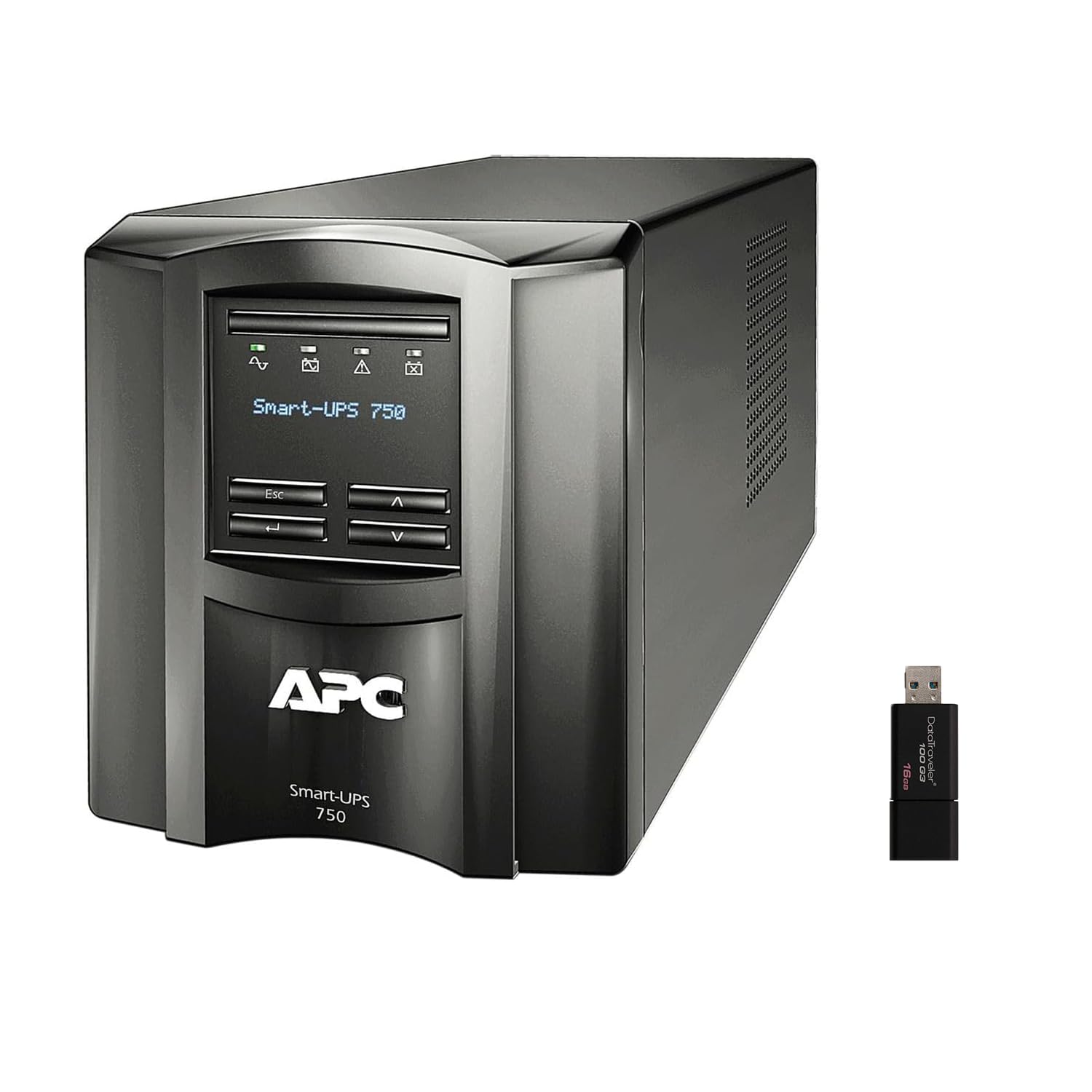
Зураг: урд ба хажуу view of the APC Smart-UPS SMT750C. This image displays the compact tower design of the UPS unit.
- Цахилгаан товч: UPS-ийн гол тэжээлийг хянадаг.
- LCD дэлгэц: Provides real-time status information, load levels, battery charge, and estimated runtime.
- Навигацийн товчлуурууд: Used to scroll through display menus and adjust settings.
Арын самбар
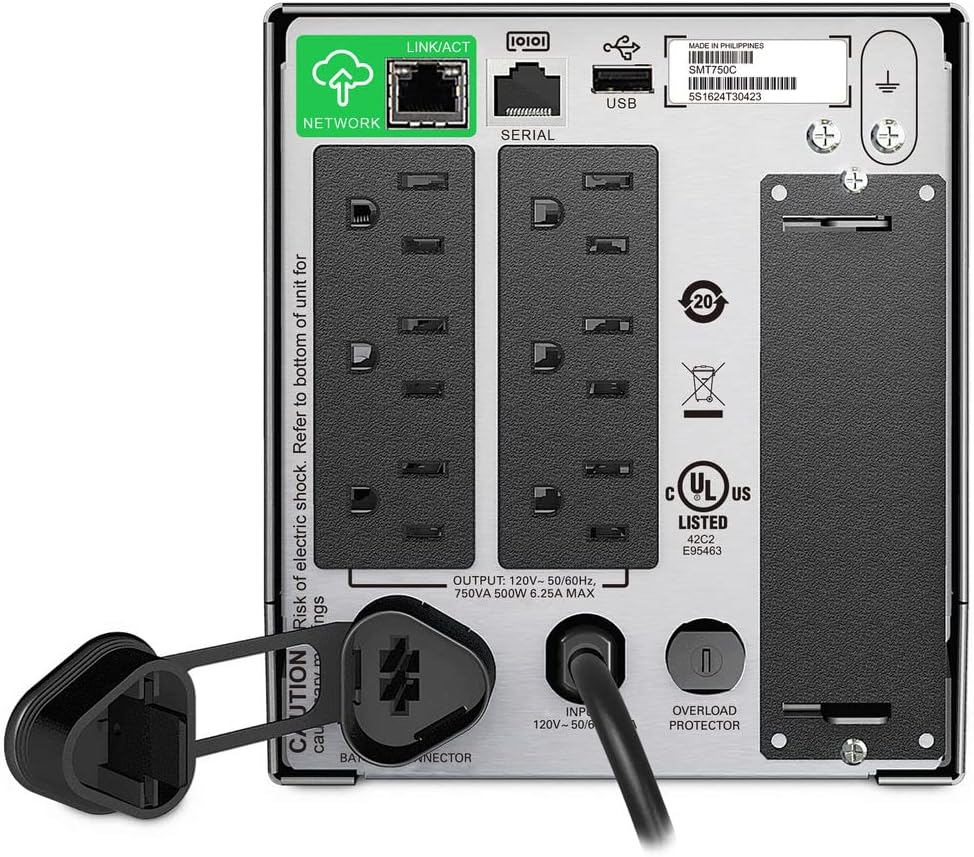
Image: Rear panel of the APC Smart-UPS SMT750C. This view highlights the various input/output ports, including NEMA 5-15R outlets, SmartConnect port, USB, and serial ports.
- NEMA 5-15R Outlets: Six outlets for connecting protected equipment.
- SmartConnect Ethernet Port: For cloud-based remote monitoring and management.
- USB порт: For communication with a computer for graceful shutdown via PowerChute Serial Shutdown software.
- Цуваа порт: Alternative communication port for graceful shutdown.
- SmartSlot: For optional Network Management Card (sold separately).
- Оролтын цахилгааны утас: UPS-ийг цахилгаан хангамжтай холбодог.
- Хэт ачаалал хамгаалагч: Resettable circuit breaker.
5. Тохиргоо
5.1 Initial Battery Connection
Before initial use, the internal battery must be connected. The unit is shipped with the battery disconnected for safety during transit.
- UPS-ийг тогтвортой гадаргуу дээр байрлуул.
- Locate the battery compartment cover, typically on the bottom or rear of the unit.
- Remove the cover to access the battery.
- Connect the red battery cable to the positive (+) terminal and the black battery cable to the negative (-) terminal. Ensure a secure connection.
- Зайны тасалгааны тагийг солих.
5.2 Цахилгаан хангамжид холбогдох
- Plug the UPS power cord into a grounded 3-prong AC outlet.
- Батерейны бүрэн хүчин чадлыг хангахын тулд чухал тоног төхөөрөмжийг холбохоос өмнө UPS-ийг дор хаяж 24 цагийн турш цэнэглээрэй.
5.3 Холбох төхөөрөмж
- Connect your critical equipment (e.g., computer, monitor, network devices) to the NEMA 5-15R outlets on the rear panel.
- For graceful shutdown capabilities, connect the provided USB cable from the UPS to your computer and install the PowerChute Serial Shutdown software (available for download from APC's webсайт).
- For remote monitoring, connect an Ethernet cable to the SmartConnect port and follow the instructions for cloud-based setup.
6. Үйл ажиллагаа
6.1 Асаах/унтраах
- To power on the UPS, press and hold the power button on the front panel until the unit beeps and the display illuminates.
- To power off the UPS, press and hold the power button until the unit beeps and the display turns off.
6.2 Автомат ботьtage Зохицуулалт (AVR)
The SMT750C features AVR, which automatically corrects minor voltage fluctuations (sags and surges) without switching to battery power. This protects connected equipment from voltage irregularities and extends battery life.
6.3 Батерейг нөөцлөх ажиллагаа
Хүчний үед уtage, the UPS will automatically switch to battery power, providing continuous power to connected equipment. The LCD display will show the estimated remaining runtime. When utility power returns, the UPS will automatically switch back to utility power and recharge its battery.
6.4 Remote Monitoring (SmartConnect)
The SmartConnect port allows for cloud-based remote monitoring of your UPS. This feature enables IT professionals and network administrators to:
- Monitor UPS status and performance.
- Програм хангамжийн шинэчлэлтийг гүйцэтгэнэ үү.
- Conduct remote diagnostics.
- Receive proactive email notifications with recommended actions.
7. Засвар үйлчилгээ
7.1 Батерейг солих
The internal battery is a user-replaceable component. When the battery reaches the end of its service life, the UPS will indicate a battery fault. To replace the battery:
- Ensure the UPS is powered off and disconnected from utility power.
- Зайны тасалгааны тагийг ав.
- Disconnect the battery cables (red and black).
- Carefully slide out the old battery.
- Insert a genuine APC replacement battery (model RBC154, sold separately).
- Connect the battery cables, ensuring correct polarity (red to positive, black to negative).
- Зайны тасалгааны тагийг солих.
- Recycle the old battery responsibly.
7.2 Цэвэрлэгээ
UPS-ийн гадна талыг зөөлөн, хуурай даавуугаар үе үе цэвэрлэж байгаарай. Шингэн эсвэл аэрозоль цэвэрлэгч бүү ашиглаарай. Агааржуулалтын нүхнүүд нь тоос шороо, хог хаягдлаас цэвэрлэгдсэн эсэхийг шалгаарай.
8. Алдаа засах
| Асуудал | Боломжит шалтгаан | Шийдэл |
|---|---|---|
| UPS асахгүй байна | Батерей холбогдоогүй эсвэл цэнэг багатай байна | Ensure battery cables are connected. Plug UPS into AC outlet and allow to charge. |
| UPS тасралтгүй дуугардаг | Overload or on battery power | Reduce connected load. Check utility power. |
| Battery symbol blinking | Battery needs to be flipped (initial setup) or is failing | For new units, ensure battery is correctly oriented and connected. For older units, consider battery replacement. |
| Цахилгаан залгуурт цахилгаан байхгүй | UPS is off, circuit breaker tripped, or utility power lost | Turn on UPS. Reset circuit breaker. Check utility power. |
9. Техникийн үзүүлэлтүүд
- Загвар: SMT750C
- Гаралтын чадлын багтаамж: 500 ватт / 750 VA
- Гаралтын холболтууд: 6 х ОБЕГ 5-15R
- Оролтын холболтууд: ОБЕГ 5-15P
- Нэрлэсэн оролт ботьtage: 120 В
- Нэрлэсэн гаралтын ботьtage: 120 В
- Зайны төрөл: Хар тугалгын хүчил
- Формат хүчин зүйл: Цамхаг
- Хэмжээ (H x W x D): 6.34 инч (16.1 см) x 5.43 инч (13.8 см) x 14.53 инч (36.9 см)
- Цэвэр жин: 27.56 фунт (12.5 кг)
- Өнгө: Хар
- Материал: Металл
- Дагалдах хэрэгсэлд багтсан: 16GB USB 3.0 Drive
10. Баталгаат хугацаа ба дэмжлэг
APC нь энэ бүтээгдэхүүнд стандарт баталгаа өгдөг. Тодорхой баталгааны нөхцөл, болзлыг бүтээгдэхүүнтэй хамт ирсэн баталгаат картаас харах эсвэл албан ёсны APC-д зочилно уу. website. For technical support, product registration, or to purchase replacement parts, please visit www.apc.com or contact APC customer service.
Protection plans are available for extended coverage. For example, a 3-Year Protection Plan is available.