1. Танилцуулга
This manual provides instructions for the safe and effective use of your GT POWER AC/DC Power Adapter, Model 109. This adapter is designed to provide power to compatible TP-Link Mesh Wi-Fi 7 Systems, specifically Deco BE63, BE10000, and BE11000 models. Please read this manual thoroughly before use and retain it for future reference.
2. Аюулгүй байдлын мэдээлэл
АНХААРУУЛГА: Гал түймэр эсвэл цахилгаанд цохиулах эрсдэлийг бууруулахын тулд эдгээр зааврыг анхааралтай дагаж мөрдөнө үү.
- Адаптерийн эзлэхүүнийг шалгана ууtage and current ratings match the requirements of your device.
- Адаптерийг бороо эсвэл чийгэнд бүү гарга.
- Do not open the adapter casing. Дотор нь хэрэглэгчийн засвар үйлчилгээ хийх хэсэг байхгүй.
- Keep the adapter away from excessive heat sources.
- Цэвэрлэхийн өмнө эсвэл удаан хугацаагаар ашиглахгүй бол адаптерийг үргэлж цахилгааны залгуураас салгаж байгаарай.
- Хэрэв утас эсвэл залгуур гэмтсэн бол адаптерийг бүү ашигла.
- This adapter is designed for indoor use only.
- The adapter features Over VoltagАюулгүй байдлыг сайжруулахын тулд e хамгаалалт (OVP), хэт гүйдлийн хамгаалалт (OCP), богино залгааны хамгаалалт (SCP)-тай.
3. Бүтээгдэхүүн дууссанview
The GT POWER AC Adapter (Model 109) is a compact power supply unit designed for specific TP-Link Deco Mesh Wi-Fi systems. It converts AC wall power to the DC power required by your device.

Зураг 1: Урд view of the GT POWER AC Adapter. The label indicates input voltage (AC100-240V) and output (DC12V 3A).
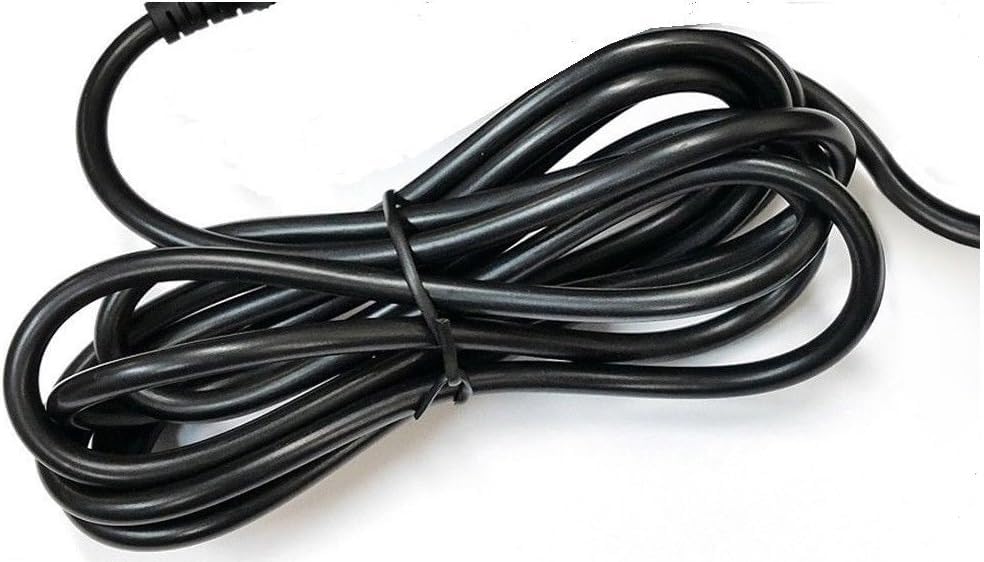
Зураг 2: Хажуу тал view of the adapter, highlighting the barrel connector that plugs into your device.
4. Тохиргоо
Follow these steps to connect your GT POWER AC Adapter to your TP-Link Deco Mesh Wi-Fi System:
- Ensure your TP-Link Deco device is powered off.
- Locate the power input port on your TP-Link Deco device. This is typically a circular port.
- Insert the barrel connector of the GT POWER AC Adapter firmly into the power input port of your Deco device.
- Plug the AC adapter into a standard 110V AC wall outlet.
- Power on your TP-Link Deco device.
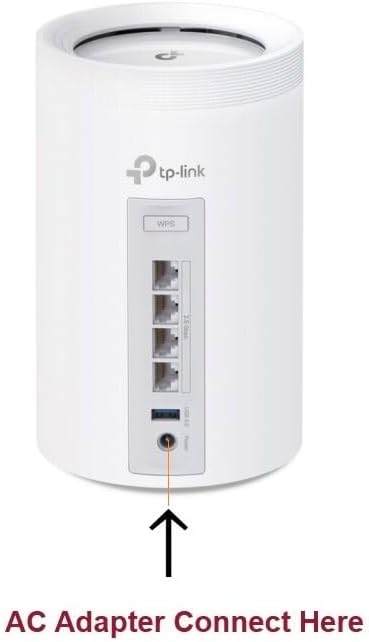
Зураг 3: Example of connecting the AC adapter to a compatible TP-Link Deco device. The arrow indicates the power input port.
5. Ашиглалтын заавар
Once properly connected and plugged into a power outlet, the GT POWER AC Adapter will continuously supply power to your TP-Link Deco device. No further user interaction is required for operation.
- Ensure the adapter is always plugged into a functional power outlet.
- Avoid disconnecting the adapter during critical operations of your Deco device.
6. Засвар үйлчилгээ
The GT POWER AC Adapter requires minimal maintenance:
- Keep the adapter clean and free from dust. Use a dry, soft cloth for cleaning.
- Шингэн цэвэрлэгч, аэрозоль хэрэглэж болохгүй.
- Regularly inspect the power cord and connector for any signs of damage. If damage is observed, discontinue use immediately.
- Адаптерийг ашиглаагүй үед сэрүүн, хуурай газар хадгална.
7. Алдаа засах
If your TP-Link Deco device is not receiving power, consider the following:
- Эрчим хүчгүй:
- Verify the adapter is securely plugged into both the wall outlet and the Deco device.
- Ханын залгуурыг ажиллаж байгаа эсэхийг шалгахын тулд өөр төхөөрөмжөөр туршина уу.
- Inspect the adapter's cable and connector for any visible damage.
- Завсрын хүч:
- Бүх холболт нягт байгаа эсэхийг шалгаарай.
- Avoid bending or stressing the power cord.
Асуудал хэвээр байвал хэрэглэгчийн дэмжлэгтэй холбогдоно уу.
8. Техникийн үзүүлэлтүүд
| Онцлог | Дэлгэрэнгүй |
|---|---|
| Брэнд | GT POWER |
| Загварын дугаар | 109 |
| Оролтын хэмжээtage | Хувьсах гүйдэл 100-240 В |
| Гаралтын ботьtagд/Одоогийн | DC 12V / 3А |
| Залгаад форматлах | Type A (US Standard) |
| Хамгаалалтын онцлог | OVP (Дээрх ботьtage хамгаалалт), OCP (Хэт гүйдлийн хамгаалалт), SCP (Богино залгааны хамгаалалт) |
| UPC | 781834735527 |
9. Баталгаат хугацаа ба дэмжлэг
This GT POWER AC Adapter comes with a Нэг жилийн баталгаа. Нэмж дурдахад, А 30 хоногийн мөнгө буцааж өгөх guarantee is offered.
For technical support or warranty claims, please contact the seller, GTXPower, through the platform where the product was purchased.


