Танилцуулга
This manual provides essential information for setting up, operating, maintaining, and troubleshooting your HP Elite Mini 800 G9 Desktop Computer. This compact and powerful mini PC is designed for business environments, offering high performance in a small form factor.
The HP Elite Mini 800 G9 features an Intel Core i5-12500T processor, 16 GB DDR5 RAM, and a 256 GB SSD, running on Windows 11 Pro. Its small size allows for flexible deployment options, including mounting behind a monitor or discreet placement on a desk.
Хайрцагт юу байна
Савлагаанд бүх зүйл байгаа эсэхийг шалгана уу:
- HP Elite Mini 800 G9 Ширээний компьютер
- Хувьсах гүйдлийн адаптер
- Гар
- Хулгана
Тохиргоо
HP Elite Mini 800 G9 ширээний компьютерээ тохируулахын тулд дараах алхмуудыг дагана уу:
1. Савлах ба байрлуулах
Carefully remove the mini PC and all accessories from the packaging. Place the mini PC on a stable, flat surface with adequate ventilation. Ensure no vents are obstructed.
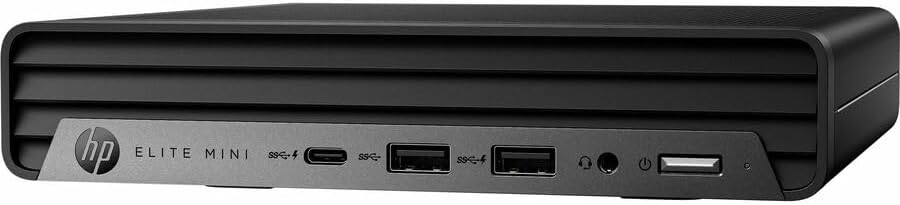
Зураг: Урд view of the HP Elite Mini 800 G9 Desktop PC, highlighting the accessible front ports including USB-C, USB-A, and a headphone jack.
2. Захын төхөөрөмжүүдийг холбох
- Мониторыг холбох: Connect your monitor to one of the available video output ports (e.g., DisplayPort, HDMI) on the rear of the mini PC.
- Гар болон хулгана холбох: Plug the included keyboard and mouse into the USB ports on the mini PC.
- Сүлжээг холбох (заавал биш): For a wired internet connection, connect an Ethernet cable from your router or network switch to the Ethernet port on the mini PC. Wireless connectivity (Wi-Fi 6) is also available.
- Эрчим хүчийг холбох: Connect the AC adapter to the power input port on the mini PC, then plug the power cord into a wall outlet.
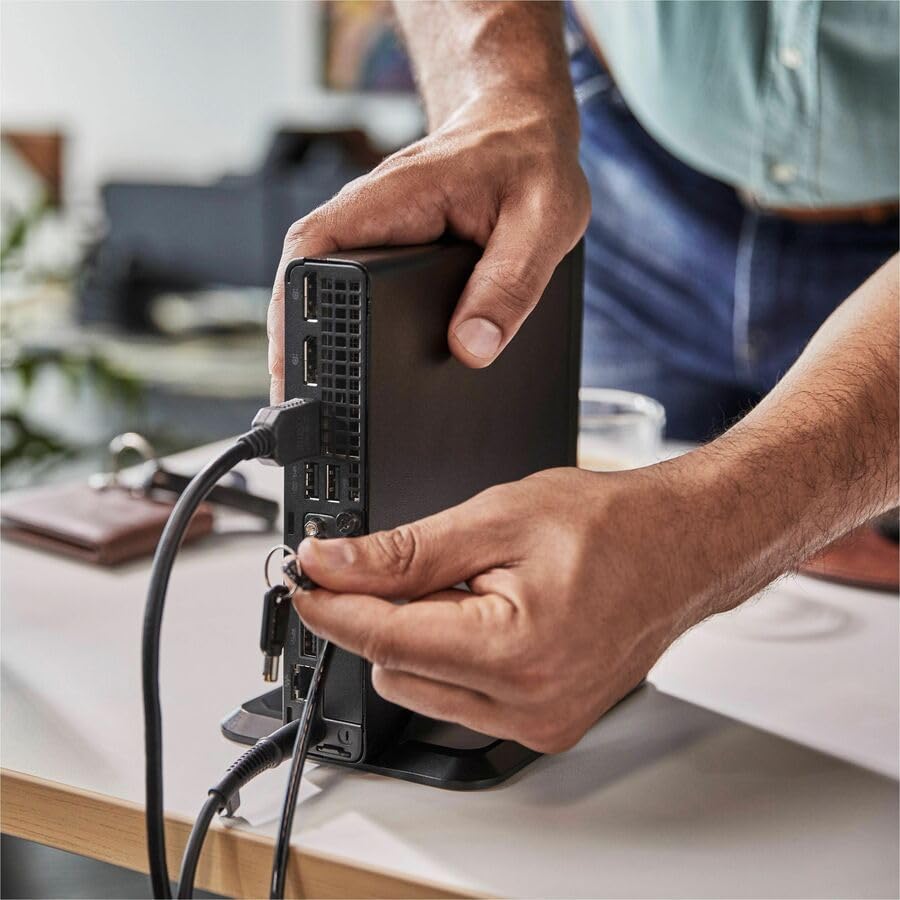
Image: A user connecting various cables, including power and display, to the rear ports of the HP Elite Mini 800 G9. This illustrates the typical connection process for peripherals.
Ашиглалтын заавар
Once your HP Elite Mini 800 G9 is set up, follow these steps for basic operation:
1. Асаах
Press the power button located on the front of the mini PC. The power indicator light will illuminate, and the system will begin to boot up. The operating system (Windows 11 Pro) will load automatically.
2. Анхны тохиргоо (Анхны хэрэглээ)
Upon first boot, you will be guided through the Windows 11 Pro setup process. This includes selecting your region, language, accepting terms, and setting up a user account. Follow the on-screen prompts to complete this process.
3. Унтраах
To properly shut down the computer, click the Эхлэх Windows дээр товчлуурыг дараад дараа нь сонгоно уу Хүч > Унтраах. Avoid powering off the system by holding the power button, as this can lead to data loss or system corruption.

Image: A professional working at a desk, demonstrating the compact integration of the HP Elite Mini 800 G9, which is mounted discreetly behind a monitor.
Засвар үйлчилгээ
Regular maintenance helps ensure the longevity and optimal performance of your HP Elite Mini 800 G9 Desktop Computer.
1. Програм хангамжийн шинэчлэлтүүд
Keep your operating system and drivers updated. Windows Update automatically handles OS updates. For driver updates, visit the official HP support webтаны загварт зориулсан сайт.
2. Цэвэрлэгээ
- Гадна: Зөөлөн, хөвөнгүй даавууг бага зэрэг хэрэглээрэй dampened with water or a mild cleaning solution to clean the exterior surfaces.
- Агааржуулалт: Periodically use compressed air to clear dust from the ventilation grilles to prevent overheating. Ensure the system is powered off before cleaning vents.
3. Өгөгдлийн нөөцлөлт
Regularly back up important data to an external drive or cloud storage to prevent data loss in case of hardware failure or other issues.
Алдааг олж засварлах
Энэ хэсэгт таны HP Elite Mini 800 G9-тай холбоотой нийтлэг асуудлуудыг авч үзэх болно.
Хүч чадалгүй
- Ensure the AC adapter is securely connected to both the mini PC and a working power outlet.
- Өөр төхөөрөмжийг залгах замаар цахилгааны залгуур ажиллаж байгаа эсэхийг шалгана уу.
- Цахилгаан товчийг ямар нэгэн гэмтэл эсвэл бөглөрөл байгаа эсэхийг шалгана уу.
Дэлгэц дээр дэлгэц байхгүй
- Confirm the monitor is powered on and correctly connected to the mini PC's video output port.
- Дэлгэц дээрээ зөв оролтын эх үүсвэр сонгогдсон эсэхийг шалгаарай.
- Try connecting the mini PC to a different monitor or using a different video cable if available.
Удаан гүйцэтгэл
- Ар талд ажиллаж байгаа шаардлагагүй програмуудыг хаа.
- Хүлээгдэж буй Windows шинэчлэлтүүд эсвэл драйверын шинэчлэлтүүдийг шалгаж, суулгана уу.
- Run a disk cleanup and defragmentation (for HDDs, not typically needed for SSDs).
- Scan for malware or viruses using reputable antivirus software.
Үзүүлэлтүүд
Detailed technical specifications for the HP Elite Mini 800 G9 Desktop Computer:
| Онцлог | Дэлгэрэнгүй |
|---|---|
| Загварын дугаар | AS1F8AT#ABA |
| Процессор | Intel Core i5-12500T (12th Gen, Hexa-core, 2 GHz) |
| RAM | 16 GB DDR5 RAM |
| Хадгалах | 256 GB SSD |
| График | Intel UHD Graphics 770 (Нэгдсэн) |
| Үйлдлийн систем | Windows 11 Pro |
| Утасгүй холболт | Wi-Fi 6 (802.11ax), Bluetooth |
| Хэмжээ (LxWxH) | 6.9 x 7 x 1.4 инч |
| Жин | 3.13 фунт |
| Портууд (урд) | USB-C, USB-A, Headphone/Microphone Combo |
| Портууд (арын) | Multiple USB-A, Video Outputs (e.g., DisplayPort, HDMI), Ethernet, Power Input |
Баталгаат болон дэмжлэг
Your HP Elite Mini 800 G9 Desktop Computer comes with a standard manufacturer's warranty. For specific warranty terms and conditions, please refer to the documentation included with your product or visit the official HP support webсайт.
For technical assistance, driver downloads, or further support, please visit the HP Support webсайт: