1. Танилцуулга
This manual provides comprehensive instructions for the installation, operation, maintenance, and troubleshooting of the PPOZYLPC Pressure Transducer, model QDW90A-JL. This device is designed for precise pressure measurement within a 0-2Mpa range and features an RS485 digital output for reliable data transmission. Please read this manual thoroughly before using the product to ensure safe and efficient operation.
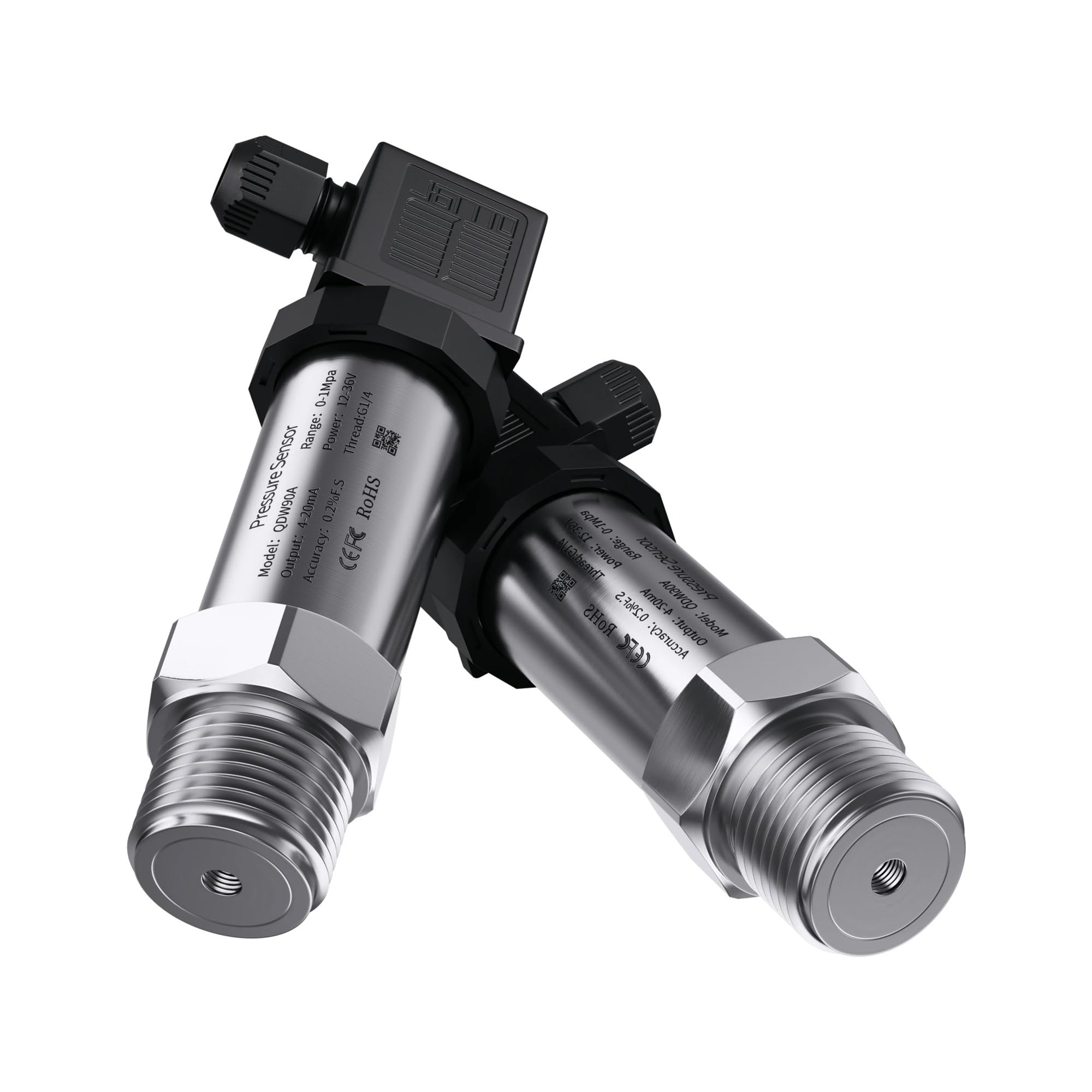
Зураг 1: Илүүview of the PPOZYLPC Pressure Transducer.
2. Бүтээгдэхүүний онцлог
- Загвар: QDW90A-JL
- Хэмжих хүрээ: 0-2Мпа
- Гаралтын дохио: RS485
- Эрчим хүчний хангамж: DC24V
- Процессын холболт: M20*1.5 thread
- High accuracy and stability
- Бат бөх зэвэрдэггүй ган хийц
3. Тохиргоо ба суурилуулалт
Proper installation is crucial for the accurate and reliable operation of the pressure transducer. Follow these steps carefully:
- Эхлээд аюулгүй байдал: Ensure that the system where the transducer will be installed is depressurized and isolated from any power sources before beginning installation.
- Inspect the Transducer: Before installation, visually inspect the transducer for any signs of damage. Verify that the model and range match your application requirements.
- Механик суурилуулалт:
- The transducer features an M20*1.5 threaded connection. Ensure the mating port on your system is compatible.
- Apply a suitable thread sealant (e.g., PTFE tape or liquid sealant) to the transducer's threads to ensure a leak-free connection.
- Carefully screw the transducer into the pressure port. Tighten it using an appropriate wrench, applying torque only to the hexagonal body, not the electrical connector or main housing. Avoid overtightening.
- Цахилгааны утас:
- Connect the transducer to a stable DC24V power supply. Observe correct polarity.
- Connect the RS485 data lines to your control system or data acquisition unit. Refer to your system's documentation for specific RS485 wiring requirements.
- Ensure all electrical connections are secure and protected from environmental factors.
- Суулгасны дараах шалгалт: After installation, slowly re-pressurize the system and check for any leaks around the transducer's mechanical connection. Verify that the transducer is receiving power and communicating correctly with your control system.

Figure 2: Detail of the M20*1.5 threaded connection for installation.
4. Ашиглалтын заавар
The PPOZYLPC Pressure Transducer provides a digital RS485 output. Operation primarily involves reading data from the transducer via a compatible RS485 interface.
- Асаах: Apply DC24V power to the transducer. The device will typically initialize within a few seconds.
- RS485 харилцаа холбоо: Use your RS485 master device (e.g., PLC, microcontroller, or PC with an RS485 adapter) to communicate with the transducer. The transducer will respond to standard Modbus RTU commands (or similar protocol, refer to specific communication protocol documentation if provided separately).
- Мэдээлэл унших: Send read commands to the transducer's assigned address to retrieve pressure values. The data format and register addresses will be specified in the communication protocol documentation.
- Хяналт: Continuously monitor the pressure readings as required by your application.
5. Засвар үйлчилгээ
The PPOZYLPC Pressure Transducer is designed for long-term, maintenance-free operation. However, periodic checks can help ensure continued accuracy and reliability.
- Харааны үзлэг: Regularly inspect the transducer and its connections for any signs of corrosion, physical damage, or loose wiring.
- Цэвэрлэгээ: Шаардлагатай бол хувиргагчийн гадна талыг зөөлөн, damp cloth. Do not use abrasive cleaners or solvents that could damage the housing or labels. Ensure no liquid enters the electrical connector.
- Дахин тохируулга: While the transducer is factory calibrated, recalibration may be necessary over time or if accuracy drifts are observed. This typically requires specialized equipment and should be performed by qualified personnel.
- Байгаль орчны нөхцөл: Ensure the transducer operates within its specified environmental limits (temperature, humidity) to prevent premature failure.
6. Алдаа засах
If you encounter issues with your pressure transducer, refer to the following common problems and solutions:
| Асуудал | Боломжит шалтгаан | Шийдэл |
|---|---|---|
| No output/No communication | Буруу утас Цахилгаан хангамж байхгүй Incorrect RS485 settings (address, baud rate) | Check power and data wiring for correct polarity and connections. Verify DC24V supply. Confirm RS485 communication parameters. |
| Буруу уншилтууд | Transducer not properly installed Системийн даралт хязгаараас гадуур Sensor damage/drift | Ensure mechanical connection is leak-free. Verify system pressure is within 0-2Mpa range. Consider recalibration or replacement if sensor drift is suspected. |
| Завсарлагатай уншлага | Сул цахилгаан холболтууд Цахилгааны хөндлөнгийн оролцоо Faulty cabling | Check all wiring for secure connections. Use shielded cables and proper grounding to minimize interference. Replace damaged cables. |
| Leakage at connection point | Утасны чигжээс хангалтгүй Буруу чангалах Гэмтсэн утаснууд | Depressurize system, reapply thread sealant, and retighten. If threads are damaged, replace the transducer or mating port. |
Хэрэв эдгээр шийдлүүдийг туршиж үзсэний дараа асуудал арилахгүй бол техникийн дэмжлэгтэй холбогдоно уу.
7. Техникийн үзүүлэлтүүд
Detailed technical specifications for the PPOZYLPC Pressure Transducer QDW90A-JL:
| Параметр | Үнэ цэнэ |
|---|---|
| Загварын дугаар | QDW90A-JL |
| Хэмжих хүрээ | 0-2Мпа |
| Гаралтын дохио | RS485 |
| Эрчим хүчний хангамж | DC24V |
| Процесс холболт | M20*1.5 |
| Багцын хэмжээ | 1.18 x 0.79 x 0.39 инч |
| Зүйлийн жин | 3.92 унц |
| Үйлдвэрлэгч | PPOZYLPC |

Figure 3: Transducer body with visible product information.
8. Баталгаат хугацаа ба дэмжлэг
Баталгаат хугацаа: This PPOZYLPC product is covered by a standard manufacturer's warranty against defects in materials and workmanship. The warranty period typically begins from the date of purchase. Please retain your proof of purchase for warranty claims. Damage resulting from improper installation, misuse, unauthorized modification, or operation outside specified parameters is not covered.
Техникийн дэмжлэг: For technical assistance, troubleshooting beyond this manual, or warranty inquiries, please contact your vendor or the manufacturer directly. Provide your product model number (QDW90A-JL) and a detailed description of the issue when seeking support.


