1. Танилцуулга
This manual provides comprehensive instructions for the assembly, operation, and maintenance of your SCULPFUN S9 Laser Engraver with Rotary Roller. Designed for precision engraving and cutting, this machine offers advanced features for various materials. Please read this manual thoroughly before use to ensure safe and optimal performance.
2. Бүтээгдэхүүн дууссанview
Гол онцлогууд
- 5.5W Diode Laser with 90W CO2 Laser Effect: Ultra-fine 0.08mm laser focus for deep cutting.
- Зүсэх чадвар: Up to 15mm wood and 10mm acrylic.
- Сийлбэрийн материал: Ceramics, stainless steel, dark stone, wood, acrylic.
- Rotary Roller Included: For engraving cylindrical objects with a diameter range of 6-150mm.
- Quick Focus: Fixed focus lens and sliding rail design for rapid setup.
- Өндөр нарийвчлал: Ultra-fine 0.1mm engraving line.
- Аюулгүй байдлын дизайн: Laser filter blocks 98% of UV light, emergency stop switch, A4 steel pad for table protection.
- Өргөн нийцтэй байдал: Supports LiteFire, GrblController, Benboc, LightBurn, Laser GRBL.
- File Форматууд: KPG, BMP, NC, G-code, SVG, DXF, PNG.
- Үйлдлийн системүүд: Compatible with Windows and Mac.
- Plug and Play: 100% pre-installed for easy setup.
Бүтээгдэхүүний зураг

Figure 2.1: SCULPFUN S9 Laser Engraver with included rotary roller and exampсийлсэн зүйлсийн цөөн хэсэг.

Figure 2.2: The SCULPFUN S9 in operation, demonstrating cylindrical engraving using the rotary roller.

Зураг 2.3: Нарийвчилсан view of the S9 laser head, highlighting its 90W CO2 laser effect and beam shaping technology.

Зураг 2.4: Жишээ ньamples of the S9's cutting depth on 15mm wood, 10mm plywood, and 10mm acrylic.
Юу багтсан бэ

Figure 2.5: All components included in the SCULPFUN S9 Laser Engraver package.
- 1 x X-axis component
- 2 x X-profiles
- 2 x Y-profiles
- 1 x Control box component
- 3 х тулгуур хөл
- 1 x Laser component
- 1 x 12V 5A power adapter
- 1 х цахилгаан кабель
- 1 x USB кабель
- 10 х зангиа
- 1 х Brush
- 1 x Anti-laser goggles
- 1 x 10x10 cm 3mm thick wood chip
- 1 x 10x10 cm wood piece
- 1 x A4 size protective steel pad
- 1 x Mounting kit with screws for steps 1 to 5
- 2 x Бүс
- 1 x M5 T-type hexagonal wrench
- 1 x M4 L-type hexagonal wrench
- 1 x M3 L-type hexagonal wrench
- 1 x 8 to 10 mm wrench
3. Тохиргоо
The SCULPFUN S9 Laser Engraver is designed for quick and easy setup, with many components pre-installed. The rotary roller is also 100% pre-assembled for plug-and-play functionality.
Анхны чуулган
- Follow the detailed instructions provided in the included manual for assembling the main frame components (X-axis, Y-profiles, support legs).
- Utilize the separated screw kits and included wrenches for a smooth assembly process.
Лазер модуль суурилуулах
- Carefully attach the laser component to the X-axis.
- Бүх холболт найдвартай эсэхийг шалгаарай.
Rotary Roller Connection

Figure 3.1: Steps for connecting the SCULPFUN Rotary Roller, highlighting its pre-installed nature.
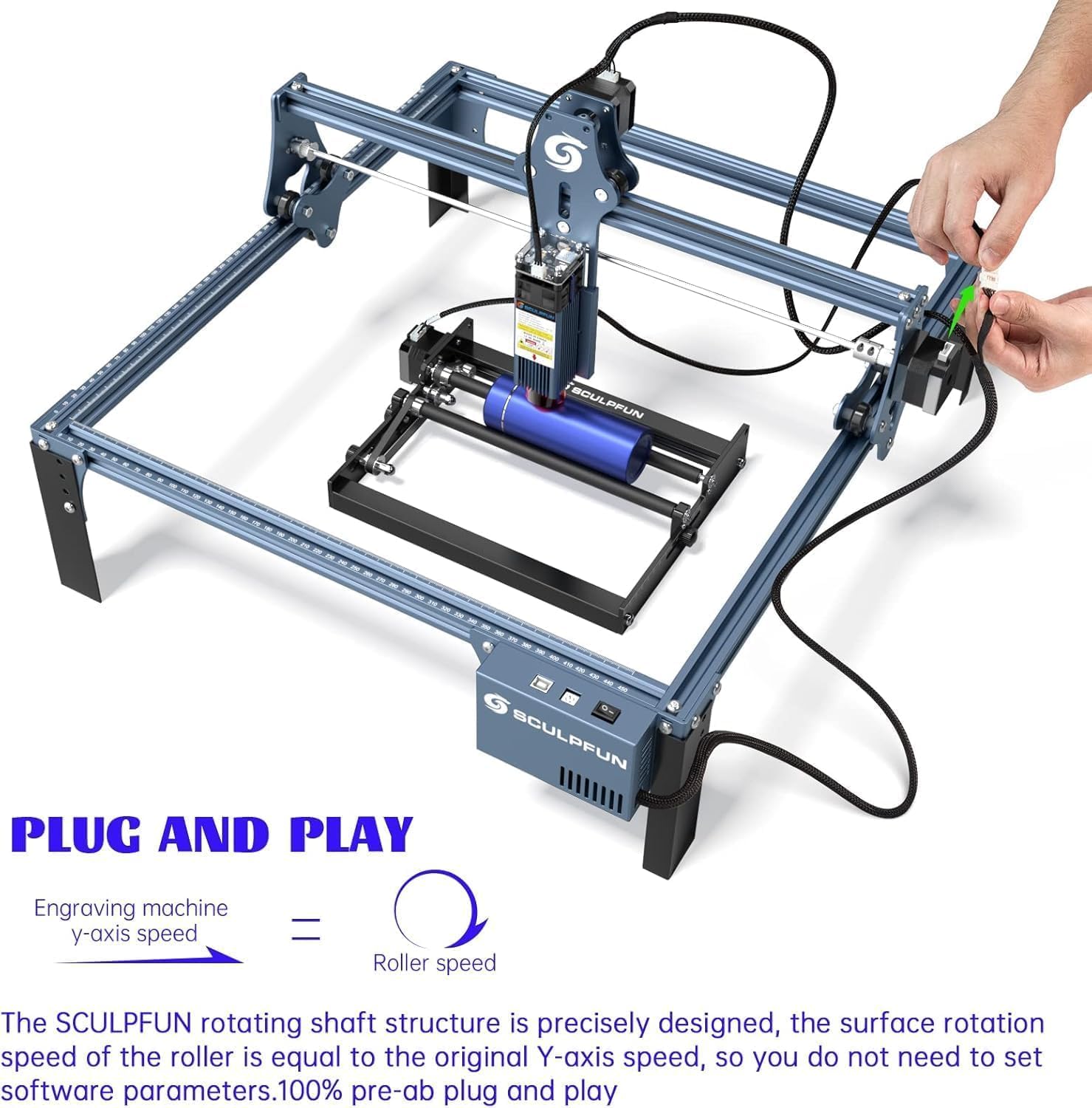
Figure 3.2: The S9 and rotary roller are designed for plug-and-play functionality, simplifying setup.
Connect the rotary roller's adapter cable to the X-axis or Y-axis stepper motor wiring of the laser engraving machine. No additional software settings are required for the rotary roller as its surface rotation speed is precisely designed to match the original Y-axis speed.
Эрчим хүч ба USB холболт
Connect the power adapter and USB cable to the machine and your computer.
Програм хангамж суурилуулах
Install your preferred engraving software (e.g., LightBurn, Laser GRBL) on your Windows or Mac computer.
4. Ашиглалтын заавар
Материал бэлтгэх

Figure 4.1: The rotary roller provides a larger engraving space for various cylindrical objects.

Figure 4.2: The rotary roller features a sliding adjustment for quick and easy distance setting.

Зураг 4.3: Гол давуу талtages of the SCULPFUN Rotary Roller for cylindrical engraving.
Place the material to be engraved or cut on the working surface. For flat materials, use the protective steel pad to prevent damage to your table. For cylindrical objects, position them securely on the rotary roller.
Фокусын тохируулга

Figure 4.4: Adjusting the laser focus by sliding the module up or down.
The S9 features a fixed-focus lens. To adjust focus, slide the laser module along its rail and tighten the screws until the laser beam is optimally focused on the material surface. This ensures a precise 0.08mm ultra-fine laser spot.
Програм хангамжийн ажиллагаа

Figure 4.5: The S9 is compatible with popular laser engraving software like Laser GRBL and LightBurn.

Figure 4.6: The S9's engraving area can be expanded for larger projects.

Figure 4.7: A wide range of materials and objects can be engraved, including pens, cups, flowerpots, and rings.
Open your chosen engraving software (e.g., LightBurn, Laser GRBL). Import your design file (KPG, BMP, NC, G-code, SVG, DXF, PNG formats are supported). Adjust engraving parameters such as power, speed, and passes according to the material type and desired effect. For rotary engraving, ensure the software settings are configured for cylindrical objects, though the S9 rotary roller is designed for plug-and-play speed matching.
Аюулгүй байдлын урьдчилан сэргийлэх арга хэмжээ

Figure 4.8: The circular protective cover allows for observation while providing eye protection.
- Always wear the provided anti-laser goggles when the machine is operating.
- The laser filter on the S9 can block 98% of UV rays, allowing for observation without goggles, but wearing them is highly recommended for maximum safety.
- Ensure the emergency stop switch is easily accessible during operation.
- Keep pets and children away from the operating machine.
- Operate in a well-ventilated area to dissipate fumes from engraving.
5. Засвар үйлчилгээ
Regular maintenance ensures the longevity and optimal performance of your SCULPFUN S9 Laser Engraver.
- Цэвэрлэгээ: Regularly clean the laser lens and the machine's rails to ensure optimal performance and prevent dust buildup. Use a soft, lint-free cloth.
- Тосолгоо: Periodically lubricate the moving parts of the X and Y axes to ensure smooth operation.
- Туузан хурцадмал байдал: Check the tension of the belts and adjust if necessary to maintain engraving accuracy.
- Лазер модулийн үзлэг: Inspect the laser module for any signs of damage or wear. If the laser output appears weak or inconsistent, consult the manufacturer's support.
6. Алдаа засах
Энэ хэсэг нь танд тулгарч болох нийтлэг асуудлуудын шийдлүүдийг өгдөг.
- Машин асахгүй байна:
- Check power cable connections to the machine and the outlet.
- Цахилгаан адаптер зөв ажиллаж байгаа эсэхийг шалгаарай.
- Лазер асахгүй/сул гаралт:
- Verify laser module connection.
- Check focus adjustment.
- Ensure laser power settings in software are correct.
- Лазер линзийг цэвэрлэ.
- Engraving Inaccuracy/Skipped Steps:
- X ба Y тэнхлэгүүд дээрх туузны хурцадмал байдлыг шалгана уу.
- Ensure all screws and connections are tight.
- Verify material is securely placed and not moving during operation.
- Check software settings for speed and acceleration.
- Програм хангамжийн холболтын асуудал:
- USB кабель найдвартай холбогдсон эсэхийг шалгана уу.
- Restart the software and the machine.
- Check device manager for proper driver installation.
7. Техникийн үзүүлэлтүүд
| Онцлог | Тодорхойлолт |
|---|---|
| Үйлдвэрлэгч | SCULPFUN |
| Загвар | S9+roller |
| Эрчим хүчний эх үүсвэрийн төрөл | AC |
| Ботьtage | 240 вольт |
| Лазер гаралтын хүч | 5.5W (90W CO2 effect) |
| Ажлын талбай | 410 х 420 мм |
| Лазер фокус | 0.08 мм |
| Engraving Line Precision | 0.1 мм |
| Cylindrical Engraving Diameter Range | 6-150 мм |
| Cylindrical Engraving Length | 0-230 мм |
| Багцын хэмжээ | 61.6 x 35.2 x 18.5 см |
| Багцын жин | 6.08 кг |
| оноос хойш ашиглах боломжтой | 26 оны наймдугаар сарын 2024 |
8. Баталгаат хугацаа ба дэмжлэг
Баталгаат хугацааны мэдээлэл
The product may be eligible for extended warranty plans (e.g., 12-month or 24-month extended warranty against failures and defects) available at the time of purchase. Please refer to your purchase documentation for specific warranty terms and conditions.
Хэрэглэгчийн дэмжлэг
For technical assistance, troubleshooting, or inquiries, please visit the official SCULPFUN store on Amazon or contact SCULPFUN customer support directly. You can find more information and contact details at: SCULPFUN Amazon Store.
9. Бүтээгдэхүүний албан ёсны видеонууд
No official product videos with 'Seller' as creator type and specific URLs were provided in the product data to embed in this manual.


