1. Танилцуулга
This manual provides essential information for the safe and efficient installation, operation, and maintenance of your TCP Economy LED UFO High Bay Luminaire. Please read this manual thoroughly before installation and retain it for future reference.
The TCP Economy LED UFO High Bay Luminaire is designed for commercial and industrial applications, offering high efficacy and a long operational lifespan. It features a robust design suitable for various environments, including warehouses, retail spaces, and gymnasiums.

Зураг 1: Урд view of the TCP Economy LED UFO High Bay Luminaire, showing the LED array and clear lens.
2. Аюулгүй байдлын мэдээлэл
- Цахилгааны аюулгүй байдал: Installation must be performed by a qualified electrician in accordance with all national and local electrical codes. Always disconnect power at the circuit breaker before installing, servicing, or cleaning the fixture.
- Газардуулга: Ensure the fixture is properly grounded to prevent electrical shock.
- Харьцуулах: Do not handle the fixture with wet hands. Avoid touching the LED array directly.
- Үйл ажиллагааны орчин: This luminaire is rated IP65 for outdoor use and protection against dust and water jets. Do not submerge the fixture in water. Ensure the operating temperature is within the specified range.
- Суурилуулалт: The mounting structure must be capable of supporting the weight of the fixture.
- Өөрчлөлт: Do not attempt to modify or disassemble the fixture. This will void the warranty and may create safety hazards.
3. Багцын агуулга
Савлагааг задлахдаа бүх эд ангиуд байгаа бөгөөд гэмтээгүй эсэхийг шалгана уу. Савлагаанд дараахь зүйлс багтсан байх ёстой.
- 1 x TCP Economy LED UFO High Bay Luminaire
- 1 x Eyebolt for suspended mounting
Note: Additional mounting hardware (e.g., chains, hooks) may be required and is sold separately.
4. Техникийн үзүүлэлтүүд
| Онцлог | Тодорхойлолт |
|---|---|
| Загварын дугаар | 762148336747 |
| Брэнд | TCP |
| Ватtage Сонголтууд | 115W / 160W / 200W |
| Үр ашиг | 145 LPW хүртэл |
| Өнгөний температур (CCT) | 4000K / 5000K |
| Бүдгэрэх | 0-10V бүдэгрүүлэх |
| IP үнэлгээ | IP65 (Dust-tight, protected against water jets) |
| Амьдрах хугацаа | 50,000 цаг |
| Оролтын хэмжээtage | 120-277V AC (Typical, verify product label) |
| Гэрлийн эх үүсвэрийн төрөл | LED |
| Суурилуулалтын төрөл | Suspended (Eyebolt included) |
| Бэхэлгээний маягт | Тааз |
| Дотор/гадаа ашиглах | Гадаа |
| Сүүдрийн материал | Акрил |
| Зүйлийн жин | 6.44 фунт |
| Багцын хэмжээ | 12.48 x 12.44 x 5.87 инч |
| Fixture Dimensions (approx.) | 11" Diameter x 5.9" Height (with eyebolt) |
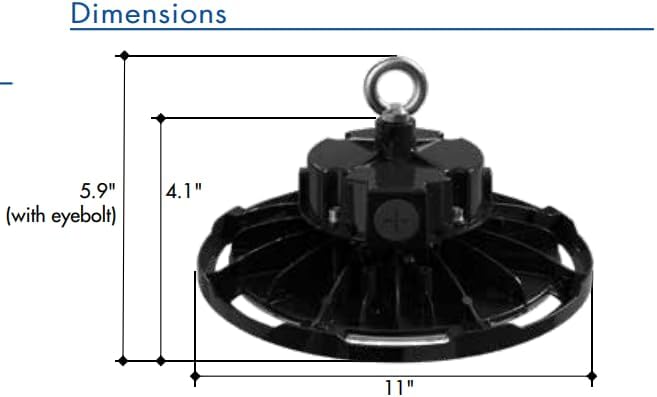
Figure 2: Approximate dimensions of the luminaire, including height with eyebolt and diameter.
5. Суулгах заавар (Тохируулга)
This luminaire is designed for suspended mounting. Follow these steps for proper installation:
- Эхлээд аюулгүй байдал: Ensure power to the installation area is turned OFF at the circuit breaker before beginning any work.
- Тоног төхөөрөмжийг шалгах: Carefully remove the luminaire from its packaging and inspect for any damage. Do not install if damaged.
- Суурилуулах цэгийг бэлтгэх: Identify a suitable structural mounting point capable of safely supporting the luminaire's weight (6.44 lbs). Install appropriate mounting hardware (e.g., chain, hook) if not already present.
- Attach Eyebolt: Securely thread the provided eyebolt into the top of the luminaire housing.
- Suspend Fixture: Carefully lift the luminaire and attach the eyebolt to your chosen mounting hardware. Ensure the fixture is stable and level.
- Утас:
- Open the wiring compartment on the top of the fixture.
- Connect the AC input wires (Line, Neutral, Ground) from your power supply to the corresponding wires on the luminaire. Refer to local electrical codes for proper wiring practices.
- For 0-10V dimming functionality, connect the purple (DIM+) and gray (DIM-) wires from your 0-10V dimmer to the corresponding dimming wires on the luminaire. If dimming is not desired, cap these wires individually.
- Бүх холболтууд найдвартай, тусгаарлагдсан эсэхийг шалгаарай.
- Хаах тасалгаа: Утасны тасалгааны тагийг найдвартай хаа.
- Эрчим хүчийг сэргээх: Суурилуулалт дуусч, бүх холболтыг шалгасны дараа таслагчийн хүчийг сэргээнэ үү.
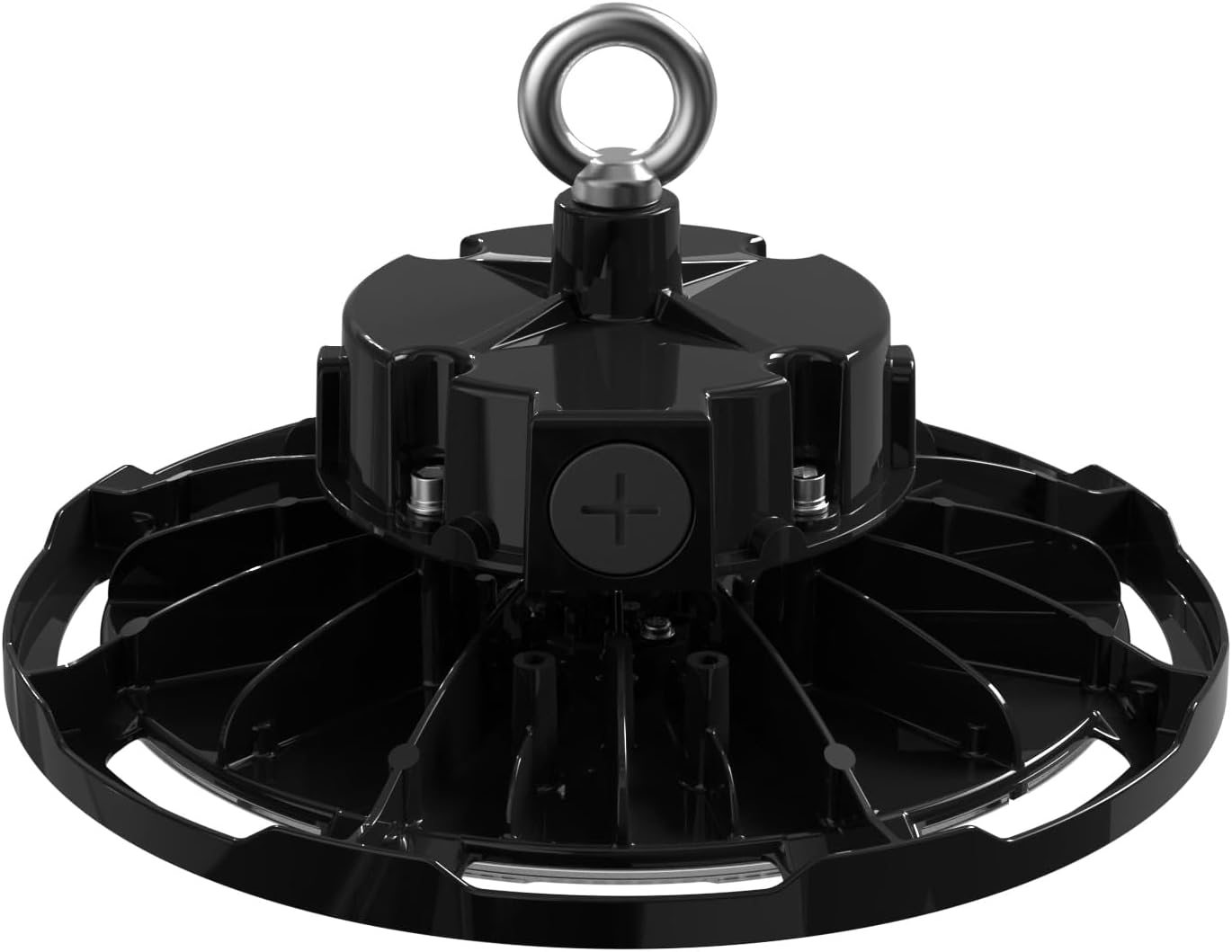
Зураг 3: Дээд тал view of the luminaire, illustrating the eyebolt for suspension and the location of the wiring compartment.
6. Үйл ажиллагаа
The TCP Economy LED UFO High Bay Luminaire operates immediately upon receiving power.
- Асаах/унтраах: Control the luminaire's power supply via the connected wall switch or circuit breaker.
- Бүдэгрүүлж байна: If connected to a compatible 0-10V dimmer, adjust the light output by manipulating the dimmer control. The luminaire will respond to the 0-10V signal to vary its brightness.
7. Засвар үйлчилгээ
The TCP Economy LED UFO High Bay Luminaire requires minimal maintenance.
- Цэвэрлэгээ: Ensure power is disconnected before cleaning. Use a soft, damp cloth to wipe the exterior of the fixture. Do not use abrasive cleaners or solvents, as these may damage the finish or optical components.
- Шалгалт: Periodically inspect the fixture and its mounting hardware for any signs of damage, loose connections, or wear. Address any issues promptly.
- Хэрэглэгчийн засвар үйлчилгээ хийх боломжтой хэсэг байхгүй: There are no user-serviceable parts inside the luminaire. Do not attempt to open or repair the unit.
8. Алдаа засах
If the luminaire is not functioning as expected, perform the following basic checks:
- Гэрэлгүй:
- Verify that the power supply to the fixture is active at the circuit breaker and wall switch.
- Check all wiring connections for proper contact and insulation.
- Бүдэгрүүлэлт ажиллахгүй байна:
- Ensure the 0-10V dimmer is compatible and correctly wired to the luminaire's dimming leads (purple and gray).
- Verify the dimmer is functioning correctly.
- Анивчих:
- Утасны холболт сул байгаа эсэхийг шалгана уу.
- Оролтын хэмжээг баталгаажуулна ууtage нь тогтвортой бөгөөд тодорхой хязгаарт байна.
If these steps do not resolve the issue, contact customer support for assistance. Do not attempt further repairs yourself.
9. Баталгаат хугацаа ба дэмжлэг
This TCP Economy LED UFO High Bay Luminaire is covered by a Таван жилийн хязгаарлагдмал баталгаат хугацаа against defects in manufacturing. Please retain your proof of purchase for warranty claims.

Figure 4: Warranty statement and product listings (UL and cUL listed, IP65 Rated).
For technical support, warranty inquiries, or replacement parts, please contact TCP customer service:
- Webсайт: www.tcpi.com
- Утас: Refer to TCP's official webодоогийн холбоо барих утасны сайт.


