1. Танилцуулга
The heltec bms HT-ED50AC8 is an advanced 8-channel battery capacity tester designed for comprehensive analysis of various lithium battery types. This device facilitates precise charging, discharging, and equalization processes, making it suitable for battery repair, research, and quality control. Each channel operates independently with a dedicated processor, ensuring accurate data collection and control. This manual provides essential information for the safe and effective use of your HT-ED50AC8 tester.
2. Аюулгүй байдлын мэдээлэл
Төхөөрөмжийг ажиллуулахаасаа өмнө аюулгүй байдлын бүх зааврыг уншиж, ойлгоорой. Эдгээр зааврыг дагаж мөрдөхгүй байх нь цахилгаан цочрол, гал түймэр эсвэл ноцтой гэмтэл учруулж болзошгүй.
- Эрчим хүчний эх үүсвэр: Use only the specified power source (Corded Electric) and ensure proper grounding.
- Агааржуулалт: Ensure adequate ventilation around the device. Do not block the air outlets. The device features an independent heat source air duct with temperature-controlled fans.
- Батерейтай харьцах: Always handle batteries with care. Ensure correct polarity when connecting batteries to avoid damage to the device or batteries.
- Байгаль орчин: Operate the device in a dry, stable environment, away from flammable materials, moisture, and extreme temperatures.
- Засвар үйлчилгээ: Төхөөрөмжийг өөрөө нээх, засах гэж бүү оролдоорой. Бүх үйлчилгээг мэргэшсэн боловсон хүчинд шилжүүлээрэй.
- Яаралтай унтрах: Familiarize yourself with the location of the main power switch for quick shutdown in emergencies.
3. Багцын агуулга
Бүх зүйл багцад байгаа эсэхийг шалгана уу:
- heltec bms 8-Channel Lithium Battery Capacity Tester (HT-ED50AC8)
- Цахилгааны утас
- Connection Cables with Alligator Clips (8 sets)
- USB Communication Cable (for PC connection)
- Хэрэглэгчийн гарын авлага (энэ баримт бичиг)
4. Бүтээгдэхүүн дууссанview
The HT-ED50AC8 features an intuitive design for efficient battery testing. Below is a diagram highlighting key components and their functions.
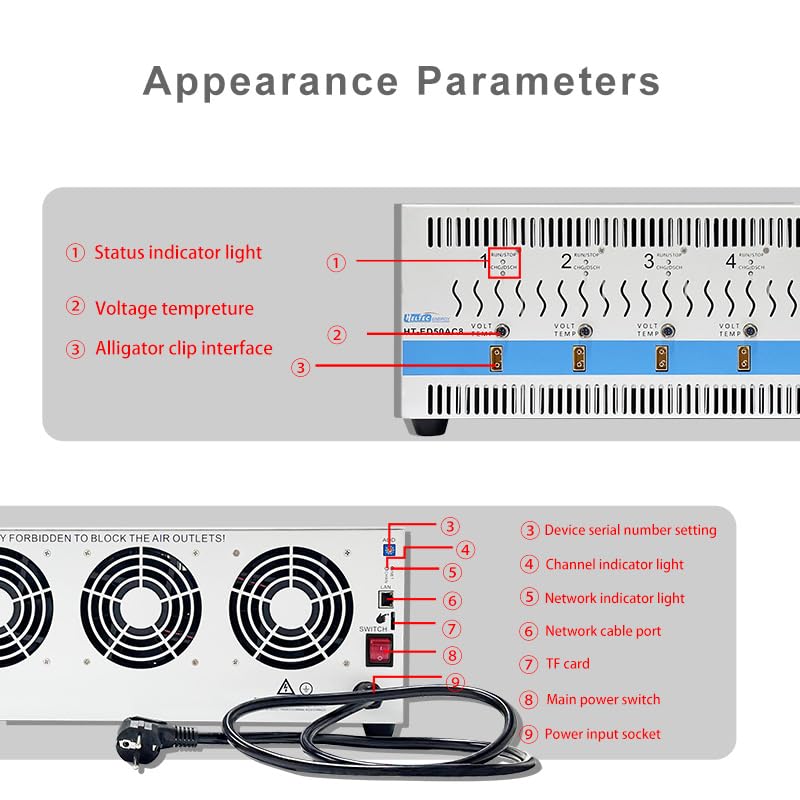
Зураг 4.1: Front and Rear Panel Layout of the HT-ED50AC8
Урд самбарын бүрэлдэхүүн хэсгүүд:
- Төлөв заагч гэрэл: Displays the operational status of each channel.
- Ботьtage/Temperature Ports: Connectors for voltage and temperature probes.
- Alligator Clip Interface: Connection points for battery cables with alligator clips.
Арын самбарын бүрэлдэхүүн хэсгүүд:
- Device Serial Number Setting: For identification and software configuration.
- Channel Indicator Light: Indicates the status of individual channels.
- Сүлжээний заагч гэрэл: Сүлжээний холболтын төлөвийг харуулна.
- Сүлжээний кабелийн порт: For connecting to a computer network.
- TF картын оролт: Мэдээлэл хадгалах зориулалттай.
- Үндсэн цахилгаан унтраалга: Төхөөрөмжийн үндсэн хүчийг удирддаг.
- Цахилгаан оролтын залгуур: Цахилгааны утсыг холбох зориулалттай.
5. Тохиргоо
Follow these steps to set up your HT-ED50AC8 battery tester:
5.1 Физик байрлал ба цахилгаан холболт
- Place the device on a stable, flat surface with sufficient clearance around the air vents for proper cooling.
- Connect the power cord to the Power Input Socket (9) on the rear panel and then to a suitable power outlet.
- Ensure the Main Power Switch (8) is in the OFF position before connecting power.

Зураг 5.1: Rear Panel with Power Connection and Air Ducts
5.2 Software Installation and PC Connection
- Install the provided software on your computer. Refer to the software's installation guide for detailed steps.
- Connect the device to your computer using the USB communication cable or a network cable via the Network Cable Port (7).
- Launch the software. The Network Indicator Light (6) should illuminate, indicating a successful connection.
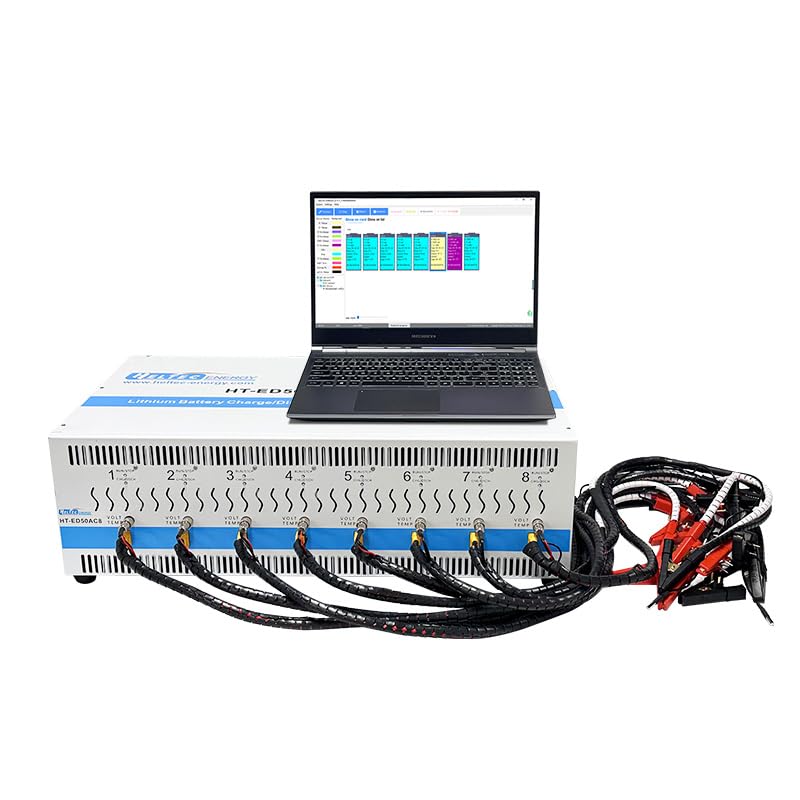
Зураг 5.2: Device Connected to PC with Software Interface
5.3 Зайны холболт
- Ensure the device is powered off before connecting batteries.
- Connect the battery cables with alligator clips to the Alligator Clip Interfaces (3) for each channel you intend to use.
- Attach the alligator clips to the battery terminals, ensuring correct polarity (red for positive, black for negative).
- The battery test probe is height-adjustable; adjust it for proper contact with various battery types.
Зураг 5.3: Battery Connections to the Tester
6. Үйл ажиллагаа
The HT-ED50AC8 offers various testing modes and features for comprehensive battery analysis.
6.1 Асаах болон эхлүүлэх
- After connecting all cables and batteries, turn on the Main Power Switch (8).
- Open the control software on your computer. The software should detect the device.
- The Status Indicator Lights (1) and Channel Indicator Lights (4) will show the device's readiness.
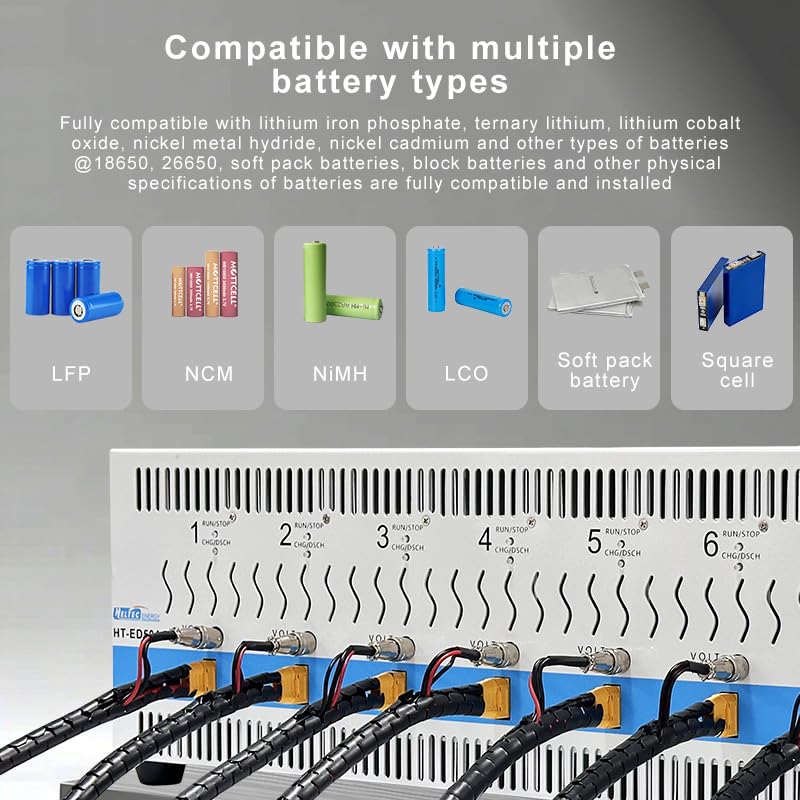
6.2 Батерейны нийцтэй байдал
The HT-ED50AC8 is compatible with a wide range of battery chemistries and physical specifications:
- Лити төмрийн фосфат (LFP)
- Ternary Lithium (NCM)
- Lithium Cobalt Oxide (LCO)
- Никель металл гидрид (NiMH)
- Nickel Cadmium (NiCd)
- Compatible physical specifications include 18650, 26650, soft pack batteries, and block batteries.

Зураг 6.1: Тохиромжтой батерейны төрлүүд
6.3 Test Modes and Parameters
The software provides various test steps and customizable parameters:
- Цэнэглэх горимууд: Constant Current (CC) charging, Constant Voltage (CV) charging, Constant Current Constant Voltage (CCCV) charging.
- Discharging Modes: Constant Current (CC) discharge, Constant Power (CP) discharge, Constant Resistance (CR) discharge.
- Бусад алхамууд: Shelving, step jump capability.
- Customize parameters such as charging voltage, current limits, and duration for each step.
6.4 Data Recording and Analysis
- The device records test process data, which can be viewed and analyzed through the software.
- The software offers 3 Y-axes (voltage, current, capacity) and a time axis for curve plotting.
- Data report functions are available for detailed analysis and export.
- Test results can be grouped according to custom standards, with visual indicators on the device and software.
6.5 Нарийвчилсан онцлог
- Dedicated Processors: Each channel has a dedicated processor for precise capacity calculation, timing, voltage, and current control.
- Full Channel Isolation: Allows direct testing of battery cells within an entire battery pack without interference.
- Ухаалаг хамгаалалт: Features include module design, 50A charge-discharge capability, intelligent temperature monitoring, data visualization, custom grouping, anti-reverse connection, compatible installation, constant current protection, and precise calculation.

Зураг 6.2: Dedicated Processor Architecture

Зураг 6.3: Intelligent Protection Features
7. Засвар үйлчилгээ
Proper maintenance ensures the longevity and accuracy of your HT-ED50AC8 tester.
- Цэвэрлэгээ: Regularly clean the exterior of the device with a soft, dry cloth. Do not use liquid cleaners or solvents.
- Агааржуулалт: Periodically check that the air vents are clear of dust and debris to maintain optimal cooling performance.
- Хадгалах: Удаан хугацаагаар ашиглаагүй тохиолдолд төхөөрөмжийг нарны шууд тусгал, хэт температураас хол, сэрүүн, хуурай газар хадгална.
- Кабелийн үзлэг: Inspect all cables and connectors regularly for signs of wear or damage. Replace any damaged cables immediately.
8. Алдаа засах
If you encounter issues with your HT-ED50AC8, refer to the following common problems and solutions:
| Асуудал | Боломжит шалтгаан | Шийдэл |
|---|---|---|
| Төхөөрөмж асахгүй байна. | Power cord not connected or faulty; Main power switch off. | Ensure power cord is securely connected and the main power switch is ON. Check power outlet. |
| Software does not detect the device. | USB/Network cable not connected or faulty; Software not installed correctly; Device drivers missing. | Verify cable connections. Reinstall software and drivers. Restart both device and computer. |
| Channel not responding or showing incorrect readings. | Battery not connected correctly; Faulty battery cable; Channel malfunction. | Check battery polarity and connection. Try a different battery or cable. If issue persists, contact support. |
| Overheating or fan noise. | Blocked air vents; High ambient temperature; Prolonged high-current operation. | Ensure air vents are clear. Operate in a well-ventilated area. The intelligent temperature control system will adjust fan speed. If alarm, reduce load. |
| Test data not saving or incorrect. | TF card full or faulty; Software error. | Check TF card status, replace if necessary. Ensure software is up-to-date. |
9. Техникийн үзүүлэлтүүд
Key technical specifications for the heltec bms HT-ED50AC8 battery tester:
- Загварын дугаар: HT-ED50AC8
- Брэнд: heltec bms
- Сувгууд: 8 (fully isolated)
- Цэнэглэх/цэнэглэх гүйдэл: Нэг суваг бүрт 50А хүртэл
- Эрчим хүчний эх үүсвэр: Утастай цахилгаан
- Тохиромжтой батерейны төрлүүд: Lithium Iron Phosphate, Ternary Lithium, Lithium Cobalt Oxide, Nickel Metal Hydride, Nickel Cadmium
- Compatible Battery Sizes: 18650, 26650, soft pack, block batteries
- Хөргөх: Independent heat source air duct with temperature-controlled speed-adjustable fan
- Холболт: USB, Network (for PC control)
- Өгөгдөл хадгалах: TF картны үүр
- Хэмжээ: Ойролцоогоор 29.13 x 20.47 x 12.2 инч (Багцын хэмжээ)
- Барааны жин: Ойролцоогоор 28 килограмм (61.6 фунт)
- UPC: 762716254336
10. Дэмжлэг
For technical assistance, warranty information, or service inquiries, please contact heltec bms customer support. Refer to the product packaging or the official heltec bms webхамгийн сүүлийн үеийн холбоо барих мэдээллийг авах сайт.
Онлайн нөөцүүд: -д зочилно уу heltec bms Store on Amazon for product updates and additional information.


