1. Танилцуулга
This manual provides comprehensive instructions for the installation, operation, and maintenance of your Antec CX700 ATX Mid Tower Gaming Case. Designed for PC enthusiasts, this case features a sleek, modern design with a tempered glass side panel and pre-installed ARGB fans to enhance visual appeal and ensure optimal airflow. Please read this manual thoroughly before beginning assembly to ensure proper setup and safe operation.
2. Техникийн үзүүлэлтүүд
| Онцлог | Дэлгэрэнгүй |
|---|---|
| Брэнд | Антек |
| Загварын дугаар | CX700 |
| Кейсийн төрөл | Дунд цамхаг |
| Эх хавтангийн нийцтэй байдал | ATX |
| Өнгө | Хар |
| Материал | Хайлшин ган, хуванцар |
| Зүйлийн жин | 5.5 килограмм (12.1 фунт) |
| Хөргөх арга | Агаар |
| Pre-installed ARGB Fans | 3 (Front-mounted) |
| Сэнсний дэмжлэг (хамгийн их) | Front: 3x120mm, Top: 3x120mm, Rear: 1x120mm, Bottom: 3x120mm |
| USB 3.0 портууд | 2 |
| USB Type-C портууд | 1 |
| Аудио портууд | Headphone, Microphone |
| GPU зай (хамгийн их) | 410мм (16.14 инч) |
| HDD дэмжлэг | 3.5 инч |
| SSD Support | 2.5 инч |
| PSU Length (Max) | 225 мм |
3. Багцын агуулга
- Antec CX700 ATX Mid Tower Gaming Case
- Pre-installed ARGB Fans (3 fans, typically front-mounted as per product title)
- Accessory Box (Screws, cable ties, user manual)
- Хажуугийн шилэн хавтан
4. Тохируулах заавар
4.1 Савлах, шалгах
Carefully remove the case from its packaging. Inspect for any signs of damage during transit. The tempered glass panel is fragile; handle with care.
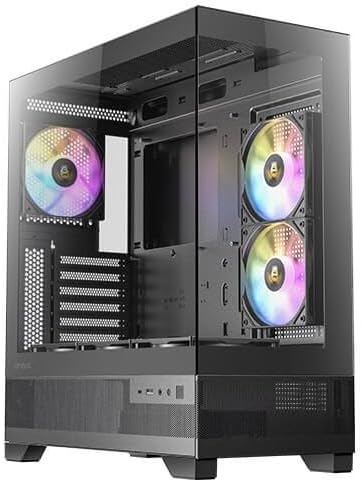
Зураг 1: Урд ба хажуу view of the Antec CX700 case, showcasing the tempered glass panel and pre-installed fans.
4.2 Removing Side Panels
To access the interior for component installation, remove the tempered glass side panel and the solid rear side panel.
- Locate the thumbscrews on the rear of the case securing the tempered glass panel.
- Carefully unscrew these thumbscrews.
- Gently pull the tempered glass panel away from the chassis. Lay it flat on a soft, clean surface to prevent scratches or damage.
- Repeat the process for the solid rear side panel if necessary for cable management access.

Зураг 2: Ар талд view of the Antec CX700 case, showing the rear fan and expansion slots. The side panel is removed for internal access.
4.3 Эх хавтангийн суурилуулалт
Install your ATX motherboard into the designated area. Ensure all standoffs are correctly aligned and secured.
4.4 Бүрэлдэхүүн хэсгүүдийн суурилуулалт
Install your CPU, RAM, GPU (up to 410mm length), storage drives (3.5" HDD, 2.5" SSD), and power supply unit (PSU, up to 225mm length) according to their respective manuals and the case's layout.

Зураг 3: Дээд тал view of the Antec CX700 case, highlighting the pre-installed fans and internal layout for component placement.
4.5 Кабелийн менежмент
Utilize the cable routing cutouts and tie-down points behind the motherboard tray to manage cables effectively. This improves airflow and aesthetics.
4.6 Урд талын самбарын оролт/гаралтын холболтууд
Connect the front panel I/O cables (USB 3.0, USB Type-C, HD Audio, Power, Reset, LED) to the corresponding headers on your motherboard.
- Цахилгаан товч: Системийн тэжээлийг эхлүүлнэ.
- Дахин тохируулах товч: Системийг дахин эхлүүлнэ.
- USB 3.0 портууд (x2): Өндөр хурдны өгөгдөл дамжуулах зориулалттай.
- USB Type-C порт (x1): Орчин үеийн төхөөрөмжүүдийн холболтын хувьд.
- Чихэвчний Жак: Аудио гаралт.
- Микрофоны Жак: Аудио оролт.
5. Ашиглалтын заавар
Once all components are installed and connected, replace the side panels. Connect your peripherals, monitor, and power cable. Press the power button on the top panel to start your system. The pre-installed ARGB fans will illuminate, providing customizable lighting effects.
6. Засвар үйлчилгээ
Тогтмол засвар үйлчилгээ нь таны компьютерын гэр болон эд ангиудын оновчтой ажиллагаа, удаан эдэлгээг баталгаажуулдаг.
- Тоосны шүүлтүүр: The case includes magnetic dust filters (e.g., on the top panel) that can be easily removed and cleaned with water or a soft brush. Clean these regularly to maintain airflow and prevent dust buildup inside the case.
- Дотоод цэвэрлэгээ: Periodically open the side panels and use compressed air to remove dust from internal components and fans. Ensure the system is powered off and unplugged before cleaning.
- Шилэн шил: Clean the tempered glass panel with a microfiber cloth and a non-abrasive glass cleaner. Avoid harsh chemicals.
7. Алдаа засах
Хэрэв танд асуудал тулгарвал дараах нийтлэг алдааг олж засварлах алхмуудыг үзнэ үү.
- Систем асахгүй байна:
- Цахилгаан хангамжийг ханын залгуурт зөв холбож, PSU унтраалга 'ON' байрлалд байгаа эсэхийг шалгаарай.
- Verify all power cables (24-pin ATX, 8-pin CPU, PCIe for GPU) are securely connected to the motherboard and components.
- Check that the front panel power button cable is correctly connected to the motherboard's front panel header.
- Фенүүд эргэхгүй байна / ARGB асахгүй байна:
- Confirm that the fan power cables and ARGB cables are correctly connected to the motherboard or a dedicated ARGB controller.
- Refer to your motherboard manual for proper ARGB header connections and software control.
- Дэлгэцийн гаралт байхгүй:
- Ensure your monitor cable is connected to the graphics card (GPU) output, not the motherboard's integrated graphics ports (unless using integrated graphics).
- График картыг PCIe үүрэнд дахин суулгана уу.
8. Баталгаат хугацаа ба дэмжлэг
The Antec CX700 ATX Mid Tower Gaming Case comes with a standard manufacturer's warranty. For specific warranty terms, duration, and to register your product, please visit the official Antec webсайт эсвэл хэрэглэгчийн дэмжлэгтэй холбогдоно уу. Баталгаат нэхэмжлэл гаргахын тулд худалдан авалтаа нотлох баримтаа хадгалаарай.
For further technical assistance or support, please refer to the Antec support resources available online.


