1. Бүтээгдэхүүн дууссанview
The QIACHIP KR3001A is a versatile 1-channel wireless remote control relay receiver designed for various applications. It operates within a wide voltage range of 5V to 60V DC and supports 433Mhz EV1527 learning code remote controls. This system allows for remote control of devices such as garage doors, electronic gates, LED lighting, and car accessories.

Image 1.1: QIACHIP KR3001A Wireless Remote Switch kit, including the receiver module, its protective casing, and two remote transmitters.
2. Техникийн үзүүлэлтүүд
| Онцлог | Дэлгэрэнгүй |
|---|---|
| Бүтээгдэхүүний загвар | KR3001A |
| Оролтын хэмжээtage | DC 5V - 60V (Ultra Wide) |
| Дамжуулах зай | 50 метр хүртэл (нээлттэй зай) |
| Supported Remote Type | EV1527 Learning Code (433Mhz) |
| Гаралтын терминал | NO, NC, COM (Dry Contact Relay) |
| ПХБ-ийн хэмжээсүүд | 35 x 30 x 18 mm (L, W, H) |
| Терминалуудын тоо | 3 |
| Холбоо барих материал | Мөнгө |
| Battery Cell Type (Transmitter) | Lithium Manganese Dioxide (included) |
3. Тохиргоо ба суурилуулалт
3.1. Бүрэлдэхүүн хэсгүүдийг тодорхойлох

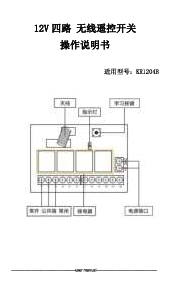
Зураг 3.1: Нарийвчилсан view of the KR3001A receiver module, highlighting the antenna, learning button, indicator light, and terminal connections (NC, COM, NO, V+, V-).
The receiver module features an antenna for signal reception, a learning button for pairing, an indicator light for status, and screw terminals for connections:
- V+: Positive power input (DC 5V-60V)
- V-: Negative power input (Ground)
- COM: Common terminal of the relay
- ҮГҮЙ: Normally Open terminal of the relay (disconnected from COM when relay is off, connected when on)
- NC: Normally Closed terminal of the relay (connected to COM when relay is off, disconnected when on)
3.2. Wiring Principles
The KR3001A is a dry contact relay with passive output. This means the relay acts as a switch, controlling the circuit of your connected device without providing power to it. You must provide external power to your device.
Video 3.2.1: This video demonstrates the wiring and working principles of the QIACHIP 1-channel remote control switch, including how to connect power and a load (e.g., an LED light) to the relay terminals.
For basic operation, connect the power supply to the V+ and V- terminals. The device you wish to control (e.g., an LED light, motor) should be connected to the COM and either NO or NC terminals, depending on the desired default state (normally open or normally closed).

Image 3.2.2: Wiring diagrams illustrating how to connect a light bulb to the receiver using either the Normally Open (NO) or Normally Closed (NC) contacts. The receiver's power input is DC 5V-60V.
When the relay is not activated, the NO port is disconnected from COM, and the NC port is connected to COM. When the relay is activated, the NO port connects to COM, and the NC port disconnects from COM.
4. Үйлдлийн горимууд
The KR3001A supports four operating modes: Momentary, Toggle, Latched, and Delay. These modes determine how the relay responds to button presses on the remote control.
Video 4.1: This video demonstrates the Momentary, Toggle, and Latched operating modes of the KR3001A receiver with a remote control and an LED indicator.

Image 4.2: Visual representation of the four operating modes: Momentary (press and hold ON, release OFF), Toggle (press ON, press again OFF), Latched (Press A ON, Press B OFF), and Delay OFF (press button, turns off after a set time).
4.1. Түр зуурын горим
In Momentary mode, the relay remains activated only while the remote control button is pressed. Releasing товчлуур нь релейг идэвхгүй болгоно.
- Үйлдэл: Press and hold the remote button.
- Үр дүн: The connected device turns ON.
- Үйлдэл: Release the remote button.
- Үр дүн: The connected device turns OFF.
4.2. Сэлгэх горим
In Toggle mode, each press of the remote control button alternates the state of the relay. One press turns it ON, the next press turns it OFF.
- Үйлдэл: Press the remote button once.
- Үр дүн: The connected device turns ON.
- Үйлдэл: Press the same remote button again.
- Үр дүн: The connected device turns OFF.
4.3. Түгжээтэй горим
Latched mode requires a remote control with at least two buttons (e.g., A and B). Pressing one button activates the relay, and it remains active until the other button is pressed to deactivate it.
- Үйлдэл: Press button 'A' on the remote.
- Үр дүн: The connected device turns ON.
- Үйлдэл: Press button 'B' on the remote.
- Үр дүн: The connected device turns OFF.
4.4. Delay Mode
In Delay mode, the relay activates when the button is pressed and automatically deactivates after a preset time (e.g., 5s, 10s, 15s, 20s). The specific delay time is configured during the pairing process.
- Үйлдэл: Press the remote button.
- Үр дүн: The connected device turns ON and starts a countdown.
- Үйлдэл: After the set delay time.
- Үр дүн: The connected device automatically turns OFF.
5. Хослуулах заавар
To use your remote control with the KR3001A receiver, you must first pair them. The pairing process also sets the operating mode.
- Clear Existing Pairings (Factory Reset): To clear all previously paired remote controllers, press the learning button on the receiver 8 times. The indicator light will flash to confirm successful clearing.
- Хослуулах горимд орно уу: Press the learning button on the receiver a specific number of times according to the desired operating mode:
- 1 удаа: Momentary Mode
- 2 удаа: Toggle Mode
- 3 удаа: Latched Mode (requires a 2-button remote)
- 4 удаа: Delay Off Mode (5 seconds)
- 5 удаа: Delay Off Mode (10 seconds)
- 6 удаа: Delay Off Mode (15 seconds)
- 7 удаа: Delay Off Mode (20 seconds)
- Алсын удирдлагатай хослуул: After pressing the learning button the required number of times, the indicator light on the receiver will flash. Immediately press the desired button on your remote control. The indicator light will flash again to confirm successful pairing.
6. Хэрэглээний хувилбарууд
The QIACHIP KR3001A Wireless Remote Switch is suitable for a wide range of applications due to its versatile operating modes and wide voltage оролт.
- Гэрийн автоматжуулалт: Control LED lights, light strings, Christmas tree lights, and other stage гэрэлтүүлэг.
- Хандалтын хяналт: Operate garage doors, electronic gates, and electromagnetic locks.
- Автомашин: Control car doors, sunroofs, trunks, and interior lighting.
- Хамгаалалтын системүүд: Integrate with motorcycle alarms or other security devices.
- General Electrical Appliances: Remotely switch various electrical appliances and heating systems.

Зураг 6.1: Жишээ ньample of using the remote switch for convenient gate or door control, suitable for electric locks.

Image 6.2: Illustration of the remote switch being used to control car doors, sunroofs, or trunks.

Зураг 6.3: Коллажийн шоуasing diverse applications for the wireless remote switch, from home lighting to automotive features.
7. Алдаа засах
If you encounter issues with your QIACHIP KR3001A, please refer to the following common troubleshooting steps:
7.1. No Output Voltage Илэрсэн
If you cannot detect output voltage, troubleshoot as follows:
- Утас шалгах: Ensure the product has been correctly wired. The COM terminal should be jumped to the positive power supply if you intend to switch the positive line of your load.
- Хослох төлөв: Verify that the product has been successfully paired with the remote control. Refer to Section 5 for pairing instructions.
- Терминалын сонголт:
- If the product relay is ON, the detected terminals should be the NO terminal and the negative pole of the power supply.
- If the product relay is OFF, the detection terminals should be the NC terminal and the negative pole of the power supply.
7.2. Remote Control Range Issues
The transmitting distance is rated at 50 meters in open space. Obstacles such as walls, metal structures, or other electronic interference can significantly reduce the effective range. Ensure the antenna is unobstructed and consider the environment when assessing range performance.
Video 7.2.1: A short demonstration of the remote control's range for the KR3001A, showing its functionality over a distance in an open environment.
8. Засвар үйлчилгээ
The QIACHIP KR3001A is designed for low maintenance. Keep the device clean and dry. Avoid exposing it to extreme temperatures or moisture. Replace remote control batteries as needed (Lithium Manganese Dioxide batteries are included).
9. Баталгаат хугацаа ба дэмжлэг
For warranty information or technical support, please contact QIACHIP customer service through the retailer where the product was purchased or visit the official QIACHIP webсайт.
QIACHIP Store Link: Visit the QIACHIP Store