1. Танилцуулга
This manual provides detailed instructions for the HOU Keyboard Case designed for the iPad Pro 13-inch M5/M4 models. Please read this manual carefully before use to ensure proper operation and to maximize the product's lifespan.
1.1 Тохиромжтой байдал
This keyboard case is specifically designed for the iPad Pro 13-inch M5/M4 (2025 models). Compatible iPad models include: A2925, A2926, A3007.
Important: This case is NOT compatible with iPad Air 13 (M2) 2024 (models A2898, A2899, A2900) or iPad Pro 12.9-inch (2017-2022) (6th/5th/4th/3rd/2nd/1st generation).
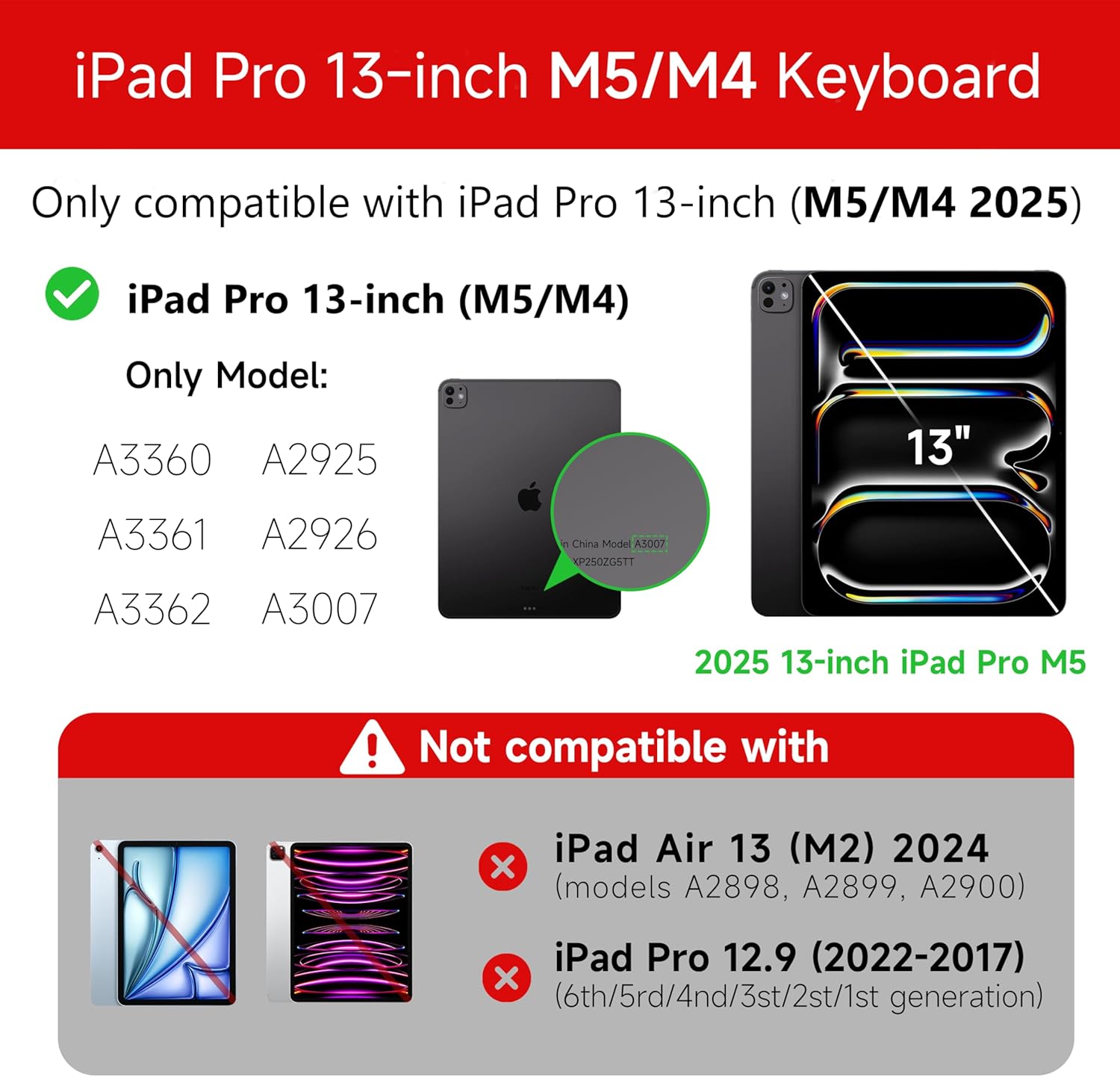
Figure 1: Compatibility details for the HOU iPad Pro 13-inch Keyboard Case.
2. Тохиргоо
2.1 Гарыг цэнэглэх
Before initial use, fully charge the keyboard. Connect the provided USB-C cable to the charging port on the keyboard and to a power source. The charging indicator light will show the charging status.
- Цэнэглэх порт: Төрөл-C
- Цэнэглэх хугацаа: Approximately <2 hours
- Зайны багтаамж: 500 мАч
2.2 iPad Pro-гоо залгах
The keyboard case features a magnetic design for secure attachment. Align your iPad Pro 13-inch with the magnetic back panel of the case. The strong magnets will securely hold your iPad in place, providing stability.

Figure 2: Magnetic attachment for secure iPad placement.
2.3 Bluetooth холболт
To connect the keyboard to your iPad Pro via Bluetooth:
- Гар цэнэглэгдэж, асаалттай байгаа эсэхийг шалгаарай.
- Өөрийн iPad дээр очно уу Тохиргоо > Bluetooth мөн Bluetooth-г асаана уу.
- Гар дээр дараад удаан дарна уу Fn + Control + R for 3 seconds until the indicator light flashes, indicating pairing mode.
- On your iPad, select the keyboard from the list of available devices (e.g., "HOU Keyboard").
- Холбогдсоны дараа гар дээрх заагч гэрэл анивчихаа болино.
After the initial connection, the keyboard should automatically reconnect to your iPad when both devices are powered on and Bluetooth is enabled.
3. Ашиглалтын заавар
3.1 Тохируулах боломжтой Viewing Angings
The keyboard case features a floating design that allows for angle adjustment up to 135 degrees. The keyboard base opens at a 45-degree angle, providing enhanced stability for various viewing and typing positions.
Figure 3: Adjustable viewing angle up to 135 degrees.
3.2 Арын гэрэлтүүлгийн функц
The keyboard features an adaptive backlight with 7 different colors and 3 adjustable brightness levels. This allows for comfortable typing in various lighting conditions, including low-light environments.

Figure 4: Keyboard backlight in use for typing at night.
3.3 Олон мэдрэгчтэй мэдрэгч самбар
The integrated multi-touch trackpad supports full-area press and various swipe gestures, transforming your iPad into a laptop-like experience. It provides responsive controls for scrolling, dragging, input, and media control.
Adjusting Trackpad Sensitivity: You can adjust the trackpad sensitivity directly from your iPad's settings to match your personal preference.
- руу оч Тохиргоо таны iPad дээр.
- руу шилжих Хүртээмжтэй байдал.
- Find and adjust Мэдрэмжийг хянах.

Figure 5: Multi-touch trackpad functionality and sensitivity adjustment.
3.4 товчлол
The keyboard includes a series of shortcut keys to boost productivity. Refer to the keyboard layout for specific functions.
4. Засвар үйлчилгээ
The exterior of the keyboard case is made from a semi-silicone material, which is wear-resistant and designed to resist fingerprints and stains, making it easy to clean.
- To clean, gently wipe the surface with a soft, damp даавуу.
- Түрэмгий химийн бодис эсвэл зүлгүүрийн материалыг хэрэглэхээс зайлсхий, учир нь эдгээр нь өнгөлгөөг гэмтээж болзошгүй.
- Ensure the charging port and keys are free from dust and debris.
5. Алдаа засах
5.1 Гар Bluetooth-ээр холбогдоогүй байна
- Гар бүрэн цэнэглэгдсэн эсэхийг шалгаарай.
- iPad дээрээ Bluetooth асаалттай байгаа эсэхийг шалгаарай.
- Re-enter pairing mode on the keyboard by pressing and holding Fn + Control + R 3 секундын турш.
- Forget the device in your iPad's Bluetooth settings and attempt to pair again.
- iPad болон гарыг хоёуланг нь дахин эхлүүлнэ үү.
5.2 Trackpad Lag or Unresponsiveness
- This can sometimes occur due to Bluetooth connectivity. Try turning the keyboard off and then back on.
- Ensure there are no obstructions between the keyboard and the iPad that might interfere with the Bluetooth signal.
- Check for any available iPadOS updates, as software improvements can sometimes resolve connectivity issues.
5.3 Арын гэрэл ажиллахгүй байна
- Гарын зай хангалттай цэнэгтэй байгаа эсэхийг шалгаарай.
- Check the keyboard's function keys for backlight control (usually a dedicated key or Fn combination).
6. Техникийн үзүүлэлтүүд
| Онцлог | Дэлгэрэнгүй |
|---|---|
| Брэнд | HOU |
| Тохиромжтой төхөөрөмжүүд | 2025 (M4/M5) iPad Pro 13-inch (A2925/A2926/A3007) |
| Холболтын технологи | Bluetooth 5.2 |
| Гарын тайлбар | Multi-functional with Trackpad |
| Зөвлөмж болгож буй хэрэглээ | Хувийн |
| Онцлог шинж чанарууд | Trackpad, Backlit, Hot Keys & Media Keys, Rechargeable, Lightweight |
| Өнгө | Цагаан |
| Арын гэрлийн өнгө | 7 RGB өнгө |
| Бүтээгдэхүүний хэмжээ (L x W x H) | 32 x 24.2 x 2.7 см |
| Материал | Aluminum, Metal, ABS, Polyurethane (PU), Semi-silicone |
| Зүйлийн жин | 1.1 кг |
| Эрчим хүчний эх үүсвэр | Батерейгаар ажилладаг |
| Зайны багтаамж | ~500 мАч |
| Үйл ажиллагааны гүйдэл | <10мА |
| Зогсоолын цаг | ≥ 30 хоног |
| Ашиглалтын зай | ≤10м |
7. Дэмжлэг
For any questions or further assistance, please contact the seller directly through your Amazon account:
- Амазон данс руугаа нэвтэрнэ үү.
- Go to "Order History".
- Locate your order for the HOU iPad Pro 13-inch Keyboard Case.
- Click on "Contact Seller".