1. Танилцуулга
The Ebitcam Indoor Camera is a versatile home security device designed to provide comprehensive monitoring with its 360° pan/tilt capabilities, 1080P HD video, and advanced features like color night vision and two-way audio. This camera is ideal for monitoring pets, babies, or for general home security. It operates on 2.4GHz WiFi networks.

Figure 1.1: Ebitcam Indoor Camera and its mobile application interface.
2. Хайрцагт юу байна
Бүх зүйл байгаа эсэхийг шалгахын тулд багцын агуулгыг шалгана уу:
- 1x Ebitcam Smart Security Camera
- 1x USB адаптер
- 1x Кабель
- 1x Түргэн суулгах гарын авлага
- 1x холбох хэрэгслүүд
3. Тохируулах гарын авлага
- Камерыг асаах: Connect the camera to a power source using the provided USB adapter and cable. The camera will power on automatically.

Figure 3.1: Connect the camera to power.
- Download the EbitCam App: Scan the QR code in the Quick Installation Guide or search for "EbitCam" in your mobile app store (iOS or Android) to download and install the application.

Figure 3.2: Download the EbitCam mobile application.
- Апп-д төхөөрөмж нэмэх: Open the EbitCam app, create an account if you don't have one, and log in. Tap the "+" icon to add a new device. Follow the on-screen instructions to connect the camera to your 2.4GHz Wi-Fi network. Ensure your phone is connected to the same 2.4GHz Wi-Fi network during setup.

Figure 3.3: Steps to add the camera in the EbitCam app.
- View Шууд хангамж: Once successfully connected, you can view the live video feed from your camera through the EbitCam app.

Зураг 3.4: Амьд view of the camera feed on a smartphone.
4. Ашиглалтын заавар
4.1. Паналах болон хазайлгах удирдлага
The Ebitcam Indoor Camera offers a 355° horizontal and 115° vertical rotation range, allowing you to monitor a wide area. Control the camera's movement directly from the EbitCam app by swiping on the live video feed.
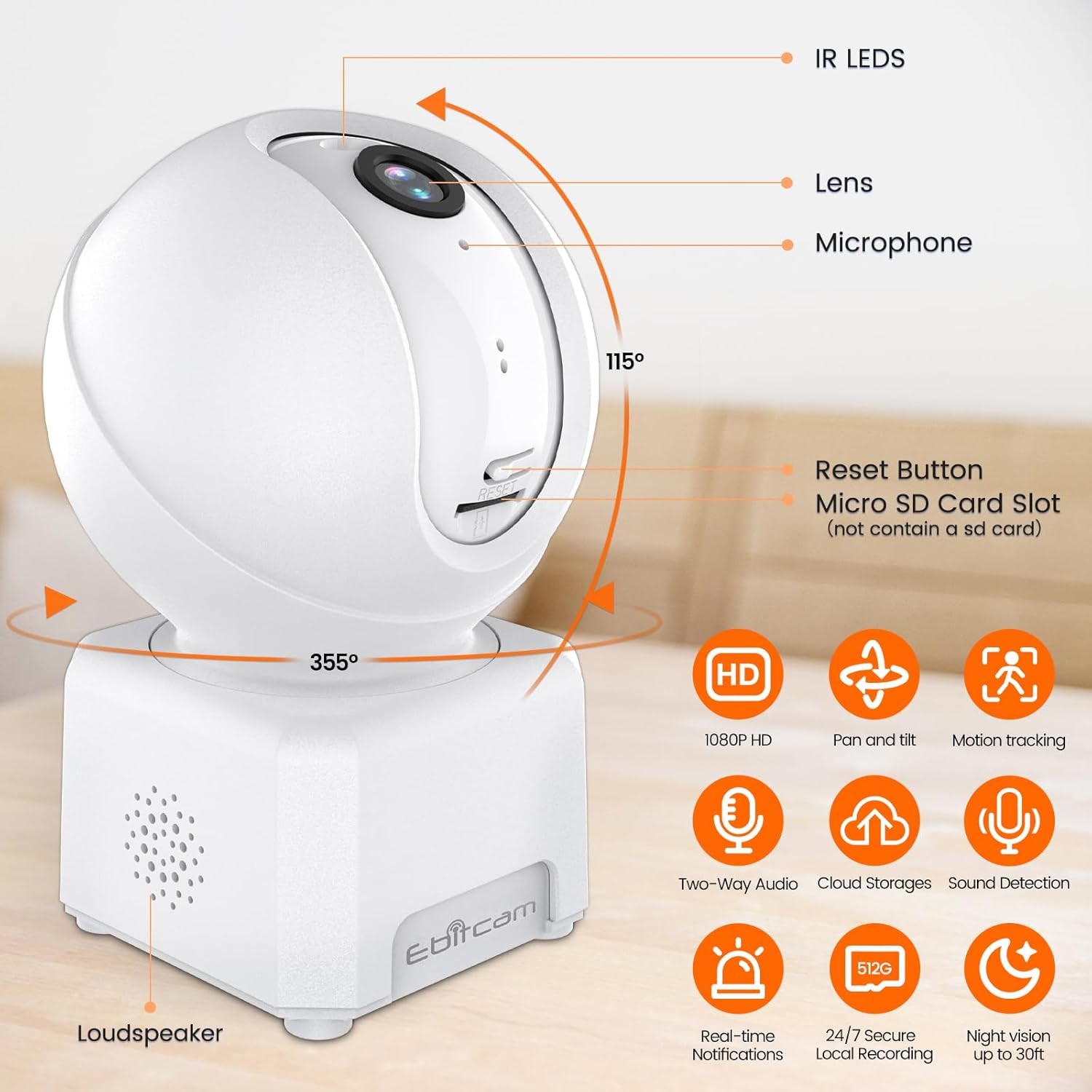
Figure 4.1: Camera's pan and tilt capabilities.
4.2. 1080P HD Color Night Vision
The camera provides sharp 1080P HD resolution and features advanced color night vision technology with a dual-source lighting system. Equipped with 1 PIR LED, it offers clear visibility up to 20 feet in low-light conditions. You can select between vivid full-color night vision or traditional infrared night vision modes within the app.

Figure 4.2: Clear day and night vision capabilities.
4.3. AI Human/Sound/Motion Detection
The camera is equipped with advanced motion sensors and intuitive analytics. It can detect human movement and unusual sounds, sending timely notifications to your EbitCam app. This feature helps minimize unnecessary alerts while ensuring important events are captured.

Figure 4.3: Motion detection and tracking in action.
4.4. Two-Way Audio & Alexa Integration
With a built-in microphone and speaker, the camera supports two-way audio communication, allowing you to speak with and listen to your baby, pet, or family members remotely. The camera also works with Alexa; simply ask Alexa to display the camera's view нийцтэй төхөөрөмжүүд дээр.
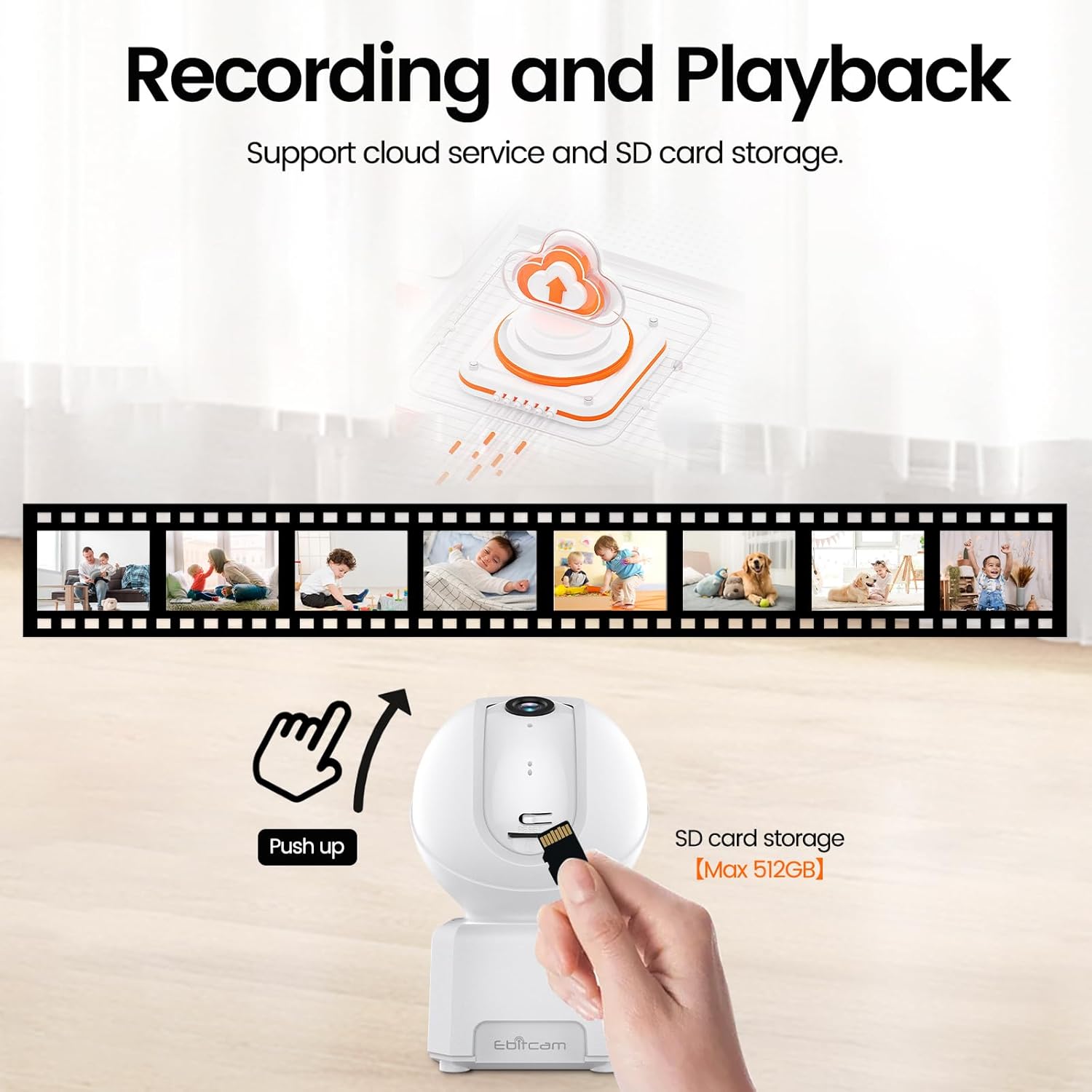
Figure 4.4: Camera integration with Alexa for voice control.
4.5. Multi-User Support
The EbitCam mobile application allows multiple users to control and view the camera simultaneously on both iOS and Android devices. You can easily share access to the camera with friends and family members.

Figure 4.5: Multiple users can access the camera feed.
4.6. Бичлэг ба Хадгалалт
The camera supports two storage options for continuous 24/7 recording:
- Үүл хадгалах сан: Financial encryption video storage technology allows private recording in the EbitCam cloud storage (sold separately). A 30-day free cloud trial is available for first-time users.
- Local SD Card Storage: The camera supports a Micro SD card up to 512GB (not included) for local storage, providing continuous recording without a subscription fee. To access the Micro SD card slot, gently push the camera head upwards.

Figure 4.6: Cloud and local SD card storage options.
5. Засвар үйлчилгээ
To ensure optimal performance and longevity of your Ebitcam Indoor Camera, follow these maintenance guidelines:
- Цэвэрлэгээ: Use a soft, dry cloth to clean the camera's exterior. For the lens, use a microfiber cloth specifically designed for optics. Avoid using harsh chemicals or abrasive cleaners.
- Байршил: Place the camera in a stable location, away from direct sunlight, heat sources, and excessive moisture. Ensure proper ventilation around the device.
- Програм хангамжийн шинэчлэлтүүд: Regularly check the EbitCam app for available firmware updates to ensure your camera has the latest features and security enhancements.
6. Алдаа засах
If you encounter issues with your Ebitcam Indoor Camera, refer to the following common problems and solutions:
| Асуудал | Боломжит шалтгаан | Шийдэл |
|---|---|---|
| Камер асахгүй байна | Power adapter or cable issue; power outlet problem. | Ensure the power adapter is securely connected to the camera and a working power outlet. Try a different outlet. |
| Wi-Fi-д холбогдох боломжгүй байна | Wi-Fi нууц үг буруу байна; 5GHz Wi-Fi сүлжээ; камер чиглүүлэгчээс хэт хол байна. | Verify Wi-Fi password. Ensure you are connecting to a 2.4GHz Wi-Fi network. Move the camera closer to the router. |
| Видео чанар муу | Wi-Fi дохио сул; бохир линз. | Check your Wi-Fi signal strength in the app. Clean the camera lens with a soft cloth. |
| Хөдөлгөөн мэдрэгч ажиллахгүй байна | Detection settings disabled or sensitivity too low. | Check the motion detection settings in the EbitCam app and adjust sensitivity as needed. |
| SD карт бичихгүй байна | SD card not inserted correctly; card full or corrupted; incorrect format. | Ensure the SD card is inserted correctly. Check card capacity and format (FAT32 recommended). Try reformatting the card via the app or replacing it. |
7. Техникийн үзүүлэлтүүд
| Онцлог | Тодорхойлолт |
|---|---|
| Загвар | B0DHX2WK2T |
| Видео бичлэгийн нягтрал | 1080p |
| Viewing өнцөг | 360 Degrees (355° horizontal, 115° vertical) |
| Холболтын технологи | Wi-Fi (2.4GHz) |
| Шөнийн харааны хүрээ | 6 Meters (approx. 20 ft) |
| Хадгалах | Micro SD (512 ГБ хүртэл), Cloud Storage |
| Хоёр талын аудио | Тиймээ |
| Хөдөлгөөн илрүүлэх | AI Human/Sound/Motion Detection |
| Тохиромжтой төхөөрөмжүүд | Amazon Alexa, Android, Apple HomeKit (via app) |
| Эрчим хүчний эх үүсвэр | Утастай цахилгаан (5 вольт DC, 5 ватт) |
| Хэмжээ (L x W x H) | 3.15 x 4.21 x 2.83 инч |
| Зүйлийн жин | 9.9 унц |
| Материал | Акрилонитрил бутадиен стирол (ABS) |
8. Баталгаат хугацаа ба дэмжлэг
Ebitcam is committed to customer satisfaction. Your Ebitcam Indoor Camera comes with a нэг жилийн баталгаат хугацаа from the date of purchase. Additionally, Ebitcam offers насан туршийн техникийн дэмжлэг бүтээгдэхүүний хувьд.
If you encounter any problems or have questions regarding your camera, please contact Ebitcam customer service. They aim to reply within 24 hours for assistance with returns, refunds, or technical queries.
For support, please refer to the contact information provided in your Quick Installation Guide or visit the official Ebitcam webсайт.


