Танилцуулга
This manual provides detailed instructions for the operation and maintenance of your CNBRO Fitness Tracker, model US-X-W5VP. Please read this manual thoroughly before using the device to ensure proper function and to maximize its features. This fitness tracker is designed to monitor various health and activity metrics, including steps, calories burned, distance, and sleep patterns.
Хайрцагт юу байна
Сав баглаа боодлыг нээсний дараа бүх зүйл байгаа эсэхийг шалгана уу:
- 1 x CNBRO Fitness Tracker (US-X-W5VP)
- 1 х хэрэглэгчийн гарын авлага
Тохиргоо
1. Төхөөрөмжийг цэнэглэж байна
Before initial use, fully charge your fitness tracker. The device features a USB direct charging design.
- Locate the USB charging port on the device. This is typically integrated into one end of the strap.
- Insert the USB end of the tracker directly into a standard USB port (e.g., computer, USB wall adapter).
- The screen will indicate charging status. A full charge takes approximately 0.5 hours.
- A fully charged device provides 3-5 days of use and up to 7 days of standby time.
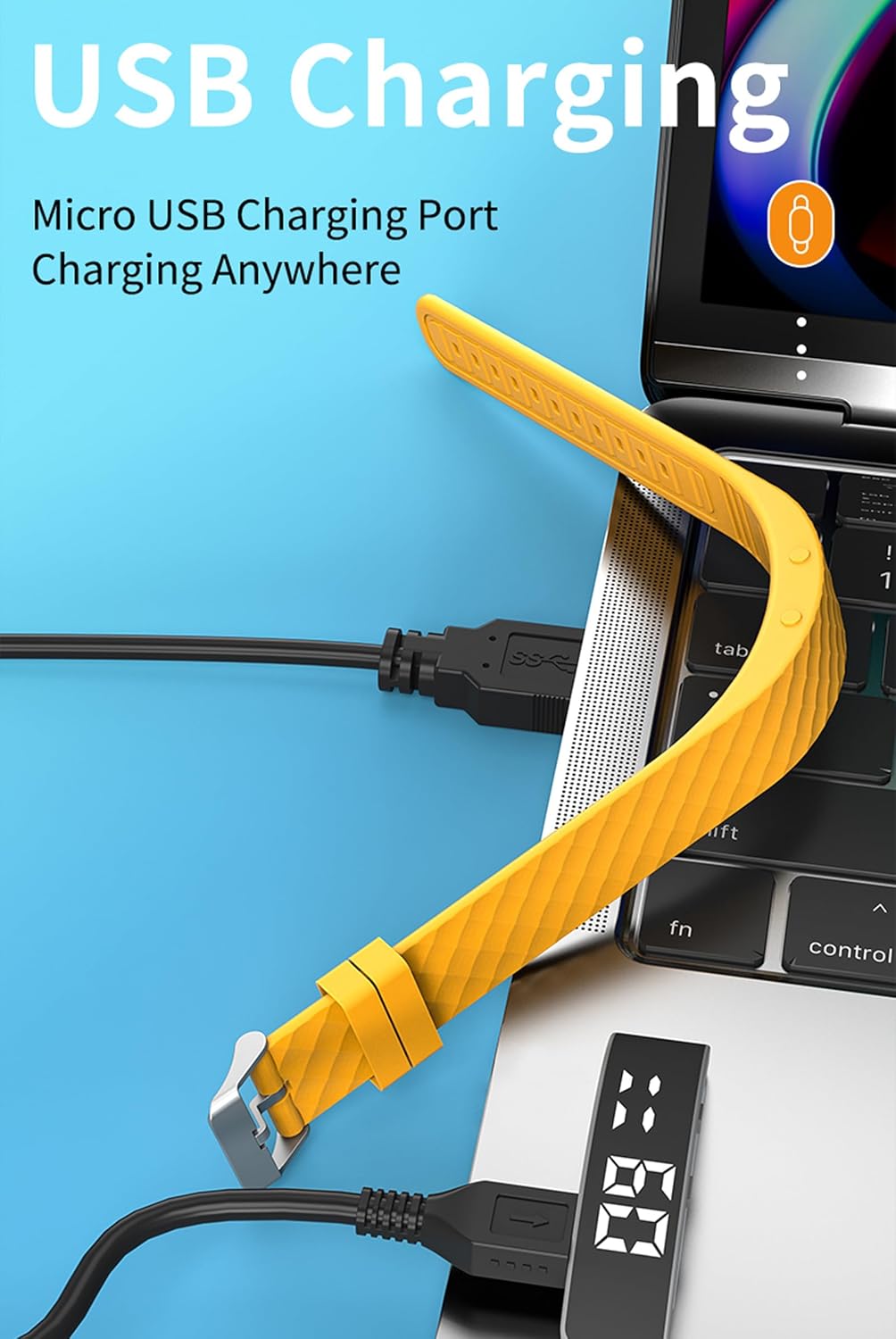
Зураг: The fitness tracker's USB end plugged into a laptop's USB port for charging, illustrating the direct USB charging method.
2. Basic Device Operation
The fitness tracker operates using a combination of a Display Button and a Function Button, typically located on the side or bottom of the device body.
- Raise Wrist to Light Up Screen: The screen will automatically illuminate when you raise your wrist to view цаг.
- Товчлуурын функцууд: Specific functions for the Display and Function buttons are detailed in the "Operating Instructions" section.

Зураг: A yellow fitness tracker highlighting the positions of the 'Display Button' and 'Function Button' on its side.
Ашиглалтын заавар
1. Цаг болон огноог харуулах
руу view the current time and date:
- Press the Function Button once to display the time.
- Press the Function Button twice to display the date.

Зураг: Two fitness trackers, one showing "6 20" (date) and another showing "09:00" (time), demonstrating the time and date display function.
2. Үйл ажиллагааг хянах
The tracker automatically records your daily activity metrics.
- Алхам тоолох: Monitors the number of steps taken throughout the day.
- Шатаасан калори: Estimates the calories consumed based on your activity level.
- Зай: Нийт явсан зайг тооцоолно.
These data points can be viewed directly on the tracker's display by cycling through the screens using the Function Button.
3. Унтах хяналт
Wear the fitness tracker while sleeping to monitor your sleep patterns.
- The device automatically detects when you fall asleep and wake up.
- It records different sleep stages: Deep Sleep (H1), General Sleep (C2), and Light Sleep (L3).
- руу view sleep data, press the Display Button 6 times.

Зураг: A yellow fitness tracker displaying "H1" for good sleep, with text indicating sleep monitoring from 23:00 PM to 7:00 AM, and a person sleeping in the background.
4. Сэрүүлгийн тохиргоо
The tracker supports setting up to 3 alarms with vibration reminders.
- Refer to the on-screen prompts or specific button combinations (not detailed in provided data) to set alarm times.
- Alarms will vibrate to notify you at the set time.

Зураг: A grey and a purple fitness tracker, both displaying digital time, with an overlay indicating the capability of setting up to 3 alarms.
5. Vibration Reminders
In addition to alarms, the tracker can provide vibration reminders for various notifications. The specific customization options for vibration melodies are managed through the device's settings (not detailed in provided data).
6. Multi-Sport Modes
The tracker supports multiple sport modes to accurately track specific activities. These include:
- Гүйж байна
- Дугуй унах
- Олс алгасах
- Фитнесс
- Ууланд авиралт
- Иог
- Гольф
- Бүжиглэх
To select a sport mode, navigate through the device's menu using the Function Button until the desired mode is displayed, then confirm selection (specific confirmation method not detailed in provided data).
7. Сарын тэмдгийн мөчлөгийн хяналт
The device offers menstrual cycle tracking. This feature allows users to log and monitor their cycle directly on the tracker. Specific setup and usage instructions for this feature are typically found within the device's menu options.
Засвар үйлчилгээ
Цэвэрлэгээ
Төхөөрөмжийн гадаад төрх байдал болон ажиллагааг хадгалахын тулд:
- Wipe the tracker regularly with a soft, damp даавуу.
- Төхөөрөмжийг гэмтээж болзошгүй тул химийн хүчтэй бодис эсвэл зүлгүүрийн цэвэрлэгч хэрэглэхээс зайлсхий.
- Цэнэглэхийн өмнө цэнэглэх контактууд нь цэвэр, хуурай эсэхийг шалгаарай.
Усны эсэргүүцэл
The CNBRO Fitness Tracker is designed to be water-resistant. This means it can withstand splashes, rain, and brief immersion in shallow water. However, it is not suitable for diving, hot showers, or prolonged submersion. Always ensure the device is dry before charging.
Алдааг олж засварлах
If you encounter issues with your fitness tracker, refer to the following common solutions:
Device Not Turning On or Responding
- Батерейг шалгах: Төхөөрөмж бүрэн цэнэглэгдсэн эсэхийг шалгаарай. Үүнийг USB тэжээлийн эх үүсвэрт дор хаяж 30 минут холбоно уу.
- Дахин эхлүүлэх: If the device is unresponsive, try holding down the Function Button for an extended period (e.g., 10-15 seconds) to force a restart.
Inaccurate Activity Tracking
- Өмсөх байрлал: Хянагчийг бугуйндаа нягт зүүж, бугуйн яснаас нэг хурууны өргөнтэй тэнцүү зайд байрлуулсан эсэхийг шалгаарай.
- Програм хангамжийн шинэчлэлт: While this model does not require smartphone connection, ensure the device's internal software is up-to-date if an update mechanism is available (consult manufacturer for details).
- Дахин тохируулах A factory reset (if available) can sometimes resolve persistent tracking issues. Note that this will erase all data.
Screen Not Lighting Up
- Raise Wrist Gesture: Ensure you are performing the "raise wrist" gesture correctly.
- Батерейны түвшин: A very low battery might prevent the screen from lighting up. Charge the device.
Хэрэв эдгээр алхмууд нь асуудлыг шийдэж чадахгүй бол хэрэглэгчийн дэмжлэгтэй холбогдоно уу.
Үзүүлэлтүүд
| Загварын нэр | US-X-W5VP |
| Брэнд | CNBRO |
| Бүтээгдэхүүний хэмжээс | 0.28 x 0.59 x 0.14 инч |
| Зүйлийн жин | 4.9 унц |
| Дэлгэцийн хэмжээ | 1 инч |
| Зайны төрөл | 1 лити ион батерей (дагсан) |
| Зайны эсийн найрлага | Лити полимер |
| Цэнэглэх хугацаа | Ойролцоогоор 0.5 цаг |
| Хэрэглэх хугацаа | 3-5 хоног |
| Зогсоолын цаг | 7 хоног хүртэл |
| Үйлдлийн системийн нийцтэй байдал | Android 6.0 and above, iOS 12.0 and above (Note: This product does not require smartphone connection for basic functions) |
| Холболтын технологи | Bluetooth (for potential future features or advanced settings, though not required for basic operation) |
| Онцлог шинж чанар | Activity Tracker, Sleep Monitor, Pedometer, Calorie Counter, Alarm Clock, Raise Wrist to Light Up Screen |
| Усны эсэргүүцэл | Yes (Splash and rain resistant, not for swimming or hot showers) |
Баталгаат хугацааны мэдээлэл
Specific warranty details for the CNBRO Fitness Tracker US-X-W5VP are not provided in this manual. Please refer to the product packaging or the retailer's website for information regarding warranty coverage and terms. Keep your purchase receipt as proof of purchase for any warranty claims.
Хэрэглэгчийн дэмжлэг
For any questions, technical assistance, or support regarding your CNBRO Fitness Tracker, please contact the seller directly through the platform where you made your purchase.
To contact support via Amazon (if purchased there):
- Go to your Amazon account and click on "Orders" баруун дээд буланд.
- Locate your order for the CNBRO Fitness Tracker.
- дээр дарна уу "Sold by Fusong US" (or the relevant seller name) below the product name.
- Click the yellow button "Ask a question".
- Сонго "I need assistance with an order I placed".
- Click the yellow button "Write message" and send your inquiry.
Харилцагчийн дэмжлэг нь 24 цагийн дотор хариу өгөхийг зорьдог.