Танилцуулга
The Hotmoon Cocoon Pro White Noise Sound Machine is designed to create an optimal soundscape environment for various activities such as sleep, relaxation, study, work, or soothing infants. It features a comprehensive library of 388 high-fidelity sounds, a night light, a sleeping timer, and convenient app control for personalized routines.
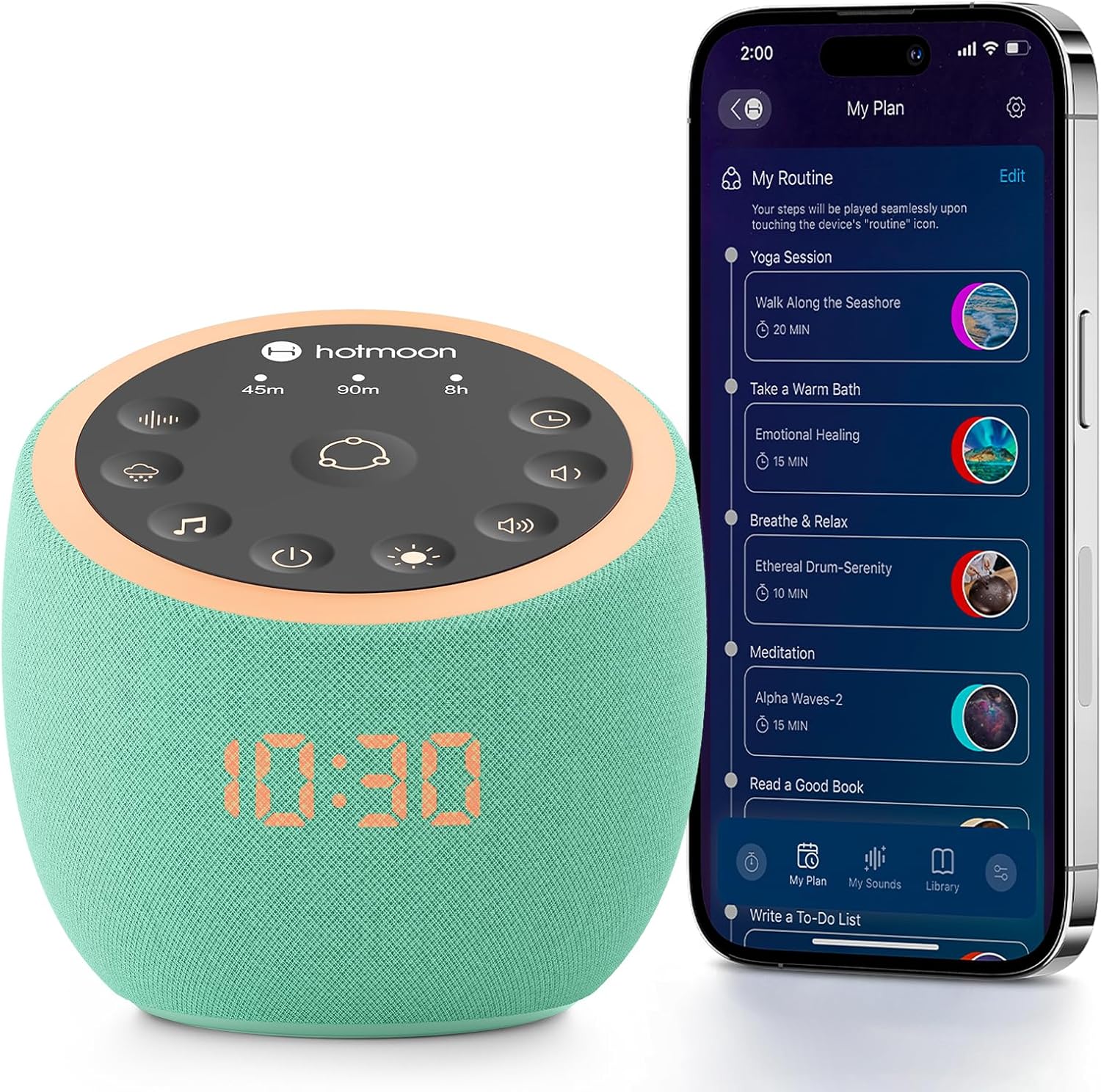
Image: The Hotmoon Cocoon Pro White Noise Sound Machine, a compact, mint-green device with a digital clock display, shown next to a smartphone illustrating its app control interface. The device features a top panel with various control icons.
Гол онцлогууд
- 388 High-Fidelity Sounds: Includes White noises, Fan sounds, Nature sounds, Lullabies, Alpha brainwaves, Zen sounds, Meditation melodies, High frequency sound, and more.
- Програмын хяналт: Adjust settings remotely via a companion app on your smartphone.
- DIY Sound Buttons: Three customizable buttons allow personalization with 1 to 9 sounds from the professional sound library.
- Colorful Night Lights: Various professional anti-glare baby night lights for soothing sleep, with adjustable brightness and static/breath modes.
- Sleeping Timer: Set timers for 45 minutes, 90 minutes, or 8 hours.
- Өсөх дохио: Features exclusive awakening melodies with volume fade-in. Clock brightness can be dimmed, turned off, or scheduled.
- Компакт дизайн: Portable and suitable for travel.

Image: A visual representation highlighting the 388 sounds available on the Hotmoon Sound Machine, categorized by type, emphasizing no subscription fees.
Тохиргоо
1. Эрчим хүчний холболт
Connect the sound machine to a power source using the provided cable. The device is not battery-operated and requires continuous power.
2. Апп татаж авах ба холболт
- Download the official Hotmoon companion app from your smartphone's app store.
- Ухаалаг утсан дээрээ Bluetooth-г идэвхжүүлнэ үү.
- Open the Hotmoon app. The app will automatically detect and connect to your Cocoon Pro device via Bluetooth. No Wi-Fi password is required for initial setup.
Ашиглалтын заавар
Програмын хяналт
The primary method for controlling the Cocoon Pro is through its companion app. This allows for comprehensive customization and scheduling.
- Дууны сонголт: Browse and select from 388 high-fidelity sounds categorized by Weather (e.g., Heavy Rain, Light Rain, Thunder), Nature, Noise (e.g., Warm Pink Noise, White Noise), Brainwave Music, Instrumental, Lullaby, and more.
- Дууны тохируулга: Control the sound volume from 0-100% using a slider in the app.
- Гэрлийн хяналт:
- Turn the night light on/off.
- Customize light color and brightness.
- Select between Static or Breath light modes.
- Routine Setup: Create personalized routines for various activities (e.g., meditation, wake-up, bedtime).
- Combine multiple sounds and light settings.
- Schedule routines to turn on/off at specific times and repeat on selected days of the week.
- DIY Sound Buttons: Assign up to 9 sounds to each of the three physical DIY buttons on the device for quick access.

Image: A smartphone screen displaying the Hotmoon app's sound library, showing various sound categories and options to customize the three physical sound buttons on the device.
Физик товчлуурын удирдлага
The device also features intuitive physical buttons for basic control without the app.
- Routine Button (Center): Press to activate pre-set or customized routines.
- Timer Buttons (45m, 90m, 8h): Select a specific duration for sound playback.
- Sound Selection Buttons: Cycle through different sound categories (e.g., fan, rain, meditation).
- Дууны түвшний хяналтын товчлуурууд: Adjust sound volume up or down.
- Гэрлийн хяналтын товчлуур: Turn the night light on/off and cycle through brightness levels.
- Цахилгаан товч: Төхөөрөмжийг асаах эсвэл унтраах.

Image: A close-up of the Hotmoon Sound Machine's top panel, showing the illuminated touch-sensitive buttons for direct control of sounds, timers, volume, and light, enabling phone-free operation.
Засвар үйлчилгээ
To ensure the longevity and optimal performance of your Hotmoon Cocoon Pro:
- Зөөлөн, хуурай даавуугаар арчиж төхөөрөмжийг цэвэр байлга.
- Шингэн цэвэрлэгч, зүлгүүрийн материал ашиглахаас зайлсхий.
- Төхөөрөмжийг ус эсвэл хэт чийгшилд бүү тавь.
- Ашиглаагүй үед сэрүүн, хуурай газар хадгална.
Алдааг олж засварлах
Төхөөрөмж асахгүй байна
- Ensure the power cable is securely connected to both the device and a working power outlet.
- Цахилгаан залгуур ажиллаж байгаа эсэхийг өөр төхөөрөмжөөр шалгана уу.
Апп холболтын асуудал
- Ухаалаг утсан дээрээ Bluetooth идэвхжсэн эсэхийг шалгаарай.
- Make sure the device is powered on and within Bluetooth range of your smartphone.
- Try restarting both the app and the sound machine.
Дууны гаралт байхгүй
- Check the volume level on both the device and within the app.
- Ensure a sound is selected and playing in the app.
Үзүүлэлтүүд
| Атрибут | Дэлгэрэнгүй |
|---|---|
| Брэнд | Hotmoon |
| Загвар | Cocoon Pro |
| Өнгө | Mint-green |
| Материал | Акрилонитрил бутадиен стирол (ABS) |
| Багцын хэмжээ | 4.92 x 4.92 x 4.52 инч; 15.04 унц |
| Батерей | 1 Lithium Metal batteries required. (included) - Note: Device is not battery operated, this likely refers to a small internal battery for clock/memory. |
| Үйлдвэрлэгч | Hotmoon |
| Эхний боломжтой огноо | 25 оны зургадугаар сарын 2025 |


