1. Танилцуулга
This manual provides essential instructions for the safe and effective use of your ONNAIS Iron PRO&Large Gun Safe. Please read this manual thoroughly before operating the safe and retain it for future reference. This safe is designed to secure firearms and valuables, offering multiple access methods including biometric fingerprint, digital password, and key access.
2. Аюулгүй байдлын мэдээлэл
Аюулгүй байдлын ерөнхий арга хэмжээ:
- Ашиглаагүй үедээ сейфийг үргэлж түгжээтэй байлгаарай.
- Store the emergency keys in a secure location away from the safe and out of reach of unauthorized individuals.
- Шатамхай шингэн болон бусад аюултай материалыг сейфэнд хадгалж болохгүй.
- Ensure the safe is mounted or secured properly to prevent unauthorized removal.
Хүүхдийн аюулгүй байдал:
The ONNAIS Iron PRO&Large Gun Safe features a child-safe design to prevent unauthorized access to firearms. It is crucial to:
- Never leave the safe unlocked, even for short periods.
- Keep all access methods (fingerprints, passwords, keys) confidential and out of reach of children.
- Educate children about the dangers of firearms and the importance of not touching the safe.
3. Багцын агуулга
Бүх зүйл багцад байгаа эсэхийг шалгана уу:
- ONNAIS Iron PRO&Large Gun Safe
- Яаралтай тусламжийн түлхүүр (2)
- Суурилуулах тоног төхөөрөмж (эрэг, зангуу)
- Хамгаалалтын ган кабель
- Хэрэглэгчийн гарын авлага (энэ баримт бичиг)
4. Тохиргоо
4.1 Сав баглаа боодол, анхны үзлэг
Carefully remove the safe from its packaging. Inspect for any signs of damage. If damage is found, contact customer support immediately.
4.2 Батерей суурилуулах
The safe requires 4 AA batteries (not included) for operation. Locate the battery compartment, typically on the underside or inside the door. Insert the batteries, ensuring correct polarity.

This image details the power supply options for the ONNAIS gun safe, including the compartment for four AA batteries and a convenient USB port for emergency power backup, ensuring functionality even if batteries are depleted.
4.3 Initial Access with Emergency Key
Before setting up electronic access, use one of the provided emergency keys to open the safe. Insert the key into the keyhole and turn to unlock. Keep the spare key in a secure, separate location.
4.4 Сейфийг хамгаалах
For enhanced security, the safe can be mounted or secured using the provided hardware and steel cable.
- Суурилуулалт: Use the pre-drilled holes on the safe's bottom or back to secure it to a floor, wall, or shelf using the provided screws and anchors.
- Ган кабель: Loop the steel security cable around a fixed object (e.g., bed frame, desk leg) and secure it to the safe's designated attachment point.
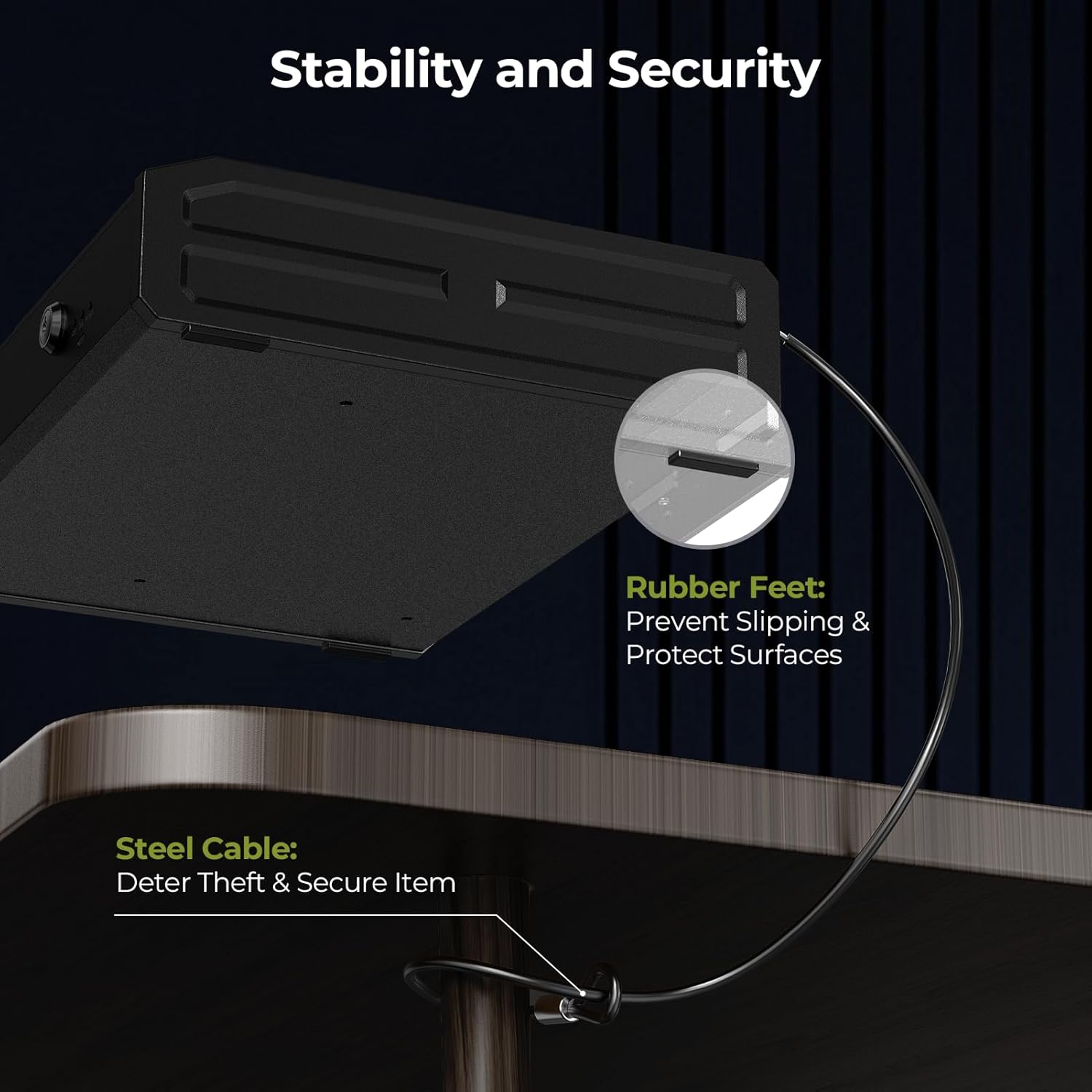
This image highlights the stability and security features of the ONNAIS gun safe, including non-slip rubber feet that protect surfaces and a robust steel cable for deterring theft and securing the safe to a fixed object.
4.5 Setting Up Fingerprint and Password
Refer to the specific instructions provided with your safe for detailed steps on programming fingerprints and setting a digital password. Typically, this involves pressing a 'SET' or 'ENROLL' button inside the safe and following prompts on the keypad/fingerprint scanner.

This image displays the three primary methods for accessing the ONNAIS gun safe: a rapid 1-second fingerprint unlock, instant password entry via the numeric keypad, and a reliable key backup for emergency access.
5. Ашиглалтын заавар
5.1 Unlocking the Safe
- Хурууны хээнд нэвтрэх: Place a registered finger firmly on the fingerprint sensor. The safe will unlock if the fingerprint is recognized.
- Password Access: Enter your programmed digital password on the keypad, then press 'OK' or 'ENTER'. The safe will unlock if the password is correct.
- Key Access: In case of battery failure or forgotten password, use the emergency key to manually unlock the safe.
5.2 Дотор гэрэлтүүлэг
The safe is equipped with an internal light for improved visibility. This light typically activates automatically when the safe is opened, or it may have a manual switch depending on the model.
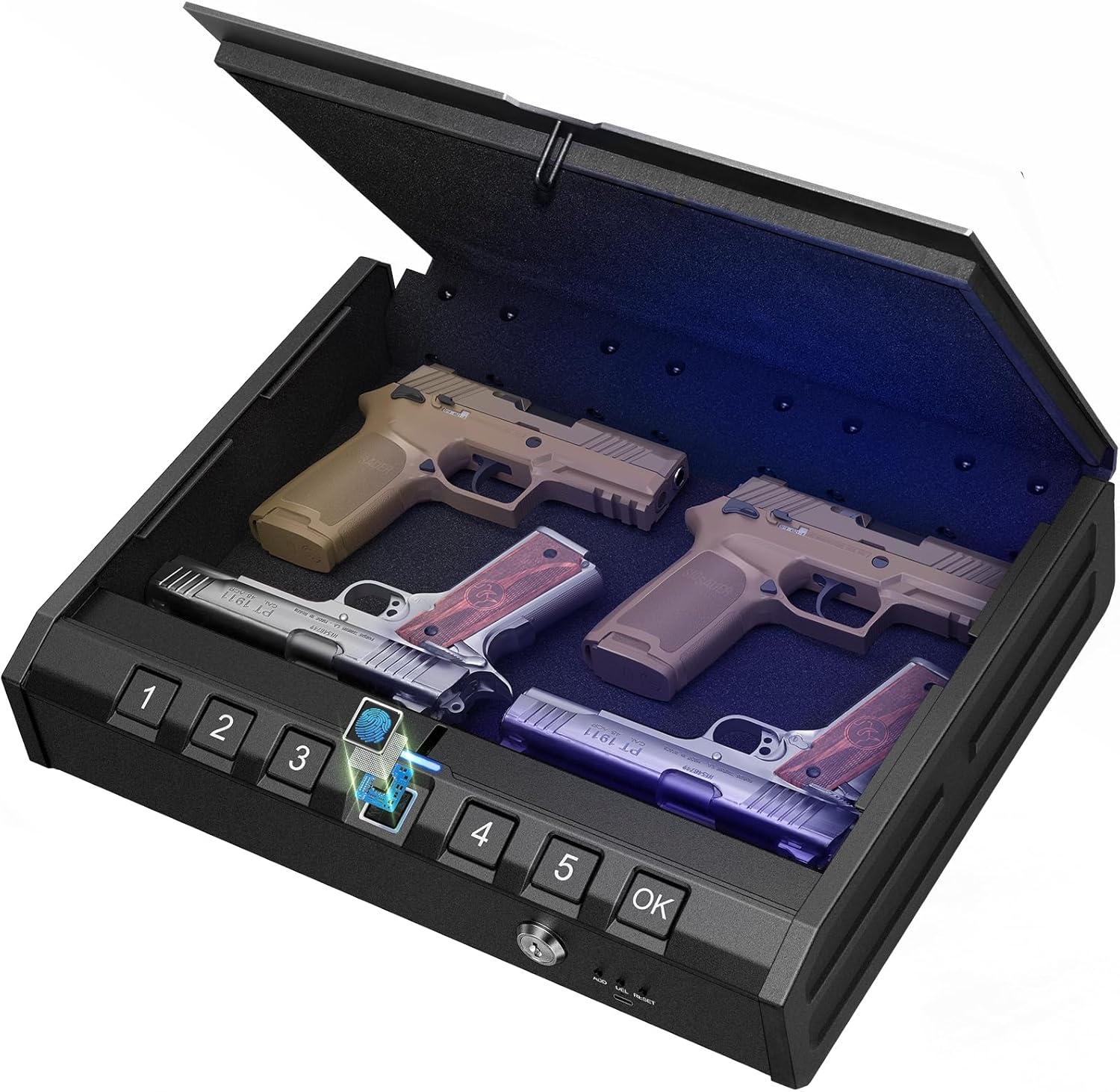
Энэ зураг нь a view of the ONNAIS gun safe's interior when open, showcasing its capacity to store multiple handguns. The integrated internal light illuminates the contents, facilitating quick access in low-light conditions, and the biometric keypad is visible on the front.
5.3 Яаралтай цахилгаан хангамж
If the internal batteries are depleted, the safe can be powered externally using a USB cable connected to a power source (e.g., power bank, wall adapter). Connect the USB cable to the emergency power port on the safe to temporarily power the electronic locking system.
5.4 Хадгалах зүйлс
The safe is designed to accommodate up to 4 handguns and additional magazines. The interior features protective padding to prevent damage to your stored items.

This image illustrates the robust construction of the ONNAIS gun safe, highlighting its advanced locking mechanism, durable carbon steel body, soft interior padding to protect contents, and reinforced hinges designed to resist prying attempts.
6. Засвар үйлчилгээ
6.1 Цэвэрлэгээ
Сейфний гадна талыг зөөлөн, d-ээр арчинаamp даавуу. Өнгөлгөө болон электрон эд ангиудыг гэмтээж болох зүлгүүрийн цэвэрлэгч, уусгагчаас зайлсхий.
6.2 Батерейг солих
Replace batteries annually or when the low battery indicator (if present) activates. Always use new, high-quality AA alkaline batteries. Do not mix old and new batteries or different battery types.
7. Алдаа засах
7.1 Safe Does Not Open Electronically
- Батерейг шалгах: Батерейг зөв суулгаж, дуусаагүй эсэхийг шалгаарай. Шаардлагатай бол солино.
- Яаралтай тусламж: Use the USB emergency power supply.
- Яаралтай тусламжийн түлхүүр: Use the physical key to open the safe.
7.2 Хурууны хээ танигдаагүй байна
- Хуруугаа цэвэр, хуурай эсэхийг шалгаарай.
- Place your finger firmly and completely on the sensor.
- Try re-registering your fingerprint if issues persist.
7.3 Нууц үгээ мартсан
- Сейфийг онгойлгохын тулд яаралтай тусламжийн түлхүүрийг ашиглаарай.
- Refer to the programming instructions to reset the password.
8. Техникийн үзүүлэлтүүд
| Онцлог | Дэлгэрэнгүй |
|---|---|
| Загварын дугаар | 14279a45-e5ba-4f37-87d4-60d1d31430e1 |
| Бүтээгдэхүүний хэв маяг | ONNAIS Iron PRO&Large Gun Safe |
| Хандалтын аргууд | Biometric Fingerprint, Digital Keypad, Emergency Key |
| Эрчим хүчний эх үүсвэр | 4 x AA Batteries (not included), USB Emergency Power |
| Хадгалах багтаамж | Up to 4 handguns and magazines |
| Интерьерийн онцлог | Protective padding, Internal LED light |
| Аюулгүй байдлын онцлог | Carbon steel construction, Reinforced anti-pry hinges, Steel security cable attachment point, Child-safe design |
9. Баталгаат хугацааны мэдээлэл
Warranty details for the ONNAIS Iron PRO&Large Gun Safe are typically included with your purchase documentation or available on the official ONNAIS webсайт. Баталгаат заргад зориулж худалдан авалтаа нотлох баримтаа үлдээнэ үү.
10. Хэрэглэгчийн дэмжлэг
For technical assistance, troubleshooting not covered in this manual, or warranty inquiries, please contact ONNAIS customer support through the retailer where the product was purchased or visit the official ONNAIS webхолбоо барих мэдээлэл авах сайт.