1. Бүтээгдэхүүн дууссанview
The AZLA SednaEarfit Crystal Standard 2 earbud tips are designed to enhance the fit, comfort, and acoustic performance of various wireless headphones. Crafted from premium German Liquid Silicone Rubber (LSR), these tips provide a secure seal for improved noise cancellation and audio clarity. This specific package includes three pairs of ear tips in SS, S, and MS sizes.

Image: AZLA SednaEarfit Crystal Standard 2 earbud tips, showing the SS, S, and MS sizes included in the package.
2. Багцын агуулга
- One pair of AZLA SednaEarfit Crystal Standard 2 ear tips (SS size)
- One pair of AZLA SednaEarfit Crystal Standard 2 ear tips (S size)
- One pair of AZLA SednaEarfit Crystal Standard 2 ear tips (MS size)
- Nozzle Adapter (for wider compatibility with thin-nozzled earbuds)
3. Тохиромжтой байдал
The AZLA SednaEarfit Crystal Standard 2 earbud tips are compatible with a wide range of wireless earbuds, including but not limited to:
- Sony: WF-1000XM5, WF-1000XM4, WF-1000XM3, LinkBuds S, INZONE Buds, WF-XB700, WF-H800, C510, C700N
- Цохилтууд: Power Beats Pro
- Сеннхайзер: Momentum True Wireless 1, MTW2, CX True Wireless, CX400BT, CX PLUS TW
- Жабра: Elite 85T
- JBL: WAVE100, Streak
- Шүрээ
- Skullcandy: ТҮЛХ
- JLAB: Epic Air Sport, Epic Air ANC
- Jaybird: ГҮЙЦЭ
- ANKER: Liberty 3 Pro, Life Dot 2 ANC
- BRITZ: BR-TWS202
- Pi8, Pi7, Pi7 S2, Pi5
- DENON: Perl Pro, Fly TWS
- Lypertek: Tevi, Z3
- Noble Audio: Falcon, Fokus Pro, Fokus Prestige, Fokus Triumph
- Nuheara: IQBuds2 MAX
- Phiaton: Bolt BT700
- Philips: TAT4556
- SUDIO: TOLV
- ЯМАХА: TW-E3B, TW-E8B, TW-E3C
A nozzle adapter is included for earbuds with thinner nozzles to ensure a secure fit.
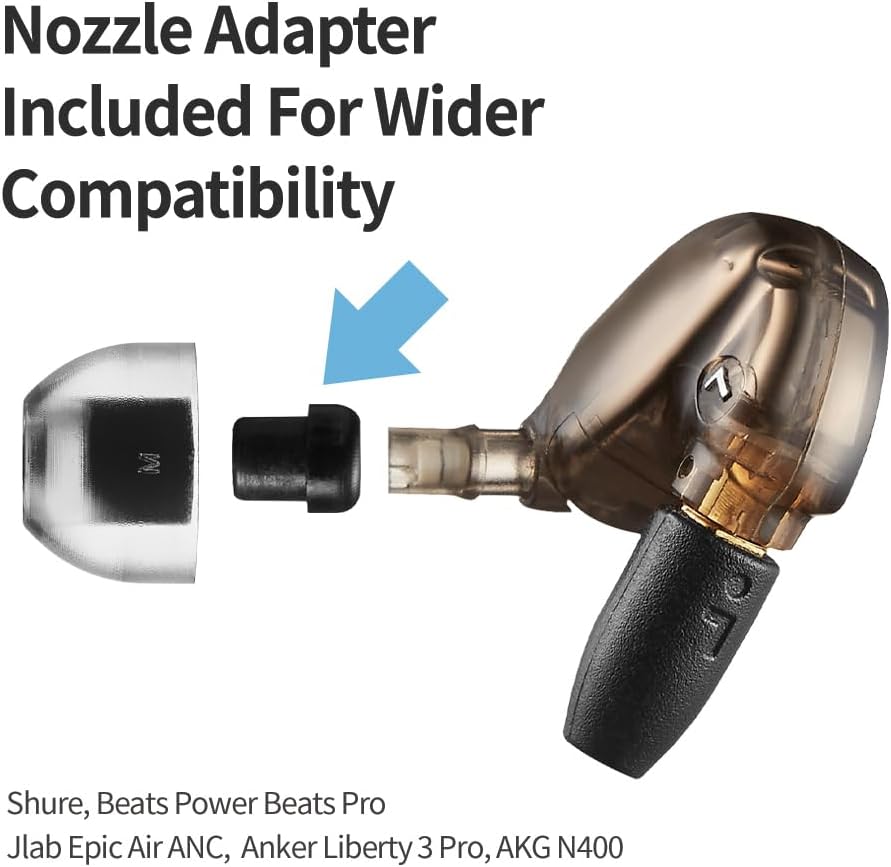
Image: An earbud tip shown with a separate nozzle adapter, illustrating how it can be used to fit earbuds with thinner nozzles.
4. Үндсэн шинж чанарууд
- Premium German Liquid Silicone Rubber (LSR): Constructed from high-quality, hypoallergenic LSR for safety, comfort, and durability.
- Evidence-Based Comfort Design: Developed through scientific analysis of ear canal shapes to provide a tapered structure for a pain-free and secure fit.
- Superior Noise Isolation: The design creates a delicate seal within the ear canal, effectively reducing external noise for an immersive listening experience.
- Secure-Grip Surface: Features a non-slip surface to ensure the ear tips remain in place during various activities.
- Precision Filter for Pure Sound: Incorporates a proprietary 12-hole hexagonal filter designed to minimize sound distortion and maintain audio fidelity.
- Custom-Fit with Delicate Size Options: Offers six precision sizes (SS, S, MS, M, ML, L) to allow users to find an optimal fit for their ear canals, preventing fall-out and improving performance.

Зураг: Ойрын зураг view of an earbud tip, emphasizing its material, tapered shape, and secure-grip surface.

Image: A diagram illustrating the proprietary 12-hole hexagonal filter design for distortion-free sound, compared to round and square holes.
5. Суулгах заавар
- Зөв хэмжээг сонгоно уу: Choose the ear tip size that provides the most comfortable and secure fit, ensuring a good seal in your ear canal. Refer to the Sizing Guide below.
- Remove Existing Ear Tips: Gently twist and pull off the current ear tips from your earbud nozzles.
- Attach AZLA SednaEarfit Crystal Standard 2: Align the opening of the new ear tip with the earbud nozzle. Push the ear tip onto the nozzle, twisting slightly until it is firmly seated and covers the entire nozzle. Ensure the ear tip is not loose and does not easily come off.
- Use Nozzle Adapter (if necessary): If your earbud has a particularly thin nozzle and the ear tip feels loose, insert the provided nozzle adapter onto the earbud nozzle first, then attach the ear tip over the adapter.
- Туршилтын тохируулга: Insert the earbuds into your ears and check for comfort and a secure seal. Adjust as needed.
Video: An instructional video demonstrating the proper method for installing AZLA SednaEarfit Crystal Standard 2 earbud tips onto wireless headphones.
6. Хэмжээ тогтоох гарын авлага
Choosing the correct ear tip size is crucial for optimal sound quality, noise isolation, and comfort. Experiment with different sizes to find the best fit for your ears. A good fit should feel snug without causing discomfort and should create a seal that blocks out ambient noise.

Image: A detailed size comparison chart showing the dimensions of AZLA Crystal 2 Standard ear tips (SS, S, MS, M, ML, L) alongside stock ear tips for Sony WF-1000XM4 and WF-1000XM5.
7. Засвар үйлчилгээ
To maintain hygiene and prolong the lifespan of your ear tips, regular cleaning is recommended.
- Цэвэрлэгээ: Gently clean the ear tips with lukewarm water and a mild, non-abrasive soap. Rinse thoroughly.
- Хатаах: Allow the ear tips to air dry completely before reattaching them to your earbuds. Do not use heat to dry.
- Шалгалт: Periodically inspect the ear tips for any signs of wear, tear, or damage. Replace if necessary to ensure optimal performance.

Image: An earbud with an installed tip, highlighting the precision filter and the ease of maintenance.
8. Алдаа засах
- Poor Fit or Earbuds Falling Out:
- Ensure you have selected the correct size. Try a different size from the included set.
- Make sure the ear tips are fully seated and securely attached to the earbud nozzles.
- If your earbud nozzles are thin, use the provided nozzle adapter.
- Дуу чимээ тусгаарлалтыг бууруулсан:
- Verify that the ear tips create a complete seal in your ear canal. Adjust the earbud position or try a larger size.
- Check for any debris or damage on the ear tips that might compromise the seal.
- Sound Quality Issues (e.g., muffled sound, lack of bass):
- A poor seal can significantly impact sound quality. Re-evaluate your ear tip size and fit.
- Ensure the ear tips are clean and free from earwax or other obstructions.
- Confirm the ear tips are correctly installed and not partially detached.
9. Техникийн үзүүлэлтүүд
| Брэнд | AZLA |
| Загварын дугаар | AZL-CRYSTAL2-ST-SET-S |
| Материал | Premium German Liquid Silicone Rubber (LSR) |
| Багцын хэмжээ | 3.74 x 2.83 x 0.75 инч |
| Зүйлийн жин | 0.352 унц |
| Оруулсан хэмжээ | SS, S, MS (3 pairs total) |
10. Баталгаат болон туслах мэдээлэл
Specific warranty details for this product are not provided in the available information. For warranty claims or technical support, please refer to the official AZLA website or contact the retailer from whom the product was purchased. Keep your proof of purchase for any warranty-related inquiries.
Нэмэлт тусламж авахыг хүсвэл зочилж болно AZLA Store on Amazon.


