1. Танилцуулга
This manual provides detailed instructions for the installation, operation, and maintenance of your ieGeek S3 2K Wireless Outdoor Security Camera. Please read this manual thoroughly before using the product to ensure proper function and safety. Keep this manual for future reference.
2. Бүтээгдэхүүн дууссанview
The ieGeek S3 is a 2K battery-powered wireless security camera designed for both indoor and outdoor use. It features 180° pan rotation, smart motion detection, color night vision, and two-way audio communication.
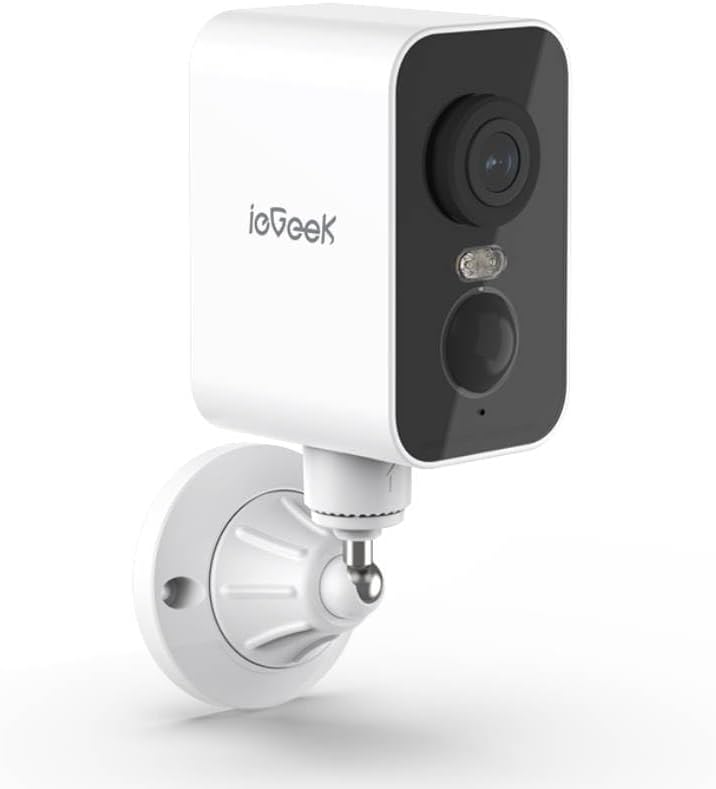
Зураг 2.1: ieGeek S3 2K Wireless Outdoor Security Camera. This image displays the white rectangular camera body with a black front panel housing the lens, an LED light, and a motion sensor. The camera is attached to a white wall-mount bracket.
2.1 Хайрцагт юу байгаа вэ
- ieGeek S3 Battery Security Camera
- Bracket Screw Pack (for wall mounting)
- Суулгах наалт
- Цэнэглэх кабель
- Хэрэглэх заавар (энэ баримт бичиг)
3. Тохиргоо
3.1 Камерыг цэнэглэж байна
Before initial use, fully charge the camera's built-in 5200 mAh lithium-ion battery using the provided charging cable. Connect the cable to the camera's charging port and a standard USB power adapter (not included). The charging indicator light will provide status.
3.2 Апп татаж авах, Бүртгэл үүсгэх
- Download the 'CloudEdge' or 'ieGeek Cam' app from your smartphone's app store (iOS or Android).
- Аппликешныг нээж, дэлгэцэн дээрх зааврыг дагаж шинэ бүртгэл үүсгэх эсвэл хэрэв танд бүртгэл байгаа бол нэвтэрнэ үү.
3.3 Биет суурилуулалт (Ханан дээр бэхлэх)
The ieGeek S3 camera is designed for wall mounting and has an IP65 waterproof rating, making it suitable for outdoor environments.
- Choose a suitable location for installation. Ensure the camera has a clear field of view and good Wi-Fi signal strength.
- Use the provided installation sticker to mark the drill holes on the wall.
- Нүх өрөмдөж, хананы зангууг оруулна уу.
- Attach the mounting bracket to the wall using the screws from the bracket screw pack.
- Secure the camera to the mounting bracket. Adjust the camera angle as needed.
3.4 Device Pairing with App
- Ухаалаг гар утсаа 2.4GHz Wi-Fi сүлжээнд холбосон эсэхээ шалгаарай. Камер нь зөвхөн 2.4GHz Wi-Fi-г дэмждэг.
- Open the 'CloudEdge' or 'ieGeek Cam' app and tap the '+' icon to add a new device.
- Жагсаалтаас камерынхаа загварыг сонгоно уу.
- Follow the in-app instructions to power on the camera and reset it if necessary (usually by pressing a reset button until an indicator light flashes).
- Утасныхаа дэлгэц дээр гарч буй QR кодыг камерын линзээр уншуулна уу. Утсаа камераас ойролцоогоор 4-8 инч (10-20 см) зайтай барина уу.
- Once the camera confirms successful scanning (e.g., with an audible prompt), proceed in the app to complete the connection.
- Name your camera and set its location.
4. Камерыг ажиллуулах
4.1 Амьд View болон Пан Эргэлт
Аппликейшны үндсэн дэлгэцээс шууд дамжуулалтад хандахын тулд камер дээрээ товшино уу view. You can use the on-screen controls to pan the camera 180° horizontally to adjust the viewөнцөг.
4.2 Хөдөлгөөн илрүүлэх ба дохиолол
The camera features AI motion detection. When motion is detected, the camera will record a video clip and send an alert to your smartphone. You can customize motion detection sensitivity and alert settings within the app.
4.3 Хоёр талын аудио
Utilize the built-in microphone and speaker for two-way communication. Tap the microphone icon in the live view to speak through the camera, and listen to audio from the camera's location.
4.4 Шөнийн хараа
The camera automatically switches to color night vision in low-light conditions, providing clear surveillance up to 33 feet (10 meters) using its infrared LEDs.
4.5 видео хадгалах
Бичсэн видео footage-г хоёр аргаар хадгалж болно:
- TF Card (MicroSD): Insert a TF card (up to 128GB, not included) into the camera's designated slot for local storage.
- Үүл хадгалах сан: Optional cloud storage services may be available through the app for remote access and backup of recordings.
4.6 Alexa интеграци
The ieGeek S3 camera is compatible with Amazon Alexa. Follow the instructions in the 'CloudEdge' or 'ieGeek Cam' app to link your camera with your Alexa account for voice control and viewing live feeds on compatible Alexa devices.
5. Засвар үйлчилгээ
5.1 Батерейг цэнэглэх
The camera is battery-powered. When the battery level is low, you will receive an alert via the app. Recharge the camera using the provided charging cable. Battery life varies based on usage and environmental factors.
5.2 Цэвэрлэгээ
To maintain optimal performance, periodically clean the camera lens and housing with a soft, dry cloth. Avoid using harsh chemicals or abrasive materials that could damage the camera's surface or lens.
6. Алдаа засах
- Камер Wi-Fi-д холбогдоогүй байна: Ensure your Wi-Fi network is 2.4GHz. Check Wi-Fi signal strength at the camera's location. Try resetting the camera and repeating the pairing process.
- Зургийн чанар муу: Камерын линзийг цэвэрлэ. Камерын талбарт ямар ч саад бэрхшээл байхгүй эсэхийг шалгаарай view. Check your internet connection speed.
- Хөдөлгөөн мэдрэгч ажиллахгүй байна: Verify motion detection is enabled in the app settings. Adjust sensitivity levels. Ensure the camera is positioned correctly to capture motion in the desired area.
- Батерей хурдан дуусдаг: Frequent motion detection events, live view access, and two-way audio use can consume battery faster. Reduce motion detection sensitivity or frequency if possible. Ensure the camera is fully charged.
- Аппликешны асуудлууд: Ensure the app is updated to the latest version. Try restarting the app or your smartphone.
7. Техникийн үзүүлэлтүүд
| Загварын нэр | ieGeek Battery Cam S3 |
| Видео бичлэгийн нягтрал | 2K (3 MP үр дүнтэй хөдөлгөөнгүй нягтрал) |
| Дотор/гадаа ашиглах | Дотор, гадаа |
| Эрчим хүчний эх үүсвэр | Батерейгаар ажилладаг (5200 мАч литийн ион) |
| Холболтын технологи | 2.4GHz Wi-Fi (Wi-Fi 6 Technology) |
| Хянагчийн төрөл | CloudEdge, Amazon Alexa, ieGeek Cam App |
| Суурилуулах төрөл | Ханын бэхэлгээ |
| Онцлог шинж чанарууд | Pan Rotating 180°, AI Motion Detection, Color Night Vision, 2-Way Audio |
| Viewing өнцөг | 180 градус (пан) |
| Шөнийн харааны хүрээ | 33 Фут (10 метр) |
| Frame Rate | Секундэд 15 кадр |
| Усны эсэргүүцлийн түвшин | Усны хамгаалалттай (IP65) |
| Хадгалах сонголтууд | TF Card (MicroSD) up to 128 GB, Cloud Storage (optional) |
| Хэмжээ (L x W x H) | 3.9 x 1 x 3.9 инч |
| Зүйлийн жин | 11.2 унц |
| Тохиромжтой төхөөрөмжүүд | Alexa, Smartphone, Smartwatch, Tablet |
8. Баталгаат хугацаа ба дэмжлэг
For warranty information, please refer to the specific terms provided at the time of purchase or contact ieGeek customer support directly. If you encounter any issues or have questions regarding your ieGeek S3 camera, please visit the official ieGeek website or contact their customer service team for assistance.
Онлайн дэмжлэг: Visit the ieGeek Store on Amazon


