1. Танилцуулга
This manual provides detailed instructions for setting up, operating, and maintaining your Mercusys MR27BE BE3600 Dual-Band Wi-Fi 7 Router. The MR27BE is designed to deliver high-speed wireless connectivity with Wi-Fi 7 technology, featuring dual-band operation and multiple high-speed Ethernet ports for a robust home or small office network.
2. Багцын агуулга
Таны багц дараах зүйлсийг агуулж байгаа эсэхийг шалгана уу.
- Mercusys MR27BE Wi-Fi 7 Router
- Эрчим хүчний адаптер
- Ethernet кабель
- Шуурхай суулгах гарын авлага

This image displays the retail packaging for the Mercusys MR27BE BE3600 Dual Band Wi-Fi 7 Router, highlighting key features and branding.
3. Физик хэтэрсэнview
3.1 Арын самбар
The rear panel of the MR27BE router features various ports and buttons for connectivity and control.
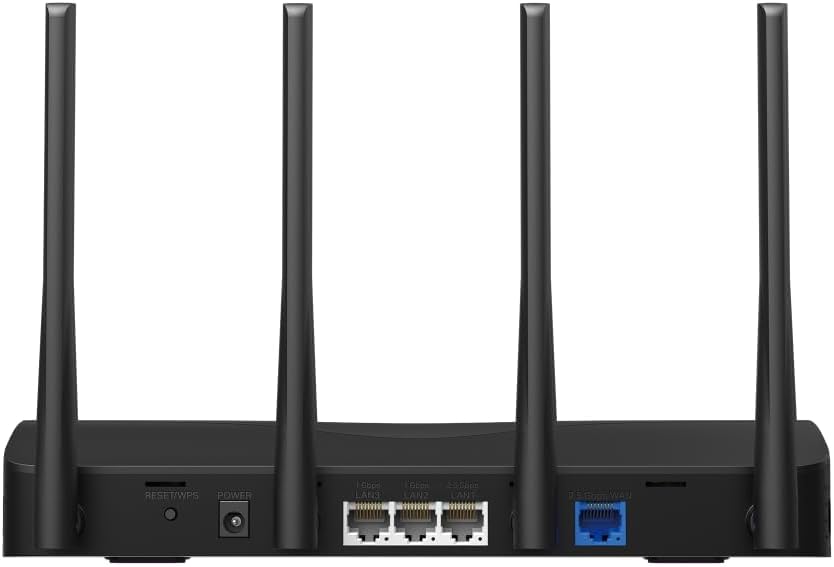
This image displays the rear panel of the MR27BE router, highlighting the 2.5 Gbps WAN port (blue), 2.5 Gbps LAN port, two 1 Gbps LAN ports, the Reset/WPS button, and the power input.
- Эрчим хүчний порт: Өгөгдсөн тэжээлийн адаптерийг энд холбоно уу.
- Дахин тохируулах/WPS товч: Press and hold for 1 second to activate WPS. Press and hold for more than 5 seconds to factory reset the router.
- LAN Ports (1 Gbps): Two Gigabit Ethernet ports for connecting wired devices.
- LAN Port (2.5 Gbps): One 2.5 Gigabit Ethernet port for high-speed wired connections.
- WAN порт (2.5 Gbps): One 2.5 Gigabit Ethernet port for connecting to your modem or internet service provider's (ISP) network.
3.2 Гол онцлогууд
The MR27BE router incorporates advanced features for enhanced network performance.

This graphic illustrates key features of the MR27BE, including its Wi-Fi 7 capabilities, the presence of 2x 2.5 Gbps ports and 2x Gigabit ports, four omni-directional high-gain antennas, EasyMesh compatibility, and easy app control.

This image demonstrates the speed performance of the MR27BE router, indicating up to 2880 Mbps on the 5 GHz band and 688 Mbps on the 2.4 GHz band, showcasing its Wi-Fi 7 capabilities.
4. Тохиргоо
4.1 Тоног төхөөрөмжийн холболт
- Унтраах: Disconnect the power from your modem (if applicable).
- WAN портыг холбох: Connect one end of the Ethernet cable to your modem's Ethernet port and the other end to the blue 2.5 Gbps WAN port on your MR27BE router.
- Эрчим хүчийг холбох: Connect the power adapter to the router's Power port and plug it into an electrical outlet.
- Асаах: Wait for the router to power on completely. The LED indicator should turn solid green.
- Төхөөрөмжүүдийг холбох (заавал биш): For wired devices, connect an Ethernet cable from your computer or other device to one of the yellow LAN ports on the router.

This image shows the 2.5 Gbps ports of the MR27BE router in use, illustrating connections for 2.5 Gbps wired devices and multi-gig internet access, emphasizing high-performance networking.
4.2 Анхны тохиргоо
You can configure your router using the MERCUSYS app or a web хөтөч.
Using the MERCUSYS App:
- Download the MERCUSYS app from the App Store or Google Play.
- Connect your smartphone to the router's default Wi-Fi network (SSID and password are on the label at the bottom of the router).
- Open the MERCUSYS app and follow the on-screen instructions to complete the setup.
Ашиглах Web Хөтөч:
- Connect your computer to the router via an Ethernet cable or the default Wi-Fi network.
- Нээлттэй a web хөтөч болон төрөл
mwlogin.netor192.168.1.1хаягийн мөрөнд. - Сануулахад нэвтрэх нууц үг үүсгэнэ үү.
- Follow the Quick Setup wizard to configure your internet connection and Wi-Fi settings.
5. Чиглүүлэгчийг ажиллуулах
5.1 Төхөөрөмжүүдийг холбох
- Утасгүй төхөөрөмжүүд: хайх your Wi-Fi network name (SSID) on your device and enter the Wi-Fi password you set during setup.
- Утастай төхөөрөмжүүд: Төхөөрөмжөөсөө Ethernet кабелийг чиглүүлэгч дээрх боломжтой LAN порт руу холбоно уу.
5.2 EasyMesh нийцтэй байдал
The MR27BE router supports EasyMesh, allowing you to create a seamless whole-home Wi-Fi network by adding compatible EasyMesh range extenders or other routers.

This diagram visually explains how the EasyMesh system, compatible with the MR27BE router, can expand Wi-Fi coverage throughout an entire home, ensuring seamless connections.
To set up an EasyMesh network, refer to the instructions provided with your EasyMesh compatible devices or the MERCUSYS app.
5.3 Дэвшилтэт тохиргоо (дамжуулан Web Интерфэйс)
хандах web интерфэйс (mwlogin.net) гэх мэт дэвшилтэт тохиргоог тохируулахын тулд:
- Зочин сүлжээ: Зочдод зориулж тусдаа Wi-Fi сүлжээ үүсгэ.
- Эцэг эхийн хяналт: Manage internet access for specific devices.
- Сүлжээний аюулгүй байдал: Configure firewall rules and access control.
- Үйлдлийн горим: Switch between Router, Access Point, or Range Extender modes.
6. Засвар үйлчилгээ
6.1 Програм хангамжийн шинэчлэлт
Regularly updating the router's firmware ensures optimal performance and security. You can check for updates via the MERCUSYS app or the web interface under System Tools > Firmware Upgrade.
6.2 Чиглүүлэгчийг дахин эхлүүлэх
If you experience network issues, a simple restart can often resolve them. You can restart the router via the MERCUSYS app, the web interface, or by unplugging and replugging the power adapter.
6.3 Үйлдвэрийн тохиргоонд дахин оруулах
A factory reset will restore the router to its default settings. This can be done by pressing and holding the Reset/WPS button on the rear panel for more than 5 seconds until the LED blinks rapidly, or via the web interface under System Tools > Factory Defaults.
7. Алдаа засах
7.1 Интернет холболт байхгүй
- Check all cable connections, especially the WAN port connection to your modem.
- Таны модем зөв ажиллаж байгаа эсэхийг шалгаарай.
- Модем болон чиглүүлэгчээ дахин эхлүүлнэ үү.
- Чиглүүлэгч дээрх интернетийн тохиргоогоо шалгана уу web интерфейс.
7.2 Wi-Fi дохионы асуудлууд
- Чиглүүлэгчийг саад тотгор, хөндлөнгийн эх үүсвэрээс (жишээ нь, богино долгионы зуух, утасгүй утас) хол, төв байршилд байрлуулсан эсэхийг шалгаарай.
- Хамгийн оновчтой хамрах хүрээг хангахын тулд чиглүүлэгчийн антеннуудыг тохируулна уу.
- Consider using EasyMesh compatible devices to extend coverage in larger homes.
7.3 Wi-Fi нууц үг эсвэл нэвтрэх нууц үгээ мартсан
- Өгөгдмөл Wi-Fi нууц үг нь чиглүүлэгчийн доод талд байгаа шошгон дээр байдаг.
- If you changed it and forgot, you will need to perform a factory reset to restore default settings, then reconfigure the router.
8. Техникийн үзүүлэлтүүд
| Загварын нэр | MR27BE |
| Утасгүй стандарт | 802.11be (Wi-Fi 7) |
| Давтамжийн зурвасын ангилал | Хос зурвас |
| WAN порт | 1x 2.5 Gbps WAN Port |
| LAN портууд | 1x 2.5 Gbps LAN Port, 2x 1 Gbps LAN Ports |
| Онцлог шинж чанар | EasyMesh нийцтэй |
| Бүтээгдэхүүний хэмжээс | 7.87 x 5.91 x 3.94 инч |
| Зүйлийн жин | 2.23 фунт |
| Оруулсан бүрэлдэхүүн хэсгүүд | MR27BE, Power Adapter, instruction manual |
9. Дэмжлэг
For technical support, warranty information, or further assistance, please visit the official Mercusys website or contact Mercusys customer support.
- Меркусис албан ёсны Webсайт: www.mercusys.com
- Refer to the Quick Installation Guide for initial setup and contact details.


