1. Танилцуулга
Welcome to the EIGIIS K22 Smartwatch user manual. This guide provides essential information for setting up, operating, and maintaining your new smartwatch. The EIGIIS K22 is a robust military-grade smartwatch designed for active lifestyles, featuring an AMOLED HD Always On Display, Bluetooth calling, comprehensive health monitoring, and over 100 sports modes.

Image: EIGIIS K22 Smartwatch, showcasing its rugged design and vibrant display.
2. Хайрцагт юу байна
Хайрцагнаас задлахдаа багцын агуулгыг шалгана уу:
- EIGIIS K22 Smartwatch (with 1 Watch Band)
- Цэнэглэх кабель
- Хэрэглэгчийн гарын авлага (энэ баримт бичиг)
3. Анхны тохиргоо
3.1 Ухаалаг цагийг цэнэглэх
Before first use, fully charge your EIGIIS K22 Smartwatch. The device features a 400mAh battery that typically charges in approximately 2 hours.
- Соронзон цэнэглэгч кабелийг ухаалаг цагны ар талд байрлах цэнэглэгч контактуудтай холбоно уу.
- Кабелийн USB төгсгөлийг стандарт USB тэжээлийн адаптер (5V/1A санал болгож байна) эсвэл компьютерийн USB порт руу холбоно уу.
- Цагны дэлгэц нь цэнэглэх төлөвийг харуулах болно.

Image: The smartwatch displaying its charging status, indicating a 400mAh battery capacity and charging time.
3.2 Апп суулгах
Ухаалаг цагныхаа бүрэн функцийг нээхийн тулд татаж аваад суулгана уу FitCloudPro ухаалаг гар утсан дээрх програм.
- Scan the QR code provided in the quick start guide or search for "FitCloudPro" in your smartphone's app store (Google Play Store for Android, Apple App Store for iOS).
- Install the app and grant necessary permissions for optimal performance.
3.3 Ухаалаг утастайгаа хослуулах
After installing the app, pair your smartwatch with your phone via Bluetooth.
- Ухаалаг утсан дээрээ Bluetooth идэвхжсэн эсэхийг шалгаарай.
- Open the FitCloudPro app and follow the on-screen instructions to add a new device.
- Select the EIGIIS K22 from the list of available devices.
- Утас болон ухаалаг цагныхаа аль алинд нь хослуулах хүсэлтийг баталгаажуулна уу.
4. Ухаалаг цагийг ажиллуулах
4.1 Дэлгэц ба навигаци
The EIGIIS K22 features a 1.43-inch AMOLED HD Always On Display. You can navigate the watch interface using touch gestures and the physical buttons.
- Дээш/Доош шудар: Шуурхай тохиргоо эсвэл мэдэгдэлд хандах.
- Зүүн/Баруун тийш шудар: Cycle through widgets like activity data, heart rate, weather, etc.
- Хажуугийн товчлуурыг дарах: Return to the home screen or access the app menu.

Image: Close-up of the 1.43-inch AMOLED display, showing a detailed watch face with time and activity data.
4.2 Bluetooth дуудлага болон ухаалаг мэдэгдэл
The smartwatch allows you to make and receive calls directly from your wrist and receive notifications from your paired smartphone.
- Дуудлага хийх: Use the built-in dialer or access your contacts through the watch interface.
- Дуудлага хүлээн авах: Answer or reject incoming calls directly on the watch.
- Мэдэгдэл: Receive alerts for messages, social media, and other app notifications. Ensure notification permissions are enabled in the FitCloudPro app.

Image: The smartwatch displaying an incoming call and various app notification icons, illustrating its Bluetooth call and smart notification capabilities.
4.3 Спортын горим
The EIGIIS K22 supports over 100 sports modes to track your physical activities. Data such as calories burned, steps taken, and distance covered are recorded and synced to the FitCloudPro app.
- Access the Sports menu on your watch.
- Select your desired activity (e.g., Running, Cycling, Basketball).
- Цаг таны дасгалын өгөгдлийг хянаж эхэлнэ.

Image: A user hiking while the smartwatch displays workout metrics like calories, distance, and steps, alongside icons for various sports modes.
4.4 Эрүүл мэндийн хяналт
The smartwatch continuously monitors key health metrics.
- Зүрхний цохилт: Бодит цагийн зүрхний цохилтыг хянах.
- Цусны даралт: Цусны даралтын түвшинг тооцоолно.
- Цусан дахь хүчилтөрөгч (SpO2): Цусны хүчилтөрөгчийн ханалтыг хэмждэг.
- Унтах хяналт: Analyzes sleep patterns (Awake, Light Sleep, Deep Sleep) to provide insights into sleep quality.
All health data is synced to the FitCloudPro app for detailed analysis and historical trends.
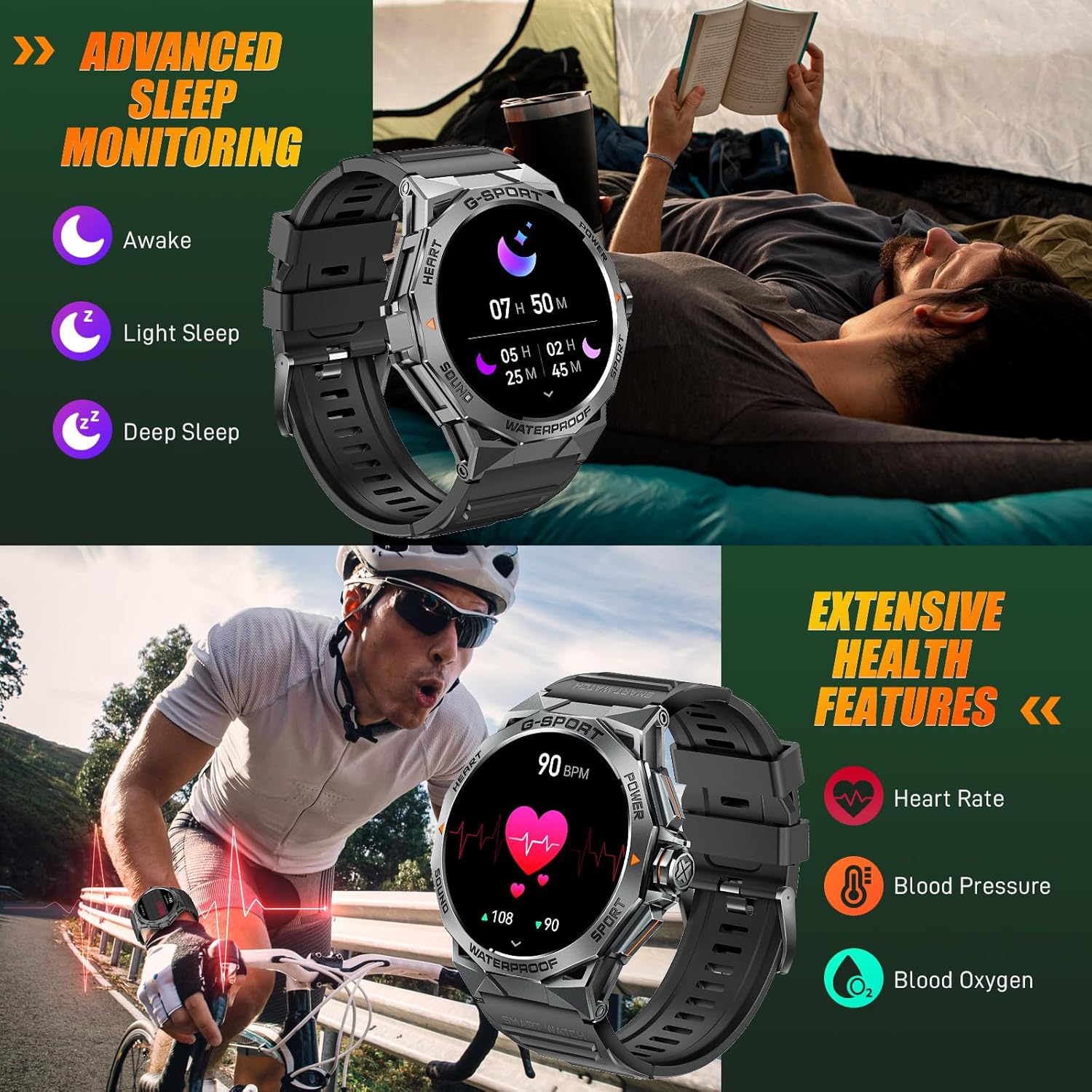
Image: The smartwatch displaying sleep data and heart rate monitoring, with icons for heart rate, blood pressure, and blood oxygen.
4.5 Бусад ухаалаг онцлогууд
The EIGIIS K22 offers several additional features to enhance daily convenience:
- Хөгжмийн хяналт: Ухаалаг утсан дээрээ хөгжим тоглуулахыг удирдаарай.
- Камерын удирдлага: Цагаа утасныхаа камерын алсын хаалт болгон ашиглаарай.
- Цаг агаарын мэдээ: Бодит цагийн цаг агаарын урьдчилсан мэдээг аваарай.
- Сэрүүлэгтэй цаг: Бугуйнаасаа шууд сэрүүлэг тохируулна уу.
- Утас хайх: Алдаатай ухаалаг гар утасныхаа байршлыг олоорой.
- Суурин сануулга: Идэвхгүй хугацааны дараа хөдлөх сэрэмжлүүлэг хүлээн авах.
- Дуут туслах: Утасныхаа дуут туслахад хандана уу.

Image: A collage showing the smartwatch controlling music, acting as a camera remote, displaying weather, and featuring stopwatch, alarm, and 'find phone' functions.
5. Засвар үйлчилгээ, арчилгаа
5.1 Усны эсэргүүцэл (IP68)
The EIGIIS K22 Smartwatch is IP68 waterproof, meaning it is resistant to dust and can withstand immersion in water up to 1.5 meters for 30 minutes. It is suitable for daily use, including washing hands and swimming.
- Халуун ус, уур эсвэл өндөр даралттай усны тийрэлтэт онгоцонд удаан хугацаагаар өртөхөөс зайлсхий.
- Усан доор товчлуурыг бүү ажиллуул.
- Усанд орсны дараа цагийг сайтар хатаана.

Image: A person swimming while wearing the EIGIIS K22 Smartwatch, highlighting its IP68 waterproof rating.
5.2 Батерейны ашиглалтын хугацааг оновчтой болгох
The 400mAh battery provides 4-7 days of typical usage and up to 25 days on standby. To maximize battery life:
- Adjust screen brightness to a lower setting.
- Limit the use of the Always On Display feature if extended battery life is critical.
- Шаардлагагүй мэдэгдлүүдийг идэвхгүй болгох.
- Close background apps on the watch when not in use.
5.3 Цэвэрлэгээ
Regularly clean your smartwatch and watch band to prevent skin irritation and maintain performance.
- Wipe the watch and band with a soft, damp даавуу.
- Химийн хатуу бодис, зүлгүүрийн материал ашиглахаас зайлсхий.
6. Алдаа засах
If you encounter issues with your EIGIIS K22 Smartwatch, refer to the following common solutions:
| Асуудал | Боломжит шийдэл |
|---|---|
| Цаг асахгүй байна | Цаг бүрэн цэнэглэгдсэн эсэхийг шалгаарай. Үүнийг дор хаяж 30 минутын турш цэнэглэгчтэй холбоно уу. |
| Ухаалаг утастай хослуулах боломжгүй | Ensure Bluetooth is enabled on your phone. Restart both the watch and phone. Make sure the FitCloudPro app has Bluetooth permissions. |
| Мэдэгдэл хүлээж аваагүй | Check notification settings in the FitCloudPro app and your phone's system settings. Ensure the app is running in the background. |
| Батерейны богино хугацаа | Disable the Always On Display feature. Reduce screen brightness. Limit frequent heart rate monitoring. See Section 5.2 for more tips. |
| Bluetooth audio defaults to watch speaker | This is a common behavior for smartwatches with built-in speakers. In your phone's Bluetooth settings, you may be able to disconnect the watch's audio profile while keeping the data connection. Alternatively, some apps allow you to select the audio output device. |
| Эрүүл мэндийн буруу мэдээлэл | Ensure the watch is worn snugly on your wrist, about one finger's width above the wrist bone. Avoid excessive movement during measurements. Note that smartwatches are not medical devices and readings are for reference only. |
7. Техникийн үзүүлэлтүүд
| Онцлог | Дэлгэрэнгүй |
|---|---|
| Загварын дугаар | K22 |
| Дэлгэц | 1.43 Inches AMOLED HD Always On Display |
| Зайны багтаамж | 400 мАч |
| Зайны ашиглалт | 4-7 days (typical use), up to 25 days (standby) |
| Цэнэглэх хугацаа | Ойролцоогоор 2 цаг |
| Усны эсэргүүцэл | IP68 |
| Холболт | Bluetooth |
| Үйлдлийн систем | Wear OS |
| Тохиромжтой байдал | Android 4.4 ба түүнээс дээш, iOS 8.0 ба түүнээс дээш |
| Зүйлийн жин | 50 грамм (1.76 унц) |
| Бүтээгдэхүүний хэмжээс | 6.69 x 4.33 x 1.18 инч |
8. Баталгаат хугацаа ба дэмжлэг
8.1 Бүтээгдэхүүний баталгаа
The EIGIIS K22 Smartwatch comes with a 12 сарын чанарын баталгаа from the date of purchase. This warranty covers manufacturing defects and issues arising from normal use. It does not cover damage caused by misuse, accidents, unauthorized modifications, or failure to follow instructions.
8.2 Хэрэглэгчийн дэмжлэг
For any questions, technical assistance, or warranty claims, please contact EIGIIS customer support through the following channels:
- Бүтээгдэхүүний сав баглаа боодолтой хамт өгсөн холбоо барих мэдээллийг үзнэ үү.
- Visit the official EIGIIS webтуслах нөөцийн сайт.
- Contact the seller directly through the platform where you purchased the product.
Please have your purchase receipt and product model number (K22) ready when contacting support.


