Танилцуулга
This manual provides detailed instructions for the safe and efficient operation of your CREWORKS 40x50 cm Heat Press Machine. This machine is designed for transferring designs onto various materials such as T-shirts, pillowcases, mouse pads, tote bags, masks, and backpacks using heat and pressure. Please read this manual thoroughly before use and keep it for future reference.
Аюулгүй ажиллагааны зааварчилгаа
- Дулааны прессийг үргэлж тогтвортой, халуунд тэсвэртэй гадаргуу дээр ажиллуул.
- Keep hands and body clear of the heating platen during operation to prevent burns.
- Ensure proper ventilation in the work area to dissipate any fumes from materials.
- Машин асаалттай эсвэл халааж байх үед хараа хяналтгүй орхиж болохгүй.
- Машиныг ашиглаагүй үед эсвэл цэвэрлэх/засвар хийхээс өмнө цахилгааны залгуураас салга.
- Do not use the machine near water or in damp нөхцөл.
- The machine features an automatic shut-off after 30 minutes of inactivity for safety.
- The rubber-coated handle helps prevent accidental burns. Always use caution.
Бүтээгдэхүүн дууссанview
Familiarize yourself with the components of your heat press machine.
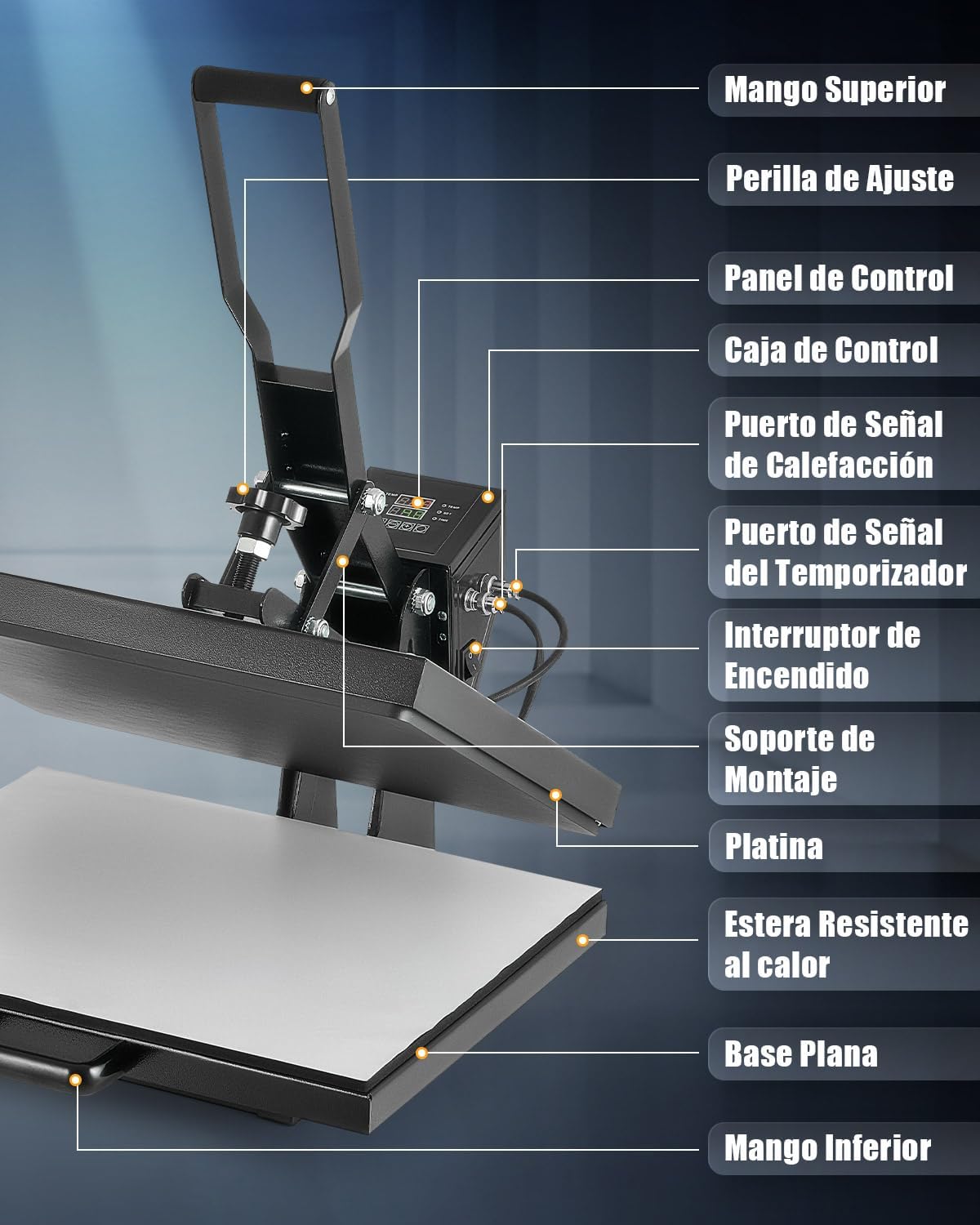
The machine features a top handle for operation, an adjustment knob for pressure, a digital control panel for temperature and time, and a sliding flat base for easy material placement.
Тохиргоо
- Unpack the heat press machine and all its components.
- Place the machine on a sturdy, level, and heat-resistant surface. Ensure there is adequate space around the machine for safe operation.
- Цахилгааны утсыг газардуулсан цахилгааны залгуурт холбоно уу.
- Залгуурыг залгахаасаа өмнө унтраалга унтраалттай байгаа эсэхийг шалгаарай.
Ашиглалтын заавар
1. Power On and Initial Settings
Turn on the machine using the power switch. The digital control panel will illuminate.
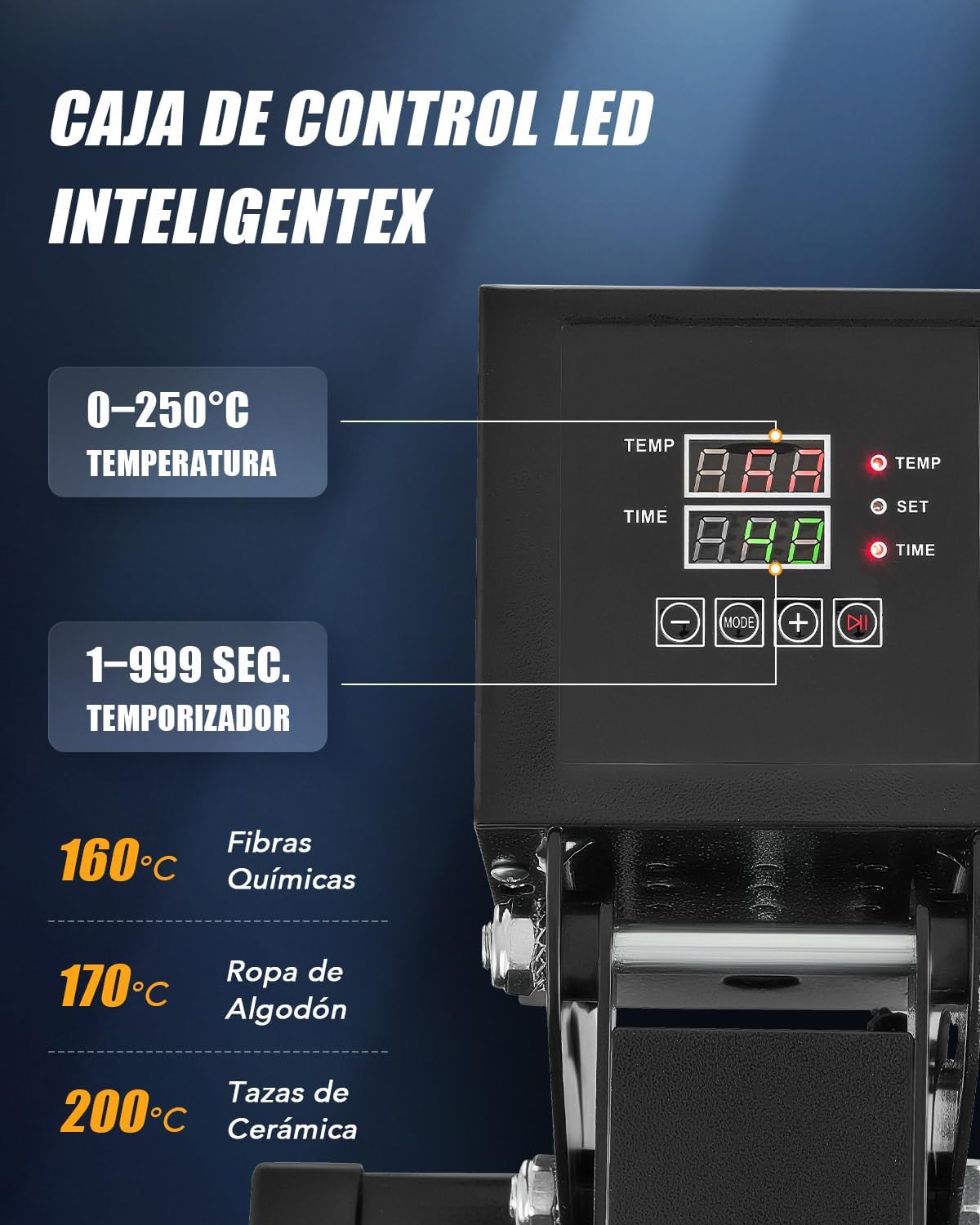
- Температурын тохируулга: Press the "SET" button, then use the "+" and "-" buttons to set the desired temperature (up to 250°C / 480°F). Press "SET" again to confirm.
- Цагийн тохируулга: Press the "MODE" button, then use the "+" and "-" buttons to set the desired time (up to 999 seconds). Press "MODE" again to confirm.
- The machine will begin heating to the set temperature.
2. Даралтыг тохируулах
The pressure can be adjusted using the knob located on top of the heating platen assembly.

- Turn the adjustment knob clockwise for more pressure and counter-clockwise for less pressure.
- Test the pressure on a scrap piece of material before applying your final design.
3. Heat Transfer Process
- Once the machine reaches the set temperature, pull out the flat base using the bottom handle.
- Place your material (e.g., T-shirt) onto the heat-resistant mat on the flat base. Ensure it is smooth and free of wrinkles.
- Position your transfer design (e.g., DTF, sublimation paper) onto the material.
- Slide the flat base back into position under the heating platen.
- Lower the top handle to bring the heating platen down onto the material. The timer will start automatically.
- When the timer alarms, lift the top handle to release the pressure.
- Pull out the flat base and carefully remove the transferred item. Allow it to cool before handling further, especially for "cold peel" transfers.

The dual heating tubes ensure uniform heat distribution across the platen for consistent transfer results.

Олон талт програмууд
This heat press machine is suitable for a wide range of items beyond just T-shirts.

Засвар үйлчилгээ
- Цэвэрлэхийн өмнө машиныг үргэлж залгуураас салгаад бүрэн хөргөхийг хүлээнэ үү.
- Wipe the heating platen with a soft, dry cloth. For stubborn residue, use a specialized platen cleaner.
- Keep the control panel clean and free of dust.
- Regularly check all connections and moving parts for wear and tear.
- Store the machine in a dry, dust-free environment.
Алдааг олж засварлах
| Асуудал | Боломжит шалтгаан | Шийдэл |
|---|---|---|
| Машин асахгүй байна. | Power cord not properly connected; Power switch off; No power from outlet. | Цахилгааны утас холболтыг шалгах; Цахилгаан унтраалга асаалттай байгаа эсэхийг шалгаарай; Гаралтыг өөр төхөөрөмжөөр шалгана уу. |
| Жигд бус дулаан дамжуулалт. | Uneven pressure; Material not flat; Heating element issue. | Adjust pressure knob; Ensure material is smooth; Contact support if heating element is suspected. |
| Design not adhering properly. | Incorrect temperature; Insufficient time; Insufficient pressure; Wrong transfer material. | Verify temperature and time settings; Increase pressure; Ensure correct transfer material for fabric. |
| Машин тасралтгүй дохио өгдөг. | Timer alarm; Error code. | Acknowledge timer alarm; Refer to control panel display for error codes and consult support if needed. |
Үзүүлэлтүүд
- Загварын дугаар: HPMES2024
- Брэнд: Багийн ажилчид
- Platen Size: 40 x 50 см
- Эрчим хүч: 2000 ватт
- Хамгийн их температур: 250°C (480°F)
- Таймерын хүрээ: 1-999 секунд
- Халаалтын төрөл: Dual Heating Tubes
- Автомат унтрах: 30 минут идэвхгүй болсны дараа
Бүтээгдэхүүний албан ёсны видеонууд
Watch these official videos for visual guidance on using your CREWORKS Heat Press Machine.
Бүтээгдэхүүн дууссанview and Operation (0:36)
Энэ видео нь хурдан дуусгах боломжийг олгодогview of the CREWORKS Heat Press Machine and demonstrates basic operational steps.
Heat Transfer Demonstration (1:04)
A detailed demonstration of the heat transfer process, showing how to place materials and apply designs.
Features and Benefits (0:54)
This video highlights the key features of the heat press, including the digital control and dual heating elements.
Баталгаат болон дэмжлэг
For warranty information and customer support, please refer to the documentation included with your purchase or contact CREWORKS customer service directly. Keep your purchase receipt as proof of purchase.
For further assistance, please visit the official CREWORKS website or contact their support team through the contact information provided in your product packaging.


