1. Аюулгүй байдлын мэдээлэл
Please read all safety instructions before using the Onvian YQ88 bike headlight. Failure to follow these instructions may result in injury or damage to the product.
- Харагдах байдал: Always ensure the light is properly aimed to illuminate your path without blinding oncoming traffic or pedestrians.
- Дулаан: The light may become warm during extended use, especially on high brightness settings. Avoid direct contact with skin when hot.
- Усны эсэргүүцэл: The light is IPX5 water-resistant, meaning it can withstand splashes and light rain. Do not submerge the light in water.
- Зай: Use only the provided USB-C cable for charging. Do not attempt to open or replace the internal battery.
- Суурилуулалт: Ensure the light is securely mounted to your handlebars before riding to prevent it from falling off.
- Хүүхдүүд: Хүүхдийн гар хүрэхгүй газар хадгална.
2. Багцын агуулга
Бүх зүйл багцад байгаа эсэхийг шалгана уу:
- Onvian YQ88 Bike Headlight
- Урд гэрлийн хаалт
- Mount Compatible with Garmin/GoPro (adapter)
- USB-C цахилгаан утас
- Хэрэглэгчийн гарын авлага (энэ баримт бичиг)
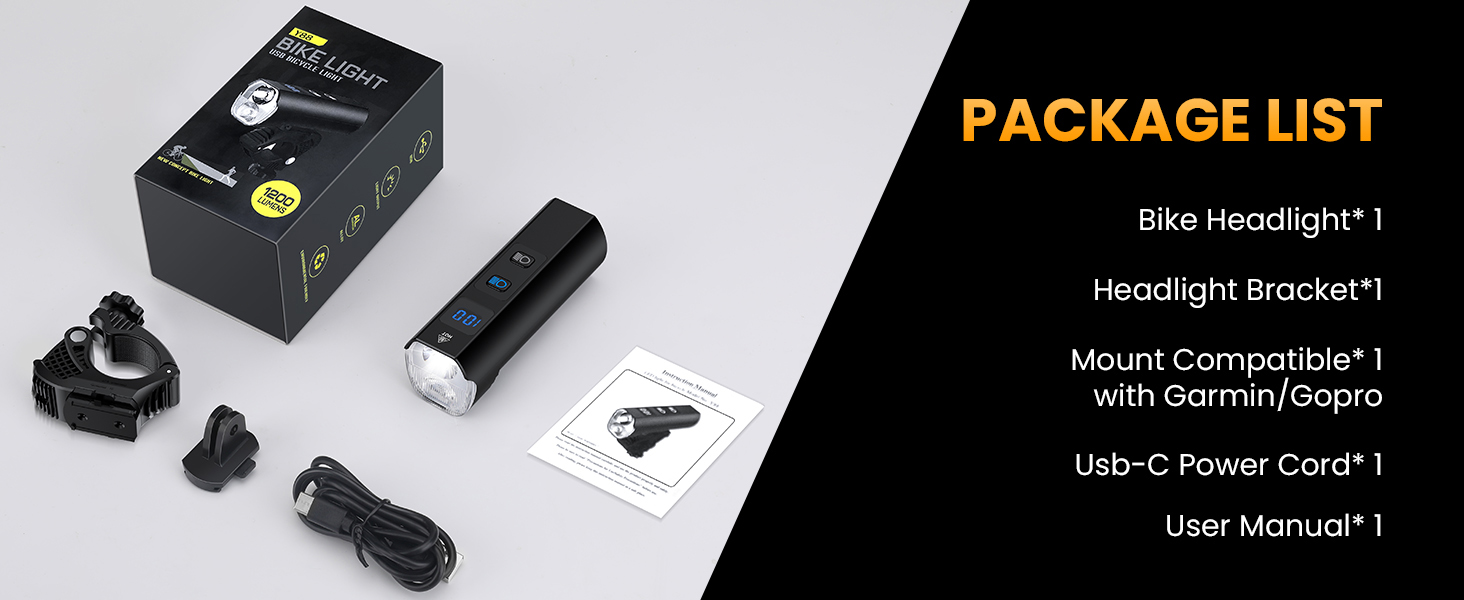
Image: Contents of the Onvian YQ88 bike headlight package, including the light, mounting brackets, and USB-C cable.
3. Бүтээгдэхүүн дууссанview
The Onvian YQ88 is a high-performance bicycle headlight designed for enhanced visibility and safety during night riding. It features a durable aluminum alloy construction, a powerful 1200 lumen output, and a 5000mAh rechargeable battery.

Image: Diagram illustrating the key components of the Onvian YQ88 bike headlight, including the high beam, low beam, battery level LED display, light buttons, USB input/output, buckle design, quick release mount, and 360° rotation bracket.
- Өндөр туяа: Provides a focused, brighter light for longer distances.
- Бага туяа: Offers a wider spread of light, ideal for closer illumination and reducing glare for others.
- Battery Level LED Display: Үлдсэн батерейны хувийг харуулнаtage.
- USB оролт гаралт: Allows for charging the device and using it as a power bank.
- Түргэн буулгах бэхэлгээ: Enables easy attachment and detachment from the handlebar.
- 360° Rotation Bracket: Provides flexibility in adjusting the light's direction.
4. Тохиргоо ба суурилуулалт
Follow these steps to install your Onvian YQ88 bike headlight:
- Prepare the Bracket: Unscrew the mounting screw on the headlight bracket to open the clamp.
- Хаалтыг байрлуулах: Place the bracket around your bicycle handlebar at the desired position.
- Хаалт бэхэлгээ: Tighten the screw until the bracket is firmly secured to the handlebar. Ensure it does not rotate freely.
- Attach the Headlight: Slide the Onvian YQ88 headlight onto the bracket until it clicks into place. Verify it is securely locked.
- Өнцөг тохируулах: Adjust the angle of the headlight to ensure optimal illumination of your path without causing glare to others. The 360° rotation bracket allows for precise adjustment.
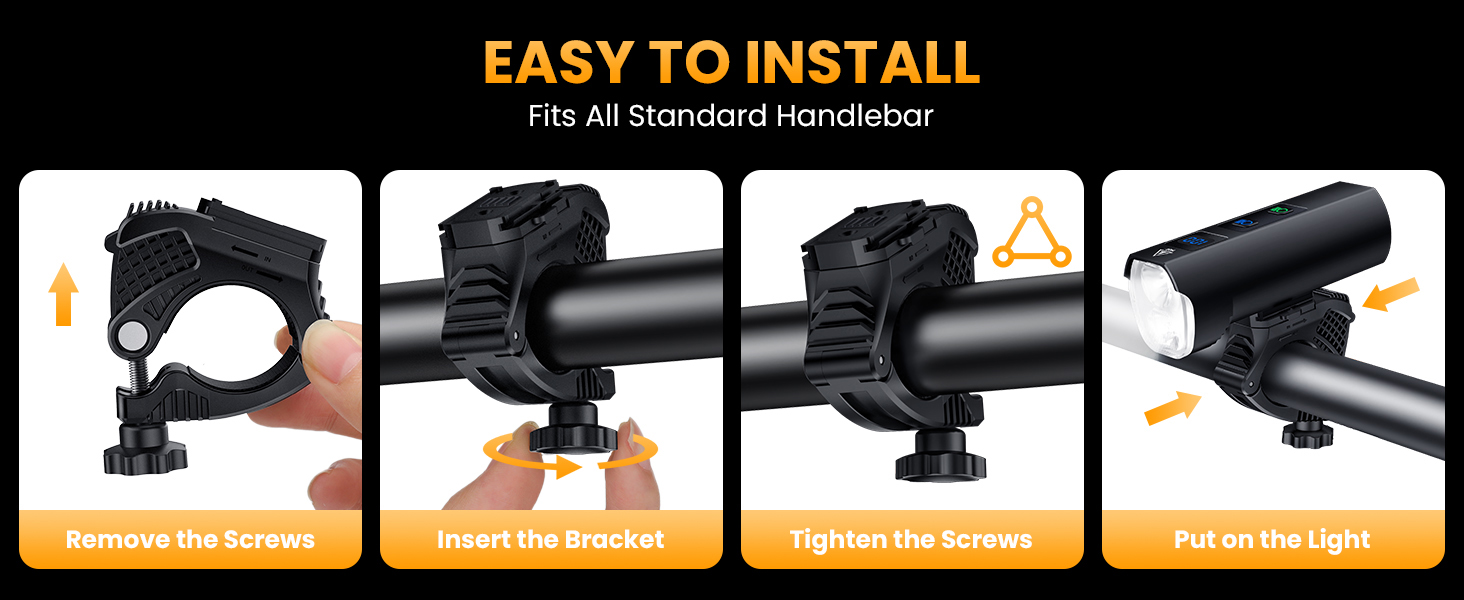
Image: Step-by-step visual guide for installing the Onvian YQ88 bike headlight onto a handlebar, showing how to remove screws, insert the bracket, tighten screws, and attach the light.
5. Ашиглалтын заавар
The Onvian YQ88 bike headlight offers 13 distinct lighting modes for various riding conditions.
5.1 Асаах/унтраах ба горимын сонголт
- Асаах: Press either the High Beam or Low Beam button to turn on the light.
- Солих горимууд: Press the respective button (High Beam or Low Beam) for 2 seconds to cycle through the modes within that beam type.
- Унтраах: Long-press either button until the light turns off, or cycle through all modes until it switches off.
- Combined Beams: Double-click either button to activate both high and low beams simultaneously.
5.2 Хөнгөн горим
The headlight features three main categories of light modes:

Image: Detailed illustration of the 13 light modes available on the Onvian YQ88 bike headlight, categorized into High Beam, Low Beam, and High Beam + Low Beam, with approximate battery life for each setting.
- High Beam Modes (5 modes):
- High (approx. 4 hours)
- Middle (approx. 6 hours)
- Low (approx. 18 hours)
- Flash (approx. 22 hours)
- SOS (approx. 22 hours)
- Low Beam Modes (5 modes):
- High (approx. 3.5 hours)
- Middle (approx. 7 hours)
- Low (approx. 16 hours)
- Flash (approx. 20 hours)
- SOS (approx. 20 hours)
- High Beam + Low Beam Modes (3 modes):
- High (approx. 3.5 hours)
- Middle (approx. 7 hours)
- Low (approx. 16 hours)
The SOS mode is designed for emergency situations to attract attention. The battery life estimates are approximate and may vary based on usage and environmental conditions.

Image: A person holding the Onvian YQ88 bike headlight in SOS mode, emitting a bright, focused beam into the night sky, indicating its use for emergency signaling.
6. Цэнэглэх болон батерейны удирдлага
The Onvian YQ88 bike headlight is equipped with a 5000mAh rechargeable battery and a USB-C port for convenient charging and power output.
6.1 Charging the Headlight
- Locate the USB-C charging port on the side of the headlight.
- Open the protective rubber cover over the port.
- Connect the provided USB-C cable to the headlight and to a compatible USB power source (e.g., computer, power bank, wall adapter, car charger).
- The LED display will show the charging progress. A full charge is indicated when the display shows 100%.
- Цэнэглэж дууссаны дараа кабелийг салгаж, усны эсэргүүцлийг хадгалахын тулд резинэн тагийг сайтар хаа.

Image: Visual guide demonstrating various methods to charge the Onvian YQ88 bike headlight, including connecting to a computer, power bank, or car charger via its USB-C port.
6.2 Эрчим хүчний банкны функциональ байдал
The Onvian YQ88 can also function as a power bank to charge other small electronic devices.
- Open the protective rubber cover over the USB output port.
- Connect your device's charging cable to the USB output port on the headlight.
- The headlight will begin charging your device. Monitor the battery level on the headlight's LED display.
- Disconnect the cable and close the rubber cover when finished.
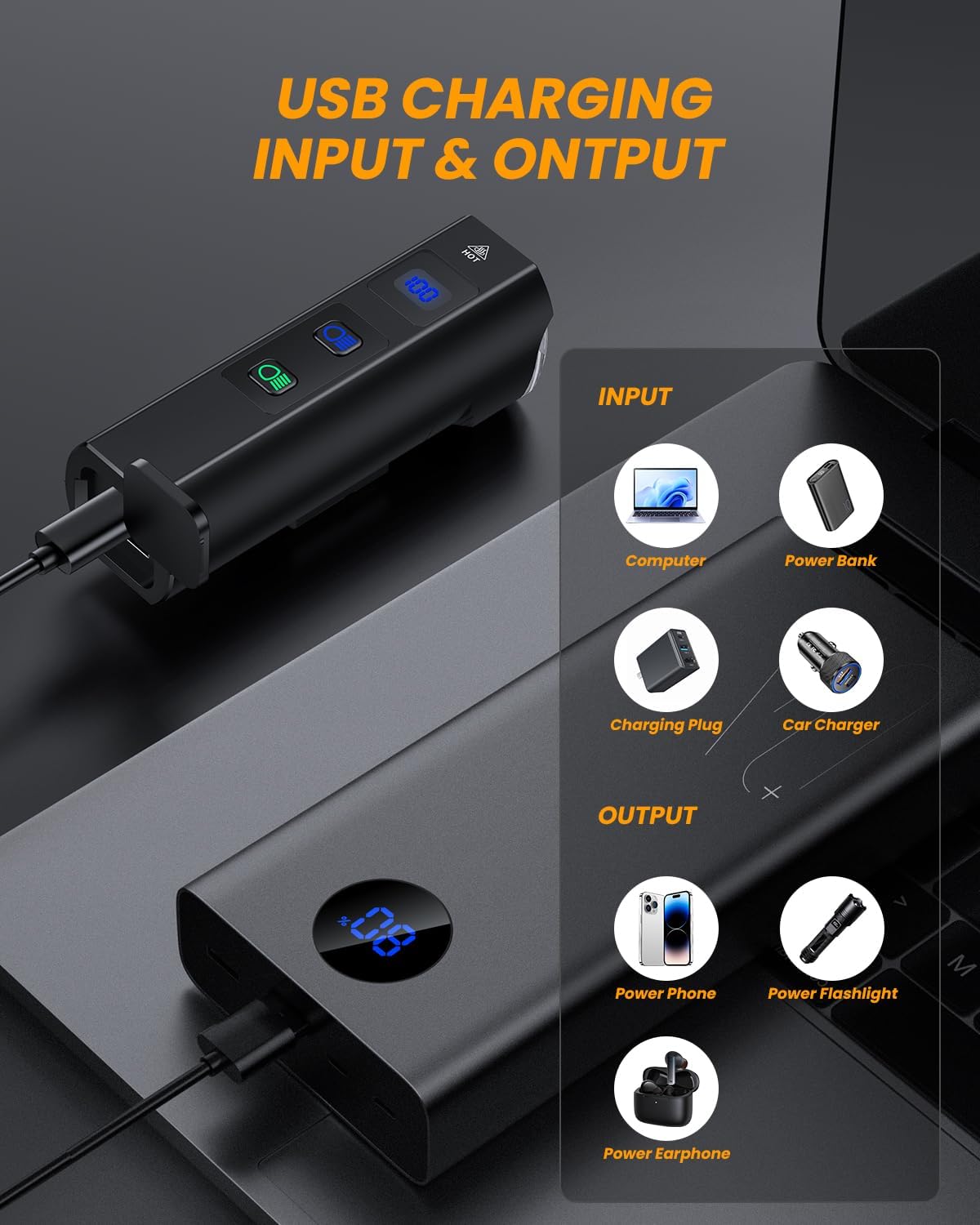
Image: Diagram showing the USB input and output capabilities of the Onvian YQ88 bike headlight, illustrating how it can be charged and used to charge other devices like phones or earphones.
7. Засвар үйлчилгээ
Proper maintenance will ensure the longevity and optimal performance of your Onvian YQ88 bike headlight.
- Цэвэрлэгээ: Хөнгөн биеийг зөөлөн, d-ээр арчинаamp даавуу. Зүлгүүрийн цэвэрлэгч, уусгагчийг бүү ашигла.
- Хадгалах: Store the light in a cool, dry place when not in use. If storing for an extended period, charge the battery to approximately 50-70% every 3-6 months to preserve battery health.
- Усны эсэргүүцэл: Always ensure the USB port cover is securely closed to maintain the IPX5 water resistance.
- Суурилуулалт: Periodically check the mounting bracket for tightness and wear.

Image: The Onvian YQ88 bike headlight mounted on a handlebar, covered in water droplets, highlighting its IPX5 waterproof rating and durable aluminum alloy construction.
8. Алдаа засах
| Асуудал | Боломжит шалтгаан | Шийдэл |
|---|---|---|
| Гэрэл асдаггүй. | Батерей дуусч байна. | Charge the headlight using the provided USB-C cable. |
| Гэрэл гэнэт унтарна. | Батерейны түвшин бага. | Recharge the headlight. |
| Light modes are not cycling correctly. | Буруу дарсан товчлуур. | Ensure you are pressing the button for 2 seconds to cycle modes, or long-pressing to turn off. |
| Mount feels loose. | Mounting screw is not tight enough. | Tighten the mounting screw on the handlebar bracket. |
| USB charging/output not working. | Cable issue or port obstruction. | Try a different USB-C cable. Ensure the port is clean and free of debris. |
9. Техникийн үзүүлэлтүүд
| Онцлог | Дэлгэрэнгүй |
|---|---|
| Загварын нэр | YQ88 |
| Брэнд | Онвиан |
| Гэрэлтүүлэг | 1200 люмен (хамгийн их) |
| Зайны багтаамж | 5000 мАч |
| Эрчим хүчний эх үүсвэр | Батерейгаар ажилладаг (USB-C-ээр цэнэглэдэг) |
| Материал | Хөнгөн цагааны хайлш |
| Усны эсэргүүцэл | IPX5 (Усны хамгаалалттай) |
| Суурилуулах төрөл | Rack Mount (Handlebar) |
| Зүйлийн жин | 0.29 кг |
| Өнгө | Хар |
10. Баталгаат хугацаа ба дэмжлэг
The Onvian YQ88 bike headlight comes with a 1 жилийн баталгаат хугацаа худалдан авсан өдрөөс.
This warranty covers manufacturing defects and material flaws under normal use. It does not cover damage caused by misuse, accidents, unauthorized modifications, or normal wear and tear.
For warranty claims, technical support, or any questions regarding your product, please contact Onvian customer service through the retailer where the product was purchased or visit the official Onvian store page on Amazon: Onvian Store.


