1. Бүтээгдэхүүн дууссанview
The MiBOXER Y3 RGB+CCT Vertical Remote provides comprehensive control over compatible RGB+CCT LED lighting systems. This remote allows for precise adjustments of RGB colors, color temperature (CCT), and brightness. Utilizing 2.4GHz wireless technology, it ensures reliable communication with your lighting devices. Its ergonomic vertical design and intuitive interface are designed for ease of use, enabling users to effortlessly customize lighting for various environments.
Гол онцлогууд:
- RGB, CCT, and Brightness Control: Adjust colors, color temperature, and brightness with ease.
- 2.4GHz утасгүй технологи: Найдвартай, урт хугацааны холболтыг баталгаажуулдаг.
- Босоо дизайн: Ergonomic and easy-to-use layout for quick adjustments.
- Multi-Color and Dimmable: Create customized lighting scenes with vibrant colors and dimming options.
- Олон талт нийцтэй байдал: Works with MiBOXER RGB+CCT lighting products.
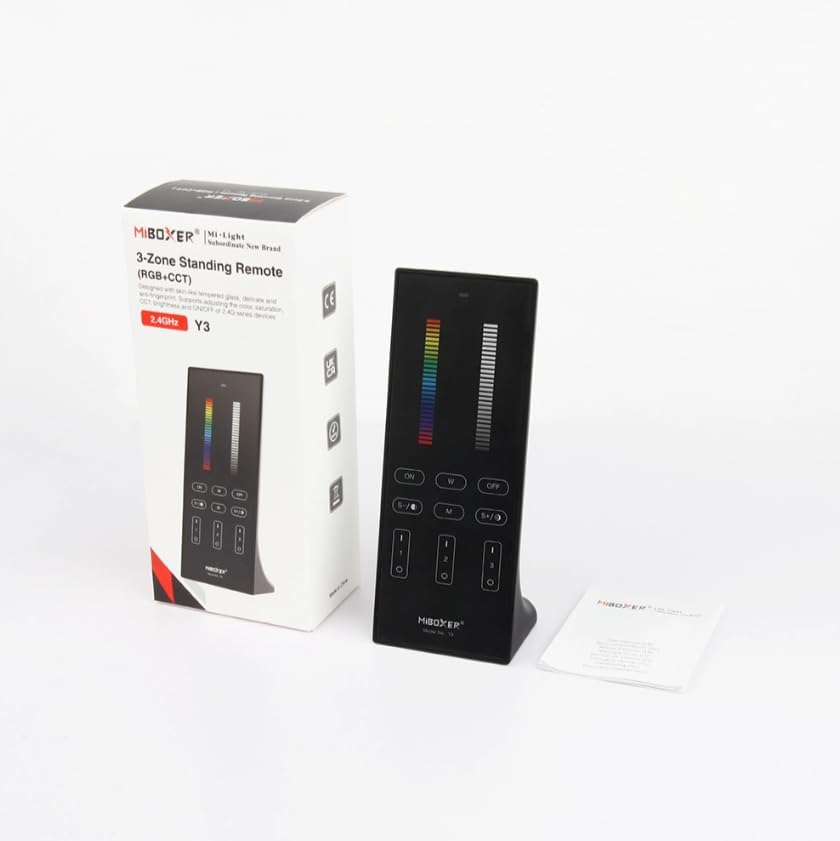
Figure 1: MiBOXER Y3 RGB+CCT Vertical Remote with its retail packaging.
2. Тохируулах заавар
2.1 Батерей суурилуулах
The MiBOXER Y3 remote requires two AAA batteries (not included). To install:
- Удирдлагын ар талд байгаа зайны тасалгааны тагийг олоорой.
- Нээх бол тагийг доош нь гулсуулна уу.
- Хоёр AAA батерейг оруулаад зөв туйлшралыг (+ ба -) баталгаажуулна уу.
- Хавтасыг найдвартай товших хүртэл нь буцааж шургуулна.
2.2 Алсын удирдлагыг гэрэлтүүлгийн төхөөрөмжтэй холбох
To control your MiBOXER RGB+CCT lighting devices, the remote must be linked to them. This process typically involves a specific sequence of actions on both the remote and the lighting device. Refer to your specific MiBOXER lighting product's manual for detailed linking instructions, as the procedure may vary slightly between different light models. A common linking procedure is as follows:
- Ensure the lighting device is powered off.
- Power on the lighting device.
- Within 3 seconds of powering on the light, press the "Zone ON" button (labeled "I" or "1") on the remote for the desired zone.
- Гэрэл хэд хэдэн удаа анивчсан байх ёстой бөгөөд энэ нь амжилттай холболтыг илтгэнэ.
- If linking fails, repeat the process.
To unlink a device from a zone, power on the light and within 3 seconds, press the "Zone ON" button (labeled "I" or "1") five times rapidly for the corresponding zone. The light should flash multiple times to confirm unlinking.
3. Ашиглалтын заавар
The MiBOXER Y3 remote features an intuitive layout for controlling various lighting parameters. Familiarize yourself with the buttons and sliders as shown in Figure 2.

Figure 2: MiBOXER Y3 Remote Control button layout and functions.
3.1 Button Functions:
| Товчлуур/Удирдлага | Чиг үүрэг |
|---|---|
| Заагч гэрэл | Flashes to confirm button presses. |
| RGB гулсагч | Slide to select desired RGB color. |
| Гэрэлтүүлгийн слайдер | Slide to adjust light brightness (0-100%). |
| Master ON (I/ON) | Холбогдсон бүх гэрлийг АСААЛТААРАЙ. |
| Master OFF (O/OFF) | Холбогдсон бүх гэрлийг УНТРАА. |
| White Light (W) | Цэвэр цагаан гэрлийн горимыг идэвхжүүлнэ. |
| Speed-/CCT-/Saturation- | Decreases speed in dynamic mode, decreases color temperature (warmer white), or decreases color saturation. |
| Speed+/CCT+/Saturation+ | Increases speed in dynamic mode, increases color temperature (cooler white), or increases color saturation. |
| Dynamic Mode (M) | Cycles through various dynamic lighting effects. Press repeatedly to change effects. |
| Zone ON (1, 2, 3 - "I") | Turns ON lights linked to the specific zone. Used for linking/unlinking. |
| Zone OFF (1, 2, 3 - "O") | Тодорхой бүстэй холбогдсон гэрлийг УНТРАА. |
3.2 Ерөнхий үйл ажиллагаа:
- Гэрлийг асаах/унтраах: Use the "Master ON" or "Master OFF" buttons for all lights, or "Zone ON" / "Zone OFF" for specific zones.
- Adjusting Color: Slide your finger along the "RGB Slider" to select your desired color.
- Гэрэлтүүлгийг тохируулах: Slide your finger along the "Brightness Slider" to increase or decrease the light intensity.
- Өнгөний температурыг тохируулах (CCT): In white light mode, use the "CCT-" and "CCT+" buttons to make the white light warmer or cooler.
- Динамик горимууд: Press the "M" button to activate dynamic lighting modes. Use "Speed-" and "Speed+" to adjust the speed of the current dynamic effect.
- Ханалтын тохируулга: In RGB mode, use "Saturation-" and "Saturation+" to adjust the intensity of the color.
4. Засвар үйлчилгээ
Proper maintenance ensures the longevity and optimal performance of your MiBOXER Y3 remote.
- Цэвэрлэгээ: Wipe the remote with a soft, dry cloth. Do not use abrasive cleaners, solvents, or wet cloths, as these can damage the surface or internal components.
- Зай солих: Replace batteries when the indicator light becomes dim or the remote's response becomes inconsistent. Always use new AAA batteries and dispose of old batteries responsibly.
- Хадгалах: Алсын удирдлагыг нарны шууд тусгал, хэт температураас хол, сэрүүн, хуурай газар хадгална уу. Хэрэв удаан хугацаагаар хадгалах юм бол гоожихоос сэргийлж зайгаа салга.
- Чийгнээс зайлсхийх: This remote is not waterproof. Keep it away from water and high humidity environments.
5. Алдаа засах
If you encounter issues with your MiBOXER Y3 remote, refer to the following troubleshooting steps:
| Асуудал | Боломжит шалтгаан | Шийдэл |
|---|---|---|
| Remote not responding to button presses. | Дуусах эсвэл бага батарей. Алсын удирдлага гэрэлтэй холбогдоогүй байна. Хязгаараас гарсан. | Зайгаа солих. Re-link the remote to the lighting devices (refer to Section 2.2). Move closer to the lighting devices. |
| Гэрэл өнгө/гэрэлтэхгүй. | Буруу горимыг сонгосон. Remote not linked to the specific zone. | Ensure you are in the correct mode (e.g., RGB for color, CCT for white temperature). Verify the remote is linked to the correct zone. |
| Indicator light not flashing. | Дууссан батерейнууд. Дотоод алдаа. | Зайгаа солих. Хэрэв батерейг сольсны дараа асуудал арилахгүй бол хэрэглэгчийн дэмжлэгтэй холбогдоно уу. |
| Interference with other 2.4GHz devices. | Proximity to other wireless devices. | Move the remote or other 2.4GHz devices further apart. |
6. Техникийн үзүүлэлтүүд
Technical specifications for the MiBOXER Y3 RGB+CCT Vertical Remote.
| Онцлог | Дэлгэрэнгүй |
|---|---|
| Загварын дугаар | Y3 |
| Брэнд | MiBOXER |
| Хяналтын төрөл | RGB+CCT Vertical Remote |
| Утасгүй технологи | 2.4 ГГц |
| Эрчим хүчний хангамж | 2x AAA батерей (оруулаагүй) |
| Онцлог шинж чанар | RGB/CCT/brightness dimmable |
| Зүйлийн жин | 4.8 унц (ойролцоогоор 136 грамм) |
| Багцын хэмжээ | 6.5 x 3 x 2 инч (ойролцоогоор 16.5 x 7.6 x 5.1 см) |


Figure 3: Dimensions of the MiBOXER Y3 Remote Control and its packaging.
7. Баталгаат хугацаа ба дэмжлэг
For warranty information, please refer to the documentation provided with your specific MiBOXER lighting product or contact the retailer where the product was purchased. MiBOXER products typically come with a manufacturer's warranty covering defects in materials and workmanship.
For technical support or further assistance, please visit the official MiBOXER website or contact their customer service department. Contact details are usually available on the product packaging or the brand's official online presence.


