1. Танилцуулга
This manual provides essential information for the proper setup, operation, and maintenance of your Sound Town STCA600X12MS6B Commercial Amplifier and Surface-Mount Speaker System. This system is designed for commercial and residential audio applications, offering a 6-zone 70V/100V amplifier and 6.5-inch surface-mount speakers.
The STCA600X12MS6B system includes:
- One (1) Sound Town STCA600-6Z Power Ampнастан
- Twelve (12) Sound Town TARVOS-MS6B-PAIR Surface-Mount Speakers
2. Аюулгүй ажиллагааны чухал заавар
- Ашиглалтын өмнө эдгээр зааврыг сайтар уншина уу.
- Эдгээр зааврыг цаашид лавлах зорилгоор хадгална уу.
- Бүтээгдэхүүн болон энэхүү гарын авлага дээрх бүх анхааруулгыг анхааралтай ажиглаарай.
- Бүх зааврыг дагана уу.
- Энэ төхөөрөмжийг усны ойролцоо бүү ашигла.
- Зөвхөн хуурай даавуугаар цэвэрлэ.
- Агааржуулалтын нүхийг хааж болохгүй. Үйлдвэрлэгчийн зааврын дагуу суурилуулна.
- Радиатор, халаалтын төхөөрөмж, зуух болон бусад төхөөрөмж (үүнд ampөргөгч) дулаан үүсгэдэг.
- Туйлшсан эсвэл газардуулгын төрлийн залгуурын аюулгүй байдлын зорилгыг бүү алдаарай. Туйлшсан залгуур нь нэг нь нөгөөгөөсөө өргөн хоёр иртэй байдаг. Газардуулгын төрлийн залгуур нь хоёр иртэй, гурав дахь газардуулгатай байдаг. Таны аюулгүй байдлыг хангах үүднээс өргөн ир буюу гурав дахь ишийг хангасан. Хэрэв нийлүүлсэн залгуур нь таны залгуурт тохирохгүй бол хуучирсан залгуурыг солихын тулд цахилгаанчинтай зөвлөлдөнө үү.
- Цахилгааны утсыг гишгэх, хавчихаас хамгаалаарай, ялангуяа залгуур, залгуур, төхөөрөмжөөс гарах цэг дээр.
- Зөвхөн үйлдвэрлэгчээс заасан хавсралт/дагалдах хэрэгслийг ашиглана уу.
- Аянга шуурганы үед эсвэл удаан хугацаагаар ашиглаагүй үед энэ төхөөрөмжийг цахилгааны залгуураас салга.
- Бүх үйлчилгээг мэргэшсэн үйлчилгээний ажилтнуудад шилжүүлээрэй. Төхөөрөмж нь цахилгаан тэжээлийн утас, залгуур гэмтсэн, шингэн асгарсан, эд зүйл унасан, бороо, чийгэнд өртсөн, хэвийн ажиллахгүй байгаа тохиолдолд засвар үйлчилгээ хийх шаардлагатай. , эсвэл хасагдсан.
3. Тохиргоо ба суурилуулалт
3.1 Ampдээш өргөгчview (STCA600-6Z)

Figure 1: STCA600-6Z Amplifier Front Panel. Features include power switch, input level controls, echo and delay for microphones, six zone volume controls, treble and bass adjustments, and a Bluetooth media player with display.

Figure 2: STCA600-6Z Amplifier Rear Panel. Connections include XLR/TRS combo MIC inputs with phantom power, RCA line inputs, direct speaker outputs (4-16 ohm), and 70V/100V speaker zone outputs with common ground.
3.2 Speaker Overview (TARVOS-MS6B-PAIR)
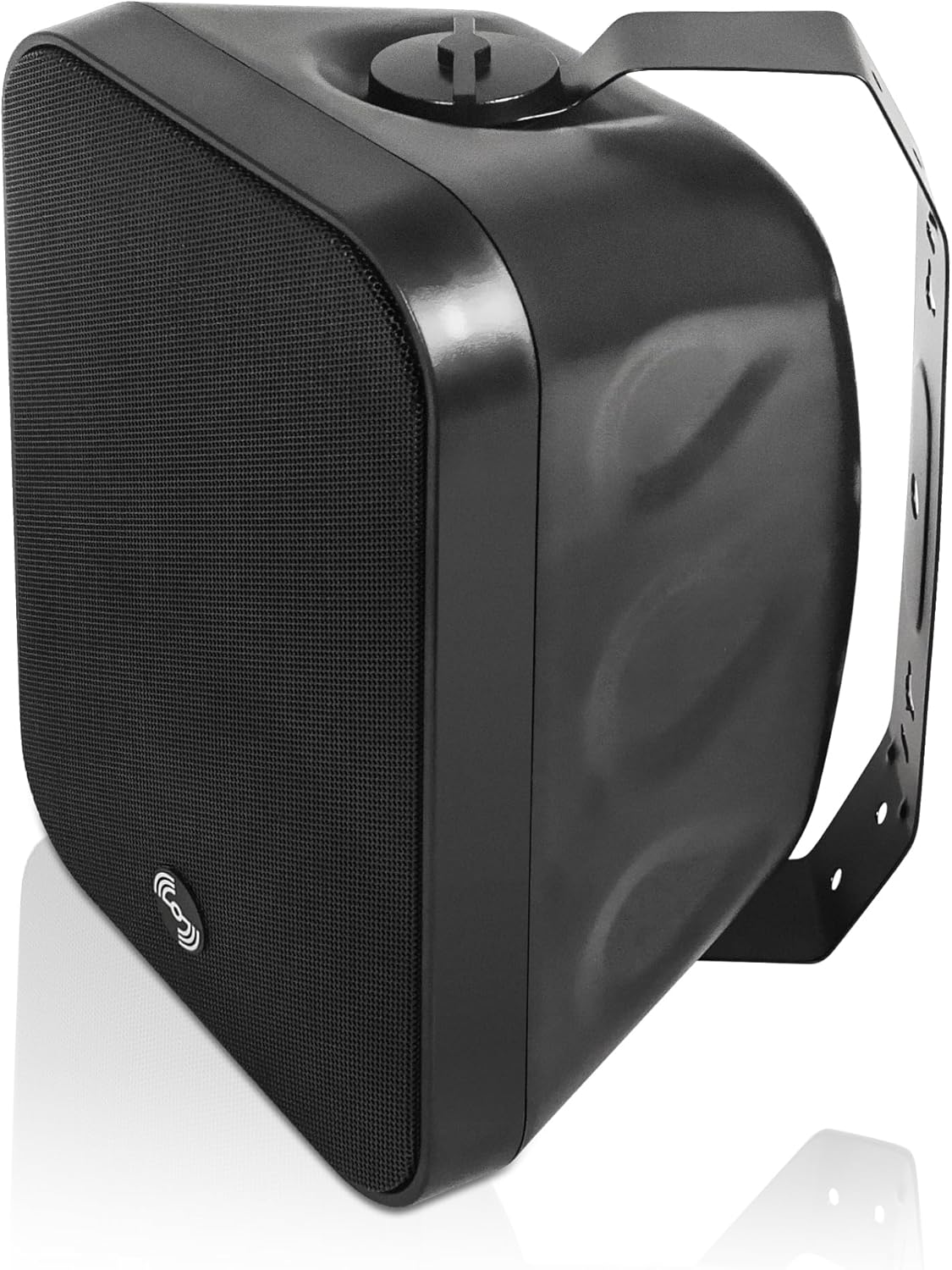
Figure 3: TARVOS-MS6B Speaker with Mounting Bracket. The speaker features a durable enclosure and a robust bracket for surface mounting.

Figure 4: TARVOS-MS6B Speaker Exploded View. This image illustrates the separate components: the speaker body, the U-bracket, and the screws for assembly and mounting.

Figure 5: TARVOS-MS6B Speaker Rear Panel. The rear panel features a rotary switch for selecting 70V/100V power taps or 8-ohm low impedance operation, along with red and black speaker wire terminals.

Figure 6: TARVOS-MS6B Speaker Power Tap Selector. This detailed view shows the rotary switch with options for 70V (15W, 30W, 60W), 100V (30W, 60W), and 8-ohm (N/C - Not Connected for 70V/100V, 8Ω for low impedance).
3.3 Speaker Mounting
- Байршлыг сонгох: Select a suitable surface for mounting, ensuring it can support the speaker's weight and is within reach of wiring. The speakers are IP55-rated for indoor/outdoor use.
- Хавсаргах: Secure the U-bracket to the wall or ceiling using appropriate hardware (not included). Ensure the bracket is level and firmly attached.
- Чанга яригчийг хавсаргах: Mount the speaker to the bracket using the provided screws.
- Өнцөг тохируулах: The speaker can be rotated 180 degrees on its bracket for optimal sound dispersion. Tighten screws once the desired angle is achieved.
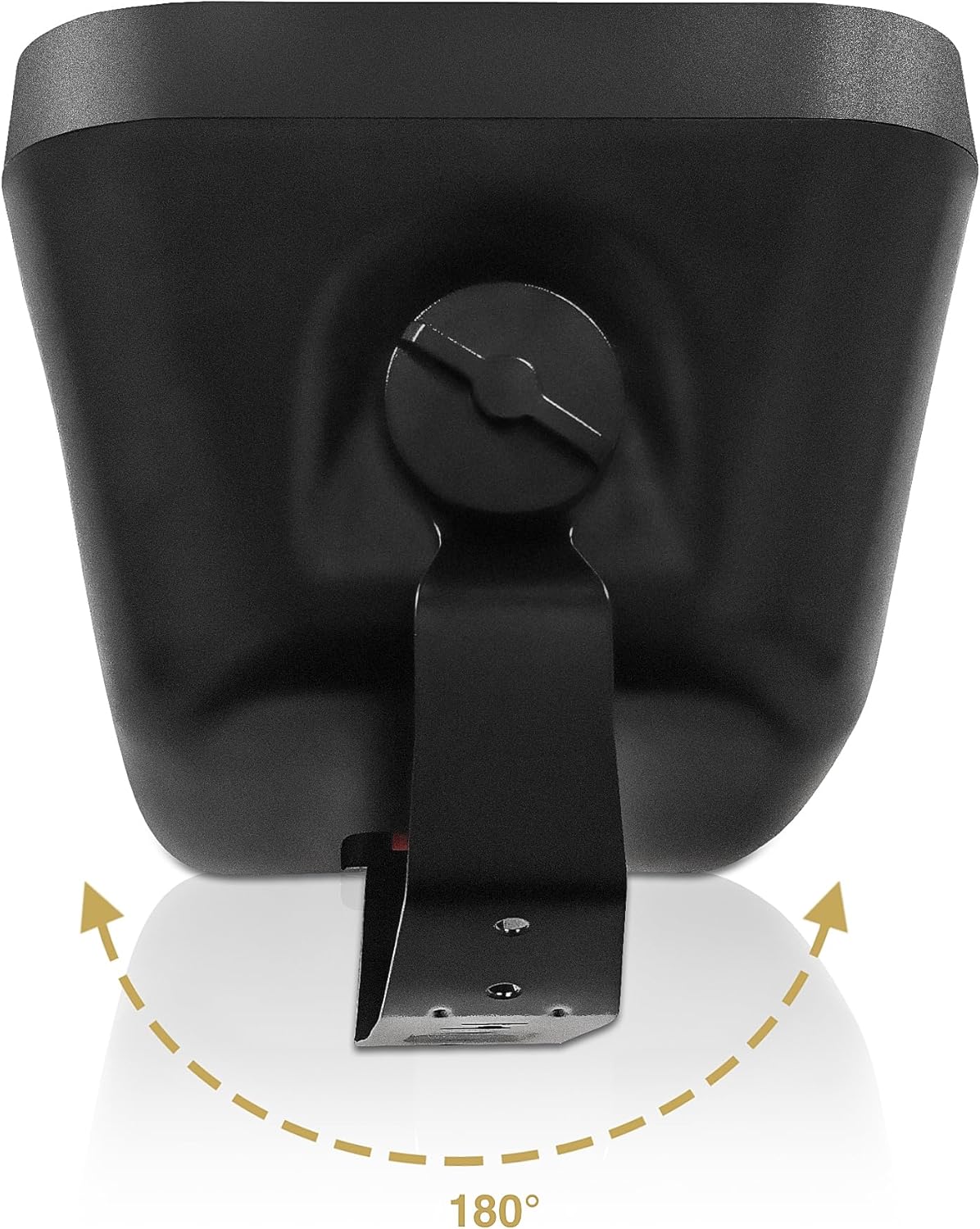
Figure 7: TARVOS-MS6B Speaker Angle Adjustment. The speaker can be rotated up to 180 degrees on its mounting bracket to direct sound as needed.
3.4 утас холболт
The STCA600-6Z amplifier supports both 70V/100V constant voltage systems and 4-16 ohm low impedance speakers. The TARVOS-MS6B speakers are equipped with a multi-tap transformer for compatibility with both systems.
3.4.1 70V/100V System Wiring
- Speaker Tap Selection: On each TARVOS-MS6B speaker, use the rotary switch (Figure 6) to select the desired power tap (e.g., 15W, 30W, 60W for 70V or 100V). Ensure all speakers connected to a single zone are set to the same voltage (70V эсвэл 100V).
- Ampөргөгч холболт: Connect the positive (+) terminal of each speaker to the corresponding 70V or 100V output terminal on the STCA600-6Z ampөргөгч 70V SPEAKER ZONE OUTPUT section (Figure 2).
- Common Connection: Чанга яригч бүрийн сөрөг (-) терминалыг холбоно COM дээр терминал ampөргөгч 70V SPEAKER ZONE OUTPUT хэсэг.
- Бүсийн даалгавар: Connect speakers for each zone to the respective zone terminals (e.g., Zone 1 speakers to terminals 21/COM, Zone 2 speakers to terminals 22/COM, etc.).
- Нийт ваттtage: Нийт ватыг баталгаажуулна ууtage of all speakers connected to a single zone does not exceed the amplifier's output capacity for that zone. The STCA600-6Z provides 600W total output.
3.4.2 Low Impedance (8 Ohm) System Wiring
Caution: Do not mix 70V/100V and low impedance speakers on the same amplifier output terminals. Use the dedicated 4-16 ohm output for low impedance speakers.
- Speaker Tap Selection: On each TARVOS-MS6B speaker, set the rotary switch (Figure 6) to the 8 Ом байр суурь.
- Ampөргөгч холболт: Чанга яригч бүрийн эерэг (+) терминалыг холбоно уу 4-16 Ом output terminal on the STCA600-6Z ampөргөгч DIRECT SPEAKER OUTPUT section (Figure 2).
- Common Connection: Чанга яригч бүрийн сөрөг (-) терминалыг холбоно COM дээр терминал ampөргөгч DIRECT SPEAKER OUTPUT хэсэг.
- Тохиромжтой эсэргүүцэл: Ensure the total impedance of connected speakers is within the amplifier's specified range (4-16 ohms).
3.5 Эрчим хүчний холболт
- -ийг баталгаажуулах ampөргөгчийн цахилгаан унтраалга нь OFF байрлалд байна.
- Нийлүүлсэн хувьсах гүйдлийн тэжээлийн утсыг холбоно уу amplifier's power inlet and then to a suitable AC power outlet (110V/220V, 50/60Hz).
- Номыг баталгаажуулна ууtage selector switch on the rear panel matches your local power supply (Figure 2).
4. Ашиглалтын заавар
4.1 Асаах/унтраах
- To power on, press the main power switch on the amplifier's front panel to the ON position (Figure 1). The power indicator light will illuminate.
- To power off, press the main power switch to the OFF байр суурь.
4.2 Input Selection and Volume Control
- Микрофоны оролтууд: Connect microphones to the MIC1, MIC2, or MIC3 inputs on the front or rear panel (Figure 1, Figure 2). Adjust individual MIC volume controls. Use the ECHO and DELAY knobs for vocal effects.
- Шугамын оролт: Connect external audio sources (e.g., CD player, mixer) to the LINE 1, LINE 2, or LINE 3 inputs on the rear panel (Figure 2). Adjust the corresponding volume controls (MIC/LINE1 VOL, MIC/LINE2 VOL, MIC/LINE3 VOL).
- Bluetooth/USB/SD: Use the built-in media player for Bluetooth streaming or playing media from USB drives/SD cards. Select the input mode using the controls on the media player panel (Figure 1).
- Zone Volume Control: Each of the six zones has an independent volume control knob (ZONE 1 - ZONE 6) on the front panel (Figure 1). Adjust these to set the desired volume level for each speaker zone.
- Өндөр ба басс: Use the TREBLE and BASS knobs on the front panel to adjust the overall tone of the audio output.
4.3 Bluetooth холболт
- -ийг баталгаажуулах ampөргөгч асаалттай байна.
- Press the MODE button on the media player panel (Figure 1) until "Bluetooth" is displayed.
- Bluetooth идэвхжүүлсэн төхөөрөмж дээрээ (ухаалаг утас, таблет гэх мэт) боломжтой Bluetooth төхөөрөмжүүдийг хайгаарай.
- Select "SOUND TOWN" from the list to pair.
- Хосолсоны дараа та төхөөрөмжөөсөө аудиог дамжуулах боломжтой ampнастан.
5. Засвар үйлчилгээ
5.1 Цэвэрлэгээ
Тогтмол цэвэрлэх amplifier and speakers with a soft, dry cloth. Do not use abrasive cleaners, waxes, or solvents. Ensure ventilation openings on the amplifier remain clear of dust and debris.
5.2 Байгаль орчны асуудал
The TARVOS-MS6B speakers are IP55-rated, meaning they are protected against dust ingress and low-pressure water jets from any direction. While suitable for outdoor use, avoid direct exposure to extreme weather conditions or prolonged submersion.
5.3 Гал хамгаалагч солих
Хэрэв amplifier does not power on, check the fuse located on the rear panel near the power inlet (Figure 2). If the fuse is blown, replace it with a fuse of the same type and rating. Refer servicing to qualified personnel if the issue persists.
6. Алдаа засах
| Асуудал | Боломжит шалтгаан | Шийдэл |
|---|---|---|
| Хүч чадалгүй ampнастан | Power cord disconnected; Power switch off; Blown fuse; Power outlet fault | Check power cord connection; Turn power switch ON; Replace fuse (same type/rating); Test power outlet with another device |
| Чанга яригчаас дуу гарахгүй | Speaker wires disconnected/incorrectly wired; Zone volume turned down; Input source not selected; Amplifier input volume low; Speaker tap setting incorrect | Check all speaker wire connections; Increase zone volume; Select correct input source; Increase input volume; Verify speaker tap setting matches amplifier output (70V/100V or 8Ω) |
| Гажуудсан дуу чимээ | Оролтын дохио хэт өндөр; Amplifier overloaded; Speaker tap setting too low for ampилүү урт гарц | Reduce input signal level; Check total speaker wattage-ээс хэтрэхгүй amplifier capacity; Increase speaker tap setting if using 70V/100V system |
| Bluetooth холбогдоогүй байна | Amplifier not in Bluetooth mode; Device too far; Device already paired with another unit | Select Bluetooth mode on amplifier; Move device closer; Disconnect from other Bluetooth devices and try again |
| Clipping indicator on amplifier is lit | Output signal too high; Amplifier operating beyond its limits | Reduce master volume or individual zone volumes; Ensure total speaker load is appropriate for ampнастан |
7. Техникийн үзүүлэлтүүд
7.1 STCA600-6Z Ampнастан
- Эрчим хүчний гаралт: 600 Вт
- Чанга яригчийн нийцтэй байдал: 70V/100V or 4-16 ohm low impedance
- Газар нутаг: 6 independent zones with individual volume control
- Холболт: Bluetooth, USB, SD, MIC (XLR/TRS combo with phantom power), Line (RCA)
- Хяналтууд: Master Volume, Zone Volume, MIC Volume, Echo, Delay, Treble, Bass
- Хамгаалалт: Баригдсан хайчлах хязгаарлагч
- Эрчим хүчний эх үүсвэр: Цахилгаан утастай (110V/220V сонголттой)
7.2 TARVOS-MS6B-PAIR Speakers
- Чанга яригчийн төрөл: Гадаргуу дээр суурилуулсан чанга яригч
- Бүрэлдэхүүн хэсгүүд: 6.5" Woofer, 1" Compression Driver
- Power Handling (8Ω): 60W RMS, 120W Program
- Эсэргүүцэл: 8Ω (selectable)
- 70V/100V Taps: 15W, 30W, 60W (selectable)
- Материал: Акрилонитрил бутадиен стирол (ABS)
- Байгаль орчны үнэлгээ: IP55 (Усны хамгаалалттай)
- Бүтээгдэхүүний хэмжээ: 6.7"D x 8"W x 12"H
- Барааны жин: 6.5 фунт (чанга яригч тутамд)
- Суурилуулалт: Adjustable U-bracket (180-degree rotation)
7.3 System (STCA600X12MS6B)
- Загварын нэр: STCA600X12MS6B
- Оруулсан бүрэлдэхүүн хэсгүүд: 1 Amplifier, 12 Speakers
- Өнгө: Хар
- UPC: 810141703391
8. Баталгаат хугацаа ба дэмжлэг
8.1 Баталгаат хугацааны мэдээлэл
This Sound Town product comes with a Limited Warranty. Please refer to the warranty card included with your product or visit the official Sound Town webдэлгэрэнгүй нөхцөл, болзлыг сайт.
8.2 Хэрэглэгчийн дэмжлэг
For technical assistance, troubleshooting not covered in this manual, or warranty inquiries, please contact Sound Town customer support. You can find contact information on the official Sound Town webсайт эсвэл жижиглэн худалдаалагчаар дамжуулан.
-д зочилно уу Амазон дээрх Саунд Таун дэлгүүр дэлгэрэнгүй мэдээллийг авна уу.


