1. Танилцуулга
The FSP VITA GM 850W Power Supply is designed to provide stable and efficient power for your computer system. Featuring 80 PLUS Gold certification, a fully modular design, and advanced protection features, it is suitable for a wide range of applications, including gaming and professional workstations. This manual provides essential information for the proper installation, operation, and maintenance of your power supply unit.

Зураг 1.1: Дээрээс доош view of the FSP VITA GM 850W Power Supply, showcasing its compact design and fan grill.
2. Аюулгүй байдлын мэдээлэл
Please read and understand all safety instructions before installing or operating the power supply. Failure to do so may result in personal injury or damage to your equipment.
- Цахилгаан хангамжийг нээж болохгүй casing. Өндөр ботьtages are present inside, even when the unit is unplugged. There are no user-serviceable parts inside. Opening the casing нь баталгааг хүчингүй болгоно.
- Цахилгаан хангамжийг агааржуулалт сайтай газар, дулааны эх үүсвэр, нарны шууд тусгал, чийгээс хол байрлуулна.
- Цахилгаан хангамжийг газардуулсан цахилгааны залгуурт холбосон эсэхийг шалгаарай.
- Use only the modular cables provided with this power supply. Using incompatible cables may cause damage to the PSU and connected components.
- Before installation or maintenance, always disconnect the AC power cord from the wall outlet.
- Avoid placing objects on top of the power supply or blocking its ventilation openings.
3. Багцын агуулга
Таны багцад бүх зүйл байгаа эсэхийг шалгана уу:
- FSP VITA GM 850W Power Supply Unit
- Modular Cable Set (including 12V-2x6 PCIe cable)
- Хувьсах гүйдлийн цахилгааны утас
- Суурилуулах эрэг
- Хэрэглэгчийн гарын авлага (энэ баримт бичиг)
4. Бүтээгдэхүүн дууссанview
The FSP VITA GM 850W features a fully modular design, allowing for clean cable management and improved airflow within your PC case. Key components include the main power unit, a 120mm hydraulic bearing fan for cooling, and various modular connectors for system components.
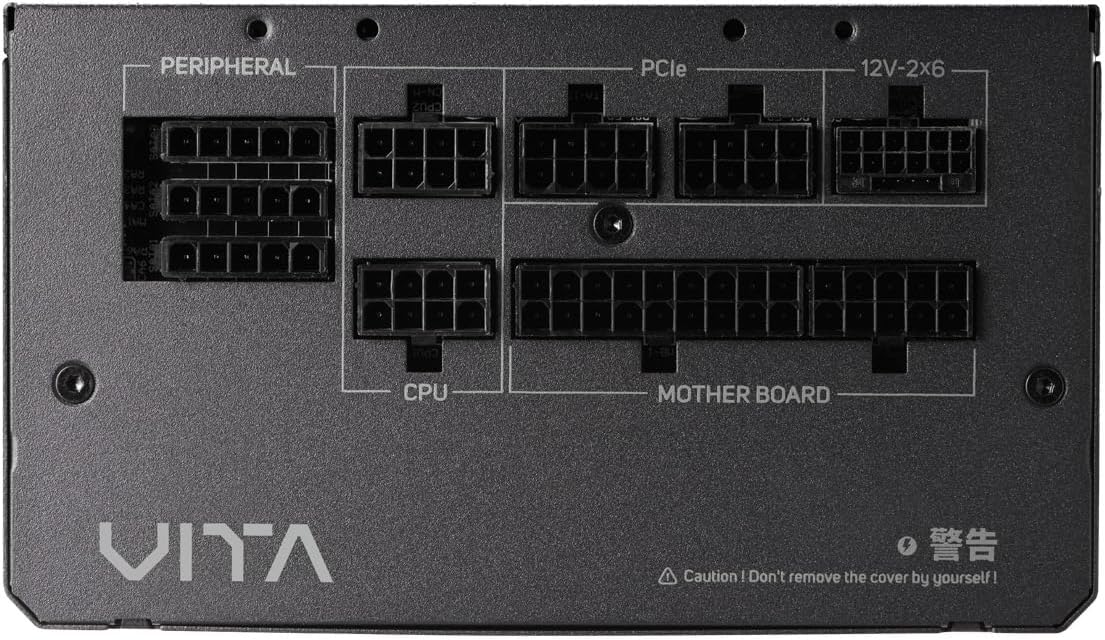
Зураг 4.1: Ойролцоогоор view of the modular connector panel on the FSP VITA GM 850W Power Supply, showing labeled ports for Motherboard, CPU, PCIe, Peripheral, and 12V-2x6.
4.1. Modular Connectors
The power supply features clearly labeled ports for connecting various components:
- Эх хавтан: Main 24-pin ATX connector.
- CPU: 8-pin (4+4 pin) EPS connectors for CPU power.
- PCIe: 8-pin (6+2 pin) connectors for graphics cards.
- 12V-2x6: Dedicated 12V-2x6 connector for high-power PCIe 5.1 graphics cards.
- Захын төхөөрөмж: Connectors for SATA and Molex devices.
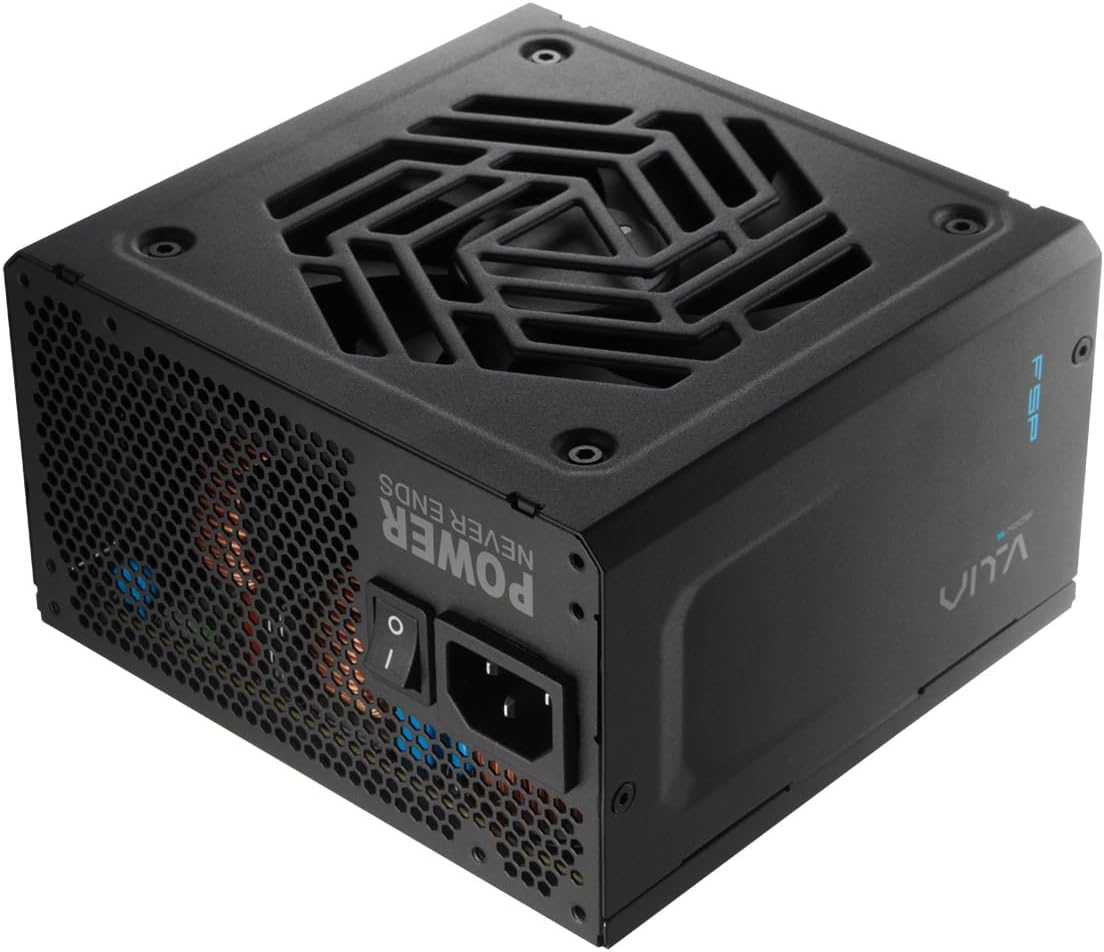
Зураг 4.2: Ар талд view of the FSP VITA GM 850W Power Supply, showing the AC power inlet, power switch, and ventilation grille.
5. Тохиргоо ба суурилуулалт
Follow these steps to properly install your FSP VITA GM 850W Power Supply into your computer system.
5.1. Физик суурилуулалт
- Компьютероо унтрааж, ханын залгуураас салгасан эсэхээ шалгаарай.
- Цахилгаан хангамжийг холбох хэсэгт нэвтрэхийн тулд компьютерийнхээ гэрийг нээнэ үү.
- Carefully place the FSP VITA GM 850W Power Supply into the designated bay, ensuring the fan faces the correct direction for optimal airflow (typically facing downwards if there's a bottom vent, or inwards if mounted at the top).
- Өгөгдсөн бэхэлгээний эрэг ашиглан гэрт цахилгаан хангамжийг бэхлээрэй.
5.2. Кабелийн холболтууд
Connect the necessary modular cables to your power supply and system components. Only connect the cables you need to minimize clutter and improve airflow.

Image 5.1: Diagram illustrating the various modular cables included with the FSP VITA GM 850W Power Supply, including Motherboard, CPU, PCIe 6+2 Pin, PCIe 12V-2x6, SATA, and SATA/Molex cables, along with their approximate lengths in millimeters.
- Connect the 24-pin ATX cable from the power supply to the motherboard.
- Connect the 8-pin (4+4 pin) EPS cable(s) from the power supply to the CPU power connector(s) on the motherboard.
- For graphics cards, connect the appropriate 8-pin (6+2 pin) PCIe cables or the 12V-2x6 cable (for compatible PCIe 5.1 GPUs) from the power supply to the graphics card(s).
- Connect SATA power cables to your storage drives (HDDs, SSDs) and other SATA-powered devices.
- Connect Molex cables to any peripheral devices that require them.
- Ensure all cable connections are secure and properly seated.
- Компьютерийнхаа хайрцгийг хаа.
- Connect the AC power cord to the power supply and then to a grounded wall outlet.
6. Ашиглалтын заавар
Once installed, operating your FSP VITA GM 850W Power Supply is straightforward.
6.1. Асаах/унтраах
- Ensure the power switch on the rear of the power supply is in the 'ON' (I) position.
- Системийг эхлүүлэхийн тулд компьютерийн гэрийнхээ цахилгаан товчийг дарна уу.
- To power off, shut down your operating system normally. For complete power disconnection, switch the power supply to the 'OFF' (O) position and unplug the AC cord.
6.2. Efficiency and Fan Operation
The VITA GM 850W is 80 PLUS Gold certified, meaning it operates with over 90% efficiency at typical loads. This reduces wasted energy, heat generation, and noise. The integrated 120mm HYB fan is designed for quiet and efficient cooling, adjusting its speed based on the power supply's temperature and load to maintain optimal performance and acoustics.

Image 6.1: Graph illustrating the fan speed (RPM) and acoustic noise (dBA) of the 120mm HYB fan in the FSP VITA GM 850W Power Supply across different load percentages, demonstrating quiet operation at lower loads.
7. Засвар үйлчилгээ
Тохиромжтой засвар үйлчилгээ нь таны цахилгаан хангамжийн урт наслалт, оновчтой гүйцэтгэлийг баталгаажуулдаг.
- Цэвэрлэгээ: Periodically clean the exterior of the power supply and its fan grille to prevent dust buildup. Use a soft, dry cloth or compressed air. Ensure the power supply is unplugged before cleaning.
- Агаарын урсгал: Цахилгаан хангамжийн оролт, яндангийн нүхэнд саад учруулахгүй байхыг анхаарна уу. Сайн агаарын урсгал нь үр дүнтэй хөргөхөд маш чухал юм.
- Кабелийн менежмент: Maintain tidy cable management within your PC case to promote better airflow and prevent cables from interfering with the power supply fan.
8. Алдаа засах
If you encounter issues with your FSP VITA GM 850W Power Supply, refer to the following common problems and solutions.
8.1. Нийтлэг асуудлууд
- Эрчим хүчгүй:
- Хувьсах гүйдлийн тэжээлийн утас нь тэжээлийн хангамж болон ханын залгуурт найдвартай холбогдсон эсэхийг шалгана уу.
- Ensure the power switch on the PSU is in the 'ON' (I) position.
- Өөр төхөөрөмжийг залгах замаар ханын залгуур ажиллаж байгаа эсэхийг шалгана уу.
- Check all modular cable connections to the motherboard and components.
- Системийн тогтворгүй байдал/санамсаргүй унтрах:
- This could indicate an overloaded system or a component issue. Ensure your system's power requirements do not exceed 850W.
- Check for proper ventilation and ensure the power supply fan is spinning. Overheating can trigger protection mechanisms.
- Бүх кабелийн холболт найдвартай эсэхийг шалгана уу.
- Чанга сэнсний чимээ:
- Ensure the power supply's fan intake/exhaust is not obstructed.
- Clean any dust buildup on the fan blades or grille.
- High system load will naturally increase fan speed. If noise is excessive at low loads, contact support.
8.2. Хамгаалалтын онцлог
The FSP VITA GM 850W Power Supply includes several protection features to safeguard your system:
- OVP (Overvoltage Хамгаалалт): Shuts down the PSU if output voltages exceed a safe level.
- OCP (Хэт гүйдлийн хамгаалалт): Shuts down the PSU if current on a single rail exceeds a safe level.
- OPP (Overpower Protection): Shuts down the PSU if the total power draw exceeds its maximum wattage.
- UVP (Undervoltage Хамгаалалт): Shuts down the PSU if output voltages drop below a safe level.
- SCP (Богино холболтын хамгаалалт): Shuts down the PSU in case of a short circuit on any output rail.
- OTP (Overtemperature Protection): Shuts down the PSU if internal temperatures become too high.

Image 8.1: Diagram illustrating the comprehensive protection features of the FSP VITA GM 850W Power Supply, including OVP, OCP, OPP, NLO, OTP, SCP, UVP, and SIP.
If any of these protections are triggered, the power supply will shut down. Disconnect the AC power, check your system for faults, and then reconnect power to attempt a restart.
9. Техникийн үзүүлэлтүүд
Detailed technical specifications for the FSP VITA GM 850W Power Supply:
| Онцлог | Тодорхойлолт |
|---|---|
| Загварын нэр | VITA-850GM |
| Брэнд | FSP |
| Гаралтын ватtage | 850 ватт |
| 80 PLUS гэрчилгээ | алт |
| Form Factor | ATX |
| Хэмжээ (L x W x H) | 140 x 150 x 86 мм (5.5 x 5.9 x 3.4 инч) |
| Зүйлийн жин | 3.1 килограмм (6.82 фунт) |
| Хөргөх арга | Air (120mm HYB Fan) |
| Конденсатор | 105°C Japanese Bulk Capacitors |
| Холбогч төрөл | ATX, PCI Express (Full Modular) |
| Тохиромжтой төхөөрөмжүүд | Computer, Gaming Console |
| Хамгаалалтын онцлог | OVP, OCP, SCP, OPP, UVP, OTP, NLO, SIP |
10. Баталгаат хугацаа
The FSP VITA GM 850W Power Supply comes with a 10 жилийн баталгаат хугацаа from the date of purchase. This warranty covers defects in materials and workmanship under normal use. Please retain your proof of purchase for warranty claims. The warranty does not cover damage caused by improper installation, accident, abuse, misuse, natural disaster, insufficient or excessive electrical supply, abnormal mechanical or environmental conditions, or any unauthorized disassembly, repair, or modification.
11. Дэмжлэг
For technical assistance, troubleshooting beyond this manual, or warranty inquiries, please visit the official FSP website or contact FSP customer support. You can often find FAQs, driver downloads, and contact information on the manufacturer's support pages.
Дэлгэрэнгүй мэдээлэл авахыг хүсвэл зочилно уу: FSP Official Store on Amazon


