1. Танилцуулга
This manual provides detailed instructions for the safe and proper installation, operation, and maintenance of your MOUNTUP MU0057-L Full Motion TV Wall Mount. Please read all instructions carefully before installation to ensure correct setup and to prevent damage or injury. Keep this manual for future reference.
The MOUNTUP MU0057-L is designed to securely mount most 42-75 inch flat or curved screen televisions weighing up to 99 lbs (45 kg). It features a 30-inch extension arm, +/-90° swivel, +5°/-10° tilt, and +/-3° leveling for optimal viewуян хатан байдал.
2. Аюулгүй байдлын мэдээлэл
WARNING: Failure to read and follow these instructions may result in serious personal injury, property damage, or voiding of warranty.
- Жингийн багтаамж: Хамгийн их жингийн багтаамж 99 фунт (45 кг)-аас хэтэрч болохгүй. Энэ бэхэлгээ нь зөвхөн заасан хамгийн их жинг ашиглахад зориулагдсан. Заасан хамгийн их жингээс илүү жинтэй бүтээгдэхүүнтэй хамт хэрэглэх нь тогтворгүй байдалд хүргэж болзошгүй гэмтэл учруулж болзошгүй.
- ТВ-ийн хэмжээ: Энэхүү суурь нь 42-75 инчийн зурагтуудтай нийцдэг.
- VESA нийцтэй байдал: Ensure your TV's VESA pattern (mounting hole spacing) is within the range of 150x100mm to 600x400mm.
- Ханын төрөл: This mount is designed for installation on solid concrete/brick walls or single wood studs. Ганцаараа хуурай хананд суулгаж болохгүй.
- Мэргэжлийн суурилуулалт: If you have any doubts about your ability to safely install this mount, consult a qualified professional.
- Бүрэлдэхүүн хэсгүүдийн шалгалт: Before installation, verify that all components are present and undamaged. Do not use damaged or defective parts.
- Багаж хэрэгсэл: Суулгахдаа тохирох хэрэгслийг ашиглана уу.
3. Багцын агуулга
Please check the package to ensure all parts are included and undamaged. If any parts are missing or damaged, contact MOUNTUP customer service.
- Ханын хавтангийн угсралт
- ТВ хаалт (2)
- Суурилуулалтын тоног төхөөрөмжийн иж бүрдэл (төрөл бүрийн эрэг, жийргэвч, зай авагч, зангуу)
- Бөмбөлөг түвшин
- Өрөмдлөгийн загвар
- Зааварчилгааны гарын авлага
4. Техникийн үзүүлэлтүүд
| Тодорхойлолт | Үнэ цэнэ |
|---|---|
| Загвар | MU0057-L |
| ТВ хэмжээтэй нийцтэй байдал | 42-75 инч |
| Жингийн багтаамж | 99 фунт (45 кг) хүртэл |
| VESA нийцтэй байдал | 150x100мм-ээс 600x400мм хүртэл |
| Ханан дээрх өргөтгөл | 3 инч (ухраасан)-аас 30 инч (сунгасан) хүртэл |
| Залгих хүрээ | +/-90° |
| Налалтын хүрээ | +5° / -10° |
| Түвшин тохируулга | +/-3° |
| Материал | Металл |
| Өнгө | Хар |
| Зүйлийн жин | 13.77 фунт |
Жич: The TV plate is offset approximately 8.5 inches (215mm) from the wall plate center. Consider this when positioning your TV on the wall.

Image: TV Plate Offset Diagram
5. Суурилуулах заавар
5.1 Суурилуулалтын өмнөх шалгалт
- ТВ-ийн нийцтэй байдлыг шалгах: Check your TV's size, weight, and VESA mounting pattern. The VESA pattern refers to the four mounting holes on the back of your TV.
- Ханын төрлийг тодорхойлох: Determine if your wall is solid concrete/brick or a single wood stud.
- Check TV Ports: Ensure the mount will not block any necessary ports on your TV.

Image: Available VESA Patterns and TV Mounting Holes

Image: Diverse Wall Compatibility

Image: Ensure Mount Won't Block Ports
5.2 Алхам алхмаар суурилуулах
The installation process involves three main steps:
- Mount Brackets to TV: Attach the TV brackets to the back of your television using the appropriate screws, washers, and spacers from the hardware kit. Ensure they are securely fastened.
- Ханын хавтанг суурилуулах: Using the provided drilling template and bubble level, mark and drill pilot holes in your wall. Secure the wall plate assembly to the wall with the appropriate anchors and lag bolts.
- Hang TV onto Wall Plate: Carefully lift your TV with the attached brackets and hook them onto the wall plate. Secure the TV to the wall plate using the safety screws or locking mechanisms.


Image: Easy & Quick 3-Step Installation Overview
6. Ажиллагаа ба тохируулга
6.1 Сунгалт ба буцаан татах
The mount allows your TV to extend up to 30 inches from the wall and retract to approximately 3 inches, providing flexibility for various viewing positions and saving space when not in use.
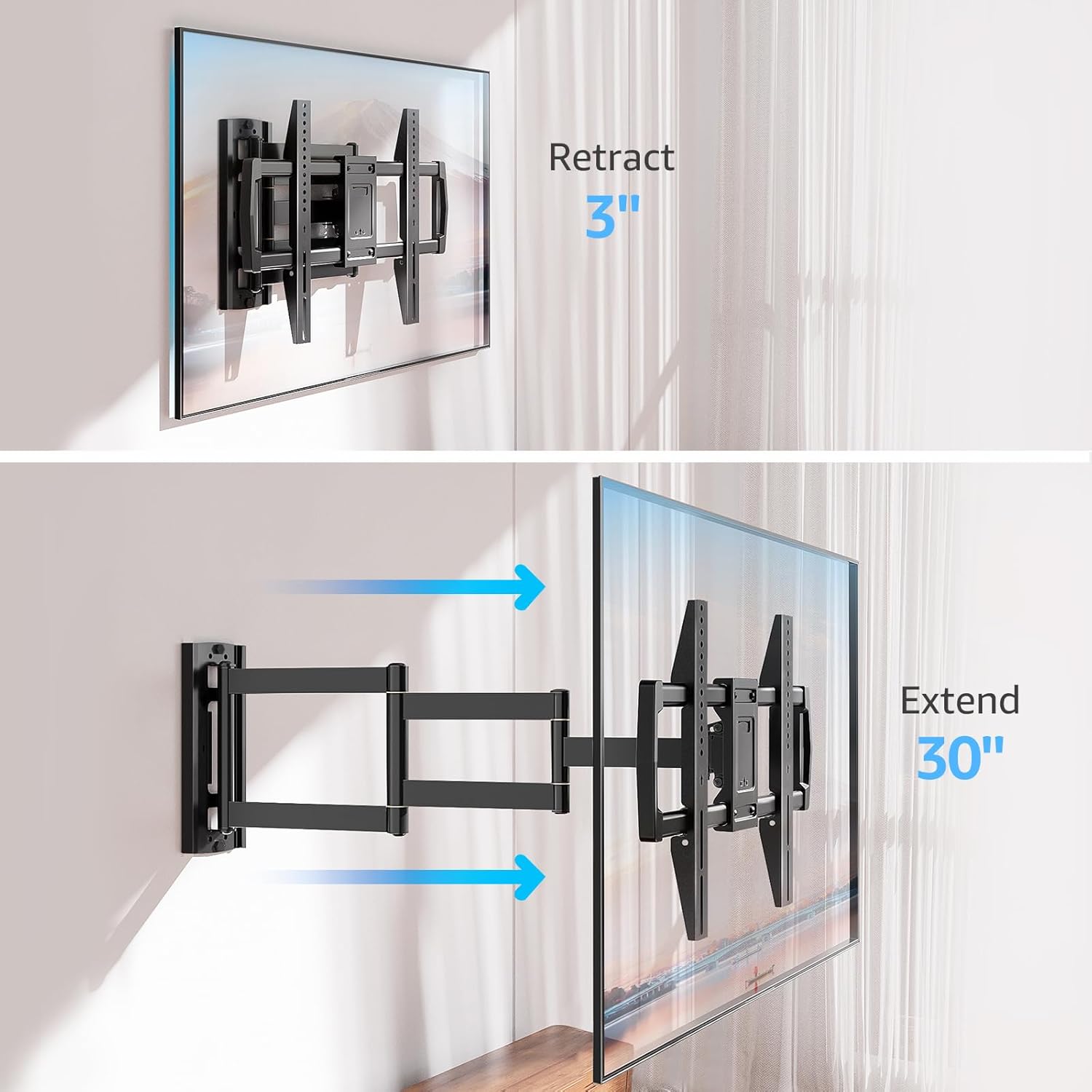
Image: Mount Extension and Retraction
6.2 Эргэлтийн тохируулга
The articulating arm allows for a smooth +/-90° swivel, enabling you to adjust the TV's angle to suit different viewing areas within a room, including corner mounting scenarios.
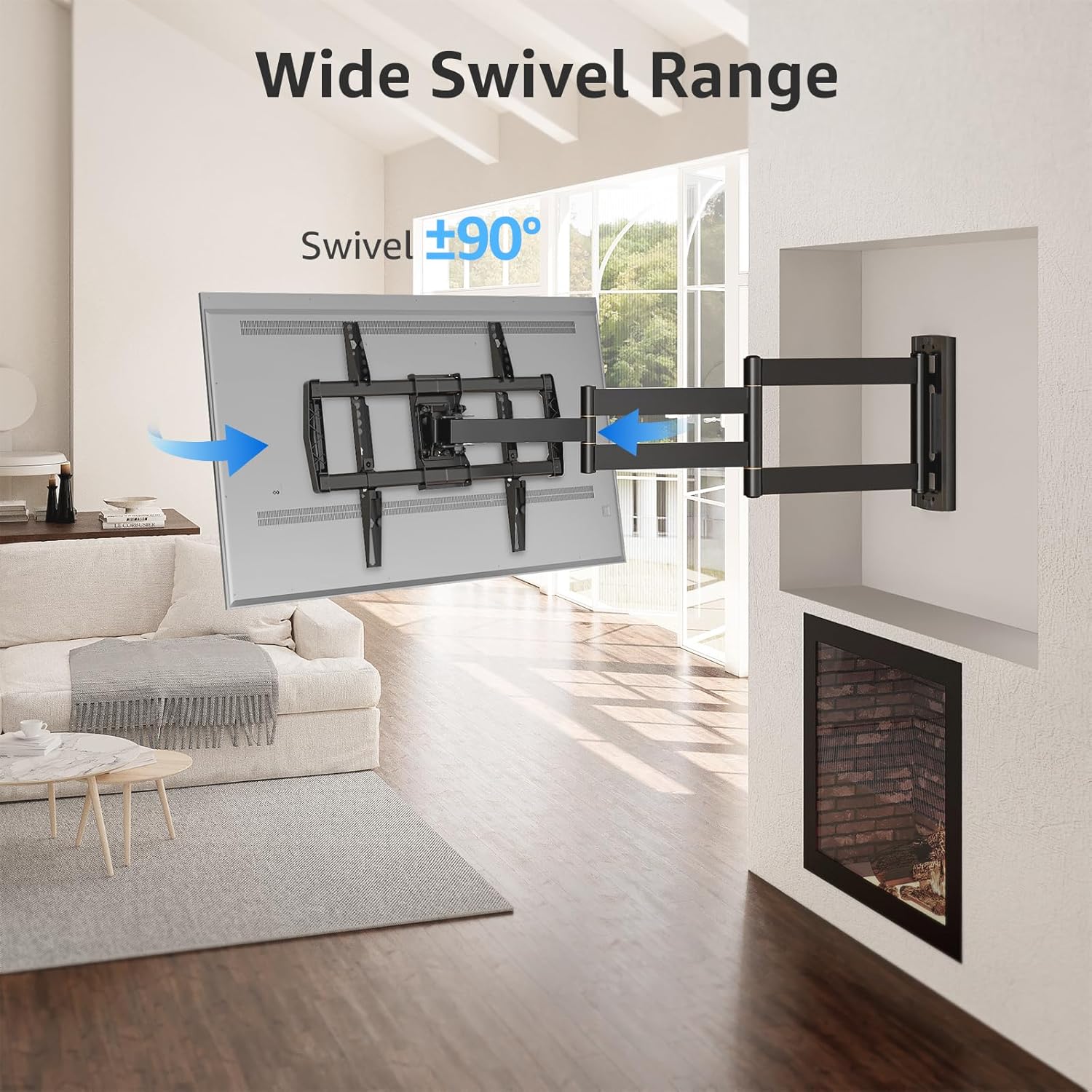
Image: Wide Swivel Range for Corner Mounting
6.3 Налалтын тохируулга
Adjust the TV's vertical angle with a +5°/-10° tilt range. This feature helps reduce glare from lights or windows and provides a comfortable viewөнцөг.
6.4 Түвшингийн тохируулга
After installation, you can make minor horizontal adjustments of +/-3° to ensure the TV is perfectly level.

Image: Level and Tilt Adjustments
7. Засвар үйлчилгээ
Тогтмол засвар үйлчилгээ нь таны ТВ-ийн хананд бэхэлгээний урт, найдвартай ажиллагааг баталгаажуулдаг.
- Цэвэрлэгээ: Суурилуулалтыг зөөлөн, хуурай даавуугаар арчина. Өнгөлгөөг гэмтээж болзошгүй зүлгүүрийн цэвэрлэгч эсвэл уусгагчаас зайлсхий.
- Бэхэлгээний шалгалт: Periodically check all screws and bolts to ensure they remain tight and secure. Re-tighten if necessary.
- Хөдөлгөөнийг шалгах: Test the mount's full range of motion (extension, retraction, swivel, tilt) occasionally to ensure smooth operation.
8. Алдаа засах
Хэрэв та суулгах явцад эсвэл дараа нь асуудалтай тулгарвал дараах нийтлэг асуудал болон шийдлүүдийг үзнэ үү.
- ТВ түвшин биш байна: Use the +/-3° post-installation leveling feature to adjust the TV's horizontal position.
- Уул нь сул байна: Re-check all wall and TV fasteners to ensure they are securely tightened. Do not overtighten.
- Гараа хөдөлгөхөд бэрхшээлтэй байх: The mount's joints may be stiff initially. Apply gentle force. If persistent, ensure no cables are snagged.
- TV not fitting VESA pattern: Double-check your TV's VESA pattern against the mount's specifications (150x100mm to 600x400mm). If incompatible, the mount cannot be used.
9. Баталгаат хугацаа ба дэмжлэг
MOUNTUP is dedicated to providing quality products and customer satisfaction. While specific warranty details are not provided in this document, MOUNTUP offers comprehensive support.
If you have any questions, require assistance with installation, or need to report a missing/damaged part, please contact MOUNTUP customer service. Experts are available 7 days a week to provide support and advanced technology solutions.
For more information or to contact support, please visit the official MOUNTUP store or webсайт.


