1. Танилцуулга
Welcome to the user manual for your GPD WIN Mini Handheld Game Console. This document provides essential information for setting up, operating, maintaining, and troubleshooting your device. Please read this manual thoroughly to ensure proper usage and to maximize your gaming experience.

Figure 1.1: GPD WIN Mini Handheld Game Console in open position, showcasing the display, gamepad controls, and keyboard.
2. Бүтээгдэхүүний онцлог
The GPD WIN Mini is a compact handheld gaming PC designed for portability and performance. Key features include:
- Компакт дизайн: Weighing approximately 520g with dimensions of 168×109×26mm, featuring a classic clamshell design for portability.
- Хөдөлгөөн мэдрэгчийн дэвшилтэт систем: Integrated 3-axis gravity sensing and 3-axis gyroscope for intuitive in-game control through hand movements.
- Өндөр нарийвчлалтай аудио: Equipped with AAC stereo speakers and support for DTS:X Ultra sound effects, providing simulated 7.1 channel surround sound via headphones and speakers.
- Нарийвчлалын удирдлага: Built-in Hall effect joysticks with a sinking design, supporting L3/R3 pressing, offering super-linear response and no dead zones for accurate input.
- Өргөтгөсөн зай: Features a 3.87V ultra-high-density polymer lithium battery with a 44.24Wh capacity, designed for extended usage.

Зураг 2.1: Илүүview of key hardware and software features, including the AMD Ryzen 7 8840U processor, backlit keyboard, Windows 11 Home operating system, ergonomic grip, Oculink interface, and 7-inch LTPS high-refresh display.

Figure 2.2: Detailed component features, highlighting the Hall Dual 3D Joystick, microSD Card Slot, USB4 Port, M.2 2230 SSD, AAC Hyper-Linear Dual Speakers, and the 44.24Wh Polymer Lithium Battery.
3. Төхөөрөмжийн зохион байгуулалт ба удирдлага
3.1. Port and Component Identification

Figure 3.1: Diagram illustrating the various ports and components of the GPD WIN Mini.
- Programmable Macro Keys
- Илтгэгч
- BIOS Flash Hole
- Type-C (USB4) Port
- Цэнэглэх заагч гэрэл
- Full Function USB Type-C Port
- Яндангийн нүх
- Gamepad / Mouse Toggle Key
- Аудио холбогч
- microSD картны үүр
- USB A порт
- Илтгэгч
- Programmable Macro Keys
3.2. Gamepad Controls
The GPD WIN Mini features integrated gamepad controls for an optimized gaming experience.

Зураг 3.2: Ойрын зураг view of the left-side gamepad controls, including the Hall effect joystick and directional pad.

Figure 3.3: Illustrates the ergonomic grip and natural hand placement during gameplay, utilizing the integrated gamepad controls.
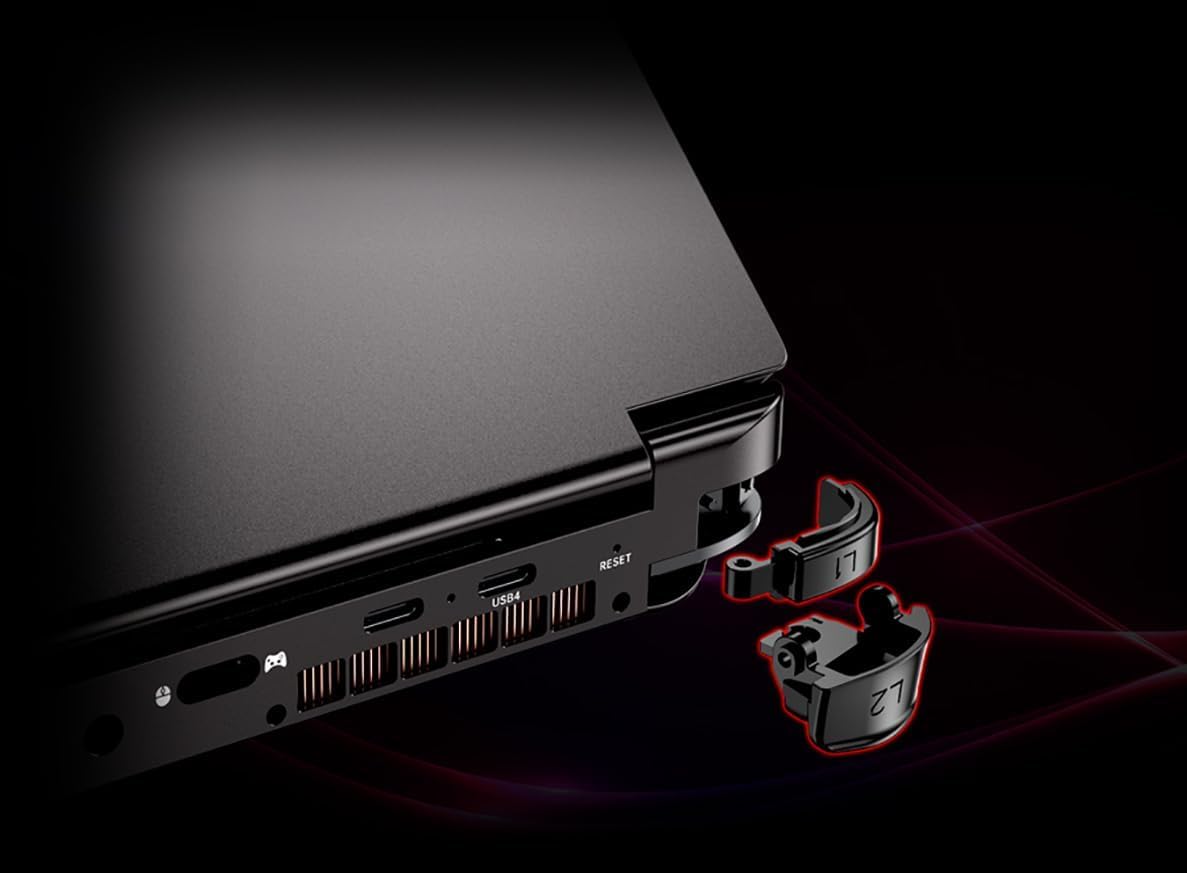
Figure 3.4: The L1 and L2 trigger buttons are designed to be removable, allowing for customization or replacement.
3.3. Гар болон мэдрэгчтэй самбар
The device includes a QWERTY keyboard and a touchpad for standard input.
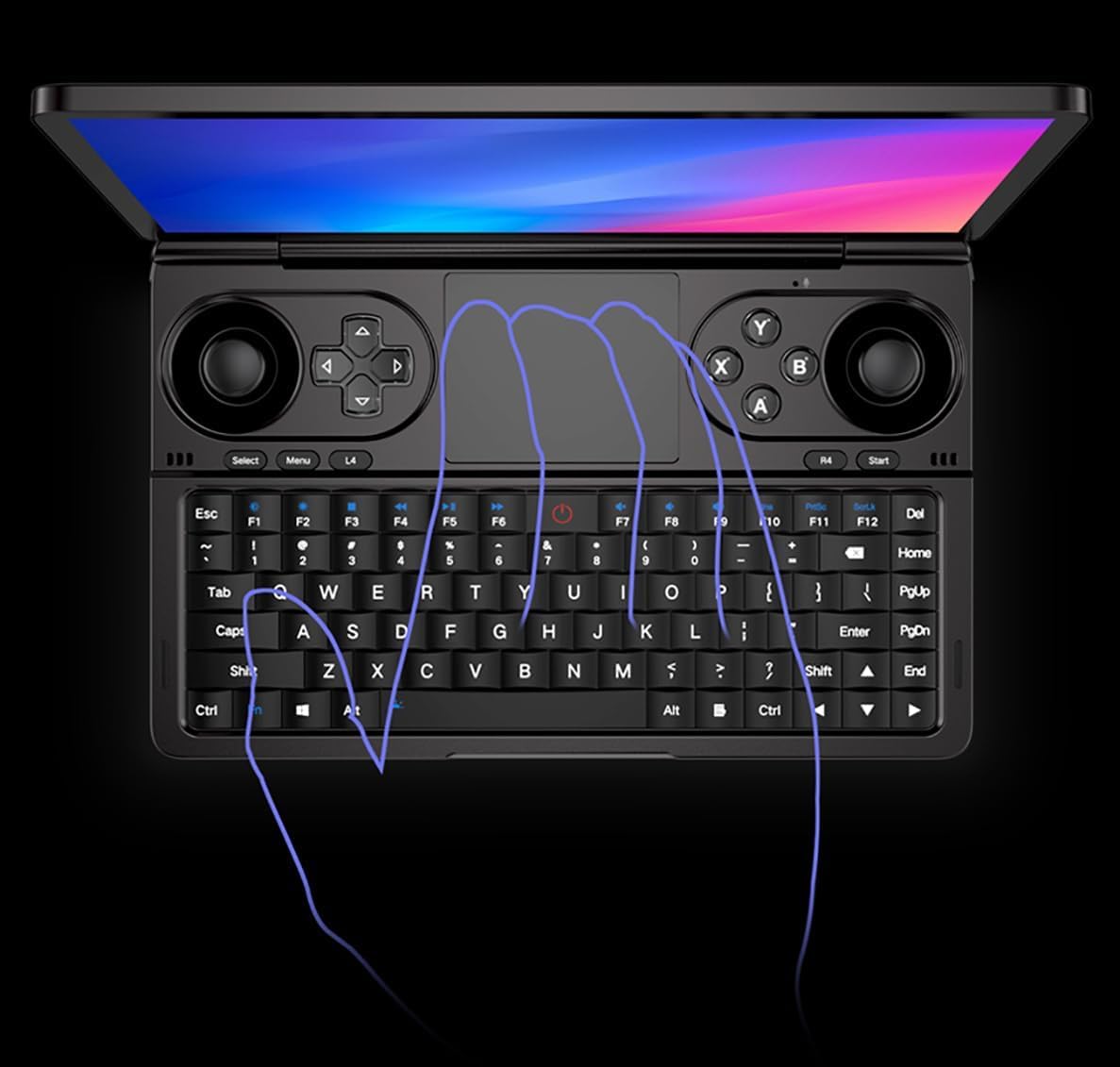
Figure 3.5: The full QWERTY keyboard and central touchpad, designed for efficient text input and navigation.
4. Тохиргоо
4.1. Анхдагч асаалттай
- Эхний хэрэглээний өмнө төхөөрөмжийг бүрэн цэнэглэсэн эсэхийг шалгаарай.
- Press and hold the power button (typically located on the side or top edge) until the screen illuminates.
- Follow the on-screen prompts to complete the initial Windows 11 setup, including language selection, network connection, and user account creation.
4.2. Төхөөрөмжийг цэнэглэж байна
To charge your GPD WIN Mini, use the provided power adapter and connect it to one of the USB Type-C ports (specifically the USB4 port or the Full Function USB Type-C port).
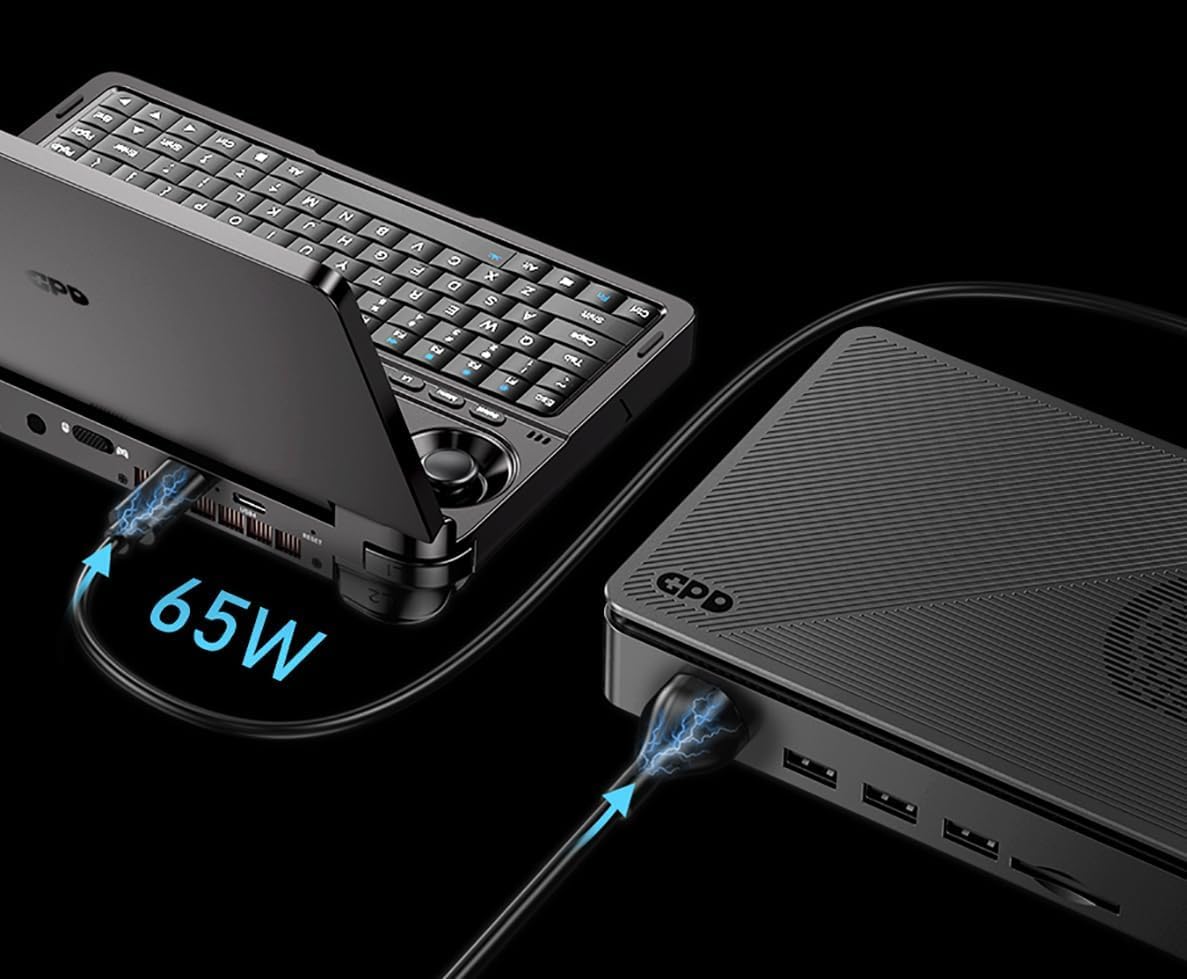
Figure 4.1: The device being charged via a 65W power adapter connected to a USB-C port.
- Connect the USB Type-C cable to the device and the power adapter.
- Цахилгаан адаптерийг ханын залгуурт холбоно уу.
- Цэнэглэж байгааг баталгаажуулахын тулд цэнэглэх заагч гэрэл асах болно.
- Бүрэн цэнэглэхэд ихэвчлэн хэдэн цаг зарцуулдаг.
5. Ашиглалтын заавар
5.1. Дэлгэцийн онцлог
The GPD WIN Mini features a 7-inch LTPS display with advanced visual capabilities.

Figure 5.1: Key display specifications, including LTPS technology, variable refresh rates (60Hz/120Hz), 100% sRGB color gamut, 500nit brightness, DC Dimming, Victus Corning Gorilla Glass protection, 314 PPI Retina Display, and 10-point touch functionality.
- Сэргээх хурд: Supports 60Hz and 120Hz refresh rates. Adjust this in Windows display settings for optimal performance or battery life.
- Мэдрэгчтэй дэлгэц: The 10-point touch display allows for intuitive navigation within Windows and compatible applications.
- Гэрэлтүүлэг: Adjust screen brightness via Windows settings or dedicated function keys for comfortable viewянз бүрийн орчинд амьдрах.
5.2. Windows 11 Operating System
The device runs on Windows 11 Home 64-bit, providing a full desktop operating system experience. Familiarize yourself with Windows 11 navigation, settings, and application management.
- Steam Client: A built-in Steam client and optimization tools are included for an enhanced gaming experience.
- Шинэчлэлтүүд: Regularly check for Windows updates to ensure system stability and security.
5.3. Тоглоом
Utilize the integrated gamepad controls for gaming. The device supports a wide range of PC games compatible with Windows 11.
- Gamepad/Mouse Toggle: Use the dedicated Gamepad/Mouse Toggle key to switch between gamepad input and mouse emulation modes as needed for different applications or games.
- Programmable Macro Keys: Configure the programmable macro keys (1 and 13 in Figure 3.1) for custom shortcuts or in-game actions. Refer to the device's software utility for configuration options.
- Гироскоп: Some games may utilize the 6-axis gyroscope for motion-based controls. Ensure this feature is enabled and calibrated in game settings if applicable.
6. Засвар үйлчилгээ
6.1. Цэвэрлэгээ
- Дэлгэц болон гаднах гадаргууг цэвэрлэхийн тулд зөөлөн, хөвөнгүй даавуу ашиглана уу.
- Зөрүүд тэмдгийн хувьд бага зэрэг dampАлчуурыг ус эсвэл тор цэвэрлэгч уусмалаар арчина. Хүчтэй химийн бодисоос зайлсхий.
- Keep the exhaust vents clear of dust and debris to ensure proper cooling. Use compressed air if necessary.
6.2. Зайны арчилгаа
- Байнга зайгаа бүрэн цэнэглэхээс зайлсхий.
- Store the device in a cool, dry place if not used for extended periods, ideally with the battery charged to around 50-70%.
- Зөвхөн анхны эсвэл баталгаажсан нийцтэй цэнэглэгч дагалдах хэрэгслийг ашиглана уу.
7. Алдаа засах
7.1. Нийтлэг асуудал ба шийдэл
- Төхөөрөмж асахгүй байна: Ensure the battery is charged. Connect the charger and attempt to power on again. If unresponsive, perform a hard reset by holding the power button for 10-15 seconds.
- Дэлгэц хоосон эсвэл анивчсан байна: Check display settings in Windows. If the issue persists, try updating graphics drivers.
- Gamepad controls not responding: Ensure the Gamepad/Mouse Toggle key is in the correct mode. Check for driver updates or recalibrate controls in Windows or game settings.
- Удаан гүйцэтгэл: Close unnecessary background applications. Check for system updates. Ensure adequate ventilation to prevent thermal throttling.
- Цэнэглэх асуудал: Verify the charger and cable are properly connected and undamaged. Try a different compatible USB Type-C port or charger if available.
8. Техникийн үзүүлэлтүүд
The following table outlines the technical specifications for the GPD WIN Mini Handheld Game Console (Model: GPD Win Mini 2024, 8840U/32G/1T).
| Онцлог | Тодорхойлолт |
|---|---|
| Загварын дугаар | GPD Win Mini 2024 |
| Процессор | AMD Ryzen 7 8840U |
| RAM | 32 ГБ |
| Хадгалах | 1TB M.2 NVMe SSD |
| Үйлдлийн систем | Windows 11 Home 64 бит |
| Дэлгэц | 7-inch LTPS Touchscreen, 60Hz/120Hz, 1080P Resolution, 314 PPI |
| График | AMD Radeon 780M |
| Батерей | 44.24Wh Polymer Lithium Battery (3.87V) |
| Холболт | USB4, Full Function USB Type-C, USB-A, microSD Card Slot |
| Аудио | AAC Hyper-Linear Dual Speakers, DTS:X Ultra support, Combo Audio Jack |
| Хяналтууд | Hall Dual 3D Joysticks, L/R Linear Analog Trigger Buttons, 6-Axis Gyroscope, QWERTY Keyboard, Touchpad, Programmable Macro Keys |
| Хэмжээ | 168 × 109 × 26 мм |
| Жин | Ойролцоогоор 520г (1.15 фунт) |
9. Баталгаат хугацаа ба дэмжлэг
9.1. Баталгаат хугацааны мэдээлэл
Please refer to the warranty card included with your product packaging for detailed warranty terms and conditions. The warranty typically covers manufacturing defects for a specified period from the date of purchase.
9.2. Хэрэглэгчийн дэмжлэг
For technical assistance, troubleshooting not covered in this manual, or warranty claims, please contact GPD customer support through their official webсайт эсвэл таны бүтээгдэхүүний баримт бичигт заасан холбоо барих мэдээлэл.


