1. Оршил ба түүнээс дээшview
This manual provides essential information for the setup, operation, and maintenance of your CHUWI Hi10 X2 Tablet Keyboard with Touchpad. Designed specifically for the CHUWI Hi10 X2 and Hi10 X1 Windows tablets, this 2-in-1 magnetic keyboard transforms your tablet into a versatile laptop, enhancing productivity and convenience.
The keyboard features a magnetic docking interface for seamless connection, eliminating the need for separate charging or Bluetooth pairing. Its ultra-slim and portable design makes it ideal for various uses, from business and education to everyday tasks and gaming.
2. Бүтээгдэхүүний онцлог
- Magnetic Docking Interface: Designed for CHUWI Hi10 X2 / Hi10 X1 Windows tablets, ensuring easy and stable connection.
- No Charging or Pairing Required: The docking magnetic suction design provides energy efficiency and a faster input response time compared to Bluetooth keyboards.
- Нэгдсэн мэдрэгчтэй самбар: Supports multi-touch gestures for responsive navigation and control.
- Сайжруулсан бичих туршлага: Features a borderless keyboard with well-spaced keys and optimized key travel for accuracy and comfort.
- 2-ын-1 функциональ байдал: Transforms your tablet into a versatile laptop instantly, complete with a sturdy stand for optimal viewөнцөг.
- Ultra Slim and Portable: Lightweight and easy to attach or remove, making it convenient for travel and daily use.

Image: The CHUWI Hi10 X2 Tablet Keyboard provides an enhanced typing experience with its well-spaced keys, designed for comfort and precision.

Image: The high-precision touchpad supports multi-touch gestures for responsive navigation and control.
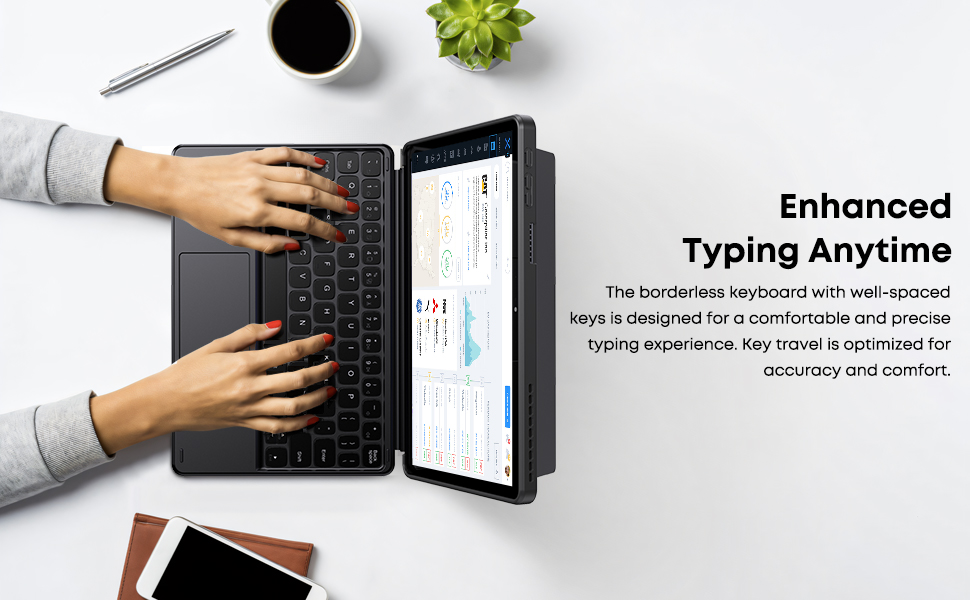
Image: The Smart Keyboard attaches magnetically to the Hi10 X1/X2 tablet, providing instant power and a great typing experience without needing charging or pairing.
3. Тохиргоо
- Гарыг хавсаргах: Align the magnetic docking interface of the keyboard with the corresponding pins on your CHUWI Hi10 X2 or Hi10 X1 tablet. The magnets will guide the keyboard into place, establishing an instant connection.
- Kickstand ашиглах: The keyboard case includes a built-in stand. Fold out the stand from the back of the case to prop up your tablet at a comfortable viewing or typing angle.
- Анхны хэрэглээ: No initial charging or Bluetooth pairing is required for the keyboard to function with your compatible CHUWI tablet once magnetically docked.
Video: This video demonstrates the installation of the CHUWI Hi10 X1 keyboard and showcases the protective case. It illustrates how to attach the tablet to the keyboard and utilize the case's features.
4. Ашиглалтын заавар
- Бичих: Begin typing immediately after docking your tablet. The keyboard provides a familiar layout for efficient text input.
- Мэдрэгч самбарын хэрэглээ: The integrated touchpad supports standard mouse functions and multi-touch gestures.
- Нэг хуруугаараа товших: Хулганы зүүн товчийг дарна уу.
- Хоёр хуруугаараа товших: Хулганы баруун товчийг дарна уу.
- Хоёр хуруугаар гүйлгэх: Дээш эсвэл доош гүйлгэнэ үү.
- Томруулахын тулд чимхэх: Томруулах эсвэл жижигрүүлэхийн тулд хоёр хуруугаа ашиглана уу.
- Detaching the Keyboard: Gently pull the tablet away from the magnetic docking interface to detach the keyboard.
5. Засвар үйлчилгээ
- Цэвэрлэгээ: Use a soft, dry, lint-free cloth to clean the keyboard and touchpad surfaces. For stubborn marks, slightly dampдаавуугаар усаар. Хүчтэй химийн бодис, зүлгүүрийн материалаас зайлсхий.
- Хадгалах: When not in use, keep the keyboard attached to the tablet to protect the screen and keys. Store in a cool, dry place away from direct sunlight and extreme temperatures.
- Харьцуулах: Avoid placing heavy objects on the keyboard or bending it excessively to prevent damage to the keys or internal components.
6. Алдаа засах
- Гар хариу өгөхгүй байна:
- Ensure the tablet is correctly docked to the magnetic interface.
- Detach and reattach the keyboard to reset the connection.
- Restart your CHUWI tablet.
- Мэдрэгч самбар ажиллахгүй байна:
- Check if the touchpad has been accidentally disabled (refer to your tablet's settings for input devices).
- Ensure the touchpad surface is clean and free from obstructions.
- Try detaching and reattaching the keyboard.
- Keys Sticking or Unresponsive:
- Clean around the affected keys with a soft, dry brush or compressed air to remove any debris.
- Гар дээр шингэн асгахаас зайлсхий.
7. Техникийн үзүүлэлтүүд
| Брэнд: | ЧУВИ |
| Загварын дугаар: | CHUWI Hi10 X1 Tablet Keyboard (Compatible with Hi10 X2) |
| Тохиромжтой төхөөрөмжүүд: | Hi10 X1 tablet, Hi10 X2 tablet |
| Холболтын технологи: | Magnetic Docking Interface (faster than Bluetooth) |
| Гарын тайлбар: | Numeric (Standard QWERTY layout with touchpad) |
| Онцлог шинж чанарууд: | Foldable, Lightweight, Portable, Integrated Touchpad, Magnetic Connection |
| Өнгө: | Хар |
| Материал: | Силикон |
| Барааны жин: | 9.9 унц |
| Багцын хэмжээ: | 9.88 x 7.8 x 0.67 инч |
| Оруулсан бүрэлдэхүүн хэсгүүд: | Hi10 X1 Tablet Keyboard |
8. Баталгаат хугацаа ба дэмжлэг
Your CHUWI Hi10 X2 Tablet Keyboard is covered by a 1-year service period, valid immediately after purchase. CHUWI is committed to providing high-quality products and excellent service.
For any questions or support needs, CHUWI offers lifetime factory professional support and 24-hour online assistance. Please refer to the contact information provided with your tablet or visit the official CHUWI webдэлгэрэнгүй мэдээллийг сайт дээрээс авна уу.