1. Танилцуулга
Thank you for choosing the Primevolve Portable Oscillating Standing Fan. This manual provides essential information for the safe and efficient use of your new fan. Please read it thoroughly before operation and retain it for future reference.
This versatile fan is designed for both indoor and outdoor use, featuring a rechargeable battery, USB-C power option, adjustable height, oscillation, and remote control for convenience.

Зураг 1.1: Дууслааview of the fan's key features including portability, foldability, remote control, rechargeable battery, multiple speeds, and low noise operation.
2. Аюулгүй ажиллагааны заавар
- Сэнсийг ашиглахаасаа өмнө бүх зааврыг уншина уу.
- Сэнсний сараалж ажиллаж байх үед хуруу болон ямар нэгэн зүйл хийж болохгүй.
- Цахилгаанд цохиулахаас сэргийлж сэнсийг ус болон бусад шингэнээс хол байлга.
- Do not use the fan in excessively humid or dusty environments.
- Сэнсийг хазайлгахаас сэргийлж тогтвортой, тэгш гадаргуу дээр байрлуулсан эсэхийг шалгаарай.
- Цэвэрлэх эсвэл засвар үйлчилгээ хийхээс өмнө сэнсийг залгуураас нь салга.
- Хүүхэд, тэжээвэр амьтдын гар хүрэхгүй газар хадгална уу.
- Цэнэглэхийн тулд зөвхөн өгсөн USB-C кабелийг ашиглана уу.
- Сэнсийг өөрөө задлах, засах гэж бүү оролдоорой. Тусламж авахын тулд хэрэглэгчийн дэмжлэгтэй холбоо барина уу.
3. Багцын агуулга
Дараах зүйлсийн багцад байгаа эсэхийг шалгана уу.
- 1 x Primevolve Portable Oscillating Standing Fan
- 1 x Алсын удирдлага
- 1 х USB-C цэнэглэх кабель
- 1 х хэрэглэгчийн гарын авлага (энэ баримт бичиг)

Image 3.1: Illustration of the items included in the product package.
4. Бүтээгдэхүүн дууссанview
The Primevolve Portable Oscillating Standing Fan features a compact, foldable design that allows it to transform from a small desk fan to a full-sized standing fan. It includes a fan head, an adjustable telescopic rod, and a stable base housing the controls and battery.

Image 4.1: The fan displayed in its various adjustable forms: standing, table-top, and folded.
5. Тохиргоо ба угсралт
5.1 Сэнсийг дэлгэх
- Сэнсний суурийг хавтгай, тогтвортой гадаргуу дээр байрлуул.
- Locate the 'OPEN' position indicator on the base. Gently twist the top part of the base counter-clockwise to unlock.
- Carefully pull the telescopic rod upwards from the base until it reaches the desired height.
- Adjust the angle of the fan head as needed. The fan head can tilt up to 180 degrees.

Image 5.1: Step-by-step visual guide for expanding the fan from its folded state.
5.2 Өндөр ба өнцгийг тохируулах
- The fan's height can be adjusted from 3.93 inches (folded) to 39.3 inches (fully extended).
- The fan head can be manually tilted up to 180 degrees to direct airflow.

Image 5.2: The fan's adjustable height and foldaway design for versatile placement.
6. Ашиглалтын заавар
6.1 Асаах/унтраах болон хурдны тохиргоо
The fan can be controlled via the touch buttons on the base or the included remote control.
- Цахилгаан товч: Press once to turn on the fan. Press and hold to turn off.
- Хурдны товчлуур: Press repeatedly to cycle through 4 speed settings: Low, Mid, High, and Natural mode.

Image 6.1: The fan operating with an indication of its four speed settings and corresponding battery life.
6.2 Хэлбэлзлийн функц
The fan features a 90° auto-oscillation function to distribute airflow across a wider area.
- Чичиргээний товчлуур: Press to activate or deactivate the 90° automatic oscillation.
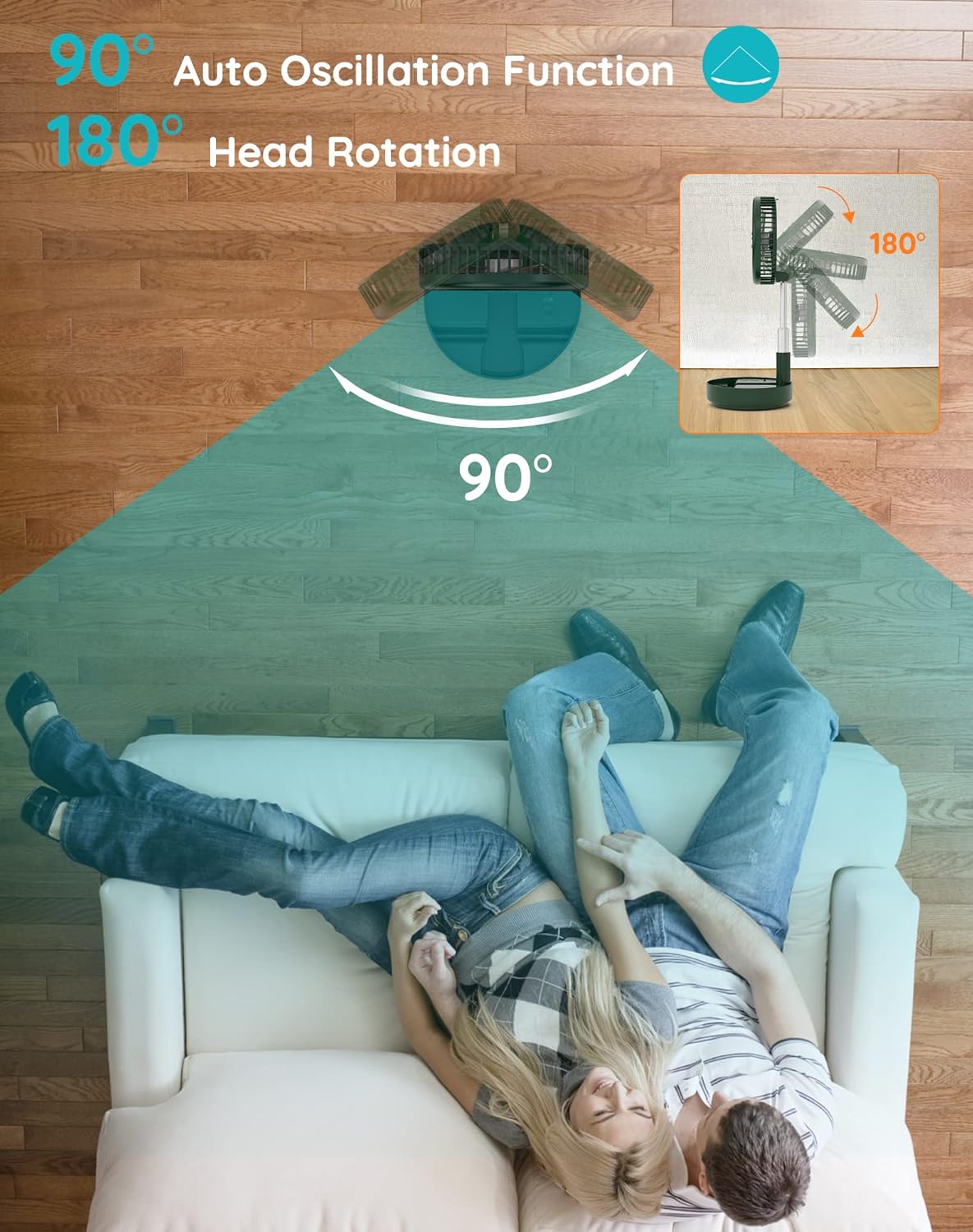
Image 6.2: Visual representation of the fan's 90-degree auto oscillation and 180-degree manual head rotation.
6.3 Алсын удирдлагатай ажиллагаа
The infrared remote control allows you to operate all fan features from up to 13 feet away.
- The remote has buttons for Power, Speed, and Oscillation, mirroring the functions on the fan base.
- Ensure the remote control has a working AAAA battery (included).

Image 6.3: Details of the fan's control methods, including the remote and integrated buttons.
7. Цэнэглэх болон батерейны мэдээлэл
The fan is equipped with a large rechargeable battery and is powered by USB-C (5V/2A).
- Анхны хэрэглээ: Please fully charge the fan before its first use.
- Цэнэглэх хугацаа: Бүрэн цэнэглэхэд ихэвчлэн 5 цаг зарцуулдаг.
- Зайны хугацаа: Provides 6 to 21 wireless working hours, depending on the speed setting and oscillation usage.
- Тохиромжтой байдал: Compatible with PC/laptop, power bank, AC adapter, car charger, and other USB-enabled power sources.

Image 7.1: The fan's USB-C charging port and examples of compatible power sources.
8. Засвар үйлчилгээ
8.1 Сэнс цэвэрлэх
- Цэвэрлэхийн өмнө сэнсийг унтрааж, залгуураас салгасан эсэхийг шалгаарай.
- The front fan hood is detachable for easy cleaning. Gently twist and remove the front grille.
- Сэнсний ир болон радиаторын сараалжийг зөөлөн, d-ээр арчинаamp даавуу. Зүлгүүрийн цэвэрлэгч, уусгагчийг бүү ашигла.
- Ensure all parts are completely dry before reassembling and using the fan.

Image 8.1: Instructions for detaching the fan hood for cleaning and information on the aromatherapy feature.
8.2 Үнэрт эмчилгээний онцлог
The fan includes a special scent box. You can place your favorite aromatherapy in this box to diffuse a pleasant fragrance while the fan operates.
9. Алдаа засах
| Асуудал | Боломжит шалтгаан | Шийдэл |
|---|---|---|
| Сэнс асахгүй байна | Батерей дууссан байна Not properly plugged in (if wired) | Charge the fan using the USB-C cable Ensure the USB-C cable is securely connected to a power source and the fan. |
| Агаарын урсгал сул | Бага хурдны тохиргоо Fan blades are dirty | Хурдны тохиргоог нэмэгдүүлэх Clean the fan blades and grille (refer to Maintenance section) |
| Хэлбэлзэл ажиллахгүй байна | Oscillation function is off | Press the oscillation button on the fan or remote to activate. |
| Алсын удирдлага ажиллахгүй байна | Батерей дууссан байна Obstruction between remote and fan | Replace the AAAA battery in the remote Сэнсний хүлээн авагч руу тодорхой харагдах шугам байгаа эсэхийг шалгаарай. |
| Сэнс ер бусын чимээ гаргадаг | Сэнсний ирний бөглөрөл Fan not on a stable surface | Turn off and unplug the fan, then check for and remove any obstructions Сэнсийг тэгш, тогтвортой гадаргуу дээр байрлуул. |
10. Техникийн үзүүлэлтүүд
| Онцлог | Дэлгэрэнгүй |
|---|---|
| Брэнд | Primevolve |
| Загварын дугаар | TM-520 (PF11S) |
| Өнгө | Ногоон |
| Эрчим хүчний эх үүсвэр | Battery Powered, USB-C (5V/2A) |
| Бүтээгдэхүүний хэмжээс (эвхэгдсэн) | 9.06"D x 4.33"W x 9.06"H |
| Тохируулах өндөр | 3.93"-аас 39.3" |
| Сэнсний толгойн хазайлт | 180 degrees (manual) |
| Мэдрэмж | 90 degrees (auto) |
| Хурдны тохиргоо | 4 (Low, Mid, High, Natural) |
| Дуу чимээний түвшин | 30-40 dB (at max speed) |
| Хутганы тоо | 5 |
| Хяналтын арга | Алсын удирдлага, мэдрэгч |
| Зүйлийн жин | 2.75 фунт |
| Зайны зайнаас | 1 AAAA battery (included) |
| Дотор/гадаа ашиглах | Тиймээ |
11. Баталгаат хугацаа ба дэмжлэг
This Primevolve fan comes with a One-Year After-sales Service.
If you have any questions, concerns, or require assistance with your product, please do not hesitate to contact Primevolve customer support. We are committed to resolving your inquiries within 24 hours.
For support, please refer to the contact information provided on the product packaging or the official Primevolve webсайт.


