1. Танилцуулга
This manual provides detailed instructions for the proper use, setup, and maintenance of your Pard NV009-850nm Digital Night Vision Monocular. Please read this manual thoroughly before operating the device to ensure optimal performance and longevity. This device is designed for wildlife observation, hunting, and general outdoor viewянз бүрийн гэрлийн нөхцөлд ажиллах.

Image 1.1: The Pard NV009-850nm Digital Night Vision Monocular. This image displays the compact and ergonomic design of the monocular, highlighting its main body, objective lens, and eyepiece.
2. Бүтээгдэхүүн дууссанview
2.1 Багцын агуулга
Хайрцгийг задлахдаа доор жагсаасан бүх зүйлс байгаа эсэхийг шалгана уу:
- Pard NV009-850nm Digital Night Vision Monocular
- Хамгаалалтын үүр
- USB цэнэглэгч кабель
- Wrist Strap / Neck Strap
- Хэрэглэгчийн гарын авлага (энэ баримт бичиг)

Image 2.1: Contents of the Pard NV009-850nm package. This image shows the monocular, its carrying case, charging cable, straps, and the user manual, all neatly arranged.
2.2 Гол онцлогууд
- Daytime and Nighttime Operation: Seamless transition between full-color daytime viewing and monochrome night vision mode.
- Өндөр нарийвчлалтай дүрслэл: Features a 1920x1080 FHD CMOS image sensor and a 1024x768 OLED display for clear, detailed visuals.
- Adjustable IR Illuminator: Integrated 850nm IR illuminator with three intensity levels, providing effective illumination up to 200 meters.
- Photo and Video Recording: Capture 2608x1944 resolution photos and 1920x1080 Full HD videos directly to a Micro SD card.
- Оптик болон дижитал томруулалт: Offers 4.7x optical magnification and 1.5x-3.0x digital zoom for precise target observation.
- Wi-Fi холболт: Connects to smart mobile devices via the "PardVision" app for remote viewing and data transfer.
- Зураг доторх зураг (PIP) горим: Provides a magnified inset view of the central area for enhanced detail without losing the wider field of view.
- Бат бөх дизайн: IP67 waterproof rating ensures reliability in various outdoor conditions.

Image 2.2: Comparison of day and night vision modes. This image illustrates the monocular's capability to provide full-color images during the day and clear monochrome images at night, featuring a fox in both scenarios.

Image 2.3: Nighttime viewing range illustration. This graphic demonstrates the monocular's effective viewing distance of up to 200 meters (656 feet) in low-light conditions, showing a wild boar as an example target.

Image 2.4: Enhanced image quality demonstration. This image compares a blurred, lower-quality image with a sharp, enhanced image, illustrating the effectiveness of the PARD Visual Light Enhancement Algorithm (VLEA) and OLED display.
3. Тохиргоо
3.1 Батерей суурилуулах
- Locate the battery compartment cover, typically on the underside or side of the monocular.
- Open the cover by twisting or sliding it according to the indicator.
- Insert a fully charged 18650 type battery (not included) with the correct polarity (+/-) as indicated inside the compartment.
- Зайны тасалгааны тагийг найдвартай хаа.
3.2 Микро SD карт оруулах
The device supports Micro SD cards for storing photos and videos.
- Locate the Micro SD card slot, usually protected by a rubber cover.
- Gently insert the Micro SD card into the slot until it clicks into place. Ensure the card is oriented correctly.
- Close the rubber cover to protect the slot from dust and moisture.
3.3 Анх асаах болон фокусын тохируулга
- Төхөөрөмжийг асаахын тулд Power товчийг удаан дарна уу.
- Adjust the diopter ring on the eyepiece until the on-screen display (OSD) text appears sharp and clear to your eye.
- Rotate the objective lens focus ring to bring the observed image into sharp focus.
4. Ашиглалтын заавар
4.1 Асаах/унтраах
- Асаах: Power товчийг ойролцоогоор 3 секундын турш удаан дар.
- Унтраах: Press and hold the Power button for approximately 3 seconds until the device shuts down.
4.2 Mode Selection (Day/Night)
The NV009-850nm automatically adjusts to ambient light, but you can manually switch modes:
- Үндсэндээ viewing interface, short press the Mode button to toggle between Day (color) and Night (monochrome) vision modes.
4.3 Хэт улаан туяаны гэрэлтүүлэгчийн тохируулга
The integrated IR illuminator enhances visibility in complete darkness.
- Activate the IR illuminator by pressing its dedicated button (if available) or through the menu.
- Short press the IR button to cycle through the three intensity levels (Low, Medium, High) or to turn it off.

Image 4.1: IR Illuminator functionality. This graphic illustrates the 200m adjustable beam IR illuminator with its three intensity levels, showing how it illuminates a target in darkness.
4.4 Томруулах ажиллагаа
- Use the designated zoom buttons (often '+' and '-') to adjust the digital magnification. The optical magnification is fixed at 4.7x.
4.5 Фото болон видео бичлэг хийх
- Зураг: In viewing mode, short press the Photo button to capture an image.
- Видео: Short press the Video button to start recording. Press again to stop recording.

Image 4.2: Video recording and playback function. This image shows the monocular's ability to capture and play back high-definition video, with a simulated screen displaying a recorded scene of a fox.
4.6 Тоглуулах
- Enter the Playback menu via the main menu.
- Navigate through your recorded photos and videos using the directional buttons.
- Select an item to view it on the OLED display.
4.7 Wi-Fi Connectivity (PardVision App)
- Download the "PardVision" app from your device's app store (Apple App Store or Google Play Store).
- On the monocular, enable Wi-Fi through the system settings. The device will broadcast a Wi-Fi network.
- Connect your smartphone or tablet to the monocular's Wi-Fi network.
- Open the PardVision app to view a live feed, control settings, and transfer files.
4.8 Зураг доторх зураг (PIP) горим
- Activate PIP mode through the quick menu or system settings.
- A magnified window will appear on the main display, showing a zoomed-in view of the central area.
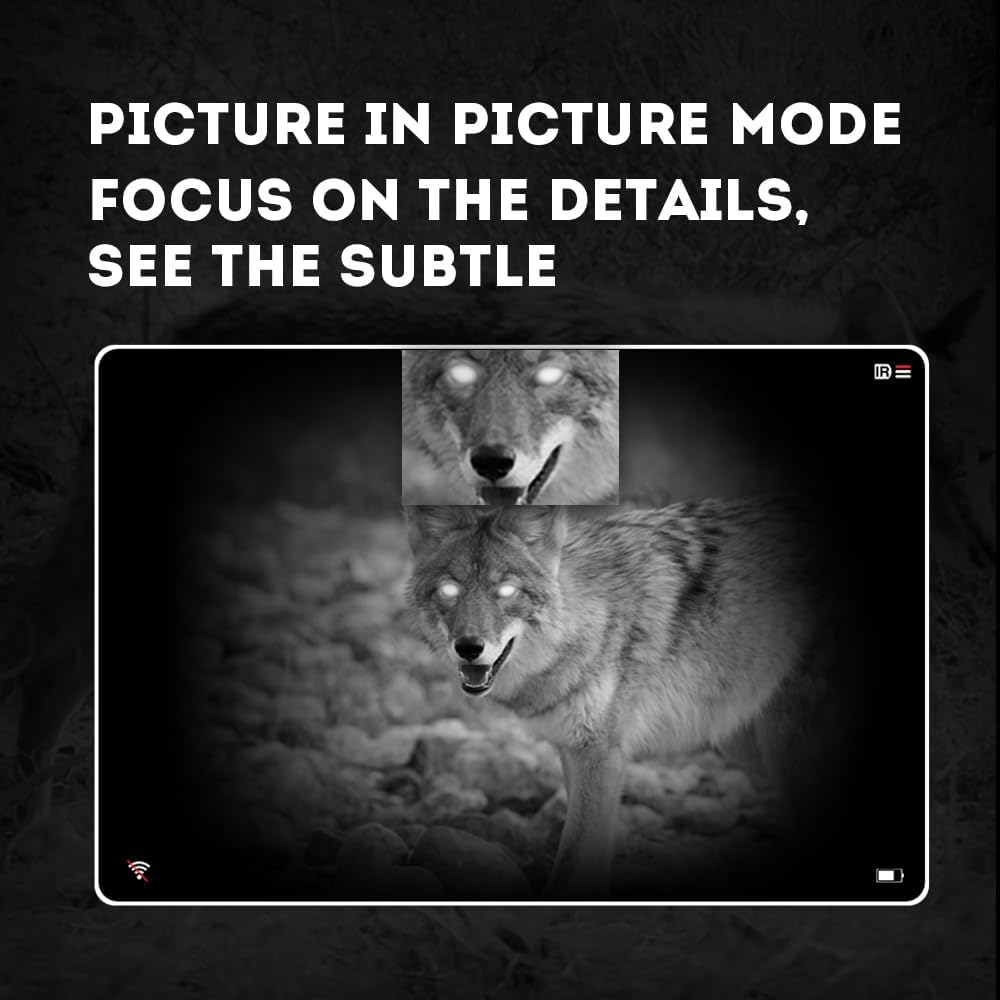
Image 4.3: Picture-in-Picture (PIP) mode. This image demonstrates how PIP mode allows users to focus on specific details within the main view, showing a magnified inset of a coyote's face.
5. Засвар үйлчилгээ
5.1 Төхөөрөмжийг цэвэрлэх
- Линз: Use a soft, lint-free cloth specifically designed for optical lenses. For stubborn smudges, use a small amount of lens cleaning solution. Avoid abrasive materials.
- Их бие: Монокуляр нүдний биеийг зөөлөн, d-ээр арчинаamp даавуу. Химийн хатуу бодис, уусгагчийг бүү ашигла.
5.2 Батерейны арчилгаа
- Always use high-quality, rechargeable 18650 batteries.
- Хэрэв төхөөрөмжийг удаан хугацаагаар ашиглахгүй бол зайгаа ав.
- Батерейг сэрүүн, хуурай газар хадгална.
5.3 Хадгалалт
- Монкулярыг ашиглаагүй үед хамгаалалтын үүрэндээ хадгална.
- Төхөөрөмжийг хуурай газар, нарны шууд тусгал болон хэт өндөр температураас хол байлга.
6. Алдаа засах
If you encounter issues with your Pard NV009-850nm, refer to the following common problems and solutions:
| Асуудал | Боломжит шалтгаан | Шийдэл |
|---|---|---|
| Төхөөрөмж асахгүй байна | Low or depleted battery; Incorrect battery installation | Charge or replace the battery; Reinstall battery with correct polarity. |
| Зураг бүдэг байна | Improper focus adjustment; Dirty lens | Adjust the diopter and objective lens focus rings; Clean the lenses. |
| No image in night mode | IR illuminator is off or set too low | Turn on the IR illuminator and adjust its intensity. |
| Wi-Fi холболтын асуудал | Wi-Fi not enabled on device; Incorrect app settings | Ensure Wi-Fi is enabled on the monocular; Check app permissions and settings. |
| Зураг/видео бичиж чадахгүй байна | No Micro SD card; SD card full or corrupted | Insert a Micro SD card; Delete old files or format the card (backup important data first). |
If the problem persists after attempting these solutions, please contact Pard customer support.
7. Техникийн үзүүлэлтүүд
| Онцлог | Дэлгэрэнгүй |
|---|---|
| Брэнд | Pard |
| Загварын нэр | PARD Night Vision Monocular |
| Загварын дугаар | NV009-850nm |
| Өнгө | Хар |
| Бүтээгдэхүүний хэмжээ (LxWxH) | 7.16" x 2.24" x 2.79" (18.19 см x 5.69 см x 7.09 см) |
| Зүйлийн жин | 340 грамм |
| Материал | Хөнгөн цагаан |
| Объектив линзийн диаметр | 25 миллиметр |
| Нүдний үрэвсэл | 25 миллиметр |
| Шөнийн харааны чадвар | Тиймээ |
| IR Illuminator Wavelength | 850nm (with 940nm option available in other variants) |
| CMOS Sensor Resolution | 1920x1080 пиксел |
| Дэлгэцийг харуулах | 1024x768 OLED |
| Оптик томруулалт | 4.7x |
| Дижитал томруулах | 1.5x-3.0x |
| Фото зургийн нягтрал | 2608x1944 пиксел |
| Видеоны нягтрал | 1920x1080 пиксел |
| Усны хамгаалалттай үнэлгээ | IP67 |
| Тохиромжтой төхөөрөмжүүд | Camera (for recording) |
| Суурилуулах төрөл | Rail Mount (if applicable for accessories) |
8. Баталгаат хугацаа ба дэмжлэг
8.1 Баталгаат хугацааны мэдээлэл
The Pard NV009-850nm Digital Night Vision Monocular comes with a 1 жилийн баталгаат хугацаа худалдан авсан өдрөөс. Энэхүү баталгаа нь ердийн ашиглалтын үеийн үйлдвэрлэлийн согог, доголдлыг хамарна. Энэ нь буруу ашиглалт, осол, зөвшөөрөлгүй өөрчлөлт, буруу засвар үйлчилгээний улмаас учирсан хохирлыг хамрахгүй.
Баталгаат заргад зориулж худалдан авалтаа нотлох баримтаа үлдээнэ үү.
8.2 Хэрэглэгчийн дэмжлэг
For technical assistance, warranty claims, or any questions regarding your device, please contact Pard customer support through the official Pard website or your retailer. When contacting support, please have your model number (NV009-850nm) and purchase date available.


