1. Танилцуулга
This manual provides detailed instructions for the setup, operation, and maintenance of your ECHTPower Wireless Switch Controller. Please read this manual thoroughly before using the product to ensure proper functionality and to maximize your gaming experience. This controller is designed for use with Nintendo Switch, PC, iOS, and Android devices.

Image 1.1: ECHTPower Wireless Switch Controller in purple. This image displays the front view of the controller, highlighting its ergonomic design and button layout.
2. Бүтээгдэхүүн дууссанview
2.1 Багцын агуулга
- ECHTPower Wireless Switch Controller
- USB-C цэнэглэгч кабель
- Хэрэглэгчийн гарын авлага (энэ баримт бичиг)
2.2 Хянагчийн зохион байгуулалт
Familiarize yourself with the buttons and features of your controller:

Зураг 2.1: Урд view of the ECHTPower Wireless Switch Controller. This image shows the left and right analog sticks, D-pad, A/B/X/Y buttons, Home button, Capture button, Plus/Minus buttons, and shoulder buttons.
- Зүүн аналог зөөгч: For movement and camera control. Features Hall Effect technology for precision.
- Баруун аналог зөөгч: For camera control and aiming. Features Hall Effect technology for precision.
- D-Pad: Чиглэлийн оролт.
- A/B/X/Y товчлуурууд: Үйлдлийн товчлуурууд.
- Зүүн/Ор товчлуурууд: Мөрний товчлуурууд.
- ZL/ZR Triggers: Аналог триггерүүд.
- HOME товчлуур: Системийн үндсэн дэлгэц рүү буцна.
- БҮТЭЭЛИЙН ТОГЛОЛТ: Takes screenshots or records video clips.
- +/- Товчлуур: Start/Select functions.
- M товч: Macro/Customization button (refer to advanced settings for programming).
- LED үзүүлэлтүүд: Player number and charging status.

Зураг 2.2: Ойролцоогоор view of the Hall Effect joystick. This image highlights the advanced sensor technology used in the analog sticks for enhanced durability and drift-free performance.
The controller features Hall Effect joysticks, which utilize electromagnetic induction for precise, drift-free control and extended lifespan compared to traditional potentiometers.
3. Тохиргоо ба холболт
3.1 Хянагчийг цэнэглэх
Before first use, fully charge the controller. Connect the supplied USB-C cable to the controller's charging port and the other end to a USB power source (e.g., console, PC, USB wall adapter). The LED indicators will show charging status and turn off when fully charged.
3.2 Nintendo Switch руу холбогдох нь
- НҮҮР Цэснээс "Хянагч" > "Бариул/Дарааллыг өөрчлөх"-г сонгоно уу.
- On the next screen, press and hold the SYNC button on the top of the ECHTPower controller for a few seconds until the player LEDs begin to flash.
- Хосолсны дараа хянагчийн дугаартай тохирох тоглуулагчийн LED гэрэл асдаг.
Note: The SYNC button is usually a small, recessed button on the top edge of the controller.
3.3 Компьютерт холбогдох (Windows)
Хянагч нь компьютерт утастай болон утасгүй холболтыг дэмждэг.
3.3.1 утастай холболт
- Connect the controller to your PC using the USB-C cable.
- Компьютер нь шаардлагатай драйверуудыг автоматаар илрүүлж, суулгах ёстой.
- The controller will be recognized as an XInput device.
3.3.2 Утасгүй холболт (Bluetooth)
- Таны компьютер Bluetooth асаалттай байгаа эсэхийг шалгаарай.
- Go to "Settings" > "Devices" > "Bluetooth & other devices" and select "Add Bluetooth or other device".
- Choose "Bluetooth".
- Press and hold the SYNC button on the controller until the LEDs flash rapidly.
- Select the "Pro Controller" or similar device name from the list on your PC.
- Once paired, the controller LEDs will stop flashing and remain lit.
3.4 Connecting to iOS/Android Devices

Image 3.1: The ECHTPower Wireless Switch Controller shown alongside various devices, including a tablet, smartphone, and laptop, illustrating its multi-device compatibility.
- Өөрийн iOS эсвэл Android төхөөрөмж дээрээ Bluetooth-г идэвхжүүлнэ үү.
- Bluetooth тохиргоо руу очоод шинэ төхөөрөмжүүдийг хайна уу.
- Press and hold the SYNC button on the controller until the LEDs flash rapidly.
- Select the "Pro Controller" or similar device name from the list on your mobile device.
- Once paired, the controller LEDs will stop flashing and remain lit.
Compatibility may vary with specific games and applications on mobile platforms.
4. Ашиглалтын заавар
4.1 Үндсэн удирдлага
The controller functions similarly to standard gaming controllers. Refer to the in-game instructions for specific button mappings.
- Аналог саваа: Used for movement, camera control, and menu navigation.
- D-Pad: Used for directional input, often for menu navigation or specific game actions.
- A/B/X/Y товчлуурууд: Primary action buttons, typically for jumping, attacking, interacting, etc.
- L/R/ZL/ZR Buttons: Used for various in-game actions such as aiming, shooting, or special abilities.
- HOME товчлуур: Returns to the console's home screen or main menu.
- БҮТЭЭЛИЙН ТОГЛОЛТ: Captures screenshots or video clips (Nintendo Switch specific).
- +/- Товчлуур: Often used for pausing games, opening menus, or selecting options.
4.2 Advanced Features (Hall Effect Joysticks)
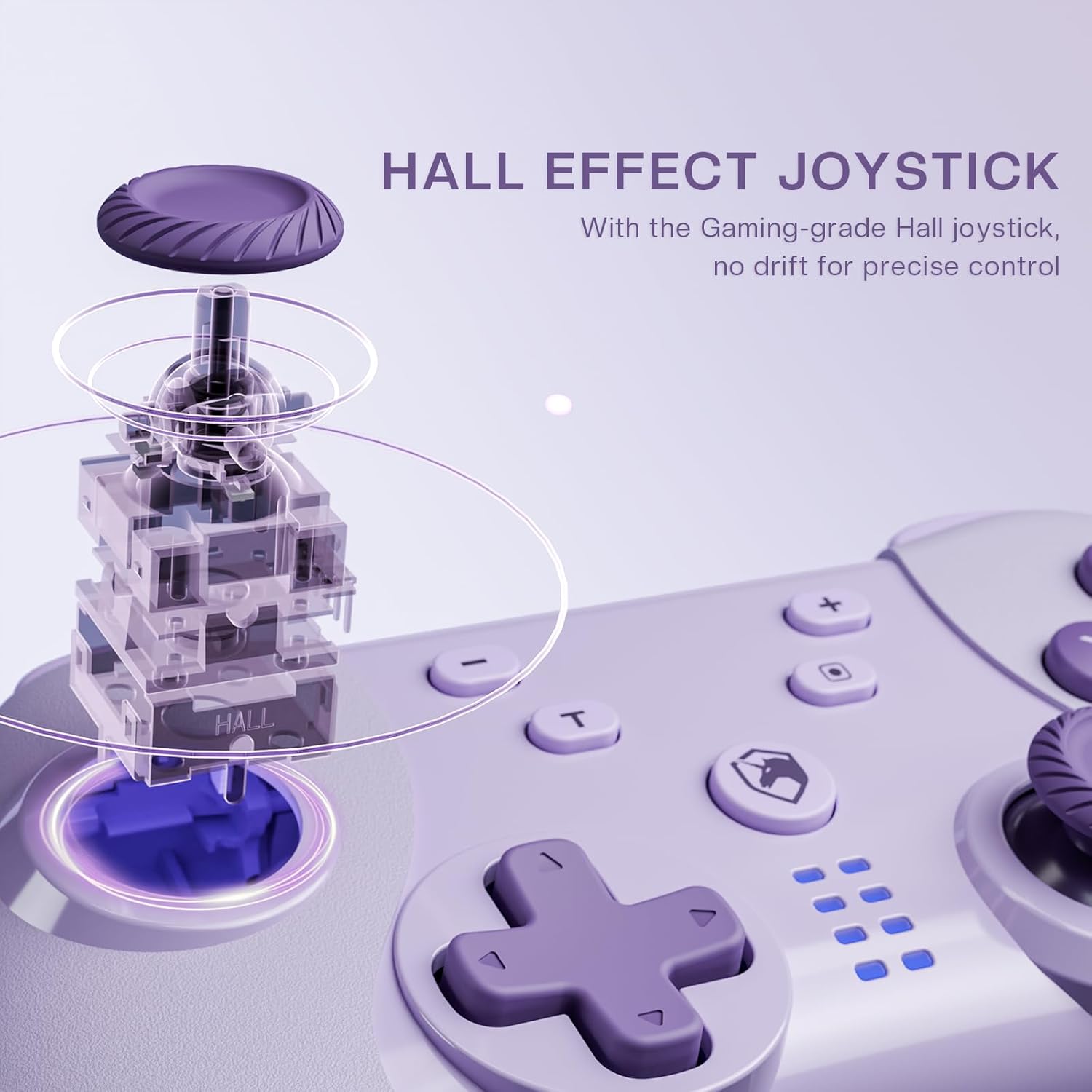
Image 4.1: Diagram illustrating the internal mechanism of a Hall Effect joystick. This image demonstrates how magnetic fields are used for position detection, contributing to drift-free and precise control.
The Hall Effect joysticks provide enhanced precision and durability. This technology uses magnetic fields instead of physical contact, virtually eliminating stick drift and extending the lifespan of the joysticks. No special operation is required; simply enjoy the improved responsiveness and accuracy.
4.3 Macro Function (M Button)
The 'M' button can be programmed for macro functions. Refer to the ECHTPower official website or advanced user guides for detailed instructions on how to program and utilize macro functions for specific gaming scenarios.
5. Засвар үйлчилгээ
- Цэвэрлэгээ: Хянагчийг цэвэрлэхдээ зөөлөн, хуурай даавуу ашиглаарай. Хүчтэй химийн бодис эсвэл зүлгүүрийн материал бүү хэрэглээрэй.
- Хадгалах: Удирдагчийг нарны шууд тусгал, хэт температураас хол, сэрүүн, хуурай газар хадгална.
- Батерейны арчилгаа: Зайны ашиглалтын хугацааг уртасгахын тулд хянагчийг ойр ойрхон бүрэн цэнэглэхээс зайлсхий. Удаан хугацаагаар ашиглаагүй байсан ч тогтмол цэнэглээрэй.
- Дусалаас зайлсхийх: Удирдагчийг уналт, нөлөөллөөс хамгаалж, дотоод эд ангиудыг гэмтээж болно.
6. Алдаа засах
| Асуудал | Боломжит шалтгаан | Шийдэл |
|---|---|---|
| Хянагч асахгүй байна. | Батерей бага. | Charge the controller using the USB-C cable. |
| Cannot connect to device. | Not in pairing mode; Bluetooth interference; device's Bluetooth off. | Ensure controller is in pairing mode (flashing LEDs). Check device's Bluetooth settings. Try restarting both controller and device. |
| Оролтын саатал эсвэл холболт тасарсан. | Distance from device; low battery; wireless interference. | Move closer to the device. Charge the controller. Reduce other wireless devices nearby. |
| Жойстикийн шилжилт. | Rare with Hall Effect, but possible calibration issue or extreme wear. | Try recalibrating the joysticks through your device's settings (e.g., Nintendo Switch system settings). If issue persists, contact support. |
7. Техникийн үзүүлэлтүүд
- Загвар: Утасгүй унтраалга хянагч
- Холболт: Bluetooth Wireless, USB-C Wired
- Тохиромжтой байдал: Nintendo Switch, PC (Windows), iOS, Android
- Joystick Technology: Холл эффект
- Эрчим хүчний эх үүсвэр: Баригдсан цэнэглэдэг батерей
- Цэнэглэх порт: USB-C
- ASIN: B0DNN1BP4F
8. Баталгаат хугацаа ба дэмжлэг
ECHTPower products come with a standard manufacturer's warranty. For specific warranty terms and conditions, please refer to the warranty card included with your product or visit the official ECHTPower webсайт.
If you encounter any issues or have questions not covered in this manual, please contact ECHTPower customer support:
- Webсайт: ECHTPower Official Store on Amazon
- Имэйл: Бүтээгдэхүүний сав баглаа боодол эсвэл албан ёсны мэдээллийг харна уу webхолбоо барих цахим шуудангийн сайт.


