1. Танилцуулга
This manual provides detailed instructions for the setup, operation, and maintenance of your THOMSON 8-inch Digital Photo Frame (Model: TRDF-8001C). Please read this manual thoroughly before using the device to ensure proper functionality and to maximize your enjoyment of its features. This digital photo frame is designed to display your cherished photos and videos with an 8-inch IPS HD screen, offering a clear and vibrant viewтуршлага.
2. Хайрцагт юу байна
Савыг задлахдаа доор жагсаасан бүх зүйл байгаа бөгөөд сайн нөхцөлд байгаа эсэхийг шалгана уу.
- THOMSON 8-inch Digital Photo Frame
- Алсын удирдлага
- Эрчим хүчний адаптер
- Photo Frame Stand
- Хэрэглэгчийн гарын авлага

Figure 2.1: Contents of the THOMSON Digital Photo Frame package.
3. Тохиргоо
3.1 Эрчим хүчний холболт
- Connect the power adapter to the DC-IN port on the back of the digital photo frame.
- Цахилгаан адаптерийг ердийн цахилгаан залгуурт холбоно уу.
- The frame will automatically power on.
3.2 Анхны тохиргоо
- Upon first startup, you will be prompted to select your preferred language. Use the navigation buttons on the remote control or the physical buttons on the back of the frame to select and confirm.
- Одоогийн огноо, цагийг тохируулна уу.
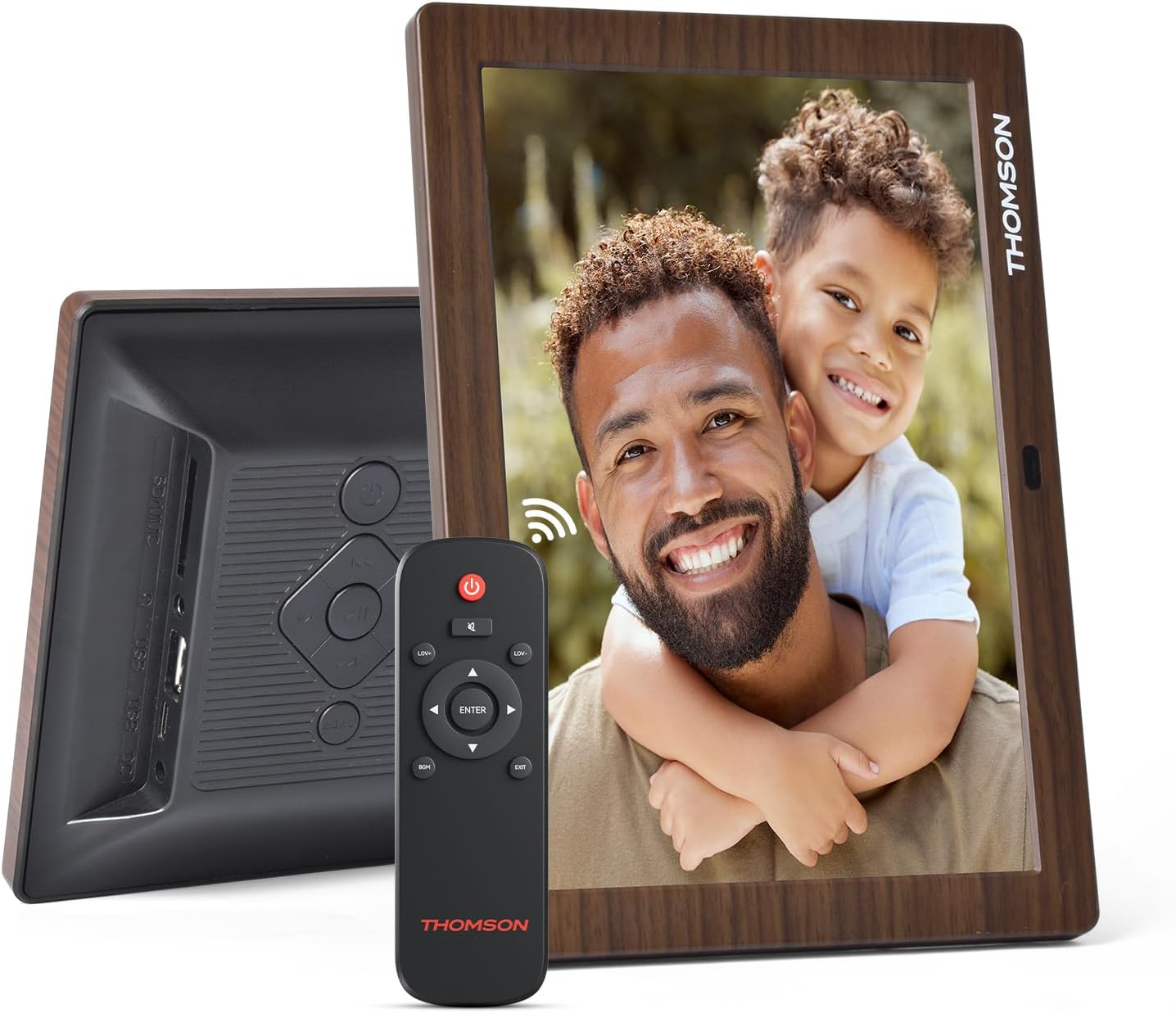
Зураг 3.1: Ар талд view of the frame with power input and physical controls.
3.3 Тавиур суурилуулах
The digital photo frame can be placed on a flat surface using the included stand. Insert the stand into the designated slot on the back of the frame. The frame also supports wall mounting using the integrated mounting holes.
4. Ашиглалтын заавар
4.1 Дэлгэцийн онцлог
- 8 инчийн IPS HD дэлгэц: Enjoy clear and vibrant images with a 1280x800 resolution from various viewөнцөг.
- Автомат эргэлт: The built-in gravity sensor automatically adjusts the photo orientation (landscape or portrait) for optimal viewing.

Figure 4.1: The 8-inch IPS HD screen provides a high-quality display for your memories.
4.2 Медиа тоглуулах
The frame supports playback of photos, music, and videos. You can navigate through your media using the remote control or the physical buttons.
- Photo Slideshow: Configure slideshow intervals and transition effects in the settings.
- Хөгжим тоглуулах: Энэ хугацаанд арын хөгжим тоглуулна viewзураг авах.
- Видео тоглуулах: Enjoy your favorite video clips directly on the frame.

Figure 4.2: User interface for media selection and playback options.
4.3 Remote Control and Physical Buttons
Control your digital photo frame conveniently using the included remote control or the physical buttons located on the back of the frame.
- Алсын удирдлагын функцууд: Power on/off, adjust volume, navigate images, control background music, and access menus.
- Физик товчлуурууд: Provide direct control for essential functions, useful for elderly users.

Figure 4.3: Remote control for convenient operation of the frame.
4.4 Expansion Modes
The frame supports various expansion options for storing your media:
- SD/SDHC/MMC Card: Expand storage up to 32 GB.
- USB-A/Type-C/U-disk: Connect USB drives for additional media.
- Жич: This frame does not have built-in storage. An external memory card or USB drive is required for media storage.

Figure 4.4: Memory expansion slots on the back of the frame.
4.5 Automatic Power On/Off
You can set a customized automatic start and stop time for the frame to conserve energy and manage display times.

Figure 4.5: Setting automatic power on/off times for convenience.
5. Засвар үйлчилгээ
- Дэлгэц цэвэрлэх: Use a soft, dry, lint-free cloth to gently wipe the screen. For stubborn marks, slightly dampАлчуурыг ус эсвэл тор цэвэрлэгч уусмалаар арчина. Хүчтэй химийн бодисоос зайлсхий.
- Хүрээг цэвэрлэх: Wipe the frame with a soft, dry cloth.
- Хадгалах: When not in use for extended periods, disconnect the power adapter and store the frame in a cool, dry place away from direct sunlight.
6. Алдаа засах
| Асуудал | Боломжит шалтгаан | Шийдэл |
|---|---|---|
| Хүрээ асахгүй байна. | Цахилгаан адаптер холбогдоогүй эсвэл алдаатай байна. | Цахилгаан адаптер нь хүрээ болон ажиллаж байгаа цахилгаан залгуурт найдвартай холбогдсон эсэхийг шалгаарай. Өөр залгуурыг туршаад үзээрэй. |
| Зураг/видео харагдахгүй байна. | No memory card/USB drive inserted or media files are corrupted/unsupported. | Insert a memory card or USB drive with supported media fileс. Шалгах file formats (JPEG for photos, MP4 for videos). Ensure the memory card/USB drive is properly inserted. |
| Алсын удирдлага ажиллахгүй байна. | Батерей бага эсвэл саад тотгор. | Replace the remote control battery. Ensure there are no obstructions between the remote and the frame's IR receiver. |
| Images are distorted or incorrect orientation. | Incorrect display settings or disabled auto-rotation. | Check display settings in the menu. Ensure the auto-rotation feature is enabled if desired. |
7. Техникийн үзүүлэлтүүд
- Загварын дугаар: TRDF-8001C
- Дэлгэцийн хэмжээ: 8 инч
- Шийдвэр: 1280x800 (WXGA)
- Харьцаа: 16:10
- Дэлгэцийн технологи: IPS HD
- Холболт: DC-4.0, USB-A, Type-C, SD Card, 3.5MM earphone jack
- Санах ойн өргөтгөл: SD/SDHC/MMC card up to 32GB, U-disk
- Эрчим хүчний эх үүсвэр: Утастай цахилгаан
- User Interface Input: Товчлуурууд, Алсын удирдлага
- Хүрээний материал: Хуванцар
- Бүтээгдэхүүний хэмжээ: 24.4 x 18 x 2.51 см
- Бүтээгдэхүүний жин: 240 грамм
8. Баталгаат хугацаа ба дэмжлэг
For warranty information and customer support, please refer to the documentation included in your product packaging or visit the official Thomson webсайт. Худалдан авалтын баримтаа аливаа баталгаат нэхэмжлэлийг худалдан авсан баримт болгон хадгална уу.


