1. Танилцуулга
This manual provides detailed instructions for the setup, operation, and maintenance of your GIEC G5300 4K Ultra HD Blu Ray Player. Designed for an enhanced home entertainment experience, this player supports true 4K ultra-high-definition picture quality, HDR10, Dolby Vision, BT.2020 color spaces, and Dolby audio decoding for immersive visuals and sound.
2. Аюулгүй байдлын мэдээлэл
- Ensure proper ventilation around the player to prevent overheating.
- Гал түймэр, цахилгаан цочролыг бууруулахын тулд төхөөрөмжийг бороо, чийгэнд бүү оруулаарай.
- Avoid placing heavy objects on top of the player.
- c-г нээж болохгүйasing; бүх үйлчилгээг мэргэшсэн боловсон хүчинд шилжүүлэх.
- Keep the player away from direct sunlight, heat sources, and strong magnetic fields.
- Зөвхөн төхөөрөмжид дагалддаг тэжээлийн адаптерийг ашиглана уу.
3. Багцын агуулга
Доор жагсаасан бүх зүйл таны багцад байгаа эсэхийг шалгана уу.
- GIEC G5300 Blu-ray Player (x1)
- HDMI кабель (x1)
- Алсын удирдлага (x1)
- Хэрэглэгчийн гарын авлага (x1)
4. Бүтээгдэхүүн дууссанview
4.1 Урд самбар

Зураг 4.1: Урд view of the GIEC G5300 Blu Ray Player, showing the disc tray, display, USB port, and control buttons (power, play/pause, eject).
- Дискний тавиур: Blu-ray эсвэл DVD дискийг энд оруулна уу.
- Дэлгэцийн самбар: Shows playback status and time.
- USB 3.0 порт: Медиа тоглуулахын тулд USB санах ойн төхөөрөмжүүдийг холбоно уу.
- Хяналтын товчлуурууд: Power On/Off, Play/Pause, Eject.
4.2 Арын самбар ба холболтууд

Зураг 4.2: Ар талд view of the GIEC G5300 Blu Ray Player, highlighting various input/output ports including LAN, HDMI 2.0, HDMI 1.4, USB 3.0, Coaxial, and Optical outputs.
- LAN порт: For network connection (e.g., firmware updates).
- HDMI 2.0 Output (Video/Audio): Primary HDMI output for 4K video and audio.
- HDMI 1.4 Output (Audio Only): Dedicated HDMI output for audio to an AV receiver.
- USB 3.0 Input: Медиа тоглуулахын тулд USB санах ойн төхөөрөмжүүдийг холбоно уу.
- Коаксиаль гаралт: Дижитал аудио гаралт.
- Оптик гаралт: Дижитал аудио гаралт.
5. Тохиргоо
5.1 Алсын удирдлагатай батерей суурилуулах
Зөв туйлшралыг хангахын тулд алсын удирдлагад хоёр AAA батерей (багцад ороогүй) хийнэ үү.
Video 5.1: This video demonstrates how to install batteries into the remote control and connect the Blu-ray player to a TV using an HDMI cable.
5.2 Connecting to a Display Device (TV/Projector)
- Нийлүүлсэн HDMI кабелийн нэг үзүүрийг холбоно HDMI 2.0 Output (Video/Audio) Blu-ray тоглуулагчийн ар талд байрлах порт.
- Connect the other end of the HDMI cable to an available HDMI input port on your TV or projector.
- For separate audio output, connect another HDMI cable from the HDMI 1.4 Output (Audio Only) port to your AV receiver, or use the Coaxial/Optical outputs.
5.3 Эрчим хүчний холболт
- Connect the power cable to the power input on the rear of the Blu-ray player.
- Цахилгааны кабелийн нөгөө үзүүрийг ханын залгуурт холбоно уу.
- Turn on your TV/projector and select the correct HDMI input source corresponding to the port you connected the Blu-ray player to.
- Press the Power button on the Blu-ray player or remote control to turn on the unit.
6. Ашиглалтын заавар
6.1 Диск тоглуулах
- Ensure the player is powered on and connected to your display device.
- дээр дарна уу ГАРАХ дискний тавиурыг нээхийн тулд урд самбар эсвэл алсын удирдлага дээрх товчлуурыг дарна уу.
- Carefully place a Blu-ray or DVD disc onto the tray with the label side facing up.
- дээр дарна уу ГАРАХ button again to close the tray. The player will automatically begin loading and playing the disc.
- Тоглуулах, Түр зогсоох, Зогсоох, Урагшлах, Ухрах гэх мэт тоглуулах функцүүдэд алсын удирдлагыг ашиглаарай.
6.2 USB медиа тоглуулах
The GIEC G5300 supports playback of various media fileUSB хадгалах төхөөрөмжөөс.
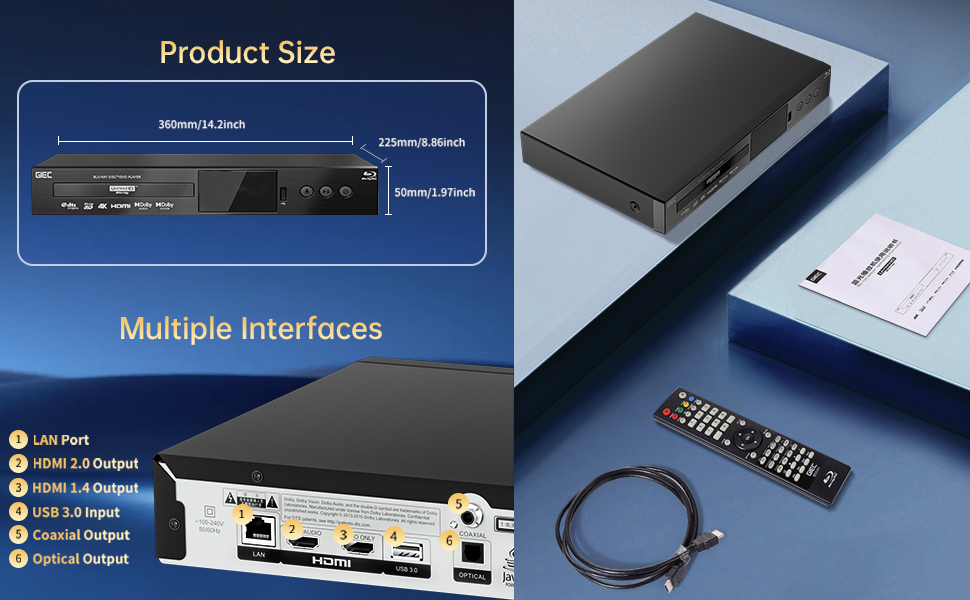
Figure 6.1: Illustration of the multiple disc, video, and audio formats supported by the player.
- USB санах ойн төхөөрөмжөө оруулна уу USB 3.0 порт урд эсвэл хойд самбар дээр.
- Navigate to the "Video," "Music," or "Photo" section on the player's main menu using the remote control.
- Хүссэн зүйлээ сонго file from the USB device to begin playback.
Дэмжигдсэн форматууд:
- Дискний төрөл: BD, BD-R, BD-RE, DVD-R/RW, DVD+R/RW, DVD-Video, VCD, CD, CD-R/RW.
- Видео форматууд: MPEG-1, MPEG-2, MPEG-4, VC1, H.264, MOV, MKV, AVI, TS.
- Аудио форматууд: AAC, APE, CUE, FLAC, OGG, MP3, WAV.
7. Онцлогууд
- 4K Ultra HD Playback: Experience movies and shows in stunning 4K resolution with clearer images and richer colors.
- HDR10 дэмжлэг: Enjoy a wider range of brightness and contrast, revealing more detail in both dark and bright scenes.
- Dolby Vision: Enhances image quality by dynamically adjusting brightness and expanding dynamic range for more detailed and vivid pictures.
- BT.2020 Color Spaces: Provides a broader color gamut than standard 1080p Blu-ray, resulting in purer, more natural, and realistic colors.
- Dolby Sound & DTS Decoding: Supports Dolby audio decoding and DTS effects for an immersive 5.1 stereo surround sound experience.
- 3D Blu-ray Playback: Compatible with 3D Blu-ray discs for an immersive three-dimensional viewing experience (requires a 3D-compatible TV and glasses).
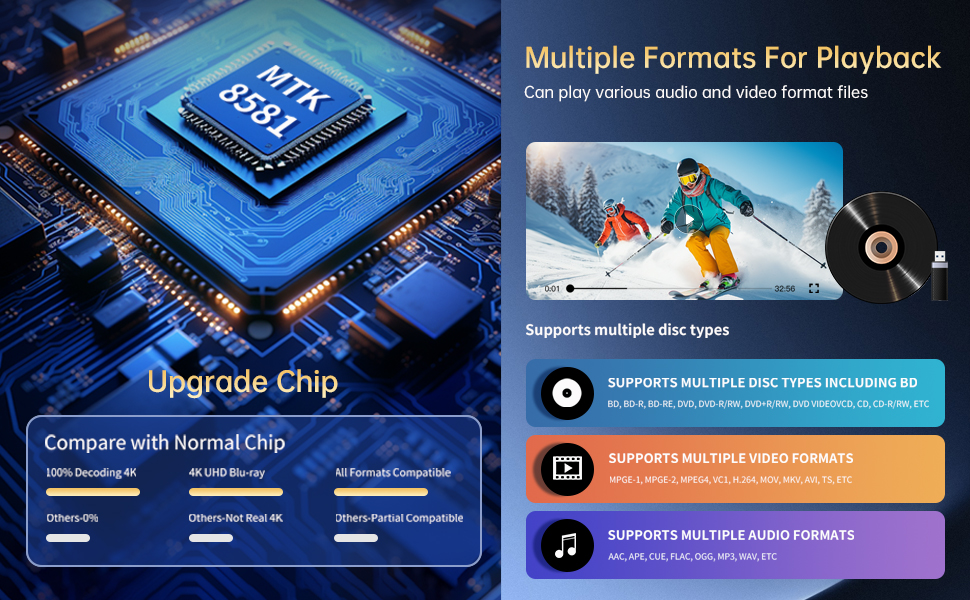
Figure 7.1: Visual comparison illustrating the difference between 8-bit (16.67 million colors) and 10-bit (1.07 billion colors) color depth, highlighting the enhanced detail and delicacy of 10-bit color.

Figure 7.2: The GIEC G5300 Blu Ray Player connected to a TV, showcasing its support for 4K UHD, 3D, HDR, HDR10+, Dolby, and Dolby Vision technologies.
8. Засвар үйлчилгээ
- Цэвэрлэгээ: Тоглуулагчийн гадна талыг зөөлөн, хуурай даавуугаар цэвэрлэнэ үү. Шингэн эсвэл аэрозоль цэвэрлэгч хэрэглэж болохгүй.
- Дискний арчилгаа: Дискийг ирмэгээр нь барь. Зөөлөн, хөвөнгүй даавуугаар дискийг голоос нь гадагш нь арчиж цэвэрлэ.
- Агааржуулалт: Хэт халалтаас урьдчилан сэргийлэхийн тулд тоглогчийн агааржуулалтын нүхийг бөглөөгүй эсэхийг шалгаарай.
9. Алдаа засах
If you encounter issues with your Blu-ray player, please refer to the following common solutions:
- Эрчим хүчгүй: Check if the power cable is securely connected to both the player and the power outlet. Ensure the outlet is functional.
- Зураг/дуу чимээ байхгүй: Verify that the HDMI cable is correctly connected to both the player and the TV/receiver. Ensure the correct HDMI input is selected on your TV/receiver.
- Диск тоглуулахгүй байна: Check if the disc is clean and free of scratches. Ensure the disc is inserted correctly with the label side up. The player supports Region A Blu-ray discs and all region DVD discs.
- Алсын удирдлага ажиллахгүй байна: Check the batteries in the remote control and replace them if necessary. Ensure there are no obstructions between the remote and the player.
10. Техникийн үзүүлэлтүүд
| Онцлог | Дэлгэрэнгүй |
|---|---|
| Брэнд нэр | GIEC |
| Загварын нэр | G5300 |
| Зүйлийн жин | 4.18 фунт (1.9 килограмм) |
| Бүтээгдэхүүний хэмжээс | 14.2 x 8.9 x 2 инч |
| Өнгө | Хар |
| Хэвлэл мэдээллийн төрөл | Blu-Ray диск, DVD |
| Шийдвэр | 3840x2160 (4K Ultra HD) |
| Онцлог шинж чанарууд | Anti-Shock, Compact, Dust Proof, Multi-Format Playback, Surround Sound, HDR10, Dolby Vision, BT.2020 Color Spaces |
| Холбогч төрөл | HDMI (Dual Outputs), USB 3.0, Coaxial, Optical, LAN |
| Холболтын технологи | HDMI |
11. Баталгаат хугацаа ба дэмжлэг
For warranty information or technical support, please refer to the documentation included with your purchase or contact GIEC customer service. Keep your proof of purchase for warranty claims.


