Танилцуулга
Thank you for choosing the Diivoo 4 Zone Sprinkler Timer. This programmable automatic irrigation timer is designed to simplify your garden watering, offering independent control over four separate zones. With features like rain delay and manual watering modes, it provides flexibility and efficiency for your lawn, yard, and pool watering needs. Please read this manual thoroughly before operation to ensure proper setup and optimal performance.
Аюулгүй байдлын мэдээлэл
- Do not immerse the timer in water. The unit is IP54 rated for water resistance, but not submersion.
- Use only 2 AA 1.5V alkaline batteries. Do not mix old and new batteries, or different types of batteries.
- Нэвчилтээс урьдчилан сэргийлэхийн тулд бүх холболтууд нягт байгаа эсэхийг шалгаарай.
- Operate within recommended water pressure limits to avoid damage.
- Хүүхдийн гар хүрэхгүй газар хадгална.
- Protect from freezing temperatures. Remove batteries and store indoors during winter.
Бүтээгдэхүүн дууссанview
Бүрэлдэхүүн хэсгүүд

Зураг 1: Урд view of the Diivoo 4 Zone Sprinkler Timer, showing the large LCD display, control buttons, and four hose outlets.
- Үндсэн нэгж: Houses the control panel, LCD display, and battery compartment.
- Оролтын холбогч: Connects to your outdoor faucet (standard 3/4" garden hose thread). Features reinforced nylon fiber for durability.
- Four Outlet Connectors: Each outlet can be connected to a separate hose or irrigation line.
- Хяналтын товчлуурууд: For navigation and setting adjustments (OK, ESC/OFF, +, -, DELAY).
- LCD дэлгэц: Large screen showing current time, program settings for each zone (A, B, C, D), and status indicators.
Гол онцлогууд
- 4 Independent Watering Zones: Allows separate scheduling for different areas.
- Програмчлагдах боломжтой хуваарь: Set start time, watering duration (1s-360min), and frequency (every 1 min to 24 hrs, or every day to every 15 days).
- Бороо хойшлуулах функц: Skip watering cycles to conserve water during rainy periods.
- Гараар услах горим: Initiate immediate watering without affecting programmed schedules.
- Том LCD дэлгэц: 3.2 x 2 inch screen for easy readability and quick operation.
- IP54 Усны эсэргүүцэл: Durable and suitable for outdoor use.
- Бага эрчим хүчний хэрэглээ: Battery life up to 6-8 months with 2 AA batteries (not included).
- Бага эрчим хүчний хамгаалалт: Valve automatically shuts off when battery is too low to prevent water waste.
Тохиргоо
1. Зай суурилуулах
The timer requires 2 AA 1.5V alkaline batteries (not included).
- Таймерын арын хэсэгт зайны тасалгааг ол.
- Зайны тагийг нээнэ үү.
- Зөв туйлшралыг (+/-) хангаж, хоёр шинэ АА шүлтлэг батерейг оруулна уу.
- Close the battery cover securely. The battery cover has a seal to isolate moisture.

Figure 2: Image showing the battery compartment and reinforced nylon fiber connection, highlighting the leakproof design.
2. Таймерыг холбох
- Ensure your outdoor faucet is turned off.
- Screw the timer's inlet connector onto any standard 3/4" garden outdoor faucet. Hand-tighten only. Do not overtighten.
- Connect your garden hoses to the four independent outlets (A, B, C, D) at the bottom of the timer.
- Turn on your outdoor faucet. The timer is designed to withstand typical household water pressure.
Ашиглалтын заавар
Understanding the LCD Display and Controls

Figure 3: Close-up of the large LCD screen and the 7-button quick setup panel.
The large LCD display shows various information including the current time, battery level, active zone indicators (A, B, C, D), start time, watering duration, watering frequency, and next start time. The control panel features buttons for navigation and setting adjustments:
- БОЛЖ БАЙНА УУ: Confirm selection or enter setting mode.
- ESC/OFF: Exit current setting, return to previous screen, or turn off the timer.
- +: Increase value or move forward in menu.
- -: Decrease value or move backward in menu.
- ХОЙШЛОО: Activate/deactivate rain delay.
- NOW/ABCD: Switch between current time display and zone selection.
1. Одоогийн цагийг тохируулах
- дээр дарна уу OK button to enter setting mode. The time display will flash.
- -г ашиглана уу + or - цагийг тохируулах товчлуурууд. дарна уу OK баталгаажуулах.
- Adjust the minutes using + or -, дараа нь дарна уу OK баталгаажуулах.
- дарна уу ESC тохиргооны горимоос гарахын тулд.
2. Programming Automatic Watering Schedules (4 Zones)
The Diivoo timer allows you to set independent watering schedules for each of its four zones (A, B, C, D).

Figure 4: Visual representation of four independent irrigation zones (Zone 1, Zone 2, Zone 3, Zone 4) for customized watering.

Figure 5: Display showing options for setting Start Time, Watering Duration (1s to 360min), and Watering Frequency (Every 1H-23H or Every 1-15 Days).
- дээр дарна уу NOW/ABCD button to select the desired zone (A, B, C, or D). The selected zone indicator will flash.
- дарна уу OK to enter programming for the selected zone.
- Эхлэх цагийг тохируулах: Ашиглах + or - to adjust the hour and minutes for the watering start time. Press OK тохируулга бүрийн дараа.
- Set Watering Duration ("How Long"): Ашиглах + or - to set the watering duration from 1 second to 360 minutes. Press OK баталгаажуулах.
- Set Watering Frequency ("How Often"):
- Ашиглах + or - to select frequency in hours (e.g., every 1 hour to 23 hours). Press OK.
- Alternatively, select frequency in days (e.g., every 1 day to 15 days). Press OK.
- You can also set specific days of the week for watering. Navigate through the days and press OK to select/deselect.
- After setting all parameters for the zone, press ESC to save and exit. Repeat for other zones as needed.
Жич: Adequate water pressure is required when all 4 zone ports are operating simultaneously. If water pressure is insufficient, it is recommended to rotate the use of the 4 zone ports to avoid reduced water flow through each port.
3. Manual Watering Mode
Manual watering allows you to water immediately without interrupting your preset programs.
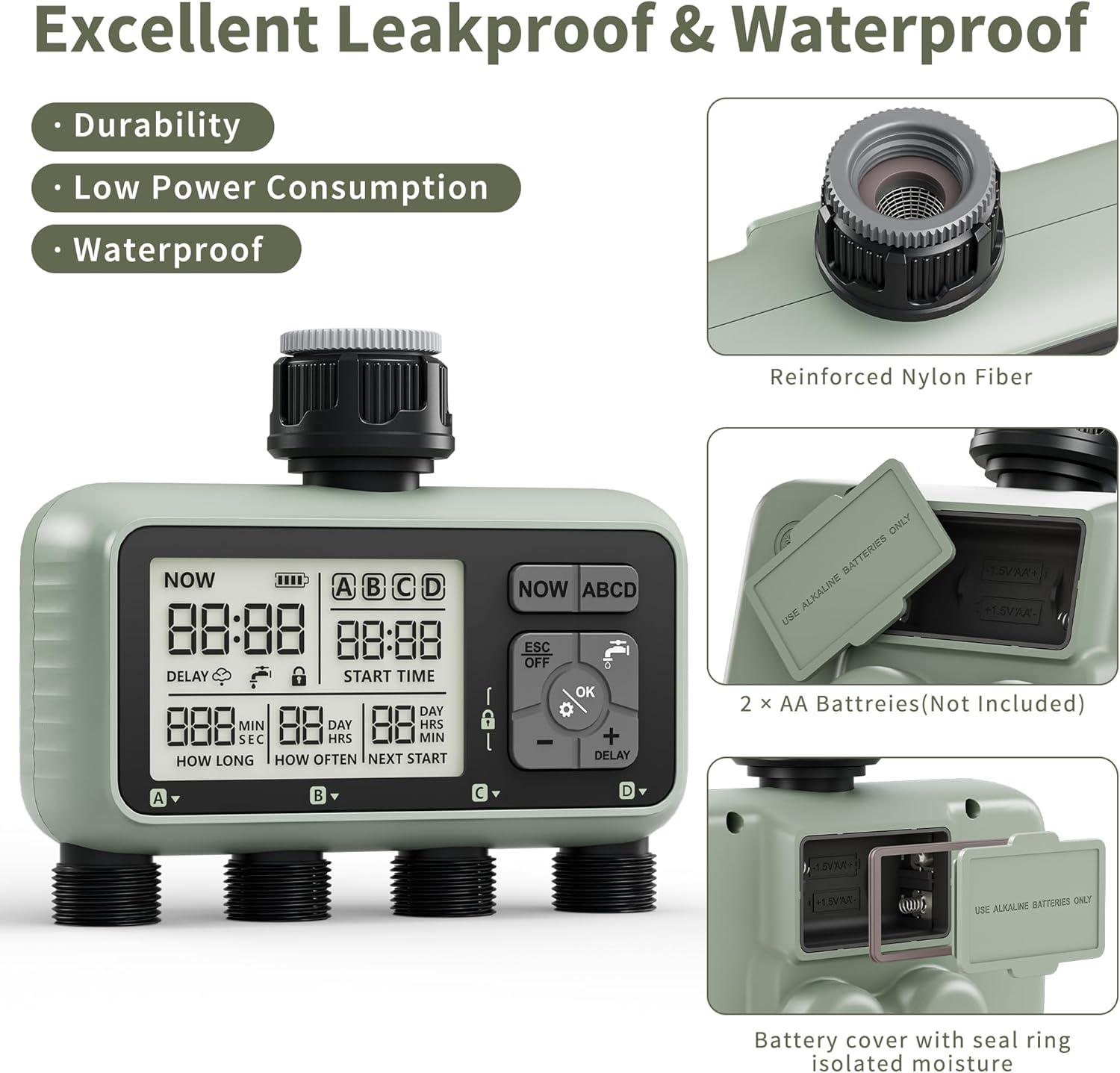
Figure 6: Illustration of manual watering in progress, showing the ability to set individual watering times for each zone from 1 second to 360 minutes.
- Үндсэн дэлгэц дээрээс дарна уу OK button (water drop icon).
- Ашиглах + or - to select the desired watering duration (from 1 second to 360 minutes).
- дарна уу OK to start manual watering. The selected zone(s) will begin watering immediately.
- To stop manual watering, press ESC/OFF.
4. Борооны саатлын функц
The rain delay feature allows you to temporarily pause your watering schedule to avoid overwatering and save water during rainy conditions. The timer does not have a rain sensor, so you will need to activate this manually based on local weather forecasts.

Figure 7: Display showing the Rain Delay feature, indicating that the next watering schedule will be skipped. This feature aids in water conservation and allows for postponed schedules.
- In the "ON" state (main display), press and hold the + 5 секундын турш дарна уу.
- The "DELAY" icon will appear on the screen, and the "NEXT START" time will update to reflect the postponed schedule.
- To deactivate rain delay, press and hold the + 5 секундын турш дахин дарна уу.
5. Product Video Guide
Video 1: An official product video demonstrating the features of the Diivoo 4 Zone Sprinkler Timer, including manual watering, automatic watering, and rain delay functionality.
Засвар үйлчилгээ
- Цэвэрлэгээ: Таймерыг зараар арчина ууamp даавуу. Зүлгүүрийн цэвэрлэгч, уусгагчийг бүү ашигла.
- Зай солих: Replace batteries when the low battery indicator appears on the LCD. It is recommended to replace batteries every 6-8 months or at the start of each watering season.
- Өвөлжилт: Before the first frost, remove the timer from the faucet. Remove the batteries. Store the timer indoors in a dry, protected area to prevent damage from freezing water.
- Шүүлтүүрийг цэвэрлэх: Periodically check the filter washer inside the inlet connector for debris. Clean if necessary to ensure proper water flow.
Алдааг олж засварлах
| Асуудал | Боломжит шалтгаан | Шийдэл |
|---|---|---|
| Timer does not turn on/LCD is blank. | Дууссан эсвэл буруу суурилуулсан батерей. | Батерейг шинэ АА шүлтлэг батерейгаар сольж, зөв туйлшралыг баталгаажуулна уу. |
| Water does not flow or flow is weak. |
|
|
| Timer leaks from connections. | Loose connections or missing/damaged O-rings. | Ensure all connections are hand-tight. Check and replace O-rings if damaged. |
| Watering schedule not activating. |
|
|
Үзүүлэлтүүд
- Загвар: HCT-379
- Бүтээгдэхүүний хэмжээ: 6.46 x 5.59 x 2.99 инч
- Барааны жин: 1.85 фунт
- Эрчим хүчний эх үүсвэр: 2 ширхэг AA 1.5V шүлтлэг батерей (багцад ороогүй болно)
- Услах хугацаа: 1 секундээс 360 минут хүртэл
- Услах давтамж: Every 1 minute to 24 hours, or Every 1 day to 15 days
- Усны эсэргүүцэл: IP54
- Inlet Thread: Standard 3/4" Garden Hose Thread
- Тохиргооны тоо: 16
Баталгаат болон дэмжлэг
Diivoo products are designed for reliability and performance. For warranty information, technical support, or any questions regarding your Diivoo 4 Zone Sprinkler Timer, please contact Diivoo customer service. Our team of experts is available to assist you.
Please refer to the contact information provided with your product packaging or visit the official Diivoo webхамгийн сүүлийн үеийн тусламжийн дэлгэрэнгүй мэдээллийг авах сайт.
Diivoo Official Store: Diivoo Store on Amazon


