1. Танилцуулга
Thank you for choosing the FLYLINKTECH 5000A Jump Starter. This portable device is designed to provide instant power to jump-start 12V vehicles, charge electronic devices, and offer emergency lighting. Please read this manual thoroughly before use to ensure safe and optimal performance.
2. Аюулгүй байдлын чухал мэдээлэл
- Ашиглахаасаа өмнө асаагуур бүрэн цэнэглэгдсэн эсэхийг үргэлж шалгаарай.
- Хөлдөөсөн батерейг үсэрч асаах гэж бүү оролдоорой.
- cl-г холбоно ууamps correctly: red to positive (+), black to negative (-). Reverse polarity can cause damage.
- Улаан ба хар cl-г бүү холбоampхамтдаа.
- Хүүхдийн гар хүрэхгүй газар хадгална.
- Агааржуулалт сайтай газарт ашиглах хэрэгтэй.
- Төхөөрөмжийг хэт өндөр температур эсвэл нарны шууд тусгалд удаан хугацаагаар байлгахаас зайлсхий.
- If the device becomes excessively hot during use, disconnect it immediately.
- Асаах тодорхой журмын талаар тээврийн хэрэгслийнхээ хэрэглэгчийн гарын авлагаас лавлана уу.
3. Багцын агуулга
Таны багцад бүх зүйл байгаа эсэхийг шалгана уу:
- FLYLINKTECH 5000A Jump Starter (Model BD10)
- Ухаалаг холбогч кабель
- USB-C цэнэглэгч кабель
- EVA хадгалах хайрцаг
- Хэрэглэгчийн гарын авлага

Image: Contents of the FLYLINKTECH 5000A Jump Starter package, including the jump starter unit, smart jumper cables, USB-C charging cable, and EVA storage case.
4. Бүтээгдэхүүн дууссанview
Familiarize yourself with the components and ports of your jump starter:
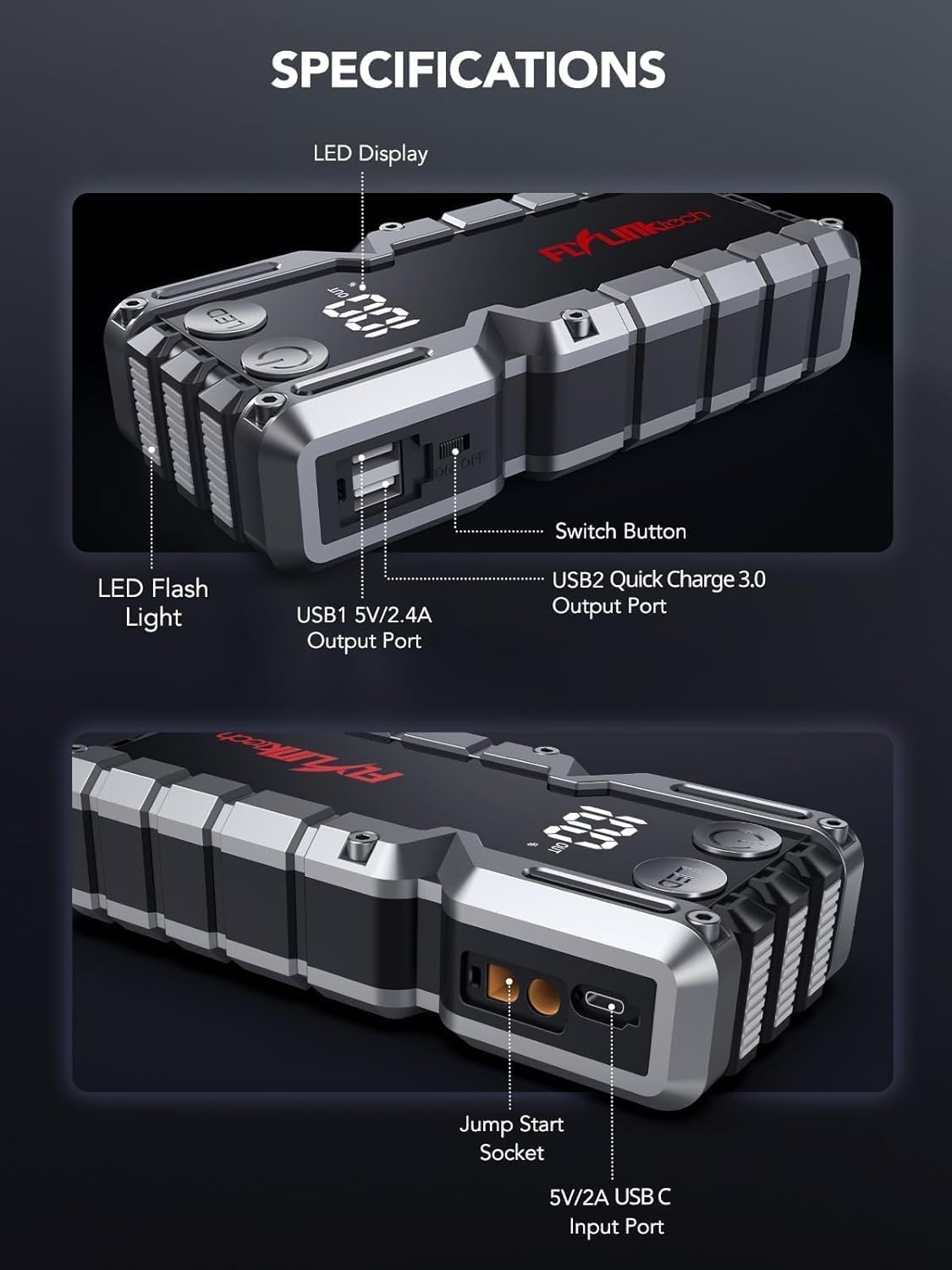
Зураг: Нарийвчилсан view of the jump starter showing the LED display, LED flashlight, power button, switch button, USB1 5V/2.4A output port, USB2 Quick Charge 3.0 output port, Jump Start Socket, and 5V/2A USB-C input port.
- Лэд дэлгэц: Батерейны цэнэгийг харуулнаtage.
- LED гар чийдэн: Олон горимоор гэрэлтүүлгийг хангана.
- Цахилгаан товч: Activates the device and controls flashlight modes.
- Солих товчлуур: Үндсэн тэжээлийн удирдлага.
- USB1 Output (5V/2.4A): Стандарт USB цэнэглэгч порт.
- USB2 Output (QC3.0): Quick Charge 3.0 port for faster charging.
- Үсрэлттэй асаах залгуур: Ухаалаг холбогч кабельд холбогддог.
- USB-C Input (5V/2A): Used to recharge the jump starter.
5. Стартерийг цэнэглэх
Before first use, fully charge the jump starter. It is recommended to recharge the unit every 3-6 months to maintain battery health.
- Connect the provided USB-C charging cable to the USB-C input port on the jump starter.
- USB-C кабелийн нөгөө үзүүрийг 5V/2A USB ханын адаптер (дагаагүй) эсвэл машины цэнэглэгчтэй холбоно уу.
- The LED display will show the charging progress. The unit is fully charged when the display shows 100%.

Image: The jump starter connected via USB to charge a smartphone and a tablet, demonstrating its power bank functionality.
6. Jump Starting Your Vehicle
Follow these steps carefully to safely jump-start your 12V vehicle:
- Үсрэлт асаагчийг бэлтгэх: Ensure the jump starter is at least 50% charged. Turn off your vehicle's ignition and all accessories (headlights, radio, etc.).
- Ухаалаг холбогч кабелийг холбох: Insert the blue plug of the smart jumper cables into the Jump Start Socket on the jump starter. Ensure a firm connection. The indicator light on the smart clamp улаан, ногоон өнгөөр анивчих болно.
- Тээврийн хэрэгслийн батерейг холбох:
- -ийг хавсаргана уу улаан (+) clamp таны тээврийн хэрэгслийн аккумуляторын эерэг терминал руу.
- -ийг хавсаргана уу хар (-) clamp таны тээврийн хэрэгслийн аккумуляторын сөрөг терминал руу.
Once connected correctly, the indicator light on the smart clamp хатуу ногоон өнгөтэй болно.
- Машинаа эхлүүлэх: Go into your vehicle and start the engine. If the vehicle does not start immediately, wait 30 seconds and try again. If it still doesn't start, press the "BOOST" button on the smart clamp for 3 seconds until the green light turns solid, then try starting the car again within 30 seconds.
- Кабелиудыг салгах: Once the engine starts, immediately remove the smart jumper cables from the vehicle battery, then disconnect them from the jump starter.

Image: Visual guide for jump-starting: 1. Insert jump clamp into booster. 2. Connect clamps to car battery. 3. Start your car. 4. Remove clamps.

Image: The smart clamps connected to the jump starter, illustrating the 10-layer safety protections including short circuit, reverse charge, over charge, reverse polarity, over discharge, over current, reverse connection, and high temperature protection.
7. Power Bank болгон ашиглах
The jump starter can also be used to charge your electronic devices.
- Connect your device's USB charging cable to either the USB1 (5V/2.4A) or USB2 (QC3.0) output port on the jump starter.
- Үсрэгч асаагуур нь таны төхөөрөмжийг автоматаар цэнэглэж эхэлнэ.
- The LED display will show the remaining battery capacity of the jump starter.

Image: The jump starter functioning as a portable power bank, with two USB output ports (5V/2.4A and Quick Charge 3.0) actively charging a smartphone and a tablet.
8. LED гар чийдэн ашиглах
The built-in 600-lumen LED flashlight has three modes for various situations:
- Асаах/унтраахын тулд: Press and hold the LED button for 3 seconds.
- Циклийн горимд: Once the light is on, short press the LED button to switch between:
- Тогтмол асаалттай: Ерөнхий гэрэлтүүлгийн зориулалттай.
- SOS горим: Онцгой байдлын үед олон улсын SOS дохиог анивчуулна.
- Strobe горим: Rapid flashing for warning or signaling.

Image: The jump starter with its LED flashlight active, illustrating the three available modes: standard flashlight, SOS signal, and strobe light for emergencies.
9. Засвар үйлчилгээ
- Цэвэрлэгээ: Төхөөрөмжийг зөөлөн, хуурай даавуугаар арчина. Хүчтэй химийн бодис эсвэл зүлгүүрийн материал бүү хэрэглээрэй.
- Хадгалах: Store the jump starter in its EVA case in a cool, dry place away from direct sunlight. Ensure it is charged to at least 50% before storing for extended periods. Recharge every 3-6 months.
- Батерейны арчилгаа: The internal lithium-ion battery is designed for long life. Avoid fully discharging the unit frequently.

Усны хамгаалалттай дизайн.

Rugged ABS shell for drop resistance.

Operates in extreme temperatures (-4°F to 140°F).
10. Алдаа засах
| Асуудал | Боломжит шалтгаан | Шийдэл |
|---|---|---|
| Vehicle won't start after connecting. | Jump starter battery too low; incorrect clamp холболт; тээврийн хэрэгслийн батерей бүрэн цэнэггүй болсон. | Асаагч бүрэн цэнэглэгдсэн эсэхийг шалгана уу.amp connections (red to +, black to -). Press the "BOOST" button on the smart clamp for 3 seconds and try again. |
| Ухаалаг clamp indicator light is red/flashing. | Reverse polarity; short circuit; over-temperature. | cl-г салгаamps and re-connect correctly. Check for any short circuits. Allow unit to cool down if overheated. |
| Асаах асаагуур цэнэглэгдэхгүй байна. | Цэнэглэгч кабель эсвэл адаптер эвдэрсэн; холболт сул байна. | Ensure USB-C cable and adapter are working and connected securely. Try a different cable or adapter. |
| LED гар чийдэн ажиллахгүй байна. | Not activated correctly; low battery. | Press and hold the LED button for 3 seconds to activate. Ensure the jump starter has sufficient charge. |
11. Техникийн үзүүлэлтүүд
| Онцлог | Дэлгэрэнгүй |
|---|---|
| Оргил гүйдэл | 5000 А |
| Зайны багтаамж | 18000mAh (66.6Wh) |
| Эхлэх ботьtage | 12 В |
| Хөдөлгүүрийн нийцтэй байдал | 9.0л хүртэл бензин / 8.0л дизель |
| USB гаралт 1 | 5V/2.4A |
| USB гаралт 2 | QC3.0 |
| USB-C оролт | 5V/2A |
| LED гар чийдэн | 600-Lumen (Constant, SOS, Strobe) |
| Ашиглалтын температур | -4°F - 140°F (-20°C - 60°C) |
| Хэмжээ | 4.2 x 9 x 19 см |
| Жин | 540 гр (1.19 фунт) |
| Аюулгүй байдлын хамгаалалт | 10-Layer (Short Circuit, Reverse Polarity, Over-Current, etc.) |
12. Баталгаат хугацаа ба дэмжлэг
The FLYLINKTECH 5000A Jump Starter comes with an industry-leading 3 жилийн баталгаат хугацаа худалдан авсан өдрөөс. Энэхүү баталгаа нь үйлдвэрлэлийн согогийг хамарч, найдвартай ажиллагааг баталгаажуулдаг.
For technical support, warranty claims, or any questions regarding your product, please contact FLYLINKTECH customer service through the retailer's platform or visit our official webсайт.
Баталгаат баталгааг баталгаажуулахын тулд худалдан авалтаа баталгаажуулна уу.